
Categories: AI Answer, AI Assistant, AI Browsers, AI Chatbot, AI Paraphraser, AI Translate, AI Writing Assistants
TinaMind Review: An AI Browser Assistant Worth a Look?

Okay, let’s have a real chat. How many browser tabs do you have open right now? Go on, I’ll wait. If you’re anything like me, it’s probably somewhere between ‘a little embarrassing’ and ‘my computer fan is starting to make a weird noise’. We live in an age of information overload, and our browsers are the front line. Every day it feels like we’re juggling research, writing emails, trying to decipher jargon-filled articles, and maybe, just maybe, watching a 45-minute YouTube video to learn one specific thing.
For a while now, the promise of AI has been dangling in front of us like a digital carrot. Dozens of tools have popped up, each claiming to be the magic bullet for productivity. So when I heard about TinaMind, another AI browser extension, my first thought was, admittedly, a bit of a sigh. Another one? But I’ve been in the SEO and traffic game long enough to know you can’t dismiss something without kicking the tires first. So I did. And folks, I have to say, this one feels a little different.
So, What Exactly is TinaMind Anyway?
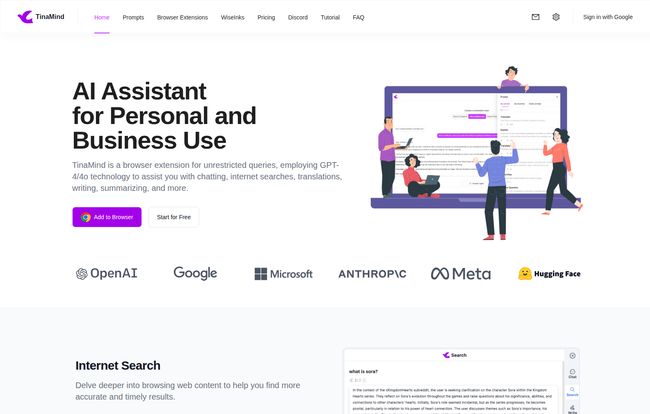
In simple terms, TinaMind is a browser extension that aims to be your ever-present AI assistant. Think of it less as a single tool and more like a Swiss Army knife that lives in your Chrome or Edge browser. It’s not just a GPT-wrapper. It taps into a whole host of powerful AI models—we’re talking tech from OpenAI, Google, Anthropic, and Meta. This multi-model approach is the first thing that caught my eye. It’s not just hitching its wagon to one star; it’s building a whole constellation.
The core idea is to stop you from constantly switching contexts. Instead of highlighting a weird phrase, opening a new tab, pasting it into a search engine, and then coming back, TinaMind lets you do it all right there on the page with a single click. Explain this, translate that, rephrase this sentence. It’s all about reducing friction.
Visit TinaMind
The Features That Actually Matter
A long list of features is great for a landing page, but which ones will you actually use? After playing around with it, a few things really stood out as genuinely useful, not just gimmicky.
Your Personal Research Librarian
This is where I think TinaMind really earns its keep. Two features in particular are just fantastic: Chat Docs and the YouTube Summarizer. I was recently digging into some dense market analysis reports for a client—you know the ones, 50-page PDFs full of corporate-speak. Instead of my usual method of skimming until my eyes glazed over, I just fed the document to TinaMind. I could ask it things like, “What are the top three projected growth areas mentioned in this report?” or “Explain the ‘synergistic market alignment’ concept on page 28 like I’m five.” And it did. It was like having a research assistant who never needs a coffee break.
The YouTube summarizer is a similar godsend. No more scrubbing through a long-winded tutorial to find the one command you need. It pulls out the key points and information, saving you a ridiculous amount of time. For anyone doing research or professional development, this is huge.
The One-Click Wonder: Shortcuts
This is the bread and butter of the extension. You highlight any text on any webpage, and a little button pops up. From there you can get an instant explanation, translation, or rephrasing. It’s incredibly simple, but the cumulative time it saves is noticeable. I found myself using the ‘Explain’ function on technical articles and the ‘Rephrase’ function when I was stuck trying to make an email sound a bit more polished. Its a small thing, but it quickly becomes second nature.
More Than Just a Parrot: The Writing Tool
TinaMind also includes a writing assistant. You can use it to generate text from scratch, get suggestions to improve your existing work, or just fix annoying grammar and spelling mistakes. Is it going to replace a dedicated writing platform like Jasper? Probably not for super heavy users. But for quick blog post outlines, social media captions, or getting over writer’s block, having it built right into the browser is incredibly convenient.
Managing the AI Chaos with a Personal Prompt Manager
Now this is a feature for the real power users. If you find yourself typing the same instructions into AI models over and over again (“Act as an expert SEO copywriter and write five alternative headlines for…”), the Personal Prompt Manager is for you. You can save your favorite, most effective prompts and reuse them with a click. For teams trying to maintain a consistent voice or workflow, this is an unsung hero of a feature.
Let’s Talk Money: TinaMind’s Pricing Plans
Ah, the all-important question. What’s this going to cost me? TinaMind’s pricing is… interesting. It seems they offer a few different structures, probably to cater to different types of users. I’ve seen both monthly plans and some pretty hefty yearly plans with big discounts.
Based on the latest info I could find on their site, they are pushing some powerful yearly Pro plans. It’s always best to check their official pricing page for the most current details, as these things can change.
| Plan | Price (Yearly) | Key Features |
|---|---|---|
| GPT-4 Plan | $100 /year | Heavy on GPT-4 queries, but also includes Claude, Gemini, etc. Unlimited access to most summarizer and search tools. |
| Claude 4.0 Sonnet Plan | $100 /year | Focuses on Anthropic’s Claude 4.0 model, with access to others. Same unlimited features as the GPT-4 plan. |
| Premium Plan | $200 /year | The kitchen sink. High query limits for both GPT-4 and Claude, all the unlimited features, and extra customization support. |
They also have more accessible entry points. There’s a Trial Plan that gives you a generous number of free queries on both Google’s PaLM2 and GPT-3.5 just for signing up. This is the perfect way to test it out. And I’ve seen monthly plans around the $10-$20 mark, which offer a solid number of queries and features without the big yearly commitment. The flexibility is a definite plus.
Where It Shines and Where It… Doesn’t
The Good Stuff
The biggest win for TinaMind is its integration. Having all these tools—summarizer, translator, writer, prompter—in one place that’s always a click away is a genuine workflow improvement. The multi-model support is also a huge advantage, as you’re not locked into one ecosystem’s quirks. And for me, personally, the document and video summarization tools are worth the price of admission alone. Seriously.
The Not-So-Good Stuff
Let’s be real, nothing’s perfect. The free tier, while a great trial, does have usage limits. If you become reliant on it for your daily work, you will eventually have to pay up. That’s just business. My other concern is more philosophical: there’s a risk of becoming too reliant on it. Some tasks, like carefully reading a critical document, maybe shouldn’t be outsourced to an AI summary. It’s a tool, not a replacement for critical thinking. You have to know when to use it and when to do the work yourself.
My Final Verdict: Is TinaMind for You?
So, do I recommend it? Yeah, I actually do.
If you’re a student, a researcher, a writer, or a marketing professional who spends hours a day in a browser sifting through information, TinaMind could be a massive time-saver. The efficiency gains from the summarization and quick-action shortcuts are undeniable.
If you’re a more casual user, the free trial is a no-brainer. Give it a spin for a week and see if it sticks. You might be surprised how often you end up using it.
TinaMind isn’t reinventing the wheel, but it is building a much, much better car. It takes all these disparate AI capabilities that usually require separate apps and subscriptions and bundles them into one convenient, surprisingly powerful package. It’s one of the few AI productivity tools I’ve tested that I’ll actually keep in my browser. And in this crowded market, that’s saying something.
Frequently Asked Questions
- Is TinaMind free to use?
- Yes, TinaMind offers a free trial plan that gives you a set number of queries after you register. For heavier use and access to all the advanced features, you’ll need to upgrade to one of their paid plans.
- What browsers does TinaMind work on?
- Currently, TinaMind is available as an extension for both Google Chrome and Microsoft Edge.
- Can I switch between different AI models like GPT-4 and Claude?
- Yes! This is one of TinaMind’s biggest strengths. Depending on your plan, you can access and choose from various leading AI models to handle your requests.
- Is it complicated to set up?
- Not at all. You just install the browser extension from the respective store (Chrome Web Store or Edge Add-ons), sign up, and it’s ready to go. You can start highlighting text and using its features immediately.
- How does TinaMind use my data?
- Like with any AI tool, it’s smart to review their privacy policy. Generally, these tools process the text you select to provide the service. TinaMind’s CEO has stated a vision to ’empower everyone with AI capabilities’, which suggests a focus on user experience, but you should always check the official policy on their website for specific details on data handling.


