
Categories: Other
TogetherForm Review: A Google Doc for Every Form Field?

Alright, let’s talk. If you’ve ever been part of a small team, especially a startup, you know the dance. The glorious, caffeine-fueled, slightly chaotic dance of filling out a critical application together. Think Y Combinator applications, complex grant proposals, or even just a really, really detailed sales inquiry form.
What’s the first step? Someone bravely opens the web form, takes one look at the 30 fields requiring thoughtful, character-limited answers, and immediately says, “Nope.” Then they proceed to do the only logical thing: copy every single prompt and paste it into a Google Doc.
And so it begins. A flurry of comments, suggested edits, conflicting versions, and that one co-founder who always forgets to switch from ‘Suggesting’ to ‘Editing’ mode. It’s a mess. A necessary mess, but a mess nonetheless. We’ve all been there, and frankly, I’m tired of it. It feels like a workaround we just accepted as reality.
But what if it wasn’t? What if you could just… collaborate, you know, in the form itself? I recently stumbled upon a new tool called TogetherForm that seems to ask that exact question, and I’ve got to say, I’m intrigued.
So, What Exactly is TogetherForm?
Let’s get this out of the way: TogetherForm is not another Typeform or Jotform. It’s not trying to be a full-blown form builder (at least not yet). Instead, its premise is beautifully, almost ridiculously, simple.
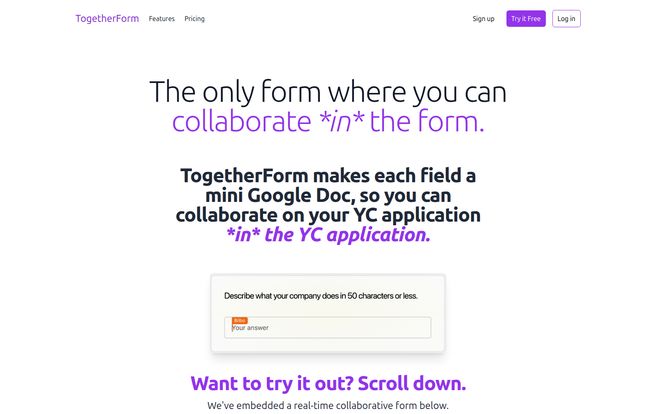
TogetherForm makes each field in a web form a mini Google Doc.
Read that again. Instead of one person being the designated “form-filler” who copies and pastes the team’s final answers from a separate document, everyone can jump directly into the form on the webpage and type, edit, and collaborate in real-time. You see your co-founder’s cursor blinking in the ‘Describe your company’ box, refining the pitch while you’re nailing the ‘What is your company going to make?’ section two fields down. It’s the collaborative magic of Google Docs, but embedded directly into the native environment of the form. No more context switching. No more copy-paste errors.
Visit TogetherForm
The primary example they use all over their landing page is the YC application, which is just… chef’s kiss. They know their audience. They’ve clearly felt this pain themselves. It’s a laser-focused solution for a problem that thousands of founders face every single application cycle.
The Real Problem TogetherForm Is Tackling
The problem isn’t just the inconvenience of using two windows. It’s about workflow integrity and speed. I call it “document drift.” That’s the slow, creeping misalignment between your Google Doc draft and the actual form. You have word counts in the form that you can’t easily track in the doc. You have formatting that doesn’t carry over. Someone updates the doc, but the changes never make it to the final submitted form.
This creates a single point of failure—the poor soul tasked with transferring everything at the end. It’s a high-stakes, low-reward job. TogetherForm aims to completely eliminate that role. It’s like taking the chaotic energy of a group brainstorm and funneling it directly into the tiny, unforgiving boxes of a web form. It’s a subtle shift, but one that could fundamentally change how teams approach these tasks.
A Peek at The Features
From what I can gather from their site, the feature set is lean and mean, which in my book, is a good thing for an early-stage tool.
Real-Time Collaboration is the Main Event
This is the star of the show. The ability to see your teammates’ cursors and edits live, directly within the form fields. This isn’t just about typing text; it’s about the psychological benefit of shared presence. It fosters a sense of working together, rather than just contributing to a static document. It turns a chore into a live, interactive session. I can already imagine the late-night sessions being just a little bit more productive and a lot less frustrating.
An Interface You Already Know
The beauty of the ‘mini Google Doc’ approach is that there’s virtually no learning curve. If you’ve used Google Docs, you get it. There are no complex dashboards to learn or settings to configure. It just works. This is so important for adoption. The last thing a stressed-out founding team needs is to learn another complicated piece of software under a tight deadline.
Frictionless Start
Their site mentions you don’t need an email or CC to start. This is a classic product-led growth move, and I’m here for it. It suggests they’re confident that once you experience the tool, you’ll see teh value. Removing barriers to entry is a great way to get your product into the hands of users, and for a tool like this, trying is believing.
The Elephant in the Room: It’s Not Quite Here Yet
Now for the reality check. If you navigate to their pricing page, you’re greeted with a friendly, honest message: “You caught us before we’re ready.”
And you know what? I respect that. In an era of perpetual betas and half-baked launches, this kind of transparency is refreshing. They’re building in public, and they’re not afraid to admit they’re still putting the finishing touches on things. This tells me they care more about getting it right than getting it out fast.
Of course, this means we don’t know everything. There’s no pricing information, so we don’t know if it will be a per-user model, a flat fee, or something else. We also don’t have much information on more advanced features. Will it support integrations with Slack or other tools? What about things like conditional logic, which are staples in other form builders? These are all open questions.
Who Is This Tool Really For?
While the YC-founder angle is the most obvious, I can see this being incredibly useful for a few other groups:
- Startup Founders: The bullseye target. For accelerators, pitch competitions, and initial customer feedback forms.
- Grant Writers: Non-profits and research institutions often face monstrously complex grant applications that require input from multiple departments. This could be a game-changer.
- Marketing & Content Teams: Collaborating on the copy for a new landing page form, A/B testing different questions, or drafting survey questions.
- Small Agencies: Working with clients to fill out detailed onboarding questionnaires or creative briefs.
The common thread is any scenario where multiple stakeholders need to contribute precise information into a structured format. Its main competitor isn’t another form tool; its main competitor is the messy ‘Google Doc + one web form’ workflow.
Frequently Asked Questions about TogetherForm
- What is TogetherForm?
- TogetherForm is a platform that enables real-time collaboration directly within web form fields. It essentially turns each field into a mini, shareable Google Doc so teams can fill out applications and forms together.
- Is TogetherForm free?
- The final pricing isn’t available yet, as the tool is still in development. Their website does mention a ‘Try it Free’ button, which suggests there will likely be a free trial or a freemium plan in the future.
- How is TogetherForm different from Google Forms?
- Google Forms is a tool for creating forms and surveys for others to fill out. TogetherForm isn’t for creating forms; it’s a tool for collaboratively filling out existing HTML forms on any website, like a YC application.
- Who should use TogetherForm?
- It’s ideal for small teams that need to collaborate on important, text-heavy applications. This includes startup founders, grant writers, marketing teams, and small agencies.
- Can I use TogetherForm for things other than YC applications?
- Absolutely. While that’s their main marketing example, it can be used on any standard HTML form. Think government contracts, university applications, detailed client onboarding forms, etc.
- When will TogetherForm be fully launched?
- There’s no public launch date yet. The best way to stay updated is to visit their website and sign up for the waitlist to be notified.
A Promising Solution for a Universal Headache
So, what’s my final take? I’m genuinely optimistic. TogetherForm is a perfect example of a tool that does one thing, and from the looks of it, it does that one thing incredibly well. It’s not trying to boil the ocean. It’s just trying to fix the leaky faucet that has been annoying all of us for years.
The success of a tool like this hinges on execution. Can they make the experience truly seamless and reliable? Can they build a sustainable business model around it? Time will tell. But the idea itself is solid gold.
For now, it’s a promising blip on my radar. If you and your team are gearing up for the next big application, I’d recommend keeping a close eye on TogetherForm. It might just save you a whole lot of headaches and a few hundred copy-paste actions. And in the startup world, that’s a win.
Reference and Sources
- TogetherForm Official Website
- Y Combinator Application Page (For context on the primary use case)


