
Categories: AI Answer, AI Chatbot, AI PDF, AI PDF Summarizer
TresdotsAI Review: Chat with Videos & PDFs? My Take.

If you’re in marketing, SEO, or frankly, just a curious human being in this decade, your life is a constant battle against information overload. I’m talking about the 2-hour long webinar you have to watch for that one golden nugget of info, the 78-page PDF report that holds the key to your next campaign, or that YouTube tutorial that you know explains the fix for your problem… somewhere in its 47-minute runtime. We’ve all been there, scrubbing back and forth on the timeline, feeling our sanity slip away with every passing, irrelevant minute.
For years, I’ve been searching for a tool that acts less like a simple summarizer and more like a junior research assistant. Something that can just… get it. So, when I stumbled upon TresdotsAI, my inner SEO-nerd skepticism was immediately dialed to eleven. Another AI tool promising to change my life? Sure. But this one felt a little different. It claimed you could literally talk to your content. Ask a YouTube video a question. Interrogate a PDF. I had to see for myself.
What Exactly is TresdotsAI Anyway?
Think of it like this: You have ChatGPT, which has read a huge chunk of the internet. That’s great, but it hasn’t read that specific report sitting on your desktop or that new video from your favorite industry expert. TresdotsAI is the missing link. You give it a piece of content – a YouTube link or a PDF file – and it absorbs it. It becomes an expert on that single document. Then, you can chat with it, ask it specific questions, and it pulls answers directly from the source material.
It’s like handing a dense book to a speed-reading savant and then getting to quiz them on chapter 7. No more manual searching. No more Ctrl+F prayers. Just direct answers. At least, that’s the promise.
First Impressions and the User Experience
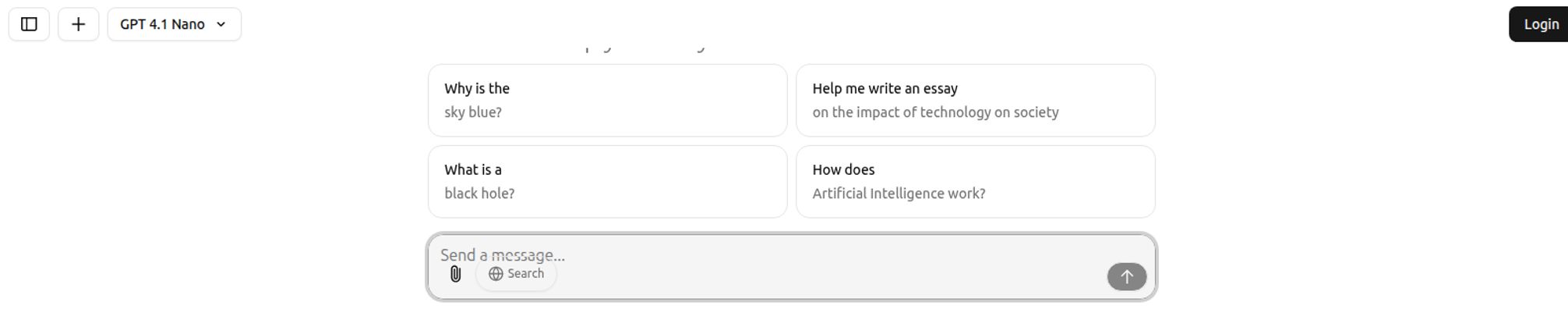
Logging in, the first thing I noticed was the interface. It’s clean. So clean. It’s a minimalist chat window, which is a breath of fresh air in the sometimes-cluttered world of SaaS tools. There’s no confusing dashboard or a million buttons to click. Just a simple input box that says “Send a message…” and a couple of clear icons for uploading files or searching the web. It feels intuitive, which I appreciate. My patience for a steep learning curve is, let’s just say, limited.
Visit Tresdots
You can see it has some prompt suggestions, but the real magic starts when you feed it your own content. That little paperclip icon is where the fun begins.
Putting TresdotsAI to the Test
Okay, enough talk. Does it actually work? I decided to throw a few real-world tasks at it that I genuinely face every week.
Chatting with YouTube Videos: The End of Endless Scrubbing?
My first test subject: a 90-minute keynote from a marketing conference I’d been meaning to watch. I didn’t have 90 minutes. I just wanted to find the 5-minute segment where the speaker talked about Google’s latest algorithm updates. Normally, this would involve a lot of guessing, clicking, and listening to introductions and thank-yous.
Instead, I pasted the YouTube link into TresdotsAI. It took a moment to process, and then I simply asked: “What were the key points about the recent Google core update?”
The answer it gave me was shockingly good. It broke down the main points into a concise summary. But here’s the part that really impressed me: it cited its sources. Next to the information, it gave me the exact timestamp in the video where it found that piece of data. That’s a game-changer. It’s not just a black box giving you answers; it’s showing its work. This moves it from a neat party trick to a legitimate research tool. I can quickly verify the context and know the AI isn’t just hallucinating.
Taming the PDF Beast
Next up, the dreaded PDF. I had a dense, jargon-filled market research report on consumer trends. My goal was to pull all the statistics related to Gen Z purchasing habits. Instead of reading all 50 pages, I uploaded the PDF and asked, “List all statistics and percentages related to Gen Z’s spending habits mentioned in this document.”
And it did. It pulled out the exact sentences and data points I needed, saving me at least an hour of tedious work. Of course, the quality of the output depends heavily on the quality of the source material. If the PDF is a poorly scanned document or the text isn’t machine-readable, you’re not going to have a good time. But for most standard business and academic documents, it’s incredibly effective.
The Tresdots AI Tutor: A Study Buddy or a Gimmick?
This feature is part of the pricier “Pro+” plan. The idea is that it’s not just pulling from a document, but from the live web, acting as a personal tutor. I was skeptical. How is this different from a Google search?
The difference lies in the synthesis. I asked it a complex question: “Explain the impact of programmatic advertising on CPCs in the retail sector, citing recent trends.” A normal search would give me 10 blue links to various articles. TresdotsAI gave me a coherent, paragraph-style answer, blending information from multiple sources and—crucially—listing those sources at the end. It’s like having someone do the initial research and write the first draft of a summary for you. For students or professionals who need to get up to speed on a new topic fast, this could be seriously powerful.
Okay, But What’s the Catch?
Look, nothing this useful is ever completely free, right? The free plan is… well, it’s a taste. You get 5 AI responses a day and can only upload one PDF. It’s enough to see if you like the tool, but not enough for any serious work. This is a classic freemium model. They hook you with the concept, and if you find it valuable, you’ll need to open your wallet.
The other thing to remember is that it’s a tool, not a replacement for your brain. As mentioned, its accuracy is tied directly to the source document. If the source is biased or contains errors, the AI’s answers will reflect that. Always use the source-checking feature to go back and confirm critical information.
A Look at the TresdotsAI Pricing
The pricing structure is pretty straightforward, which I appreciate. No confusing credit systems or weird pricing tiers. Here’s how it breaks down:
| Plan | Price | Key Features |
|---|---|---|
| Free | $0 / month | 1 free PDF upload, 5 AI responses per day. |
| Pro | $10 / month | Unlimited file uploads and unlimited AI responses. |
| Pro + | $20 / month | Everything in Pro, plus the Tresdots AI Tutor. |
In my opinion, the $10/mo Pro plan is the sweet spot. For the price of a couple of fancy coffees, you get unlimited use of the core features, which is where the real time-saving magic happens. The Pro+ plan is probably best for hardcore students, academics, or researchers who constantly need to learn and synthesize information on new topics.
So, is TresdotsAI Worth It? My Final Verdict
After spending some quality time with it, I can say my initial skepticism has mostly melted away. This isn’t just another AI chatbot. It’s a focused, practical utility that solves a very real, very annoying problem.
This tool is a fantastic fit for:
- Students: Imagine turning lecture notes and textbook chapters into interactive study guides. It’s a no-brainer.
- Content Creators & Marketers: Quickly mining research reports, competitor whitepapers, and expert interviews for content ideas and data points.
- Researchers & Academics: Drastically speeding up the literature review process by chatting with dozens of papers instead of reading them all cover to cover.
- Anyone who’s busy: If you’ve ever thought, “Just tell me the answer!” while looking at a long piece of content, this is for you.
It’s not going to write your strategy for you or replace critical thinking. But it is an exceptional tool for cutting through the noise. It’s a force multiplier for your own intelligence, letting you process information faster and more efficiently than ever before. It’s one of the few new AI tools that has earned a permanent spot in my browser’s bookmarks bar. And for me, that’s saying something.
Frequently Asked Questions about TresdotsAI
What exactly is TresdotsAI?
TresdotsAI is an AI-powered chat tool that allows you to ‘talk’ to specific documents. You can upload a PDF or provide a YouTube link, and then ask questions to get instant, sourced answers directly from that content.
How is this different from ChatGPT?
While ChatGPT has a broad knowledge of the general internet, TresdotsAI becomes a specialist on the specific document you provide. This allows it to answer highly contextual questions about a report, video, or textbook that ChatGPT wouldn’t know anything about. The inclusion of sources from the document is also a major differentiator.
Is TresdotsAI free to use?
Yes, there is a free plan. It’s limited to 1 PDF upload and 5 questions per day, which is good for trying it out. For regular use, you’ll likely need to upgrade to one of their paid plans, starting at $10 per month for unlimited usage.
Can it work with any YouTube video or PDF?
For YouTube, it works best with videos that have accurate, auto-generated captions or transcripts. For PDFs, the document needs to have selectable text (not just a flat image of text). For most modern PDFs and popular YouTube videos, it works very well.
Is the information always accurate?
The AI’s answers are based entirely on the source material you provide. If the source is accurate, the answers will be too. The best feature is that TresdotsAI provides citations (timestamps for videos, direct quotes for PDFs), so you can and should always quickly verify the information yourself.
Who would benefit most from the Tresdots AI Tutor feature?
The AI Tutor is ideal for students, life-long learners, and professionals entering a new field. It uses real-time web search to synthesize information on complex topics from multiple sources, making it a powerful tool for rapid learning and research.


