
Categories: AI Assistant, AI Schedule Maker, AI Travel, AI Trip Planner
Tripetta Review: An AI Travel Planner for Less Stress?

How many of you have a folder on your computer named something like “Trip_to_Italy_FINAL_v4_notes_links”? Inside, there’s a tangled mess of spreadsheets for budgets, Google Docs with half-finished itineraries, and about 37 open browser tabs with flight deals and hotel reviews. It’s a special kind of administrative hell that we lovingly inflict upon ourselves for the promise of a week away from it all.
So, when I see a tool that boldly proclaims itself as “America’s first AI travel planner” and promises to eliminate spreadsheets and chaotic searches, my professional skepticism kicks in, but so does my personal curiosity. The tool in question is Tripetta. I’ve spent the last few years watching AI seep into every corner of the digital world, from writing content to creating code. But can it really tackle the nuanced, personal, and often chaotic art of travel planning? I decided to find out.
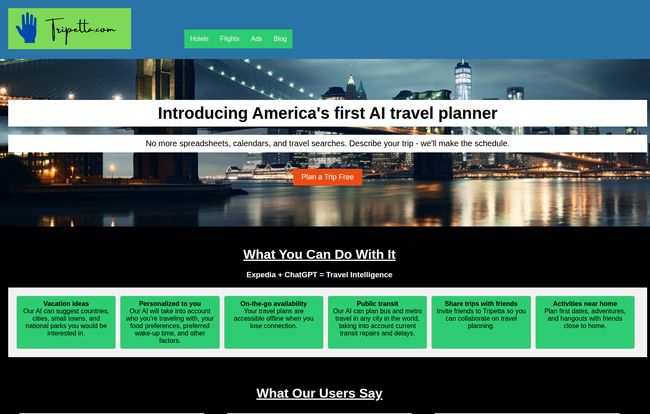
Visit Tripetta
So What is Tripetta, Really?
At its core, Tripetta is an AI-driven platform designed to take the grunt work out of planning your travels. Instead of you spending hours sifting through blogs and booking sites, you give the AI your parameters—where you want to go, who you’re with, your travel style, your budget—and it spits out a customized plan. It’s like having a travel agent, but one that lives in your computer and doesn’t get tired of your endless questions.
The whole idea is to move you from a vague dream of “I want to go somewhere cool” to a concrete, day-by-day schedule with suggestions for flights, hotels, activities, and even how to get around on public transport. A lofty goal, for sure.
The Three Ways to Plan: Robot, Hybrid, or A Blank Slate
One of the first things that stood out to me was that Tripetta doesn’t force you into one rigid planning process. It gets that different trips (and different people) require different approaches. They offer three distinct templates, which I found to be a pretty smart move.
The “Robot” Template
This is the full-throttle AI experience. You tell the AI everything about your desired trip, and it does all the heavy lifting, generating a complete itinerary from scratch. This is for the person who is completely overwhelmed and just wants a solid plan handed to them. Think of it as the “I trust you, robot, take the wheel” option. It’s perfect for getting a baseline itinerary that you can then tweak.
The “Hybrid” Template
This was my personal favorite. The Hybrid mode lets you browse through AI-generated ideas and pull the ones you like into your own plan. It feels less like a directive and more like a brainstorming session with a very knowledgeable assistant. You maintain full control, but you have this constant stream of inspiration to draw from. For a control freak like me who still wants new ideas, this felt like the perfect balance.
The “Empty” Template
For the traditionalists out there, the Empty template is basically a souped-up, travel-specific notebook. You can build your trip from the ground up, manually adding your own flights, hotels, and notes. While it ditches the main AI feature, it still keeps everything organized in one place, which is a big step up from the classic spreadsheet-and-doc combo.
My Favorite Tripetta Features That Aren’t Just Hype
A lot of new platforms are all sizzle and no steak. They promise the world but deliver a clunky interface. I was pleasantly surprised to find a few features in Tripetta that are genuinely useful and well-thought-out.
The AI Itinerary Builder Actually Works
The main event, the AI itself, is impressive. I threw a test at it: “A 5-day foodie trip to Chicago for two people on a moderate budget, who like museums but not super touristy ones.” The results were… pretty darn good. It suggested neighborhoods like Logan Square and the West Loop for dining, recommended the Museum of Contemporary Art over the more crowded Field Museum, and even laid out a logical daily flow. It wasn’t perfect, but it gave me a framework that would have taken me hours of research to build myself.
“I used to spend weeks planning trips. Now I just tell Tripetta what I want and get a full itinerary in minutes.” – Maria G., Los Angeles
Collaboration Is Surprisingly Simple
Anyone who has planned a group trip knows the pain of the endless group chat. “Did you see the link I sent?” “What does everyone think of this hotel?” “WAIT, what dates are we going again?!” It’s chaos. Tripetta’s collaboration feature lets you invite your friends or family directly to the trip plan. They can view, comment, and add their own suggestions. It centralizes the conversation, which is a godsend for keeping everyone on the same page and, more importantly, keeping the peace.
Offline Access and Public Transit Info
These two features are the unsung heroes of the platform. The thrill of landing in a new country can quickly be replaced by the panic of realizing you have no cell service and no idea how to get to your hotel. Being able to access your entire itinerary offline is a massive relief. The integrated public transit planning is another huge win. It pulls bus and train routes right into your schedule, simplifying navigation in a new city and saving you from having to download three different local transit apps. It’s a small detail that shows they’ve thought about the actual experience of traveling.
The Good, The Bad, and The AI
No tool is perfect, especially not one that relies on something as complex as AI. For a balanced look, you have to weigh the shiny promises against the practical realities.
| What I Loved (The Pros) | Where It Could Improve (The Cons) |
|---|---|
| Huge Time-Saver. It genuinely cuts down the initial research phase from days to minutes. A massive win. | AI Can’t Read Your Mind. The suggestions are only as good as your input. Vague requests will get you generic results. |
| Great for Group Planning. The collaboration tools are a real solution to a common travel headache. | Data Isn’t Always Perfect. Public transit info can change. The AI might not know about a sudden closure or a brand-new local gem. Always double-check. |
| Practical On-the-Go Features. Offline access and transit maps are incredibly useful in the field. | Risk of Losing Spontaneity. If you follow the plan too rigidly, you might miss out on the magic of getting lost and discovering something unexpected. |
The biggest ‘con’ for me is really a matter of perspective. You can’t just expect Tripetta to be a magic wand. It’s a tool, and like any good tool, it requires a little bit of guidance from you. You still have to do the final vetting and booking. It won’t book the flights for you, but it’ll find them. It won’t make the reservation, but it’ll suggest the restaurant.
What’s the Cost? A Look at Tripetta’s Pricing
Here’s the million-dollar question. As of my review, Tripetta’s pricing structure isn’t publicly listed on their site. This is pretty common for new tech startups; they’re often in a beta phase, gathering user feedback before rolling out paid tiers. I’d speculate they’ll go with a ‘freemium’ model—a free version with basic planning features and one or two premium tiers that unlock more advanced AI capabilities or a higher number of saved trips. For now, it seems you can sign up and try it for free, which is what I’d advise doing to see if it fits your style.
So, Who is Tripetta For?
After playing around with it, I can see a few types of people who would absolutely love this tool:
- The Overwhelmed Planner: If you’re the person who gets paralyzed by the sheer number of options, the “Robot” mode is your new best friend.
- The Group Trip Organizer: If you’re always the one herding the cats for the annual friends’ trip, the collaboration features will save your sanity.
- The Inspiration Seeker: If you know you want a vacation but have no idea where to start, the AI can serve up destinations and ideas you might not have considered.
- The Organization Enthusiast: Even if you prefer to do all your own research, using the “Empty” template to keep everything in one tidy, accessible place is a huge upgrade from the spreadsheet life.
My Final Verdict
So, does Tripetta live up to its promise of ending travel planning madness? I’d say it comes pretty close. It’s not a fully autonomous travel agent, and you shouldn’t treat it as one. It’s more like a brilliant, tireless research assistant. It organizes the chaos, presents you with smart options, and handles the logistical legwork so you can focus on the fun part: imagining yourself there.
It won’t replace the joy of stumbling upon a hidden alleyway cafe or changing your plans on a whim. But it will make sure you get to the right city, with a great hotel, and a handful of fantastic ideas in your pocket. For me, that’s a win. The age of the travel spreadsheet might not be over just yet, but its days are definitely numbered.
Frequently Asked Questions about Tripetta
- 1. How does Tripetta’s AI actually work?
- Tripetta uses artificial intelligence to process your travel requests—like destination, budget, travel style, and interests. It then scours data on flights, hotels, activities, and logistics to build a customized itinerary that matches your criteria, much like a human travel agent would, but much faster.
- 2. Is Tripetta completely free to use?
- Currently, the pricing information is not available on their website, which usually means it’s in a free beta or trial period. It’s best to visit their site directly for the most up-to-date information on any potential costs or subscription tiers.
- 3. Can I book my flights and hotels directly through Tripetta?
- Tripetta is primarily a planning tool. While it suggests flights and hotels and provides links to find deals, the final booking process is typically completed on the airline or hotel’s website. It acts as an aggregator and organizer, not a direct booking agent.
- 4. How accurate is the public transit information?
- The public transit feature is a major plus, but as with any third-party data, its accuracy can vary. It’s always a good idea to cross-reference with a local transit app or Google Maps once you’re on the ground, just in case of last-minute schedule changes or detours.
- 5. Is my data safe with Tripetta?
- Like any online service, you should review their privacy policy. Generally, platforms like this use your input to personalize your experience. They plan trips, so they need to know your travel plans. Always practice good digital hygiene and understand the terms of service.
- 6. What if I don’t like the AI’s suggestions?
- That’s the beauty of the platform! Every part of the AI-generated itinerary is adjustable. You can delete activities, add your own, and fine-tune the schedule. The “Hybrid” mode is specifically designed for you to pick and choose the suggestions you like.


