
Categories: AI Article Summarizer, AI Blog Generator, AI Newsletter Generator, AI PDF Summarizer, AI Podcast, AI Repurpose, AI Script Writing, AI Social Media Post Generator, AI Summarizer, AI Text Generator, AI Translate, AI Youtube Summary
TubeOnAI Review: Is This AI Summarizer Worth It?

If your YouTube ‘Watch Later’ list looks anything like mine, it’s less of a list and more of a digital graveyard where good intentions go to die. Between industry podcasts, expert interviews, long-form articles, and those webinars you swore you’d get to, the content treadmill never stops. It’s exhausting.
For years, my process was a chaotic mess of frantic note-taking, having 15 tabs open, and promising myself I’d summarize it all later. Spoiler: I never did. So when a tool like TubeOnAI pops up on my radar, claiming to be an “AI summarizer and content repurposer,” my professional curiosity—and personal desperation—kicks in. I’ve been in the SEO and traffic generation game for a while, and any tool that promises to give me back time is worth a serious look. So I took it for a spin. Here’s what I found.
What Exactly Is TubeOnAI?
First off, calling TubeOnAI just a “YouTube summarizer” is selling it short. Think of it more as a universal translator for long-form content. Yes, it creates frighteningly accurate summaries of YouTube videos, but it doesn’t stop there. You can feed it podcasts, research papers, news articles, even files straight from your Google Drive. It’s designed to be a central hub for digesting information quickly.
Essentially, you give it a link or a file, and its AI gets to work, pulling out the key points, actionable insights, and main arguments. The goal is to turn a one-hour video into a five-minute read. For someone who needs to stay on top of trends for their clients, this idea is, frankly, a godsend. It’s like having a research assistant who never sleeps and is fueled by algorithms instead of coffee.
Visit TubeOnAI
The Features That Actually Matter
A long feature list can be overwhelming. Most of us only end up using a handful of functions anyway. So I focused on the ones that promised to make a real difference in my workflow. Here’s the breakdown of what stood out.
Beyond Just Summaries: The Repurposing Magic
This is the big one for me. As a blogger and content strategist, my brain is always thinking, “How can I turn this into something else?” TubeOnAI has a built-in content repurposing feature that feels a bit like alchemy. I tested it with a 45-minute marketing podcast I’d been putting off. Instead of just getting a summary, I asked it to generate a blog outline, a few Twitter (or X, whatever we’re calling it this week) posts, and an email newsletter snippet based on the content.
The results were… impressive. Not perfect, mind you. The copy needed a human touch to inject some personality and smooth out the edges. But it gave me a solid B+ draft in about two minutes. That’s hours of work saved. It’s the difference between staring at a blank page and having a structure ready for polish. This feature alone is a massive value-add for anyone in the content creation space.
Chatting With Your Content
Another really cool feature is the ability to “chat” with the content you’ve uploaded. Imagine you’ve just summarized a dense, 50-page research PDF. Instead of re-reading the whole thing to find a specific statistic, you can just ask the chat interface, “What did the study say about organic click-through rates in Q3?” It will pull the answer directly from the source material. It’s like having a conversation with your documents. For deep research, this is way more efficient than Ctrl+F and praying you used the right keyword.
The “Set It and Forget It” Channel Summaries
If you follow specific thought leaders or news channels on YouTube, you can subscribe to them within TubeOnAI. The platform will then automatically generate summaries of their new videos as they’re released. I set this up for a few key SEO channels, and now I get a daily digest of the latest happenings without having to scrub through intros, ad reads, and fluff. It’s a beautifully lazy way to stay informed.
My Experience: The Good, The Bad, and The AI
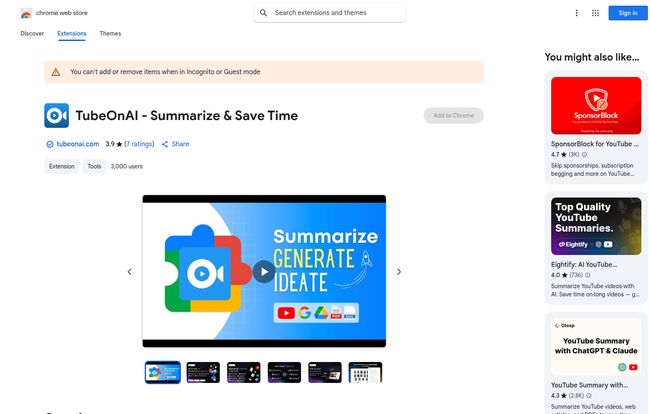
Okay, so no tool is perfect. Let’s get into the nitty-gritty. I’m looking at its Chrome Web Store page right now, and it’s sitting at 3.9 stars from a handful of reviews. That feels about right. It’s very useful, but there are a few things to keep in mind.
The Good stuff is genuinely good. The time-saving is real. Summarizing a long webinar saved me at least an hour of passive watching. The multi-language support is a huge plus for global teams, and having a mobile app means I can catch up on summaries while waiting in line for my morning coffee. The productivity boost is undeniable.
Now for the not-so-good. The free plan is extremely limited. With only 3 channel subscriptions and 60 minutes of content per month, it’s really just a teaser. You’ll hit that wall fast if you’re a serious user. Most of the powerhouse features, like content repurposing and unlimited channels, are locked behind the Pro plan. This is a pretty standard SaaS strategy, but it’s something to be aware of. Don’t expect the world for free.
Let’s Talk Money: TubeOnAI Pricing
The pricing structure is straightforward, which I appreciate. There are basically two tiers that matter to most people.
| Plan | Price | Key Features | Best For |
|---|---|---|---|
| Starter | Free | 3 Channel Subscriptions, 60 Minutes/month | Individuals who want to test the waters. |
| Pro | $19/month | Unlimited Channels, 10,000 Minutes/month, Content Repurposing, Text-to-audio support | Professionals, content creators, and students. |
Is the Pro plan worth $19 a month? In my opinion, it depends entirely on how you value your time. If you’re a content creator, that repurposing feature could easily save you 5-10 hours a month. If you’re a consultant who bills at $100/hour, the tool pays for itself if it saves you just 15 minutes of research. For a student drowning in academic papers, it could be an absolute lifesaver. Plus, they offer a 7-day free trial for the Pro plan, so you can test the full suite of features before committing.
Who Should Actually Use TubeOnAI?
This tool isn’t for everyone. If you genuinely love the experience of watching a three-hour podcast at 1x speed, this might ruin the fun. But for specific people, it’s a game-changer.
- The Busy Professional: You need the cliff notes on the latest industry trends yesterday. TubeOnAI delivers that.
- The Content Creator: You’re looking to squeeze every drop of value from your pillar content. The repurposing tool is your new best friend.
- The Student or Researcher: You have a mountain of reading material. This tool helps you find the signal in the noise, fast.
It’s for anyone who views information as a resource to be managed, not just an experience to be had. It’s a tool for peak efficiency, and sometimes, that’s exactly what you need.
Final Verdict: Is TubeOnAI a Must-Have Tool?
So, have I cleared out my ‘Watch Later’ graveyard? Not completely, but it’s a lot more manageable. TubeOnAI has firmly earned a spot in my digital toolbox. It successfully bridges the gap between endless content and limited time.
It’s not a magic wand that will do your job for you, but it’s a powerful assistant that handles the tedious parts of information gathering and initial content drafting. The real power lies in the Pro plan, particularly with the repurposing features. If you’re just a casual user, the free plan might be enough to summarize the occasional video. But if you’re a professional whose currency is time and information, I’d say the Pro plan is a very compelling investment. It’s a solid tool that does exactly what it says on the tin—it saves you time. And in this business, time is everything.
Frequently Asked Questions (FAQ)
What can TubeOnAI summarize?
It can summarize a wide range of content, including YouTube videos, podcasts, online articles, blogs, research papers, and even documents you upload like PDFs or from Google Drive.
Is TubeOnAI really free?
Yes, there is a ‘Free Forever’ Starter plan. However, it has limitations, such as a cap of 60 minutes of content summarization per month and 3 channel subscriptions. For more extensive use, you’ll need the paid Pro plan.
Can TubeOnAI repurpose content for different social media platforms?
Absolutely. The content repurposing feature (available on the Pro plan) can help you create drafts for articles, email newsletters, and posts for social media platforms like Twitter/X, and LinkedIn.
Does TubeOnAI support languages other than English?
Yes, the tool supports multiple languages and offers AI-powered translations, making it useful for interactive learning and consuming content from around the world.
Is my data safe with TubeOnAI?
According to their privacy policy on the Chrome Web Store, TubeOnAI states that user data is not sold to third parties and is not used or transferred for purposes unrelated to the item’s core functionality.
How accurate are the AI summaries?
In my experience, the summaries are quite accurate at capturing the main ideas and key points. While they may not catch every single nuance of a conversation, they do an excellent job of providing a high-level overview and saving you from watching or reading the entire piece of content.


