
Categories: AI Code Generator, AI Design Generator, AI Font Generator
Typiq Review: AI Font Pairings in a Flash?

How many hours of your life have you lost to the infinite scroll of Google Fonts? You know the dance. You pick a headline font—let’s say, Poppins. Classic. Safe. Then you need a body font. Do you go with a serif like Lora? Or another sans-serif like Lato? You try them out, squint at the screen, and before you know it, two hours have vanished and you’re no closer to a decision. It’s a creative black hole.
For years, this has been one of the most tedious parts of starting any new web project. It’s a decision that feels both incredibly important and impossibly subjective. Well, I recently stumbled upon a new tool called Typiq that claims to use AI to kill this problem for good. An AI-powered typography tool? My curiosity was piqued, along with a healthy dose of skepticism I’ve earned from years in the SEO and web dev trenches. So, I took it for a spin.
So What Exactly is Typiq?
Think of Typiq as a typography sommelier for your website. You don’t just walk into a fancy restaurant and ask for “some wine.” You tell the sommelier what you’re eating, the vibe you’re going for—celebratory, casual, serious—and they come back with the perfect bottle. Typiq does the same, but for fonts.
Visit Typiq
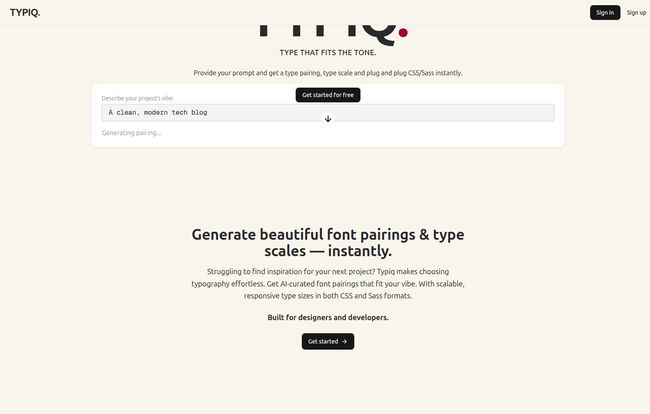
You feed it a simple prompt describing your project’s personality, something like “a playful and friendly children’s brand” or, as their own example shows, “a clean, modern tech blog.” In a matter of seconds, its AI engine analyzes your prompt and presents you with a curated Google Font pairing that fits the tone. But here’s the kicker, and the part that really got my attention: it doesn’t just give you two font names. It generates a full, responsive type scale and hands you the ready-to-use CSS or Sass code to plug straight into your project. Now that’s useful.
How Typiq Actually Changes Your Workflow
I’ve seen a lot of “AI-powered” design tools that are little more than fancy random generators. I was half-expecting Typiq to be the same. I’m happy to report that it feels more thoughtful than that. Here’s where I think it really makes a difference.
From Vibe to Code in Mere Seconds
The core of the experience is that prompt box. This isn’t just a gimmick; it’s a fundamental shift from picking from a list to describing an outcome. It forces you to think about the feeling you want your site to convey, which is what good typography is all about anyway. This natural language approach is way more intuitive than scrolling through hundreds of font specimens hoping one jumps out at you. It saves time, sure, but more importantly, it saves creative energy that you can spend on more complex problems.
More Than Just a Pretty Font Pairing
Okay, let’s get a little nerdy. A good font pairing is only half the battle. You also need a mathematical system for your font sizes—a type scale—so that your `h1` looks appropriately dominant over your `h2`, your `p` tags are readable, and your small print is, well, small. Manually creating a harmonious type scale (often using a modular scale like the golden ratio) is another tedious task.
And then you have to make it responsive. In 2024, if your text doesn’t scale smoothly between a 320px phone screen and a 27-inch monitor, you’re doing it wrong. This usually means writing complex media queries or, if you’re up-to-date, using modern CSS functions like `clamp()`. Typiq handles all of this automatically. It generates a fluid type scale that adapts to the viewport, giving you that slick, modern responsiveness without you having to write a single line of a `clamp` function. This is a huge time saver for developers and desgners alike.
The Perfect Designer-to-Developer Handshake
Here’s a scenario that plays out in agencies every single day. A designer creates a beautiful mockup in Figma. They hand it over to a developer. The developer asks, “What are the responsive font sizes?” The designer shrugs. The developer then has to guess, creating a frustrating back-and-forth that wastes everyone’s time.
Typiq can be the bridge over that troubled water. A designer can use Typiq to quickly find a pairing and scale they love, and then hand the developer the actual production code. No ambiguity. No guesswork. It’s a clean, efficient handoff that aligns both design intent and technical implementation from the get-go.
A Quick Look at the Features
While the concept is straightforward, the execution is what counts. Typiq’s feature set is focused and powerful, without a lot of fluff. At its heart is the AI-powered font pairing engine that taps into the extensive library of Google Fonts—which is great, because they’re free, reliable, and easy to implement. The real star, in my opinion, is the responsive type scale generation. The tool spits out instant code in either vanilla CSS or SCSS, so it fits right into most modern front-end workflows. You also get a simple toggle to enable or disable the responsive CSS, though I can’t imagine a reason you’d ever turn that off. It’s a simple, elegant solution to a surprisingly complex problem.
The All-Important Question: What Does Typiq Cost?
Alright, this is where things get a little hazy. The good news is, you can sign up and start generating font pairings for free. The landing page has a big, friendly “Get started for free” button. For now, it seems to be completely open.
However, when I went looking for a dedicated pricing page to see if there were premium plans or usage limits, I hit a 404 error. This usually tells me one of two things: either the tool is brand new and still figuring out its monetization strategy, or it’s a passion project that might remain free for the foreseeable future. Either way, my advice is to jump in and use it now while it’s completely open. It’s a fantastic utility to have in your back pocket, and getting in on the ground floor of a new tool is never a bad idea.
Is This AI Typography Tool Right for You?
So who is this for? Honestly, almost anyone building for the web could find a use for it.
- Freelance Developers and Designers: For you, time is literally money. Typiq can shave hours off the initial setup of a project. It’s perfect for getting a client project off the ground quickly with a professional look.
- Small Agencies: It’s a great way to standardize the initial design process and ensure consistency across projects, not to mention smoothing out that designer-dev workflow.
- Indie Hackers & Solopreneurs: When you’re building your own product, you’re wearing all the hats. You don’t have time to become a typography expert. This gets you 90% of the way there in 10 seconds.
- Students and Beginners: It’s an incredible learning tool. You can see how experts might pair fonts and, by inspecting the generated CSS, learn how modern responsive typography is built.
If you’re a high-end branding agency with your own dedicated typographers, you probably have your own rigorous process. But for the rest of us? This is a game-changer.
Frequently Asked Questions About Typiq
Is Typiq really free to use?
As of right now, yes. You can sign up and generate font pairings and type scales for free. There is no pricing information available yet, so this might change in the future as they potentially add premium features.
What fonts does Typiq use?
Typiq uses the Google Fonts library, which includes over 1,500 open-source font families. This ensures the fonts are free to use in any project, personal or commercial.
Do I need to be a developer to use Typiq?
Not at all! Designers and project managers can use it to find typography inspiration and make design decisions. While the code output is for developers, the tool itself is incredibly user-friendly and requires no coding knowledge to operate.
How does the AI actually work?
The platform doesn’t go into deep technical specifics, but it likely uses a trained machine learning model that has analyzed thousands of successful font pairings from across the web. It associates certain font characteristics (like x-height, weight, and style) with descriptive words from your prompt to find a suitable match.
Can I customize the fonts after they are generated?
Typiq provides a starting point. Once you have the font names and the CSS code, you can take that and customize it however you see fit. You can adjust the font weights, sizes, or even swap out one of the fonts if you’re not 100% sold on the pairing.
Is this better than choosing fonts manually?
“Better” is subjective. For speed and efficiency, it’s absolutely better. For a project requiring a very specific, unique, or artistic typographic direction, a skilled human typographer’s touch might still be superior. Typiq is about getting you a fantastic, professional result in a fraction of the time.
My Final Verdict on Typiq
After playing around with Typiq for a while, I’m genuinely impressed. It’s not just another shiny AI toy; it’s a practical utility that solves a real, persistent problem for web creators. It elegantly combines font pairing, type scaling, and responsive code generation into one dead-simple workflow.
Will it replace the artistic eye of a seasoned designer? Probably not. But will it save you from the agony of Google Fonts and give you a rock-solid, professional foundation for your next project in under a minute? Absolutely. And for that, it’s earned a permanent spot in my web development toolkit.
References and Sources
- Typiq Official Website: https://www.typiq.co/
- Google Fonts Library: https://fonts.google.com/


