
Categories: AI Assistant, AI Chatbot, AI Customer Service, AI Response Generator
Unthread Review: Is This the Future of Slack Support?

Someone pings a public channel with a “quick question,” a few people drop an 👀 emoji, someone else says they’re “on it,” and then… crickets. The request gets buried under a mountain of GIPHYs and chatter, lost to the digital ether. For years, I’ve watched teams—IT, HR, customer support—struggle with this. They try to impose order with complicated emoji-based workflows or funnel everything to a clunky, external ticketing system that nobody wants to use.
It’s a mess. And it’s a mess that costs businesses time, money, and customer goodwill. So when I first heard about Unthread, a platform promising to automate and organize support directly within Slack, my ears perked up. Another tool? Sure. But this one felt different. It wasn’t trying to pull you out of Slack; it was designed to live inside it. As someone who has managed teams and seen the traffic-jam that is modern communication, I had to see if it lived up to the hype.
What Exactly is Unthread? (And Why Should You Care?)
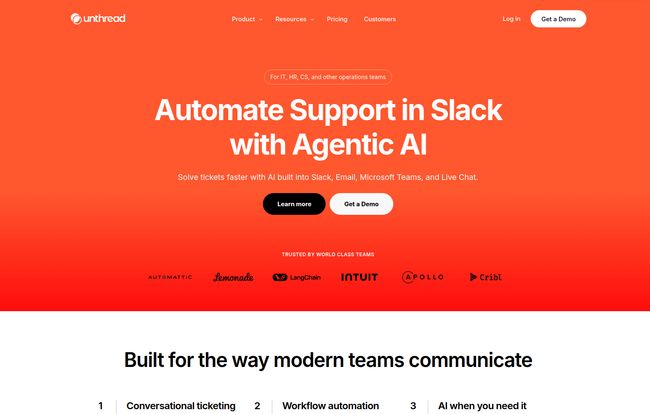
At its core, Unthread is a service management platform built for the way modern teams actually communicate. It hooks directly into your Slack workspace and acts like a hyper-efficient digital assistant. It watches for support requests in designated channels (or even DMs), automatically turns them into trackable tickets, and uses AI to help you manage them. Think of it less as a traditional helpdesk and more as an intelligent layer that brings structure to the beautiful chaos of Slack.
Visit Unthread
But it doesn’t stop there. The real magic is that Unthread also pulls in your other support streams—like shared email inboxes (think support@ or help@) and even live chat from your website. Suddenly, everything is in one place, managed within the same Slack-based workflow. You’re not just taming the Slack beast; you’re bringing the whole support zoo into one well-organized enclosure. For anyone who’s had to juggle a Zendesk tab, an Outlook inbox, and a Slack window just to answer one customer’s question, this is a pretty big deal.
The Features That Actually Matter
A feature list is just a feature list until you see how it solves a real problem. Unthread’s website is packed with buzzwords like “Conversational AI” and “Service Management Platform,” but I want to break down what truly makes a difference in the day-to-day grind.
Finally, Real Ticketing Inside Slack
This is the main event. The core promise. Trying to manage support in a busy Slack channel is like trying to catch raindrops in a sieve. Unthread gives you the bucket. Any message can be turned into a formal ticket with a simple emoji reaction or a click. Once it’s a ticket, you can assign it to a team member, set a priority, and track it against Service Level Agreements (SLAs). No more questions of “who is handling this?” It’s all there, clear as day, in a dedicated triage channel or a tidy Slack Connect channel. This “human-first workflow” they talk about is less about a feature and more about a fundamental shift in how you handle internal and external requests.
The AI Co-Pilot: More Than Just a Chatbot
I’m naturally skeptical of AI claims. We’ve all been burned by dumb chatbots. But Unthread’s approach feels more practical. They claim their Conversational AI can deflect up to 60% of tickets. How? By connecting to your existing knowledge bases (like Notion, Confluence, or Zendesk) and automatically suggesting answers to common questions before a human even needs to intervene. It can also generate ticket summaries, suggest replies for your agents, and automatically tag conversations based on their content. Its not about replacing your team, but about giving them a co-pilot that handles the repetitive stuff, so they can focus on the complex issues.
Escaping the Silos: Truly Omnichannel Support
I’ve worked in places where the customer support journey was a fractured nightmare. A customer sends an email, gets a reply, then asks a follow-up in the live chat and has to start all over again because the two systems don’t talk. Unthread aims to fix this by funneling email and live chat directly into the same Slack inbox. This means your team has the full context of every conversation, regardless of where it started. You can reply to an email from within Slack just as easily as you can answer a direct message. This unified view is a game-changer for providing a consistent customer experience.
How Different Teams Can Use Unthread
While the most obvious use case is for customer support, Unthread is built to be flexible.
- IT Support: Imagine all those “my laptop is slow” DMs and channel pings being automatically corralled into a prioritized queue. IT can manage access requests, incidents, and equipment issues all from one place without leaving Slack.
- HR Support: Employees can ask questions about payroll, benefits, or company policy in a private and secure way. Unthread ensures these sensitive requests are tracked and handled by the right person, providing a much better employee experience than firing an email into the void.
- Customer Support: This is Unthread’s bread and butter. The testimonial from Lemonade on their site—“We saved thousands of hours switching from Jira to Unthread
—is a powerful statement. For customer-facing teams, centralizing communication and automating 40% of tickets isn’t just a convenience; it’s a massive competitive advantage.
Let’s Talk Money: Unthread Pricing Breakdown
Alright, the all-important question: what’s this going to cost? Unthread has a pretty straightforward pricing model, but it’s clearly aimed at teams, not individuals. They also offer a 14-day free trial, which is always a good sign.
| Plan | Price (per agent/month) | Key Features | My Take |
|---|---|---|---|
| Basic | $50 | Basic Slack integration, conversation tracking, SLAs, up to 100 conversations/month. | A good starting point for small internal teams (like IT or HR) to get organized. The 100-conversation cap feels a bit tight for any real customer-facing volume, though. |
| Pro | $75 | Everything in Basic, plus unlimited conversations, multiple email inboxes, in-app live chat, knowledgebase sync, NPS & CSAT surveys, CRM integrations. | This is the sweet spot. For any serious support team, the unlimited conversations and multi-channel support make this the obvious choice. This is where the real value is. |
| Enterprise & Business | Contact for quote | Custom integrations, SSO, HIPAA compliance, dedicated hosting. | The ‘call us’ plan for large organizations with strict security and compliance needs. If you need SSO or HIPAA, this is your only option. |
A crucial thing to note: all plans have a minimum of 5 seats. So, your starting cost for the Basic plan is $250/month and for the Pro plan is $375/month. This positions Unthread firmly as a tool for established teams, not for solopreneurs or micro-businesses.
The Good, The Bad, and The Slack-Reliant
No tool is perfect, right? After digging in, here are my unfiltered thoughts.
The Good: The native Slack integration is just… chef’s kiss. It’s not a clunky add-on; the platform is built around the Slack experience, and it shows. It reduces context-switching and meets your team where they already work, which is half the battle for tool adoption. The AI also seems genuinely useful, focusing on augmentation rather than clumsy replacement. And the analytics finally provide visibility into a support channel that was previously a black box of unmeasured effort.
The Not-So-Good: First, the price. While I think the value is there for the right company, the 5-seat minimum and per-agent cost can add up fast. You need to be sure the problem you’re solving is big enough to justify the investment. Second, you are tying your support wagon pretty firmly to Slack. If your company culture is already deeply embedded in Slack, that’s great. But if there’s any chance of a move to Microsoft Teams or another platform down the road, you’d be facing a major migration headache. Its a classic SaaS playbook move to lock in features like custom integrations to the highest tier, which can be frustrating for teams on a budget.
My Final Verdict on Unthread
So, is Unthread the real deal? In my opinion, yes. For the right company, it’s a powerful solution to a very modern problem. If your team is currently drowning in a sea of unstructured Slack requests, Unthread offers a lifeline. It’s more than just a ticketing system; it’s a strategic shift towards meeting your employees and customers where they are.
The investment makes sense when you calculate the cost of not solving this problem: missed customer queries, slow internal support, frustrated employees, and a total lack of visibility. Unthread isn’t just selling software; it’s selling sanity. It’s a tool built for how we work now, not how we worked five years ago. And in today’s fast-paced environment, that’s a significant advantage.
Frequently Asked Questions (FAQ)
- What is Unthread used for?
- Unthread is primarily used to manage and automate support requests from various channels like Slack, email, and live website chat. It turns these requests into organized, trackable tickets for IT, HR, and Customer Support teams, all within the Slack interface.
- Does Unthread replace Jira or Zendesk?
- It can. For teams using Slack as their main communication hub, Unthread can replace traditional helpdesks like Zendesk. As the Lemonade case study suggests, some companies also use it to replace internal ticketing systems like Jira for support workflows. However, it also integrates with many of these tools, so it can augment them instead of replacing them entirely.
- How much does Unthread cost?
- Unthread’s pricing starts at $50 per agent per month for the Basic plan and goes up to $75 per agent per month for the Pro plan. There is a 5-seat minimum for all plans. An Enterprise plan with custom pricing is also available for larger organizations.
- Is there a free trial for Unthread?
- Yes, Unthread offers a 14-day free trial for its plans, allowing teams to test the platform and see if it fits their workflow before committing to a subscription.
- What integrations does Unthread support?
- Unthread integrates with a variety of popular tools, including Jira, Asana, Linear, HubSpot, and Salesforce for workflow automation. It also connects with knowledge bases like Notion, Confluence, and Guru to power its AI suggestions.
- Is Unthread secure for HR and IT support?
- Yes, Unthread is designed with security in mind. The Enterprise plan offers features like Single Sign-On (SSO), HRIS integration, and HIPAA compliance, making it suitable for handling sensitive employee and company data.
Reference and Sources
- Unthread Official Website
- Unthread Pricing Page
- Unthread homepage for social proof and case study mentions (Lemonade).


