
Categories: AI Assistant, AI Chatbot, AI For Data Analytics, AI Marketing, AI Productivity Tools, AI SEO Tools, AI Summarizer, AI Task Management, Google Ads AI
Uplyt Review: AI for Your Google Analytics Woes?

Let’s have a little chat. Just you and me. Remember the good old days of Universal Analytics? It wasn’t perfect, but it was our imperfect. We knew where to find things. We could pull a basic traffic report without needing a spirit guide and a stiff drink. Then came Google Analytics 4.
And everything changed.
I’m not going to sit here and bash GA4. It’s a powerful platform, no doubt, but for the average small business owner or even a seasoned marketer who doesn’t have a PhD in data science, it can feel like trying to drink from a firehose while solving a Rubik’s cube. The learning curve isn’t just a curve; it’s a vertical climb up a cliff face in the pouring rain. I’ve wasted more hours than I care to admit trying to build what used to be a simple report. Frustrating, right?
For months, I’ve been on the hunt for something to bridge the gap. Not necessarily a full-blown GA4 replacement, but a translator. A tool that can take that mountain of data and just… make it make sense. That’s when I stumbled across a platform called Uplyt. And honestly, it’s the first thing in a long time that’s made me genuinely excited about analytics again.
What Exactly is Uplyt?
Think of Uplyt not as a replacement for Google Analytics, but as an intelligent, AI-powered layer that sits right on top of it. It connects to your GA and Google Ads accounts and acts as your personal data interpreter. It’s designed specifically for people who don’t have time to become data scientists—e-commerce store owners, SMBs, marketing managers, and agencies.
Its whole reason for being is to cut through the noise, pull out the insights that actually matter, and then—and this is the part that really got my attention—help you figure out what to do next. It turns passive data into an active strategy.
Visit Uplyt
My First Impressions: Getting Started is Shockingly Simple
I’m naturally skeptical of any tool that promises to ‘simplify’ things. Usually, that means it’s just a stripped-down version that lacks any real power. But setting up Uplyt was… easy. Like, five minutes easy. You just connect your Google account, give it the necessary permissions, and it starts pulling in your data. There was no complex configuration, no code to install (since it uses the existing GA tag), no headache.
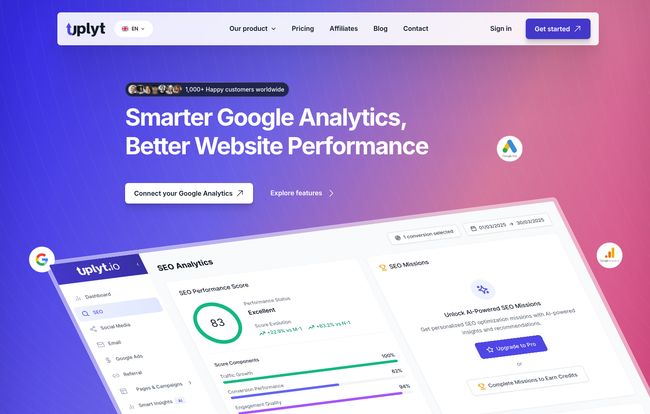
The first thing that hits you is the dashboard. It’s clean. It’s calm. It’s the polar opposite of the chaotic, menu-heavy interface of GA4. Key performance indicators are right there, front and center, with clear trend lines. I didn’t have to hunt for anything. It felt less like an analytics platform and more like a well-designed project management tool. A breath of fresh air, truly.
The Features That Actually Matter
A pretty dashboard is nice, but it’s the engine under the hood that counts. Uplyt has a few core features that, in my opinion, make it a standout tool in a very crowded market.
The AI Insights: A Data Analyst in Your Pocket
This is the magic. Uplyt’s AI sifts through your data 24/7, looking for anomalies, trends, and opportunities. Instead of just showing you a graph of your bounce rate, it gives you a recommendation like, “Homepage bounce rate has increased by 15%. Consider adding clearer calls-to-action or a featured products section.
It even flags technical SEO issues or points out which blog post is suddenly driving a ton of traffic from a new referral source. These are the kinds of insights you’d typically pay an analyst a hefty sum to find. It’s proactive, not reactive.
The Action Board: Where Insights Go to Get Done
Here’s what separates Uplyt from 99% of other reporting tools. Most platforms give you data and then say, “Good luck!” Uplyt gives you the insight, and then lets you turn it into a task with a single click. The “Action Board” is a built-in task management system. See an AI recommendation you like? Convert it into a “mission,” assign it to a team member (on the higher-tier plans), set a deadline, and track its progress.
This is a game-changer. It closes the loop between analysis and action. You can directly see if the changes you made based on teh insights actually moved the needle on your KPIs. For agencies, this is an incredible way to demonstrate value to clients. For in-house teams, it keeps everyone accountable.
Dashboards That Don’t Give You a Headache
Beyond the main dashboard, Uplyt provides simplified views for your most important channels. You can get a quick, easy-to-digest summary of your SEO performance, Google Ads campaigns, and referral traffic without getting bogged down in endless columns and filters. The AI also generates time-saving summaries, perfect for that Monday morning meeting or a quick weekly client update. It’s about getting the information you need and getting back to work.
Who is Uplyt Really For?
So, who should be rushing to sign up? In my experience, Uplyt hits the sweet spot for a few key groups:
- Small to Medium Business Owners: You’re the CEO, the marketer, and the customer service rep. You don’t have 10 hours a week for data analysis. Uplyt gives you the critical information you need to grow, fast.
- E-commerce Managers: Quickly see which products are performing well, which channels are driving sales, and where your checkout process might be failing.
- Marketing Teams & Agencies: This is a massive one. Streamline your reporting process, stop wasting time building custom reports, and use the Action Board to manage client tasks and prove your ROI with hard data.
Now, who is it probably not for? If you’re a data scientist at a massive enterprise who loves building complex custom queries in BigQuery and lives for convoluted data modeling, you might find it a bit too simple. You’re not the target audience, and that’s okay. This tool is for the rest of us.
Let’s Talk About Uplyt’s Pricing
Pricing is always the million-dollar question, isn’t it? Uplyt seems to understand its audience with a pretty accessible pricing structure. When I checked, they had a few tiers that make sense for different growth stages. Here’s a quick breakdown of their main plans from what I could gather on their site.
| Plan | Price | Best For |
|---|---|---|
| Basic | Free Forever | Just testing the waters. You get access to dashboards and a handful of AI credits to see how it works. |
| Freelancer/Small Team | $29.90 /month | Small teams and freelancers who need the full feature set, including more AI credits and the ability to assign tasks. |
| Team/Agency | $99.00 /month | Growing teams and agencies needing a ton of AI credits, more users, and priority support. |
Note: They also seem to have a “Solo” plan for around $9.90, which is a great step up from the free tier. Pricing can change, so always check their website for the latest details.
Is it worth it? Look at it this way: How much is one hour of your time worth? Or the cost of hiring a freelance analyst for a few hours a month? I’d wager Uplyt’s fee is a fraction of that, which makes it a pretty compelling value proposition.
The Good and The Could-Be-Better
No tool is perfect. After playing around with Uplyt, here’s my honest take.
The Good: The simplicity is its greatest strength. The AI-powered insights are legitimately useful and go beyond surface-level data. And that Action Board… I can’t say enough about it. It’s brilliant. It fundamentally changes how you interact with your data, making it a tool for growth, not just for reporting.
The Could-Be-Better: This is less of a criticism and more of a ‘wait and see’. The AI recommendations are based on established marketing and SEO best practices, which is great. I am curious to see how nuanced they become for very specific or unconventional business models over time. Also, as a power user, I’ll always want more customization options, but I also recognize that adding too much would defeat the purpose of the tool’s beautiful simplicity. It’s a fine line to walk.
Frequently Asked Questions about Uplyt
- Does Uplyt replace Google Analytics?
- Nope. It works with your existing Google Analytics and Google Ads accounts. It doesn’t store your data, it just reads it and makes it understandable. You still need GA running on your site.
- Is my data secure with Uplyt?
- Yes, it uses Google’s own secure authentication to connect to your accounts. It’s only granted read-only access, meaning it can’t change anything in your GA or Ads profiles. This is standard and secure practice.
- How long does it take to get insights?
- The setup is almost instant. Once connected, it will start analyzing your data, and you should begin to see insights and a populated dashboard very quickly, usually within the hour.
- Are the AI recommendations actually useful?
- From what I’ve seen, yes. They are practical and based on real-world marketing tactics. They give you a concrete starting point, which is often the hardest part of data analysis.
- Can I really just start with the free plan?
- Absolutely. The free plan is generous enough to let you connect your data, see the dashboards, and get a feel for the AI insights. It’s a no-risk way to see if it’s right for you.
My Final Verdict on Uplyt
I’m a bit of a grizzled veteran in this industry. I’ve seen countless tools that promise to revolutionize my workflow, and most of them end up collecting digital dust. Uplyt feels different. It’s not trying to be everything to everyone. It has a clear, focused mission: to make web analytics accessible and actionable for the people who need it most.
Using Uplyt feels like finally putting on the right pair of glasses after squinting at a blurry GA4 for two years. Suddenly, things are clear. You know where to look and what to do.
If you’ve felt overwhelmed by data, frustrated by GA4’s complexity, or you just want to spend less time building reports and more time growing your business, I genuinely think you should give Uplyt a try. Start with the free plan. You have nothing to lose except a whole lot of headaches.


