
Categories: AI Email Generator, AI Lead Generation, AI Message Generator, AI Sales Assistant
useArtemis Review: Is This AI LinkedIn Tool Legit?

LinkedIn prospecting is a grind. A necessary, soul-sucking grind. You spend hours searching for the right people, copying and pasting names into spreadsheets, and then trying to find a valid email address without paying a fortune for a list that’s probably three years out of date. Then comes the fun part: crafting a message that doesn’t scream “I AM A SALES ROBOT.” We’ve all been there.
So, when a tool like useArtemis comes along, flashing its shiny AI-powered features and promising to automate the whole shebang, my inner SEO and traffic-gen nerd gets a little tingly. But the skeptic in me, the one who’s seen a hundred “game-changing” tools crash and burn, raises an eyebrow. Can it really do what it says on the tin? Or is it just another cog in the automation machine?
I decided to put it through its paces. This isn’t a regurgitated feature list. This is my down-and-dirty take on whether useArtemis is the real deal for lead generation in 2024.
Visit useArtemis
What Exactly is useArtemis Supposed to Do?
At its heart, useArtemis is a lead generation and outreach assistant built specifically for LinkedIn. Think of it as an intern you don’t have to pay overtime, who’s surprisingly good at finding contact info. The whole process is designed to take the manual labor out of your sales pipeline. It scrapes leads from LinkedIn or Sales Navigator searches, enriches those leads with verified emails and other data points, and then helps you contact them with automated sequences.
The secret sauce, and the part that got my attention, is the AI. It claims to write personalized opening lines and even handle replies, which could either be incredibly brilliant or hilariously bad. We’ll get to that.
The Features That Actually Matter
A tool can have a million features, but only a few ever really move the needle. Here’s what I found most interesting about useArtemis.
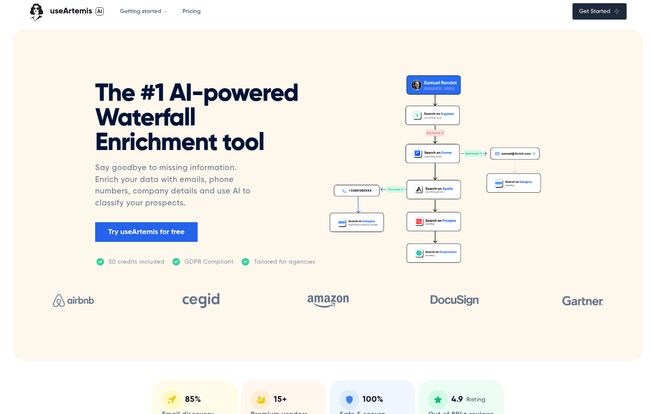
The “Waterfall Enrichment” – Does It Really Find Emails?
First off, what a cool name. “Waterfall Enrichment” sounds like something out of a fantasy novel. In reality, it’s a clever, multi-step process for finding contact information. Instead of just checking one database, it tries a series of different methods and sources, one after another, until it gets a hit. It’s like having a set of master keys for the internet’s address book.
They boast an 85% find rate for emails, which is a pretty bold claim. In my experience with similar tools, anything above 60-70% is solid gold. While your mileage may vary depending on your industry, their method is sound. Getting verified emails is the key here. It reduces your bounce rate, keeps your email domain healthy, and just plain saves time. It’s a huge plus.
AI Personalization: The End of “Dear Sir/Madam”?
This is where things get futuristic. The AI in useArtemis can scan a prospect’s LinkedIn profile and generate a personalized hook or opening line for your message. The idea is to break the ice with something relevant to them—their recent post, a job change, a shared interest. I’ve seen this go horribly wrong with other tools, spitting out awkward, clunky sentences. But the examples I saw from Artemis seemed… surprisingly human. It’s a massive leap from the generic `”Hi {first_name}, I saw your profile and was impressed…”` template we all hate.
The higher-tier plans even have Automatic AI replies. This feels like playing with fire, but for a busy agency, I can see the appeal. The AI handles the initial back-and-forth, teeing up the conversation for a human to close. It needs supervision, for sure, but it’s a fascinating development.
The Unified Inbox: Sanity for Sales Teams
If you’ve ever managed more than one LinkedIn account or tried to run a multi-channel campaign (LinkedIn DMs + emails), you know the pain. Toggling between tabs, trying to remember who you replied to where… it’s a recipe for disaster. The unified inbox pulls all your conversations from your connected LinkedIn and email accounts into one place. It’s not a revolutionary idea, but its inclusion here is a massive quality-of-life improvement. For me, it’s the difference between organised outreach and pure chaos.
Let’s Talk Money: The useArtemis Pricing Breakdown
Alright, the all-important question: what’s this going to cost? The pricing is pretty straightforward, broken into three tiers. It’s not the cheapest tool on the market, but it’s not the most expensive either. The value really depends on how much you’re currently spending (in time or money) on lead gen.
| Plan | Price (Monthly) | Who It’s For | Key Features |
|---|---|---|---|
| Starter | $69 | Solo founders, freelancers, or small teams just starting out. | 2,500 leads, 500 verified emails, 2 LinkedIn accounts, Unified Inbox. |
| Scale | $159 | Growing sales teams and serious marketers. | 5,000 leads, 1,500 emails, 5 accounts, Automatic AI Replies. |
| Agency | $399 | Lead generation agencies or large teams managing multiple clients. | 100k leads, 10k emails, 10 accounts, AI replies. |
My take? The Starter plan is plenty for most individual users. The Scale plan is the sweet spot if you’re serious about growth; that jump in lead/email credits and the AI reply feature justifies the price hike. The Agency plan is exactly what it says on the tin—for power users managing a ton of outreach.
The Good, The Bad, and The AI
No tool is perfect. After digging in, here’s my honest breakdown.
The Good Stuff. It automates the most boring parts of prospecting, and it does it well. The email-finding success rate is genuinely impressive. The AI personalization, when it hits, is a cut above the competition. And I can’t overstate how helpful the unified inbox is. Plus, being GDPR compliant is a non-negotiable for me, so big check mark there. The testimonial from an executive at Cegid speaks volumes:
“Our customer meeting count skyrocketed from none to 50. By the second day of using useArtemis, we secured a qualified appointment. It not only provides contacts, but with C-lev, CXOs, and VPs from major enterprise companies.”
Things to Keep an Eye On. My main gripe, and it’s a small one, is that the pricing isn’t front-and-center on the homepage. You have to click over to the pricing page. Also, and this is crucial, you can’t just set the AI loose and walk away. It’s a powerful assistant, not a replacement for a human sales brain. You still need to review the personalized messages and monitor the automated replies to make sure they align with your brand’s voice. Don’t let the robot run wild.
So, is useArtemis Right for You?
If you’re in B2B sales, marketing, or you run a lead generation agency, this tool should absolutely be on your radar. If your days are filled with building lead lists on LinkedIn and you feel that pain I described earlier, then yes, useArtemis could be a fantastic investment. The time you save could easily pay for the subscription in the first week.
Who is it not for? If your business is primarily B2C or you don’t use LinkedIn as a primary channel, then obviously this isn’t for you. It’s a specialized tool for a specific job, and it does that job very well.
Final Thoughts
I’ve seen a lot of LinkedIn automation tools. Most are clunky, risky, or just glorified scrapers. useArtemis feels different. It’s smarter. The combination of powerful data enrichment with a genuinely useful AI layer makes it a formidable contender. It’s not a magic wand—you still need a good offer and a solid sales strategy—but it can certainly take a lot of the heavy lifting off your shoulders.
In a world where personalization is king, useArtemis gives you a fighting chance to stand out in a crowded inbox. And for that, it gets a solid nod of approval from me.
Frequently Asked Questions about useArtemis
- Is useArtemis safe for my LinkedIn account?
- This is the million-dollar question for any automation tool. useArtemis, like its peers, operates in a grey area of LinkedIn’s ToS. However, good tools mimic human behavior to reduce risk. The key is to be smart: don’t send 500 connection requests a day. Use sensible limits, warm up your account, and focus on quality over quantity. The tool itself is safe; how you use it determines the risk.
- What does 1 credit mean?
- Typically in these tools, one credit is used for one major action. Based on their plans, it seems one email lookup (enrichment) costs one credit. So the Starter plan’s 500 verified emails would use up its 500 credits for the month.
- Do I need a LinkedIn Sales Navigator subscription?
- It’s not required, which is a great perk. You can scrape leads from a free LinkedIn account. However, using Sales Navigator will give you much more powerful and specific search filters, leading to higher quality lead lists to feed into useArtemis.
- Can I really trust the AI to write my messages?
- Trust, but verify. I would treat the AI-generated lines as a first draft from a talented but new copywriter. They are often great starting points that you can quickly edit and approve. For the automatic replies on the Scale plan, I’d recommend using them for very top-of-funnel interactions, like acknowledging a new connection, before a human takes over.
- What kind of payment methods are accepted?
- The FAQ on their site confirms they accept common payment methods, which usually implies major credit cards like Visa, Mastercard, and Amex.
- Can I roll over unused credits?
- Yes! The pricing table mentions “Credit roll-over” on all plans. This is a fantastic, user-friendly feature that many competitors dont offer.


