
Categories: AI API, AI Assistant, AI Chatbot, AI Customer Service, AI Knowledge Base, AI Lead Generation, AI Productivity Tools, AI Sales Assistant, No-Code&Low-Code
Userdesk Review: An AI Chatbot for Your Website?

If you run a website that gets any kind of traffic, you’ve felt the pressure. The constant ping of the live chat window, the endless stream of emails asking the same three questions, the leads that slip away because you weren’t online at 2 AM on a Sunday. We all dream of having a team of hyper-efficient, caffeine-fueled support agents working around the clock. But budgets, you know, are a thing.
For years, the solution was ‘chatbots’. And honestly? Most of them were terrible. Clunky, rule-based systems that felt more like a frustrating phone tree than a real conversation. “Press 1 for sales, say ‘operator’ if you’re stuck in a loop of despair.” We’ve all been there.
But the game has changed. With the explosion of large language models like GPT, AI assistants are suddenly… smart. Conversational. Genuinely helpful. And a whole new generation of tools has sprung up to make this power accessible. One that’s been making waves is Userdesk. It promises to let you build a ChatGPT-style bot, trained on your own data, with no code. Sounds good, right? Almost too good. So, as someone who’s wrestled with more than a few API docs and clunky bot interfaces in my day, I had to see for myself.
So, What Exactly is Userdesk?
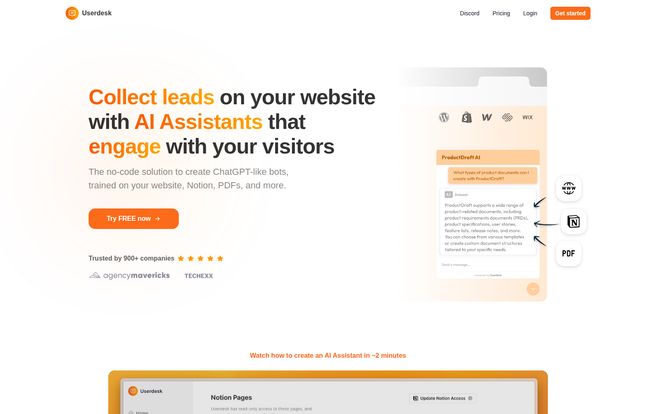
Think of Userdesk as a translator. It doesn’t create knowledge out of thin air; it takes all the brilliant stuff you’ve already created—your website content, your help docs in Notion, your product specs in Google Drive, your FAQs in a PDF—and translates it into instant, conversational answers for your visitors. It’s a no-code platform designed to build a custom AI chatbot that acts as your company’s expert.
The magic phrase here is “trained on your data.” This is what separates it from just embedding a generic AI on your site. This bot won’t start making up facts or telling users about your competitor’s products. It learns your business, speaks with your voice, and becomes a genuine extension of your brand. And the best part? You don’t need to be a developer to make it happen. If you can upload a file or paste a link, you’re pretty much qualified.
Visit Userdesk
Putting Your Business on Autopilot (The Key Features)
Okay, so it’s a custom chatbot. But what does it do? I’ve seen a lot of platforms that are just a gimmick. Userdesk, however, seems focused on solving some very real business headaches.
More Than Just a Welcome Mat: Actually Generating Leads
A simple “Hi, how can I help?” is nice, but it doesn’t pay the bills. Userdesk’s AI is designed to be an active participant in your sales funnel. It can be configured to ask for contact information, qualify leads based on their questions, and even book demos. It’s like having a friendly, non-pushy salesperson on your site 24/7, ready to engage the moment someone shows interest. For any business where a lead is worth its weight in gold, this feature alone could justify the cost.
Your Tireless 24/7 Support Agent
This is the most obvious win. Imagine cutting down on the repetitive support tickets by 50%, 60%, or even more. What’s our return policy? Do you ship to Australia? How do I reset my password? The bot handles it. Instantly. This frees up your human team to focus on the complex, high-value conversations that actually require a human touch.
And it’s not just for English-speaking audiences. The platform supports over 52 languages, so your AI assistant can chat with a customer from Paris just as easily as one from Peoria. For businesses with a global footprint, this is huge.
The Easiest Knowledge Base You’ll Ever Manage
Here’s the thing that really caught my eye. I’ve worked with systems where you had to meticulously build and maintain a separate knowledge base just for the chatbot. It was a nightmare. Every time a product was updated, you had to update your website, your internal docs, and the chatbot’s brain. It was a recipe for outdated information.
Userdesk’s approach is just… smarter. It connects directly to the sources you already use. Got all your team knowledge in Notion? Plug it in. Is your help center built on your website? Just give Userdesk the URL. All your processes in Google Docs? Connect it. The bot automatically syncs with this data, so when you update your Notion page, the bot knows the new information. This “connect, don’t create” philosophy is a genuine game-changer.
Listening to What Your Customers Actually Want
One of the most underrated features is the visitor insights. Userdesk keeps track of the questions people are asking. This is pure gold. It’s a direct, unfiltered pipeline into the mind of your customer. Are people constantly asking about a feature you don’t have? Maybe it’s time to build it. Are they confused about a certain part of your pricing? Maybe your page needs a rewrite. It turns your support function into a proactive product and market research tool, and you don’t have to do a thing except read the report.
Let’s Talk Money: A Breakdown of Userdesk’s Pricing
Alright, this is where the rubber meets the road for any SaaS tool. A great product with the wrong pricing is a non-starter. Userdesk uses a pretty standard tiered model, and I’ve gotta say, it’s fairly competitive. Here’s how it breaks down:
| Plan | Price (Monthly) | Key Features | Who It’s For |
|---|---|---|---|
| Free | $0 | 1 chatbot, 30 AI messages/mo, GPT-3.5 | Tire-kickers and testers. A great way to see if it works for you. |
| Hobby | $16 | 1 chatbot, 2,000 AI messages/mo, GPT-3.5 | Solopreneurs, personal blogs, or very low-traffic sites. |
| Growth | $41 | 2 chatbots, 4,000 AI messages/mo, GPT-4 access | Small businesses and startups that are serious about automation. |
| Pro | $83 | 5 chatbots, 15,000 AI messages/mo, GPT-4 access | Established businesses with significant website traffic. |
| Enterprise | $416 | 50 chatbots, 100,000 AI messages/mo, removes branding | Large organizations with heavy support and sales demands. |
A few thoughts here. The Free plan is generous enough for a proper test drive, which I appreciate. 30 messages isn’t much, but it’s enough to get it set up and see the magic happen. The jump to the Growth plan at $41 feels like the real sweet spot for most businesses. That’s where you get access to the more powerful GPT-4 model, which can make a noticeable difference in the quality and nuance of the responses.
Now, the little add-on. There’s a separate $39/month fee to remove the “Powered by Userdesk” branding if you’re on a lower plan. I’ve always found it a bit cheeky when companies charge for this, but it’s becoming common practice. It’s something to factor into your total cost if having a completely white-labeled experience is important to you.
The Other Side of the Coin: Where Userdesk Might Stumble
No tool is perfect, and it’s important to go in with eyes wide open. While I’m pretty impressed with Userdesk, there are a few potential gotchas.
- AI Isn’t Human (Yet): As good as GPT-4 is, it can still misinterpret a truly complex or emotionally charged query. You still need a human escalation path for those tricky conversations. Don’t fire your entire support team just yet. Think of the AI as your first line of defense, not your entire army.
- The Cost of Conversation: The message limits on the plans are real. If you have a massive traffic spike, you could burn through your monthly allotment pretty quickly. You need to have a good handle on your site traffic and engagement to pick teh right plan.
- Reliance on Your Docs: This is both a strength and a weakness. The chatbot is only as smart as the library it reads from. If your help documentation is sparse, inaccurate, or poorly written, your chatbot will be too. It’s a classic “garbage in, garbage out” scenario.
The Final Verdict: Is Userdesk Worth It?
After spending some quality time with the platform, I’m optimistic. Userdesk isn’t just another chatbot. It feels like a well-thought-out tool built for business owners and marketers, not just developers. Its biggest selling point, by far, is the sheer simplicity of training it on your existing content. The ability to just point it at a Notion database or a website and say “learn this” is incredibly powerful.
It strikes a great balance. It’s simple enough for a solopreneur to set up in an afternoon but has the depth (API access, GPT-4, detailed integrations) to scale with a growing company.
So, is it right for you? If you find your team answering the same questions over and over, if you’re losing leads after-hours, or if you just want to offer a more modern, instant support experience, then yes. Absolutely give the free plan a spin. Connect a couple of your help docs and ask it a few questions. I have a feeling you’ll be impressed.
Frequently Asked Questions
- How exactly do I train the Userdesk chatbot?
- You don’t “train” it in the traditional sense. You simply provide it with data sources. This can be your website URL, help center links, public Notion pages, Google Docs, or uploaded files like PDFs. It automatically reads and learns from this content.
- Does it integrate with platforms like Zendesk or Intercom?
- Yes, it’s designed to work with your existing tools. It can create tickets in helpdesk systems like Zendesk, Intercom, and Hubspot, so complex queries get handed off seamlessly to your human agents.
- Can I use my own OpenAI API key or a custom model?
- According to their FAQ, Userdesk supports using your own OpenAI models or other custom models on certain higher-tier or custom plans. You’d need to contact them directly for this.
- What happens if I go over my monthly message limit?
- Like most services with usage-based billing, you’ll likely need to upgrade to the next plan tier if you consistently exceed your message limit. It’s best to choose a plan that gives you a comfortable buffer based on your website’s traffic.
- Is it possible to remove the “Powered by Userdesk” branding?
- Yes. It’s included in the highest-tier Enterprise plan, or you can purchase it as a $39/month add-on for the other paid plans.
- How customizable is the chat widget?
- You can customize the chatbot’s appearance to match your brand, including colors, logos, and welcome messages. You can also give it a name and a personality through a custom prompt, telling it to be formal, friendly, witty, etc.


