
Categories: AI API, AI Assistant, AI For Data Analytics, AI Recording, AI Report Generator, AI SEO Tools, AI Summarizer, AI UX Design
UXSniff Review: An AI Sidekick for Your Website’s UX?

Let’s have a little heart-to-heart. As someone who’s been wrestling with SEO and website traffic for more years than I care to admit, I’ve seen a lot of tools come and go. They all promise the moon. They all claim to be the ‘one-stop shop’ for all your problems. And most of the time? They’re just another complicated dashboard that ends up gathering digital dust.
One of the biggest headaches has always been understanding what people actually do on a website. Sure, Google Analytics tells you where they came from and what pages they visited. But it doesn’t tell you why they left. It doesn’t show you the exact spot on the checkout page where they got frustrated and bailed.
So, we turned to session recording tools. Amazing, right? We can watch real users! Except… who has time to watch hundreds, or even thousands, of recordings? It’s like trying to find a specific needle in a continent-sized haystack. It’s a great idea with a terrible execution problem.
That’s the cynical headspace I was in when I stumbled upon UXSniff. Another one? Oh, but wait. This one had a little trick up its sleeve: AI. My curiosity was officially piqued. Could this be the tool that finally cracks the code? Let’s find out.
So, What is UXSniff, Really?
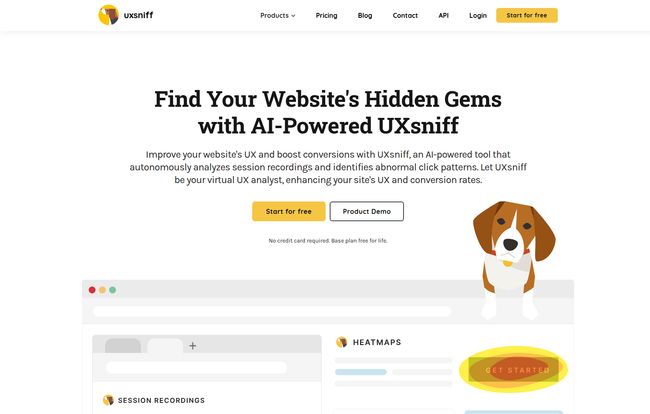
At its core, UXSniff is a user experience analytics platform. Think of it as a diagnostics kit for your website. It combines a bunch of tools that, historically, you’d have to subscribe to separately. We’re talking session recordings, heatmaps, user feedback surveys, and even some basic SEO auditing.
But the secret sauce, the thing that makes it different, is the AI layer built on top. Instead of just giving you a library of 500 session recordings to sift through, it uses GPT models (yes, the same family as ChatGPT) to watch them for you and pull out the important moments. It’s less of a passive library and more of an active assistant, constantly sniffing out problems. I have to admit, the name is starting to make a lot of sense.
My Favorite UXSniff Features (The Stuff That Actually Matters)
A tool is only as good as its features. Here are the ones that stood out to me during my testing.
AI-Powered Session Recordings That Save Your Sanity
This is the headline act. The main event. Manually reviewing session recordings is a soul-crushing task. You watch ten recordings of people successfully using your site just to find the one where everything goes wrong. It’s inefficient and, frankly, boring.
UXSniff’s AI summaries change the game. You can look at a session and get a quick, bulleted summary of what happened. “User added item to cart, hesitated on shipping page for 35 seconds, then left the site.” Boom. Insight found. Time saved. And don’t even get me started on the ‘rage click’ alerts. We’ve all been there, hammering a button that does absolutely nothing. It’s the digital equivalent of shouting into the void. Getting an alert every time a user does this is pure gold. It’s a direct signpost pointing to a broken or confusing element on your page.
Visit UXSniff
Heatmaps with a Time Machine Twist
Heatmaps aren’t new, but they’re a classic for a reason. Seeing a visual representation of where people click, move their mouse, and scroll is incredibly insightful. It helps you answer questions like, “Are people even seeing our main call-to-action?” or “Why is everyone clicking on this thing that isn’t even a link?”
What I found really neat about UXSniff’s heatmaps is the integrated ‘Wayback Machine’. This is such a simple but brilliant idea. It lets you compare heatmaps from different points in time. Did that button color change you made last month actually work? Just pull up the before and after heatmaps and see the data for yourself. No more guessing or relying on gut feelings.
More Than Just UX – The SEO Angle
I’m an SEO guy at heart, so my ears perked up when I saw the SEO and UX audits. Look, a tool like this won’t replace a dedicated crawler like Screaming Frog or Ahrefs, but it’s not supposed to. Its “LinkGuard” feature constantly checks for broken links on your site, which is a fantastic little bonus. Broken links are bad for users and bad for search engine crawlers. It’s a simple thing that has a surprisingly big impact.
This reinforces a philosophy I’ve been preaching for years: good UX is good SEO. When you make your site easier and more enjoyable for humans to use, Google notices. Things like dwell time, bounce rate, and conversions are all signals that tell search engines your site is a quality result. Fixing a UX issue that stops users in their tracks is also fixing an SEO issue.
Let’s Talk Money: UXSniff Pricing Breakdown
Alright, this is often the make-or-break moment. A tool can have all the cool features in the world, but if it costs a fortune, it’s a non-starter for most of us. This is where UXSniff really surprised me.
They have a few tiers with fun, dog-themed names, and the entry point is… well, it’s less than a fancy cup of coffee.
| Plan Name | Monthly Cost | Who It’s For |
|---|---|---|
| Free Plan | $0 | Small blogs or anyone wanting to test the waters. |
| Poodle | $4 | Solopreneurs and small businesses just getting started with UX. |
| Hound | $10 | Growing websites that need more recordings and features like rage click alerts. |
| K-9 | $18 | Serious marketers who need access to better AI models (GPT-4) and reporting. |
| Wolf Pack | $60 | Agencies or businesses managing multiple websites. |
Honestly, the pricing is incredibly competitive. There’s a genuinely useful free forever plan, and the paid plans start at just $4 per month. That is unheard of in this space. It makes powerful UX analysis accessible to pretty much everyone, which I think is fantastic.
Okay, What’s the Catch?
No tool is perfect, and it would be dishonest to pretend otherwise. While I’m pretty high on UXSniff, there are a couple of things to keep in mind.
First, the lower-tier plans have limits on things like daily recordings and data storage. The free plan only stores data for a month. This is pretty standard stuff for SaaS products, but you need to be aware of it. If you have a high-traffic site, you’ll probably need to jump to the ‘Hound’ or ‘K-9’ plan pretty quickly.
Second, the most powerful AI models (GPT-4 and GPT-4 Turbo) are reserved for the ‘K-9’ plan and up. The lower tiers use GPT-3.5 and GPT-4o, which are still very capable, but for the absolute best-in-class analysis, you’ll have to pay a bit more. Again, totally fair, but it’s a trade-off to consider.
Frequently Asked Questions about UXSniff
Is there really a free plan?
Yes! It’s not just a trial. The free ‘Base Plan’ gives you access to core features like heatmaps and a limited number of recordings and pageviews each month. It’s a great way to try it out with no risk.
What does the AI actually do?
The AI assistant analyzes the session recordings to identify key user behaviors. It summarizes what a user did, flags moments of frustration (like rage clicks), and essentially does the tedious work of watching the recordings for you, presenting you with the highlights.
Is UXSniff hard to install on a website?
Not at all. Like most analytics tools, it just requires you to copy and paste a small snippet of JavaScript code into your website’s header. If you’ve ever installed Google Analytics or a Facebook Pixel, you’ll find it very familiar. It takes about two minutes.
Can I use it on more than one website?
Yes, but you’ll need the ‘Wolf Pack’ plan for that, which allows for up to 10 websites. The lower-tier plans are for a single site.
What about visitor privacy?
This is a big one. According to their site, UXSniff is GDPR and CCPA compliant. Session recording tools have a responsibility to protect user privacy, and it looks like they take that seriously by anonymizing sensitive data.
How does this compare to other big-name UX tools?
In my opinion, its main advantages are the AI-powered analysis and the incredible affordability. While some enterprise-level tools might have more bells and whistles, UXSniff offers the most critical features for a fraction of the price, with the added bonus of an AI assistant that saves you time. It’s built for the 99% of website owners who don’t have a dedicated team of UX researchers.
The Final Woof: My Verdict on UXSniff
After spending some time with it, I’m genuinely impressed. UXSniff isn’t just another clone in a crowded market. It’s a smart, focused, and incredibly affordable tool that solves a real problem. It bridges the gap between having tons of user data and actually understanding it.
Is it for everyone? If you’re an enterprise with a multi-million dollar budget and a team of analysts, you might have more complex needs. But for the small business owner, the blogger, the freelancer, the marketing manager wearing ten different hats… I think it’s a no-brainer.
It stops you from guessing and helps you make data-driven decisions to improve your site. And at the end of the day, that’s what moves the needle. It’s time to stop flying blind and start sniffing out your website’s real opportunities.


