
Categories: AI Agent, AI Chatbot, AI Developer Tools, AI Speech Recognition, AI Speech Synthesis, AI Workflow
Vagent Review: Voice Control for Your Custom AI Agents

I spend a frankly unreasonable amount of time tinkering with automations. If you’ve ever found yourself deep in an n8n or Zapier workflow at 2 AM, trying to get your calendar to talk to your to-do list via a custom API call, you’re my people. We build these incredible, personalized systems that run our lives in the background. But interacting with them? It’s usually a mess of typing into a terminal, firing off a webhook from a browser bookmark, or using some other clunky method. Especially on a phone.
It’s the one part of the custom AI revolution that feels… unfinished. We have the brains, but no mouth. So when I stumbled upon Vagent, I felt that familiar spark of excitement. A clean, simple voice interface for all the weird and wonderful automations I’ve built? Yes, please. I had to check it out.
So, What on Earth is Vagent?
Let’s get this out of the way first. Vagent is not another Siri or Google Assistant. It’s not a standalone AI that’s going to tell you jokes or the weather. Think of it less as the brain and more as the beautiful, minimalist microphone and speaker you connect to your brain.
In more technical terms, Vagent is a mobile app that acts as a voice front-end for your custom AI agents. You talk to the app, it securely sends your command to your backend automation (the thing you built in n8n, for example), your backend does its magic, and Vagent speaks the result back to you. It’s the stylish, user-friendly front door to your powerful, custom-built AI engine running on your own server or cloud service.
How the Magic Happens: Webhook Wizardry
If you’re in the automation space, the word “webhook” should be music to your ears. For everyone else, a webhook is just a way for different apps to send each other automated messages. It’s a simple URL.
Vagent’s setup is beautiful in its simplicity. You don’t have to install a complicated SDK or fight with a dozen authentication settings. You just give Vagent a single webhook URL pointing to your automation. That’s pretty much it. When you speak, the app packages up your words and sends them to that URL. Your workflow receives the message, processes it, and sends a response back. The connection is authenticated, so you don’t have to worry about random people talking to your personal automations. It’s a brilliantly simple architecture.
The Features That Actually Matter
A tool can have a million features, but only a few usually make or break the experience. For Vagent, these are the ones that stood out to me.
An Interface That Gets Out of the Way
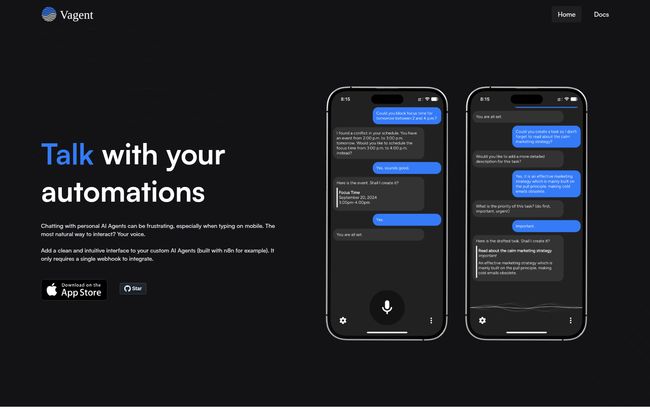
The first thing you’ll notice is how clean the app is. It looks and feels like a modern messaging app. There’s a microphone button, a text log of your conversation, and… that’s it. No clutter. No confusing menus. It’s designed to do one thing—let you talk to your agent—and do it well. This is a huge win. The last thing I want when I’m trying to quickly add a task on the go is to navigate a complex UI.
Privacy is a Feature, Not an Afterthought
This one is huge for me. Vagent requires no registration. They state clearly that they don’t collect your data or store your chat history. Your conversations are between you and your own backend. In an age where every free service is harvesting your data, this is more than refreshing; it’s a statement. The chat history is tied to a local session on your phone, which you can clear at any time.
Visit Vagent
Great Speech Quality and Language Support
Vagent uses OpenAI’s Speech models for its voice recognition and text-to-speech. This is a smart move. Instead of trying to reinvent the wheel, they’ve plugged into one of the best speech systems out there. The result is high-quality, natural-sounding interactions. It also supports over 60 languages, automatically detecting them from your input, which is a fantastic touch for global users or polyglots.
Separate Speech and Text Outputs
I love this little detail. Your AI agent can send back two different responses: one for Vagent to speak aloud and one to display as text. Why is this cool? You can have the spoken response be more conversational and natural (e.g., “Okay, I’ve added ‘buy milk’ to your shopping list for you!”), while the text response is short and to the point (e.g., “Task added: buy milk”). It’s a subtle feature that significantly improves the user experience.
The Good, The Bad, and The Nitty-Gritty
No tool is perfect, right? After playing around with Vagent, here’s my honest breakdown of what I love and what you should be aware of.
What’s to love is obvious. The single webhook integration is a dream for developers and tinkerers. The clean UI is a joy to use, and the commitment to privacy is something I wish more companies would adopt. It’s secure, it supports multiple languages, and it just works.
However, there are a few things to keep in mind. First, and this is the most important point, Vagent is useless on its own. You absolutely must have a custom AI agent or automation backend for it to talk to. If you’re not someone who builds things with tools like n8n, this app isn’t for you. Second, its speech quality is entirely dependent on OpenAI’s service. If OpenAI has a bad day, Vagent’s voice capabilities might suffer. Lastly, for security, it requires you to confirm actions before they’re executed. It shows you a card with the action your agent wants to take. While I personally see this as a critical safety feature (I don’t want to accidentally delete my entire customer database with a misspoken command), some might find the extra tap a bit of a drag.
What’s the Price Tag?
This is the interesting part. As of writing this, there is no public pricing information available. The app is on the App Store, but the website is quiet on the cost. This could mean a few things. It might be free for now while it’s in an early stage, or it could be a passion project. My gut says it’s a tool built by developers for developers, and they haven’t gotten to the monetization part yet. For now, it seems you can just download it and start building.
So, Who Should Download Vagent?
Vagent is a beautifully designed tool for a very specific person. It’s for:
- The n8n power user who has workflows for everything and wants a faster way to trigger them.
- The developer building a custom AI-powered service who needs a quick and easy voice interface without the hassle.
- The automation enthusiast who loves connecting services and building personalized productivity systems.
- The privacy-conscious techie who wants the power of a voice assistant without sending all their data to a big tech company.
It’s not for your grandma who just wants to ask about the weather. It’s for the people who are building their own weather service.
Frequently Asked Questions
Is Vagent a standalone AI assistant like Siri?
No, not at all. Vagent is an interface, or a ‘client’. It provides the voice and chat screen, but it requires you to connect it to your own custom-built AI agent or automation backend to actually perform any tasks or answer questions.
What do I need to get started with Vagent?
You need two things: the Vagent app on your phone, and a backend automation that can be triggered by a webhook. The most common tool for this would be a self-hosted or cloud instance of n8n, but any platform that can receive and respond to webhooks will work.
How much does Vagent cost?
Currently, there is no pricing listed on their website or in the App Store. It appears to be free to use at the moment, but that could change in the future. Your only real cost would be running your own backend agent (e.g., n8n server costs) and any API calls it makes (e.g., to OpenAI).
Is Vagent secure to use with my personal data?
It seems to be designed with security in mind. The connection to your backend is made via an authenticated webhook, and the company states it collects no personal data and does not store your conversations. All history is stored locally on your device.
Does Vagent work with languages other than English?
Yes, it supports over 60 languages for both voice input and audio output. It’s designed to automatically detect the language being spoken.
My Final Verdict
I’m genuinely impressed with Vagent. It’s not trying to be everything to everyone. It’s a sharp, focused tool that solves a specific problem with elegance and a respect for user privacy. It bridges the final, frustrating gap between our powerful custom automations and easy, on-the-go interaction. For the right person—the tinkerer, the builder, the automation nerd—Vagent feels less like an app and more like a missing piece of the puzzle we’ve been looking for. It gives our creations a voice, and that’s a pretty powerful thing.


