
Categories: AI Design Generator, AI Vector Graphics, Text to Image
VectorMind Review: Your Next AI Vector Generator?

I can still feel the phantom cramp in my hand. You know the one. The cramp you get after spending six hours hunched over your Wacom tablet, meticulously tracing a client’s blurry JPEG logo with the Pen Tool in Illustrator. Every. Single. Point. Click. Drag. Adjust. It’s a rite of passage for designers, I guess, but man, is it a grind.
For years, we’ve been hearing about how AI is going to change everything. We’ve seen it with writing, with photorealistic image generation from tools like Midjourney, and now it’s starting to really sink its teeth into the world of graphic design. But a lot of that has been focused on raster images—you know, pixels. For those of us who live and breathe scalable, infinitely-resizable graphics, the question has always been: when is AI coming for vectors?
Well, I think I’ve found an answer. It’s called VectorMind. I’ve been playing around with it for a bit, and I wanted to give you the real, no-fluff rundown. Is it a magic wand? Nope. Is it a ridiculously powerful assistant that can save you from Pen Tool-induced carpal tunnel? Let’s find out.
So, What is VectorMind Anyway?
At its core, VectorMind is an AI platform designed specifically to create vector graphics from simple text descriptions. Think of it like this: you tell your very talented (and very, very fast) robot intern, “Hey, I need a minimalist icon of a coffee cup, flat design style,” and a few seconds later, it hands you a clean, ready-to-use SVG file. No coffee breaks needed.
It was apparently founded by some former AI engineers and scientists from Meta and Uber, which gives it a certain amount of street cred. These aren’t just hobbyists in a garage; they’re people who’ve worked on some of the biggest AI systems out there. The platform isn’t just a one-trick pony, either. It’s a whole suite of tools aimed at making a designer’s life easier.
The Full Toolkit: More Than Just a Text-to-Vector Box
When I first logged in, I thought it would just be a single input field. I was pleasantly surprised to see a whole range of tools. It’s clear they’re thinking about the entire creative workflow, not just the initial creation part.
The AI Vectorizer and Generator
This is the main event, the star of the show. You have two options: generate a brand-new vector from a text prompt or upload an existing bitmap image (like a JPG or PNG) and have the AI vectorize it for you. The text-to-vector part is where the fun is. I typed in “a majestic lion wearing a crown, geometric style” and got some genuinely impressive results. The real power here is for quick ideation and creating assets that would otherwise be tedious to draw from scratch.
Upscaling Your Images Without the Fuss
We’ve all been there. A client sends you their logo, and it’s a 72dpi, 100-pixel-wide file they pulled from their email signature. The AI Upscaler in VectorMind aims to solve that. It enhances the resolution and details of your raster images, making them usable for high-quality projects. It’s a lifesaver, plain and simple.
Background Removal That Actually Works
Cutting out backgrounds is another one of those soul-crushing tasks. While Photoshop’s tools have gotten better, a dedicated AI background remover that gets it right 95% of the time is worth its weight in gold. This is perfect for creating clean product shots for e-commerce sites or prepping images for social media graphics. A few clicks, and poof, your background is gone.
The Magic of the AI In-painter
This feature feels a bit like sorcery. You can mask a part of your image and then tell the AI what to put there. For example, you could select a person’s shirt in a photo and type “change to a red Hawaiian shirt.” It’s an amazing tool for making quick edits and tweaks without having to jump through a dozen hoops in another program.
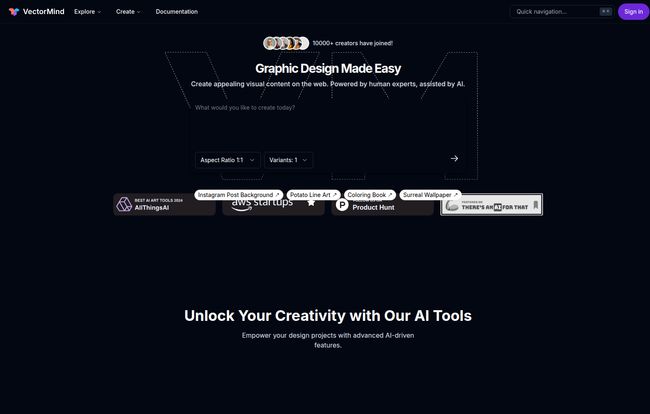
Visit VectorMind
Product Scenes and 3D Engraving Generators
Here’s where VectorMind gets into some really interesting, niche territory. The AI Product Scene Generator lets you create mockup scenes for your designs. Imagine dropping your new sticker design onto a photorealistic laptop, or your t-shirt graphic onto a model. This is huge for anyone on Etsy or running a Shopify store. The AI 3D Laser Engraving Art Generator is even more specific but shows the team’s ambition. It helps create unique designs optimized for custom engraving products. Pretty cool.
Let’s Talk Money: The VectorMind Pricing Breakdown
Okay, let’s get down to the brass tacks. Is this thing going to break the bank? It really depends on what you need it for. They have a pretty standard three-tier system that caters to different users. Here’s how it shakes out.
| Plan | Price | Best For | Key Features |
|---|---|---|---|
| Hobby (Free) | $0 | Hobbyists, students, or anyone wanting to test the waters. | 30 one-time AI credits, personal use license only, attribution required, basic SVG/PNG downloads. |
| Pro | $19.99/month | Freelancers, professionals, and small businesses. | 300 AI credits per month, commercial use license, no attribution, asset privacy, priority support. |
| Enterprise | Contact Sales | Large teams and agencies needing scalable solutions. | Custom credits, advanced security, dedicated support, and tailored features. |
My Take on the Pricing
The Free tier is a solid demo. You get to try all the tools, but the 30 one-time credits will disappear fast, and the personal-use-only license means you can’t use anything you create for a client project. Think of it as a trial run.
The Pro plan is where the real value is for anyone making money from their designs. At about twenty bucks a month, it’s a steal. If it saves you just two or three hours of manual vector work, it has already paid for itself. The commercial license is the most important part here—it gives you the freedom to use your creations professionally. The 300 credits per month feel generous enough for a steady stream of projects.
The Good, The Bad, and The… Prompty?
No tool is perfect. After spending some time with it, here are my honest thoughts.
The good stuff is obvious: the speed is incredible, and the sheer variety of tools in one place is fantastic. Being able to download a clean SVG is the killer feature for me. It integrates directly into my existing design workflow with Adobe Illustrator and Affinity Designer.
Now, for the not-so-good. The free tier is pretty restrictive, but that’s standard for SaaS products. The biggest challenge, and this applies to ALL generative AI, is that the output quality is entierly dependent on the quality of your prompt. Typing “cat” will give you a generic cat. But “a stylized art deco cat, with clean lines, gold and black color palette, side profile” will yield something much more specific and usable. There’s a learning curve to writing good prompts. It’s a new skill we all have to develop. So don’t expect it to read your mind.
So, Who is VectorMind Really For?
I see a few key people getting a ton of value out of this platform:
- Social Media Managers: Need a quick icon for an Instagram story or a custom graphic for a post? This is way faster than searching through stock sites.
- Freelance Graphic Designers: It’s an amazing tool for brainstorming and generating initial concepts. Instead of starting with a blank page, you can generate a dozen ideas in minutes and then refine the best one.
- E-commerce Entrepreneurs: The background remover and product scene generator are game-changers for creating professional-looking product listings without hiring a photographer or a Photoshop wiz.
- Content Creators & Bloggers: Need a unique graphic for your blog post or YouTube thumbnail? You can create something that perfectly matches your topic in seconds.
Frequently Asked Questions
- What is an SVG file and why is it so important?
- An SVG (Scalable Vector Graphic) is an image format based on mathematical equations, not pixels. This means you can scale it to any size—from a tiny icon to a giant billboard—and it will never lose quality or look blurry. It’s the standard for logos, icons, and illustrations.
- How do the AI credits work? Do they roll over?
- One credit is typically used for one generation or major action. On the Free plan, you get 30 credits one time. On the Pro plan, you get 300 credits each month. Most subscription services like this don’t roll over monthly credits, so it’s best to assume you should use them or lose them each month.
- Can I really use the graphics for my business?
- Yes, but only if you are on the Pro plan or higher. The Pro subscription includes a commercial license, which gives you the legal right to use the graphics you create for profitable projects, like client work, marketing, and products for sale.
- Is VectorMind difficult to learn?
- The interface itself is very user-friendly. The main skill to learn is “prompt engineering”—learning how to write descriptive text that gives the AI the best instructions. They do offer prompt templates, which is a great starting point!
- How is this different from AI image generators like Midjourney?
- The key difference is the output. Tools like Midjourney create beautiful but flat, pixel-based (raster) images. VectorMind creates scalable vector files (SVG). You can’t easily edit the individual shapes and paths of a Midjourney image, but with a VectorMind SVG, you can open it in Illustrator or a similar program and have full control over every line and curve.
- What happens to my graphics if I cancel my Pro subscription?
- Typically with these licenses, any graphics you created and downloaded while you had an active Pro subscription are yours to keep and use commercially forever. However, you would lose access to the Pro features and the ability to generate new commercial-use assets.
Final Thoughts: A Worthy Addition to the Designer’s Toolbox
So, is VectorMind the future of graphic design? Part of it, I think. It’s not going to replace the creativity, strategy, and problem-solving skills of a good designer. Not by a long shot. But as a tool to augment our abilities, to speed up the tedious parts of our job, and to break through creative blocks? It’s absolutely brilliant.
It’s like trading in your handsaw for a power saw. You still need to be a skilled carpenter to build a beautiful table, but the right tool makes the job faster, more efficient, and maybe even a little more fun. If you’re in the creative field, I’d say giving VectorMind’s free plan a spin is a no-brainer. It might just save your hand from that next Pen Tool marathon.


