
Categories: AI Animation Generator, AI Lip Sync Generator, AI Movie Generator, AI Sound Effect Generator, AI Speech Synthesis, AI Video Generator, AI Voice Generator, Image to Video, Text to Video
Veo3Video Review: Google’s AI Video Tool That Can Hear

Alright, let’s have a little chat. For the last couple of years, the world of AI video generation has been a bit like a silent movie festival. We’ve seen some absolutely stunning visuals, no doubt. Cars flying through impossible cities, photorealistic animals doing… well, whatever we tell them to. But it’s always had this slightly eerie, disconnected feeling. The sound was always an afterthought, a separate, clunky step you had to tackle later. I’ve spent more hours than I care to admit trying to perfectly time a footstep sound effect to an AI-generated clip. It’s tedious work.
Then Google waltzes in, taps the microphone, and says, “Testing, one, two, three.” Meet Veo3Video, the platform running on Google’s shiny new Veo3 model. And frankly, it’s making some serious noise.
What is Veo3Video, Really?
In a nutshell, Veo3Video is a platform designed to turn your text and image prompts into high-quality video. Okay, nothing new there. But here’s the kicker: it generates the video and the audio at the same time. We’re talking natively synchronized sound effects, background ambience, and even character dialogue with shockingly accurate lip-syncing. It’s not just sticking a stock audio track over a clip; it’s creating a cohesive audiovisual experience from the ground up. This isn’t just an update; it feels like a whole new chapter.
It’s powered by Google’s Veo3, which seems to have a much deeper understanding of how the real world looks and sounds. The physics feel right, the motion is coherent, and the whole thing just feels… more grounded.
The Sound is the Secret Sauce
Let’s be honest, this is the feature that made me sit up and pay attention. The synchronized audio. It’s the difference between a cool tech demo and a genuinely useful creative tool. Imagine typing a prompt like: “A detective walks down a rainy, neon-lit alley in Tokyo, his trench coat rustling as he talks into his phone.
Previous tools might give you the visuals. But Veo3Video aims to give you the whole scene: the soft patter of rain on the pavement, the distant city hum, the rustle of the coat, and the detective’s voice actually matching the movement of his lips. That’s a massive leap forward.
More Than Just People Talking
The lip-sync is the headline act, for sure. But the platform’s ability to generate ambient sound and effects is just as important. It understands that a forest scene needs the sound of wind in the trees and a cracking twig, not just a generic nature soundscape. It’s this attention to integrated detail that starts to blur the line between generated content and actual footage.
Stunning Visuals and Cinematic Control
Okay, so the audio is a big deal. But what about the video itself? It’s gorgeous. The realism is top-tier, and it seems to handle complex prompts with a lot more grace than some of its predecessors. You can ask for specific camera moves—pans, zooms, tilts—and stylistic choices, from hyperrealism to whimsical animation. It feels less like you’re rolling the dice and more like you’re actually directing.
The Google Flow Connection
This is another piece of the puzzle that I think is getting overlooked. Veo3Video is deeply integrated with something called Google Flow. Think of Flow as a director’s toolkit or a production hub. It’s designed to help you maintain narrative consistency across multiple shots. You can manage assets, keep character appearances the same, and generally build a longer, more cohesive story instead of just a bunch of cool-looking, disconnected clips. For anyone trying to use this for actual filmmaking or marketing campaigns, this is absolutely huge.
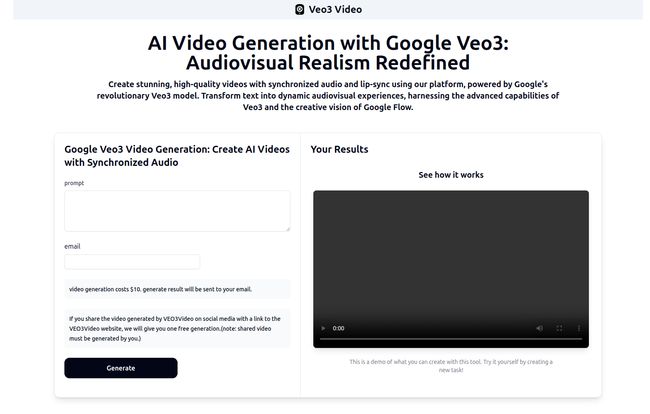
Visit Veo3Video
Show Me the Money: Veo3Video Pricing
Of course, this kind of power doesn’t come for free. The pricing structure is… interesting. It’s clearly segmented for different types of users, from the hardcore AI enthusiast to the professional studio. It can get pretty pricey, especially if you want the top-tier stuff.
Here’s a breakdown of what we know so far. I’ve put it in a table to make it a bit easier to digest.
| Plan | Price | Key Features & Target Audience |
|---|---|---|
| Gemini App – Ultra | $249.99 /month | Includes Veo3 with audio, highest usage. Aimed at individual power users and AI fanatics, currently only in the US. |
| Flow – AI Pro | $19.99 /month | Core Flow features (mostly Veo2 at first), 100 generations/month. Great for individual creators and small teams getting their feet wet. |
| Flow – AI Ultra | $249.99 /month | Full Flow power, Veo3 access, highest limits, and premium features. This is for the pros and filmmakers in the US. |
| Vertex AI API | ~$0.35 /second | Pay-as-you-go API access for enterprise and big projects. Comes with some initial limitations (8-sec clips, 720p). |
My take? The $20 Flow – AI Pro plan seems like a fantastic entry point for creators. But that $249.99/month price tag for the full Veo3 experience is steep. It positions teh tool firmly in the professional-grade category, away from the casual user market.
The Bumps in the Road
Okay, it can’t all be perfect, right? And it’s not. There are some significant hurdles. The most glaring one for many will be the high cost and the fact that the full-fat Veo3 functionality is initially limited to users in the US. That’s a bit of a bummer for the global creative community.
On the technical side, the API preview is currently capped at 8-second, 720p clips, which is more for testing than for final production. And like all AI, it can still wander into the uncanny valley, creating human figures that are almost perfect but just a little… off. Maintaining perfect consistency over very long videos is still a challenge too.
Ethics and The Future of Creative Work
And then there’s the big conversation we all need to have. Tools this powerful bring up serious ethical questions about deepfakes, misinformation, and intellectual property. Google says they’re using their SynthID watermarking to help identify AI content, which is a good step. But it also forces us to think about the future of creative jobs. I don’t think it’s a simple case of “AI will replace artists,” but it will most certainly change the workflow and the skills required to succeed in the creative industries.
Frequently Asked Questions
- What makes Veo3Video different from other AI video tools?
- The biggest differentiator is the native synchronized audio generation, including realistic sound effects and accurate lip-sync for dialogue. It creates the sound and video together, which is a huge step up in realism.
- Can I really generate a video of a person talking believably?
- That’s the promise! The lip-sync technology is designed to match the generated audio to the character’s mouth movements. While it might not be flawless 100% of the time, early examples show it to be incredibly impressive and a massive improvement over previous methods.
- What is Google Flow and why does it matter?
- Google Flow is a workflow platform integrated with Veo3Video. It helps creators maintain consistency across multiple video clips—keeping a character’s appearance the same, for example. It turns the tool from a single-clip generator into a more robust filmmaking solution.
- Is Veo3Video free to use?
- No, there isn’t a free tier mentioned in the initial plans. The entry-level plan for creators is the Flow – AI Pro at $19.99/month, with more powerful (and expensive) options available for professionals.
- How long does it take to create a video?
- It’s a computationally intensive process. API documentation suggests latency can be up to 6 minutes for a short clip. So, it’s not instantaneous, but the quality of the output is the main focus.
- What are the main limitations right now?
- The main limitations include the high cost for full access, the initial geographic restriction to the US for top features, and technical caps on the preview API (like 8-second video length). And like all current AI, it can sometimes produce slightly unnatural or inconsistent results.
Is This the Future, Then?
Look, I get excited by new tech, but I’m also a seasoned skeptic. Veo3Video is genuinely exciting. It’s a huge, confident stride towards a future where generating high-quality audiovisual content is accessible to more people than ever before. We’re finally moving on from those ghostly silent AI films.
Is it perfect? No. It’s expensive, it has limitations, and it raises some thorny questions. But it’s a powerful statement of intent from Google. It feels less like a toy and more like a tool. And for any creator, marketer, or filmmaker who’s been waiting for AI video to grow up, Veo3Video is a sign that it’s finally happening.
Reference and Sources
- Official Pricing & Platform Information: veo3video.app
- Google DeepMind on SynthID Technology: deepmind.google/discover/blog/identifying-ai-generated-images-with-synthid/


