
Categories: AI Description Generator, AI Script Writing, AI Title Generator, AI Transcriber, AI Translate, AI YouTube, AI Youtube Thumbnail Generator, Youtube Tags Generator
VidChapter Review: AI for YouTube SEO? My Honest Take

If you’re a YouTuber, or manage a channel for a client, you know the feeling. The video is finally, finally edited. The color grade is perfect, the audio is crisp, you’ve cut out all the awkward pauses. You feel a wave of relief. And then it hits you. The other work. The grind. Writing the description, coming up with a title that isn’t just clickbait, brainstorming a cloud of tags, and the absolute worst part for me… creating timestamped chapters.
Ugh. The drudgery. It’s the digital equivalent of having to do the dishes after cooking a magnificent meal. It’s necessary, but it’s not the fun part. I’ve spent more hours than I’d like to admit scrubbing through timelines, jotting down “03:15 – Start of the second point,” only to have it be slightly off. So, as an SEO guy who’s always on the hunt for a good shortcut, when I heard about an AI tool called VidChapter that promised to do all this for me, my curiosity was definitely piqued.
I’ve seen a lot of AI tools come and go. Some are brilliant, some are just fancy-looking calculators that dont really work. So I took VidChapter for a spin to see if it could actually lighten the load or if it was just another gimmick. Here’s my honest take.
What Exactly is VidChapter? More Than Just Timestamps
At its core, VidChapter is an AI-powered assistant designed specifically for video creators on platforms like YouTube and Vimeo. Think of it as a junior SEO specialist who lives in your browser and is ready to work 24/7. Its main job is to automate the most tedious parts of video optimization.
Visit VidChapter
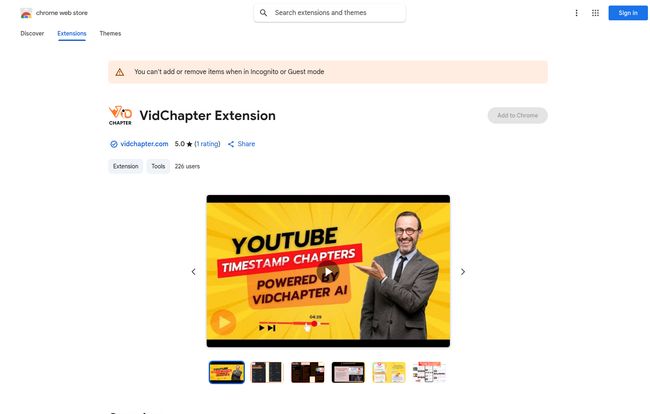
The first thing that caught my eye was its Chrome Extension. It integrates directly into your YouTube Studio interface. This is a huge win. I’m not a fan of having to constantly switch between a dozen different tabs to get one task done. Having the tool right there where you’re uploading is a smart, seamless touch. It analyzes your (pre-recorded) video and generates chapters, a full-blown SEO-focused description, a handful of title options, and a list of relevant tags. It’s an all-in-one optimization package.
The Features That Actually Matter to Creators
A long feature list is nice, but what actually moves the needle? After messing around with the platform, a few things really stood out as genuinely useful.
AI-Generated Chapters: Bye-Bye, Manual Timestamps!
This is the headline feature, and for good reason. Manually creating chapters is a soul-sucking task, especially for longer, in-depth videos. It’s also incredibly important for viewer experience. Nobody wants to scrub through a 20-minute tutorial to find the one 30-second clip they need. Chapters give viewers control, and a happy viewer is more likely to stick around. VidChapter’s AI scans your video’s content and automatically creates timestamped sections with logical titles. It’s not always 100% perfect, but man, it gets you 95% of the way there in seconds. A quick review and a few tweaks, and you’re done. This feature alone is a massive time-saver.
SEO-Optimized Descriptions and Titles That Don’t Sound Robotic
We’ve all seen those awful, keyword-stuffed descriptions that read like they were written by a malfunctioning robot from the 90s. A good YouTube description generator needs to do more than just list keywords; it needs to create a readable, engaging summary that helps both the algorithm and a human understand what the video is about. I found VidChapter’s output to be surprisingly natural. It crafts a decent narrative while weaving in important terms. Same goes for the titles. It provides a few different options, usually a mix of straightforward, SEO-friendly titles and more catchy, curiosity-driven ones. It’s great for breaking through writer’s block.
Smart Tags and Other Goodies
There’s a long-standing debate in the SEO world about the importance of YouTube tags. My take? They still matter. They provide extra context to YouTube’s algorithm, helping it categorize your video and show it to the right audience. VidChapter generates a solid list of both broad and specific tags, which is the exact strategy I recommend. It also has a Thumbnail Analyzer and multi-language support, which is a fantastic addition for creators looking to reach a global audience without hiring a translation service for every single video.
The Real-World Test: My Honest Thoughts (The Good and The Not-So-Good)
Okay, no tool is perfect. Let’s get into the nitty-gritty. After using it on a few of my own videos, I have some clear thoughts.
The best thing about it is, without a doubt, the time it saves. I probably clawed back a solid hour or two of tedious work on my first long video alone. That’s time I can now spend on scripting the next video or engaging with comments—you know, the stuff that actually grows a channel. I also noticed that on a video where I used the AI chapters, the audience retention graph had more peaks and valleys, which tells me people were actively using the timestamps to find what they needed. That’s a win for viewer engagement.
Now, for the caveats. The biggest one for me is the pricing model. VidChapter uses a credit system. Each action, like generating a description or creating chapters, consumes credits. This is pretty standard for AI tools, but you need to be aware of it. If you’re a heavy user uploading multiple videos a day, you could burn through credits quickly. Also, it’s built for pre-recorded content, so if you’re a live streamer, this won’t help you optimize your streams in real-time. Lastly, I saw a few promising features, like an ‘A/B Analyze’ tool, that were listed as ‘coming soon’. I’m excited to see them, but it’s a reminder that the platform is still growing.
What’s the Damage? A Look at VidChapter’s Pricing
So, how much does this AI magic cost? The pricing is subscription-based, with discounts for paying annually. It’s pretty straightforward.
| Plan | Monthly Price | Annual Price (Equivalent) |
|---|---|---|
| PRO | $19 / month | $12 / month (Billed $144 per year) |
| ULTRA | $49 / month | $32 / month (Billed $384 per year) |
In my opinion, the PRO plan is the sweet spot for most individual creators or small businesses who are serious about their channel’s growth. The ULTRA plan is likely geared more towards marketing agencies or content creators managing a whole portfolio of channels. The good news is they offer a free trial, so you can always kick the tires and see how many credits you actually use before committing.
So, Is VidChapter Worth It for Your Channel?
Here’s my final verdict. If you’re a creator who values your time—and you should—then yes, VidChapter is absolutely worth considering. The cost of the subscription is easily offset by the hours you save on the backend. Time is money, after all.
It’s perfect for educators, tutorial-makers, product reviewers, and anyone creating long-form content where clear navigation is a must. If you’re a solo creator wearing all the hats, this tool can feel like hiring your first part-time assistant.
Who might not need it? If you’re a hobbyist who genuinely enjoys the entire process from start to finish, or if your channel primarily features short, non-informational content like vlogs or cinematic shorts, you might not see as much benefit from the chaptering and deep SEO features.
Conclusion
In the ever-growing world of AI tools for creators, VidChapter stands out as a practical, well-designed solution to a very real problem. It’s not about replacing creativity; it’s about automating the tedious, repetitive tasks so you can focus more on creating. It makes the technical side of YouTube SEO more accessible and, frankly, less of a chore. For any serious creator looking to improve their workflow and boost their video performance, it’s a tool that deserves a spot in your arsenal. Give the trial a run and see for yourself.
Frequently Asked Questions (FAQ)
- Does VidChapter work for Vimeo too?
- Yes, the platform is designed to work with both YouTube and Vimeo, helping you optimize your videos across both services.
- Is VidChapter’s AI content ready to publish immediately?
- The AI-generated content is a fantastic starting point and often very high quality. However, I always recomend giving it a quick review to tweak it for your personal voice and to ensure it’s 100% accurate. Think of it as a 95% solution that saves you the bulk of the work.
- What happens when I run out of credits?
- When you run out of credits on your plan, you’ll likely need to either wait for your next monthly renewal or upgrade to a higher-tier plan to get more credits immediately.
- Can I use VidChapter for live streams?
- No, at the moment VidChapter is focused on optimizing pre-recorded video files. It does not currently support live stream optimization.
- Is there a free trial for VidChapter?
- Yes, VidChapter offers a free trial that allows you to test its features and see if it’s a good fit for your workflow before you have to pay anything.


