
Categories: AI Summarizer, AI Video Summarizer, AI Video Translator, AI Youtube Summary
VideoDigest Review: The AI Tool That Tamed My YouTube Habit

How many videos are in your YouTube ‘Watch Later’ playlist? Ten? Fifty? A hundred? Mine was a digital graveyard, a testament to my best intentions and my complete lack of time. Every day, I’d add another hour-long marketing deep dive, another coding tutorial, another podcast clip I swore I’d get to. And every day, they’d just sit there, gathering digital dust.
This is the content creator’s paradox, isn’t it? We need to consume massive amounts of information to stay sharp—new trends, competitor analysis, skill development—but the very act of consumption eats the time we need to actually create. It’s like trying to drink from a firehose.
I’ve been in the SEO and traffic generation game for years, and I’ve seen countless ‘productivity’ tools that promise the world. Most of them are just shiny wrappers on a half-baked idea. So when I stumbled upon VideoDigest, my cynical SEO-brain immediately went on high alert. Another AI video summarizer? Groundbreaking. But I gave it a shot. And folks, I’m genuinely surprised. This one might actually be the real deal.
So, What Exactly is VideoDigest?
In short, VideoDigest is an AI-powered tool that takes a long video (mostly from YouTube right now) and spits out a concise, readable summary. But that description is a bit like calling a smartphone a ‘pocket calculator.’ It’s technically true, but misses the entire point.
It doesn’t just transcribe the video. It uses AI—the landing page says it’s powered by OpenAI—to pull out the core concepts, the key takeaways, and the actual structure of the discussion. It turns a rambling, hour-long video into a scannable document with timestamps. You can get the gist of a video in about three minutes of reading, instead of 60 minutes of watching. That’s not just a time-saver; it’s a fundamental change in how you can process information.
Visit VideoDigest
My First Run: Dropping in a Link and Holding My Breath
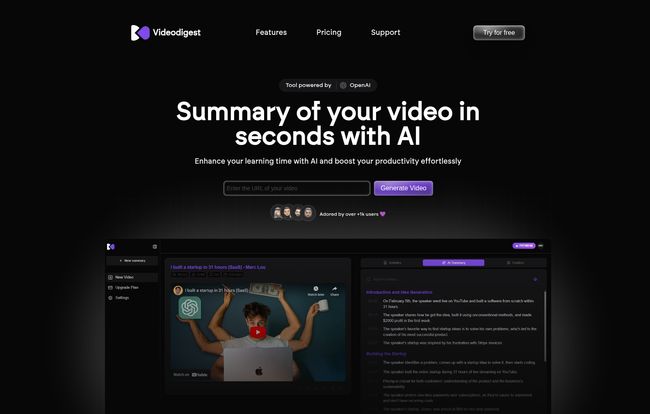
The user interface is clean. Almost deceptively simple. It’s a dark-mode, no-fluff dashboard that gets straight to the point. You see a big box that says “Enter the URL of your video.” No complex setup, no 10-step tutorial. I like that.
I grabbed a link to a 45-minute video from a well-known marketing guru, one that had been mocking me from my Watch Later list for weeks. I pasted it in, hit ‘Generate Video,’ and waited. I expected a long loading screen, maybe a spinning wheel of death. Instead, in what felt like less than a minute, it was done. On the left, the video player. On the right, a beautifully formatted, timestamped summary broken down into logical sections. It was… impressive.
I could immediately see the main arguments, the examples used, and the final conclusion. I could click on any timestamp in the summary and jump straight to that part of the video. This, right here, was the magic moment. I hadn’t just saved 42 minutes; I’d gained a way to instantly verify the AI’s summary and get more context if I needed it. It felt less like a black box and more like a collaboration.
The Features That Make a Difference
Okay, so the core function works. But a tool is only as good as its supporting features. Here’s what stood out to me.
The AI Summaries are Actually Smart
This is the main event, and it delivers. The quality of the summaries is high. They’re not just a collection of sentences from the transcript. The AI seems to understand context, identifying headings and sub-points even when the speaker doesn’t explicitly state them. The support for multiple languages is a huge plus for those of us working in international markets. It’s not perfect, of course, no AI is, but it’s far more accurate and useful than I anticipated.
Little Things That Aren’t So Little
VideoDigest packs in a few quality-of-life features that I didn’t know I needed. The Ad-Free Viewing experience within the tool is a godsend. No more getting interrupted by a 2-minute ad for a product I’ll never buy. Then there’s the Turbo Reader, which is a clever name for a feature that lets you watch at accelerated speeds with smart playback. For power users, this is fantastic.
Going Beyond the Summary
Two other features caught my eye: the AI Chat Assistant and the Creator Finder. The Chat Assistant lets you ‘talk’ to the video. You can ask it questions like, “What were the three main points about lead generation?” or “Did the speaker mention any specific tools?” It’s like having an instant research assistant for every video you watch.
The Creator Finder is a neat little discovery tool. If you find a video on a topic you like, it can help you find other creators talking about similar stuff. It’s a nice touch for digging deeper into a new niche.
The All-Important Question: What’s the Price?
Alright, let’s talk money. This is often where great tools fall apart with confusing tiers and expensive monthly subscriptions. VideoDigest does something I love to see: Lifetime Deals. You pay once, you use it forever. This is a massive win in my book. In a world of SaaS subscriptions, a lifetime offer feels like a breath of fresh air.
Here’s a quick breakdown of their current lifetime plans:
| Plan | Price | Key Features |
|---|---|---|
| Free | $0 | 120 minutes/month, 2 uploads/day, 30 min max length, limited AI chat. Great for testing the waters. |
| Premium (Lifetime) | $39 USD | 12,000 minutes/month, 10 uploads/day, 120 min max length, unlimited AI chat, summary downloads. |
| Pro (Lifetime) | $68 USD | 30,000 minutes/month, 25 uploads/day, 120 min max length, all features included. |
The free plan is genuinely useful for casual use. But for anyone in a professional or academic setting, that $39 lifetime Premium plan is absurdly good value. The amount of time that can be saved makes it a complete no-brainer. The minute limits are very generous for a one-time purchase.
Who Is This Really For?
While I think almost anyone could benefit, I see a few groups getting massive value here:
- Students and Researchers: Imagine summarizing hours of lectures or academic talks in minutes. This is a research superpower.
- Marketers and SEOs: We need to keep up with so many trends. This lets you monitor competitor video strategies, analyze industry talks, and pull quotes for content without losing an entire afternoon.
- Content Creators: Quickly research topics, summarize your own long-form content for show notes or blog posts, and find what other creators in your space are talking about.
- Lifelong Learners: Anyone with a genuine curiosity and a packed schedule. You can finally make a dent in that educational content backlog.
My Final Verdict: Is VideoDigest Worth It?
Yes. Unreservedly, yes. Especially with the current lifetime deal pricing.
Look, no tool is a magic bullet. You still have to do the work. But the biggest bottleneck for many of us isn’t effort; it’s time. VideoDigest doesn’t do the work for you, but it clears the path. It removes the friction of information gathering. It turns passive video watching into an active, efficient research process.
It’s one of the few AI tools I’ve tested recently that feels like it was built to solve a real, tangible problem, not just to ride a hype wave. It’s given my poor, neglected ‘Watch Later’ list a new lease on life. And for a content professional, that’s worth its weight in gold.
Frequently Asked Questions
What is VideoDigest in simple terms?
VideoDigest is a tool that uses AI to create short, written summaries of long YouTube videos. It helps you understand the main points of a video quickly without having to watch the whole thing.
Is the pricing really a one-time payment?
Yes, the current Premium and Pro plans are advertised as lifetime deals (LTDs). This means you pay the fee once and get access to the features of that plan forever, which is a fantastic value compared to monthly subscriptions.
Is there a free version of VideoDigest?
Absolutely. There’s a free plan that gives you 120 minutes of video summarization per month. It’s a great way to try out teh core features and see if it fits your workflow before considering an upgrade.
What languages does VideoDigest support?
The tool supports multiple languages for its summaries. This makes it incredibly useful for users who consume or work with content from different parts of the world.
How accurate are the AI summaries?
In my experience, they are very accurate for getting the main ideas and structure of a video. While no AI is 100% perfect, VideoDigest does an excellent job of creating useful, coherent summaries that save a ton of time. The included timestamps also let you easily check any part of the summary against the original video.
So, if your YouTube backlog is starting to look like a digital library you’ll never have time to read, maybe it’s time to get a super-fast librarian. This might just be it.
Reference and Sources
For the most up-to-date information on features and pricing, visit the official website:
- VideoDigest Official Website & Pricing: https://videodigest.app


