
Categories: AI Art Generator, AI Background Remover, AI Bikini, AI Face Swap Generator, AI Face Swap Video, AI GIF Generator, AI Headshot Generator, AI Image Generator, AI Lip Sync Generator, AI Outfit Generator, AI Photo Editor, AI Portrait Generator, AI Sticker Generator, AI Tattoo Generator, AI Video Editor, AI Video Enhancer, AI Video Generator, Image to Video, Text to Video
VideoFaceSwap Review: AI Face Swaps Made Easy (& Fun)

The AI space is getting crowded. Every other day, there’s a new tool that promises to write your emails, design your house, and probably walk your dog. As someone who lives and breathes digital trends, I’ve seen a lot of them come and go. Most are… well, forgettable. But every now and then, a tool pops up that’s just plain fun. And that’s where I think VideoFaceSwap fits in.
I’ve spent the better part of a week playing around with it, putting my face, my cat’s face, and a few celebrity faces (for research purposes, of course) onto various videos and GIFs. So, is it just another gimmick, or is there something more to it? Let’s get into it.
What in the World is VideoFaceSwap?
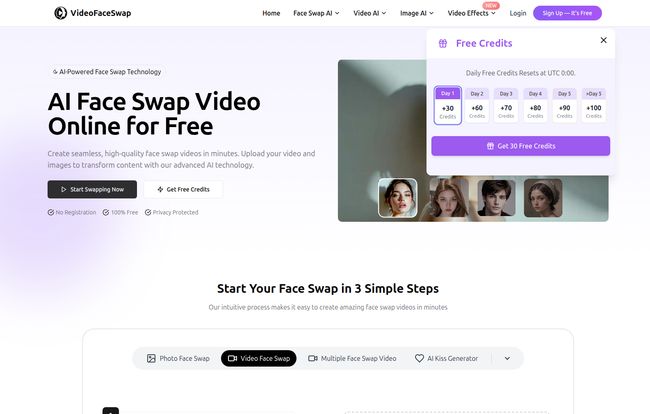
At its core, VideoFaceSwap is exactly what it sounds like: a web-based platform that uses artificial intelligence to swap a face from a photo onto a person in a video. Simple, right? But it’s not the clunky, Photoshop-nightmare process you might be imagining from five years ago. This isn’t just a cut-and-paste job. The AI here is pretty sophisticated, mapping the new face onto the original video’s expressions and movements to make it look surprisingly natural. Or, you know, as natural as seeing your grandpa’s face on a TikTok dancer can be.
The platform boasts that you can create realistic face swap videos in just a few minutes, all online, without downloading any clunky software. And it handles not just videos, but GIFs and still photos too.
Getting Started is Almost Too Easy
I’m used to tools with a learning curve. I expect to spend at least 15 minutes clicking around, trying to figure out the UI. But with VideoFaceSwap, the process is ridiculously straightforward. I’m not kidding, it’s a three-step dance:
- Upload Your Video: You pick the video or GIF you want to be the base. This could be a movie clip, a meme, or a video of you and your friends.
- Upload Your Face: You provide a clear, front-facing photo of the face you want to swap in. Pro tip: good lighting and no obstructions (like sunglasses) make a huge difference.
- Click and Wait: You hit the ‘Start Face Swap’ button and let the AI do its thing. A few minutes later, you’ve got your creation.
That’s it. There’s no complex timeline editing or motion tracking to worry about. The platform handles the heavy lifting, which is a massive plus for anyone who isn’t a seasoned video editor.
Visit VideoFaceSwap
It’s Way More Than Just a One-Trick Pony
Here’s what genuinely surprised me. I came for the face swapping, but I stayed for the whole AI toolkit. It feels less like a single tool and more like an entire creative suite hiding behind a simple interface. I was expecting a one-page wonder, but poking around revealed a whole bunch of other AI generators.
You’ve got your standard stuff like an AI Headshot Generator and an AI Portrait Generator, which are becoming pretty common. But then it gets weirder and way more interesting. There’s an AI Ghibli Generator to turn your photos into something out of a Studio Ghibli film. There’s an AI Lip Sync tool that can make a still photo appear to talk or sing a song you provide. Want to see what you’d look like as an action figure? There’s a generator for that. A tattoo? Yep. A dancing video? You betcha.
Honestly, it’s a content creator’s sandbox. The ability to jump from creating a funny face swap meme to generating a professional-looking headshot, and then creating a Ghibli-style video all on one platform is pretty impressive. It saves you from having to hunt down and learn a half-dozen different AI websites.
The Good, The Bad, and The AI
No tool is perfect, right? Every platform has its quirks. Here’s my breakdown of what I loved and what made me raise an eyebrow.
The Good Stuff I Appreciated
First off, the ease of use cannot be overstated. It’s incredibly accessible. You don’t need a high-powered computer or any technical skills. If you can upload a photo to social media, you can use this. I also loved the variety of options—video, GIF, and photo swaps give you a lot of creative freedom. And the big one for me is the privacy statement. In an age of data leaks and security concerns, seeing a platform explicitly mention comprehensive privacy protection is a good sign. They say your uploaded media is protected, which helps ease some of teh anxiety of putting your face online.
The Not-So-Good Stuff to Keep in Mind
Now for the catch. While the tool is advertised as “free,” it operates on a credit system. You get some free credits to start, and you can apparently get more by logging in daily. This is great for casual use, but if you’re like me and want to experiment with ten different videos in an hour, you’ll burn through those credits fast. When you run out, you’re faced with a choice: wait for tomorrow’s free credits, buy more, or shorten your video to conserve them. This freemium model is standard practice, but it can be a workflow killer when inspiration strikes. There are also limitations on video length for free users, so you won’t be face-swapping an entire feature film.
So, How Much Does It Actually Cost?
This is the million-dollar question, isn’t it? The information I have doesn’t lay out a clear pricing table with tiered plans like ‘Basic,’ ‘Pro,’ etc. The model seems to be focused on a combination of daily free credits and the option to purchase more credits as needed.
My advice? Think of it like an arcade. You can walk in for free and they might give you a few tokens to try some games. If you want to play all night, you’re going to have to buy more tokens. For the most up-to-date pricing and credit packages, your best bet is to head directly to the VideoFaceSwap website. These things change, so always check the source.
Who Is This Tool Really For?
I can see a few groups getting a ton of value out of this.
- Social Media Managers and Content Creators: This is a goldmine for creating viral, engaging content. The meme potential is off the charts.
- The Casual User: Perfect for making hilarious birthday videos for friends, spicing up a family group chat, or just having a laugh.
- Marketers with a Sense of Humor: A small business could use this for a quirky ad campaign that stands out from the boring, corporate stuff.
Who isn’t it for? Probably professional VFX artists working on blockbuster movies. They have their own incredibly powerful (and incredibly expensive) software. This is for the rest of us—the creators, the marketers, the meme-makers, and the chronically online.
The Ethical Tightrope of Face Swapping
We can’t talk about face-swapping without mentioning the elephant in the room: deepfakes. It’s a technology with a serious potential for misuse. Creating funny memes is one thing; creating misleading or malicious content is another entirely. I was glad to see VideoFaceSwap has a privacy policy and, one assumes, terms of service that forbid nefarious uses.
My personal take is that the user bears the responsibility. With great power comes great responsibility, and the power to put your boss’s face on a dancing cat is a great power indeed. Use it for good. Use it for laughs. Don’t use it to be a jerk.
Frequently Asked Questions
- Is VideoFaceSwap really free to use?
- Yes, it’s free to start. It uses a credit system, and you get a certain number of free credits daily. For more extensive use, you’ll likely need to purchase additional credits.
- Is it safe to upload my photos and videos?
- The platform claims to offer comprehensive privacy protection for user data. However, as with any online tool, it’s always wise to be cautious and aware of the types of images you upload.
- Can I swap more than one face in a single video?
- Yes! They have a feature specifically for ‘Multiple Face Swap,’ allowing you to replace several faces in one go, which is pretty cool for group scenes.
- How long does the face swap process take?
- The site says it takes just a few minutes. In my experience, it depends on the length of your video and how busy their servers are. A short GIF is super quick, a longer video takes a bit more time.
- What other AI tools does VideoFaceSwap have?
- It has a surprising number of them! Beyond face swapping, you can find an AI Lip Sync tool, an AI Ghibli Generator to create anime-style art, AI headshot and portrait generators, and even a text-to-video feature.
My Final Verdict on VideoFaceSwap
So, what’s the bottom line? VideoFaceSwap is a powerful, accessible, and genuinely fun tool. It brilliantly lowers the barrier to entry for creating complex video effects that used to require expensive software and a lot of skill. The sheer volume of additional AI tools packed into the platform adds a ton of value, turning it from a simple gimmick into a versatile creative hub.
The credit system is its main drawback, but it’s a fair trade-off for the power you’re getting without an upfront subscription. Is it going to change the world of professional video production? Probably not. But is it a fantastic tool for creating hilarious memes, engaging social media content, and just having a good time? Absolutely. I’d say it’s well worth bookmarking.
Reference and Sources
- VideoFaceSwap Official Website
- TechCrunch – Artificial Intelligence News for general trends in the AI space.


