
Categories: AI Design Generator, AI Interior Design, AI Photo Editor, AI Real Estate
VirtualStagingAI Review: The AI Tool Selling Homes Faster?

That Empty Room Isn’t ‘Full of Potential,’ It’s Full of Doubt
Let’s be real for a second. As real estate pros and marketers, we’ve all said it. We walk into a vacant, echoey room with a potential buyer and wave our hands around, proclaiming, “Just imagine a beautiful sofa here… a cozy rug there… it’s a blank canvas!”
And most of the time, the buyer just nods, but their eyes are blank. They can’t imagine it. A blank canvas is intimidating. An empty room isn’t a space of opportunity; it’s a space of unanswered questions. How big a sofa? What style? Will my stuff even fit? That hesitation can kill a deal.
For years, the answer was physical staging. You know, renting furniture, hiring movers, spending thousands of dollars and several days to make a property look lived-in. It works, but it’s a massive, expensive headache. Then came digital staging services, which were better, but often involved slow turnarounds and back-and-forth emails. A step in the right direction, for sure. But now, AI is here to just completely change the game. I’ve been watching this space for a while, and I recently got my hands on a tool that’s making some serious waves: VirtualStagingAI.
So, What Exactly is VirtualStagingAI?
At its core, VirtualStagingAI is a web-based app that uses artificial intelligence to transform your property photos. You upload a picture of an empty (or even a terribly furnished) room, and within what feels like a few heartbeats, it spits out a beautifully, realistically staged version. It’s like having an interior designer, a furniture warehouse, and a photography team on call 24/7, all powered by an algorithm.
I’ve seen a lot of tools that promise the world, but this one feels different. It’s positioned as a direct competitor to services like BoxBrownie, but without the manual, human-in-the-loop delay. It’s all about speed and efficiency, which in the real estate world, is gold.
Visit VirtualStagingAi
The goal is simple: make your listings so irresistible that buyers can’t help but click, inquire, and visit. It helps them move past the question marks and start seeing a future home.
The Features That Actually Matter
Okay, so it makes pretty pictures. But what can it do? The interface is refreshingly straightforward, focusing on the tasks that actually move the needle for a real estate agent or property manager.
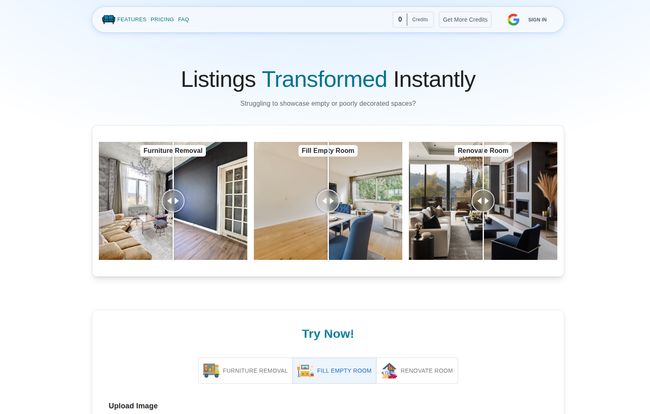
Wipe the Slate Clean with Furniture Removal
Ever had a listing with a seller’s… let’s say, eclectic taste in furniture? That ancient floral sofa and shag carpet from the 70s isn’t doing you any favors. The furniture removal feature is a godsend. It digitally erases the existing clutter, giving you that clean, empty room to work with. It’s like a digital magic eraser for bad design choices.
Fill an Empty Room with Possibilities
This is the main event. You take that photo of the empty living room or bedroom and let the AI do its thing. You can choose from different styles—modern, contemporary, farmhouse, you name it. A few minutes later, you have a photo that looks like it was pulled from a design magazine. This isn’t just about adding furniture; it’s about adding a vibe. It’s about selling a lifestyle, not just four walls and a floor.
Envision the Future with Room Renovation
This one really got me excited. Beyond just adding a couch, the renovation tool lets you change wall colors, update flooring, and more. Got a property with great bones but a hideous paint job? Instead of spending a week and a grand on painters before you can even list it, you can show potential buyers what it could look like with a few clicks. This is powerful stuff for flipping properties or selling fixer-uppers.
But Does It Actually Help You Sell?
Look, cool tech is one thing, but results are what pay the bills. According to VirtualStagingAI’s own data, the impact is pretty staggering.
- Virtually staged homes sell 73% faster than their non-staged counterparts.
- Listings see an 83% increase in buyer interest.
- And the big one: Staged homes sell for an average of 25% higher prices.
Are these numbers a bit marketing-heavy? Probably. But even if you cut them in half, the return on investment is massive. Selling a home just 30% faster saves on carrying costs, and a 10% bump in the sale price can mean tens of thousands of dollars. From my experience in this industry, I can tell you that first impressions online are everything. A stunning lead photo gets you the click. A gallery of beautifully imagined rooms gets you the showing. That’s how you win in today’s market.
My Honest Take: The Good, The Bad, and The AI
After playing around with the tool and reading what other users are saying, here’s my unfiltered opinion.
What I Genuinely Like
The speed is incredible. The testimonials on their site mention creating images in two minutes, and that’s not far off. The quality of the renders is also top-notch—far from the clunky, obviously-fake digital staging of five years ago. And I have to give a shoutout to the customer support. A few user reviews mentioned some small startup issues but praised how quickly the support team fixed them. That’s a huge green flag for me. It shows they care about their users, which isnt always a given.
A Few Minor Hiccups
No tool is perfect. The main thing to know is that it operates on a credit system. One credit gets you one AI generation. This is pretty standard for AI tools, but you need to be mindful of your usage. Also, as mentioned in some testimonials, being a newer peice of software, there can be the occasional startup glitch. I haven’t run into any major ones, but it’s something to be aware of. It’s the nature of the beast with cutting-edge tech.
Let’s Talk Money: VirtualStagingAI Pricing
Alright, down to the brass tacks. How much does this magic cost? They have a few tiers that seem designed for different types of users, which I appreciate.
| Plan | Price | Details | Best For |
|---|---|---|---|
| Lite | $29 (One-Time) | Includes 60 credits. MLS Ready & Commercial Use. | The solo agent or someone who wants to try it out on a few listings without a monthly commitment. It’s a no-brainer entry point. |
| Staging Starter | $49 / month | Includes 160 credits per month. All features plus Priority Email Support. | The busy agent or small team that handles a consistent flow of properties each month. This seems like the sweet spot for most professionals. |
| Agency | $99 / month | Includes 500 credits per month. All features and Priority Support. | The power users. Large brokerages, dedicated real estate marketing agencies, or high-volume teams. |
Honestly, the pricing feels very reasonable, especially the $29 one-time payment to get 60 credits. That’s less than 50 cents an image. When you compare that to the thousands you’d spend on physical staging for just one property, the value is undeniable.
Frequently Asked Questions About Virtual Staging
I’ve gotten a few DMs about this, so let’s clear up some common questions.
How fast does it really generate an image?
It’s quick. Most generations take just a few minutes. You upload your photo, select your style, and by the time you’ve grabbed a coffee, it’s likely done. A far cry from waiting 24-48 hours for a design service to email you back.
Is it difficult to use?
Not at all. The user interface is one of its strong points. It’s very intuitive. If you can upload a photo to social media, you can definately use VirtualStagingAI. There’s virtually no learning curve.
Do my unused credits roll over to the next month?
This is a good question. Based on their FAQ and pricing model for the monthly plans (Staging Starter and Agency), credits are replenished each month. The one-time Lite plan credits are yours until you use them. Always best to check their latest terms, though, as these things can change.
What kind of image quality can I expect?
The output is high-resolution and supports up to 1080p, which is perfect for MLS listings, social media, and websites. The images are clean, crisp, and most importantly, realistic. They don’t have that uncanny valley feel that some older AI image generators suffer from.
Can I use the images for my MLS listings?
Yes! All plans generate images that are MLS Ready. This is a critical detail. They understand their audience and have made sure the output is compliant and ready for professional use.
Is this cheating or false advertising?
This is a philosophical debate I see a lot. My take? It’s not. As long as you disclose that the images are “virtually staged” (which is a best practice and often required by MLS boards), you’re not misleading anyone. You’re helping them see the potential, not lying about the property itself. You’re selling the future, not just the present.
The Final Verdict
So, is VirtualStagingAI worth it? In my professional opinion, absolutely. It’s a powerful, fast, and cost-effective tool that solves a real, expensive problem for anyone trying to sell or rent a property.
The ability to transform a boring, empty space into a warm, inviting home in minutes is more than just a novelty; it’s a massive competitive advantage. It bridges the imagination gap for buyers, drives more qualified traffic to your listings, and can have a direct impact on your final sale price and time on market.
We’re past the point where we can just throw raw photos online and hope for the best. The market is too competitive for that. Tools like VirtualStagingAI aren’t the future anymore—they’re the present. And if you’re not using them, you’re likely leaving money on the table.
Reference and Sources
- VirtualStagingAI Official Website & Pricing: https://virtualstagingai.co


