
Categories: AI Audio Editing, AI Reader, AI Speech Synthesis, AI Text-to-Speech, AI Voice Cloning, AI Voice Enhancer, AI Voice Generator, AI Voice Over
VoiceCanvas Review: Is This AI Voice Tool Worth It?

You need a voiceover for a quick video, a podcast intro, or maybe to turn one of your blog posts into an audio version. You fire up a free text-to-speech tool and… cringe. The result is a robotic, monotone voice that sounds like it’s been gargling dial-up modem noises. It’s the audio equivalent of the uncanny valley, and it can kill your content’s vibe instantly.
For years, I’ve been on a quest for an AI voice tool that doesn’t just read words, but performs them. Something with a bit of soul. A few weeks ago, I stumbled upon a platform called VoiceCanvas, and honestly, I was skeptical. Another AI voice generator promising the world? Sure. But I decided to give it a spin, and I have to say, I’m pleasantly surprised. So, grab a coffee, and let’s talk about whether this tool actually lives up to its promises.
What Exactly is VoiceCanvas? A Quick Look Under the Hood
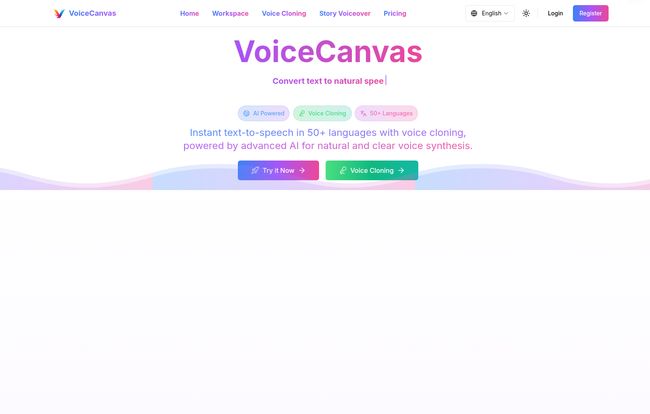
At its heart, VoiceCanvas is an AI-powered platform for turning text into speech. But that’s a bit like saying a Ferrari is just a way to get from A to B. The secret sauce here is its use of what they call “neural voice synthesis.” Without getting too techy, this means the AI has been trained on massive amounts of human speech data, allowing it to understand context, inflection, and the natural rhythm of how people actually talk. The result is audio that’s remarkably clear and natural.
It’s not just about reading English text either. The platform supports over 50 languages, which is a huge deal for anyone trying to build a global audience. But the feature that really caught my eye, the one that made me sign up for a trial, was the promise of AI voice cloning.
Visit VoiceCanvas
The Features That Actually Matter for Creators
A long list of features is great for a landing page, but in the real world of content creation, only a few things truly move the needle. Here’s what stood out to me during my testing.
The Star of the Show: AI Voice Cloning
This is it. The main event. VoiceCanvas allows you to create a digital clone of your own voice. The idea is simple: you provide a high-quality audio sample of your voice, and the AI learns its unique characteristics. Once it’s done, you can type any text and have it spoken in your voice. Wild, right?
The applications are pretty exciting. Imagine narrating all your YouTube videos or blog posts with perfect consistency, without ever having to record new audio for small edits or updates. Or creating a branded voice for your company’s training materials. It’s like having a voice actor on retainer, but without the awkward small talk and scheduling conflicts. Now, there’s a small catch, and it’s a classic one: garbage in, garbage out. The quality of your cloned voice is directly tied to the quality of the audio sample you provide. A muffled recording from your laptop mic won’t cut it. You need clear, clean audio for the best results.
Multilingual Magic: Speaking to a Global Audience
As an SEO guy, I can’t overstate the importance of reaching a wider audience. Translating your content is one thing, but providing localized audio? That’s next level. VoiceCanvas’s support for 50+ languages is a massive advantage. I recently worked with a client who wanted to create simple tutorial videos for both English and Spanish markets. A tool like this would have saved them a ton of time and money finding and hiring two different voice actors.
Fine-Tuning Your Audio with Advanced Controls
What separates a basic tool from a professional one is control. VoiceCanvas gives you a decent amount of it. You can adjust the speed and tone of the voice, which is crucial for matching the mood of your content. There’s also a real-time audio visualizer and even a “word-by-word reading” mode, which seems tailor-made for language learners or for creating educational content. You’re not just a passenger here; you have some say in the final output, which I really appreciate.
So, How Does It Actually Sound? My Honest Test
Okay, features are nice, but the million-dollar question is: does it sound good? In my experience, yes. For the most part. The standard voices are a definite step up from the generic, robotic options plaguing the internet. They handle pauses for commas and inflection for questions surprisingly well. It’s not perfect—occasionally, a complex sentence might have a slightly odd cadence—but it’s closer to human than most I’ve heard, especially at this price point.
I’d say it firmly escapes that creepy uncanny valley. It’s the difference between a voice that’s just reading words and a voice that seems to understand what it’s saying. For most content creation needs, from social media videos to e-learning modules, the quality is more than sufficient.
Let’s Talk Money: Breaking Down VoiceCanvas Pricing
Alright, let’s get into the nitty-gritty. The pricing structure is one of the most interesting things about VoiceCanvas because it’s so flexible. They seem to understand that not everyone is a power user.
Here’s a simplified breakdown of their subscription plans:
| Plan | Price | Key Features |
|---|---|---|
| Free Trial | Free | 1,000 characters, 7-day trial, basic features. Good for a quick test. |
| Monthly Plan | $4.99/month | 100,000 characters/month, all voices, full features. Ideal for small projects. |
| Annual Plan | $49.9/year | 1,500,000 characters/year, 24/7 support, early access. Best value for regular users. |
One-Time Purchases for Specific Needs
This is where it gets really smart. Don’t need a monthly subscription? No problem. You can buy one-time packages for voice cloning or character counts. The voice clone packages (starting at just $3 for one clone) are a one-time purchase with lifetime validity. Let that sink in. You pay once, and that cloned voice is yours to use forever on the platform. That is a fantastic deal.
Similarly, you can buy Pay-As-You-Go character bundles if you have an occasional big project but don’t want the commitment of a subscription. This kind of flexibility is rare and a huge plus in my book.
The Good, The Bad, and The… Slightly Annoying
No tool is perfect. Here’s my brutally honest breakdown.
The Good Stuff: I’m genuinely impressed with the natural-sounding neural voices and the powerful AI cloning feature. But the real winner for me is the pricing model. The combination of affordable subscriptions and one-time, non-expiring purchases is brilliant. It caters to everyone from the casual hobbyist to the professional content agency.
The Not-So-Good Stuff: The free trial character limit is a bit tight. At 1000 characters, it’s enough for a quick test phrase or two, but not enough to get a real feel for a full project. It’s a teaser, not a meal. Also, as mentioned before, the voice cloning is only as good as your source audio, so it requires some effort on your part to get a great result. Lastly, you do have to keep an eye on your character quota on the subscription plans. It’s easy to burn through them if you’re regenerating audio frequently.
Who is VoiceCanvas Actually For?
After playing around with it for a while, I have a pretty clear picture of who would get the most out of VoiceCanvas.
- Podcasters and YouTubers: For creating consistent intros/outros, narrating videos, or even fixing audio mistakes in post-production without re-recording.
- E-learning Designers: Perfect for building training modules and educational content in multiple languages with a clear, easy-to-understand voice.
- Marketers: A quick and affordable way to produce voiceovers for social media ads, corporate presentations, and promotional videos.
- Bloggers: To easily convert articles into audio format, making content more accessible and increasing engagement.
My Final Verdict
So, is VoiceCanvas worth it? I’m gonna have to say yes. It’s a powerful, versatile, and thoughtfully designed tool that punches well above its price point. It successfully navigates the treacherous waters of the uncanny valley to deliver audio that is, for the most part, genuinely pleasant to listen to.
The combination of high-quality standard voices, game-changing voice cloning, and an incredibly flexible pricing structure makes it a strong contender in the crowded AI voice space. If you’re a creator who’s been let down by robotic TTS tools in the past, I’d strongly suggest giving VoiceCanvas a try. It might just be the new secret weapon in your content creation arsenal.
Frequently Asked Questions about VoiceCanvas
- How good is the voice cloning in VoiceCanvas?
- It’s surprisingly good, but its quality is highly dependent on your input. If you provide a clean, high-quality recording of your voice (without background noise), the cloned result can be very natural. A poor-quality sample will result in a poor-quality clone.
- Can I use VoiceCanvas for commercial projects?
- Yes, the audio generated on paid plans is typically available for commercial use. This makes it great for YouTube monetization, advertisements, and audiobooks. However, I always advise double-checking the platform’s latest terms of service to be absolutely sure.
- What happens when I run out of characters on my plan?
- If you’re on a monthly or annual plan and use up your character allowance, you’ll need to either wait for the next billing cycle for it to reset or purchase a Pay-As-You-Go character bundle to top up your account immediately.
- Is VoiceCanvas better than free text-to-speech tools?
- In my opinion, yes. While free tools are great for simple tasks, VoiceCanvas offers much more natural-sounding voices, professional features like voice cloning and advanced editing, and a higher degree of customization. You get what you pay for.
- How many languages does VoiceCanvas support?
- VoiceCanvas supports over 50 languages and various accents, making it a powerful tool for creating content for a global audience.
- Do the voice clone packages expire?
- No, and this is one of its best features. The Voice Clone packages are a one-time purchase, and the clones you create are valid forever on the platform.


