
Categories: AI Assistant, AI Speech-to-Text, AI Transcription, AI Writing Assistants, Open Source AI Models
VoiceInk Review: The Best Local AI Voice to Text for Mac?

As someone who lives and breathes content, my biggest bottleneck has always been the physical act of typing. My brain is firing off ideas, crafting sentences, and outlining entire articles, while my fingers are desperately trying to keep up, like a corgi in a greyhound race. I’ve tried everything. Voice memos that I promise myself I’ll transcribe later (spoiler: I don’t). Built-in OS dictation that gets half the words right and the other half hilariously, disastrously wrong. And of course, the big cloud-based transcription services.
Those services are powerful, no doubt. But they always came with this little nagging feeling in the back of my mind. Where is my data going? Who’s listening? And good grief, another monthly subscription? It feels like every piece of software wants a piece of my bank account every single month. I was getting serious subscription fatigue.
So when I stumbled upon VoiceInk, I was skeptical but intrigued. An opensource voice-to-text app for macOS that promises near-perfect accuracy, works entirely offline, and… wait for it… is a one-time purchase. It sounded too good to be true. I had to see for myself.
So What Is VoiceInk, Really?
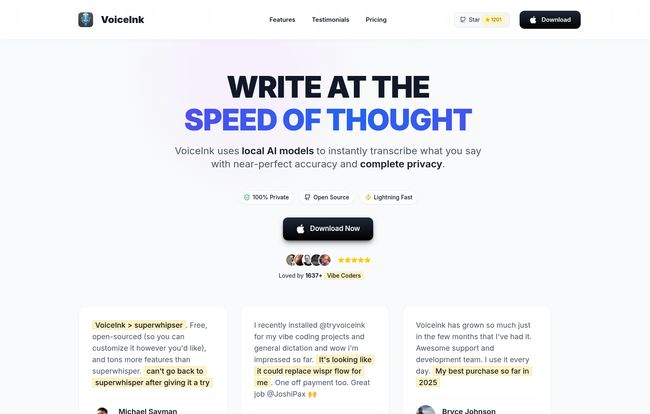
Think of VoiceInk not just as a dictation tool, but as a private secretary living inside your Mac. It’s a clever piece of software that uses local AI models to turn your spoken words into text. The key word there is local. Unlike most of the big names in the game, VoiceInk does all its magic right on your machine. Your words, your ideas, your confidential client notes—they never leave your computer. They aren’t uploaded to some anonymous server in who-knows-where to be processed. For a privacy-conscious person like me, that’s a massive, massive win.
This local-first approach is a philosophy I’ve seen gain a ton of traction with apps like Obsidian for note-taking. It’s a return to owning and controlling your own data. VoiceInk is bringing that same powerful idea to voice transcription, and I am so here for it.
My First Impressions and The Setup Experience
Getting started was surprisingly simple. You download the app, install it, and… that’s pretty much it. One thing to note: it does require macOS 14.0 (Sonoma) or later. This is because it leans on some of the newer, powerful AI and processing capabilities built into Apple’s latest operating systems. So if you’re running an older OS, you’ll need to update before you can join the party.
Once installed, it just sits quietly in your menu bar, waiting for you. You set a global shortcut, and from that point on, you can trigger it from literally any application. I’m writing this very sentence in my CMS using it right now. No copying, no pasting, no switching windows. It just works. That’s the kind of frictionless workflow that makes a real difference in a busy day.
The Features That Actually Matter
A long feature list can be deceiving. What matters is how those features work in the real world. Here’s what stood out to me during my testing.
Accuracy That Feels Like Magic
I’ve thrown everything at VoiceInk. Fast-talking rants about SEO trends, complex technical jargon, even some mumbling when I hadn’t had my second coffee yet. The accuracy is astounding. I’d say it’s consistently in the 95-99% accuracy range for me, which is on par with, or even better than, some of the premium cloud services I’ve paid for. It correctly handles punctuation, capitalization, and context with a spooky level of intelligence. It’s not perfect, no speech-to-text is, but its errors are few and far between and easy to correct.
Your Words Stay YOURS: The Privacy Promise
I can’t stress this enough. In an era of data breaches and constant surveillance, knowing my thoughts aren’t being fed into a massive corporate AI model is priceless. The fact that it works perfectly offline is a huge bonus. I can be on a plane, in a coffee shop with spotty Wi-Fi, or just have my internet turned off to focus, and VoiceInk works just as well. It’s completely self-contained. For journalists, therapists, lawyers, or anyone handling sensitive information, this isn’t just a feature; it’s a necessity. The app is also open-source, which means anyone with the technical know-how can inspect the code. It’s the ultimate form of transparency.
Customization: Making VoiceInk Sound Like You
This is where it gets really cool. VoiceInk has a “Personal Dictionary” and a “Smart Replace” feature. I’ve taught it niche SEO terms like “programmatic SEO” and “search intent”. I’ve also taught it my company’s name, which other transcribers always mangled. You can also set up rules, for instance, every time I say “new paragraph” it creates a line break. It learns your unique vocabulary and style over time, becoming an even better assistant. It’s a small thing that makes a huge impact on workflow efficiency.
The One-Time Purchase Model is a Revolution
Okay, let’s talk about the pricing model, because it’s my favorite part. I have a spreadsheet to track my monthly and annual software subscriptions, and it gives me anxiety just looking at it. VoiceInk’s “Buy Once, Own Forever” approach feels like a cool drink of water in a desert of SaaS. You pay once, and you get lifetime access and all future updates. That’s it. No recurring charges. No holding your features hostage for a higher tier next month. It’s honest, simple, and respects the customer. More companies should do this, seriously.
Let’s Talk Turkey: VoiceInk Pricing
So what does this freedom from subscriptions cost? It’s refreshingly straightforward. Based on their site, here are the current tiers. It’s worth noting they also offer a 7-day free trial to test everything out, which I always appreciate.
| Plan | Price (One-Time) | Device Limit | Best For |
|---|---|---|---|
| Solo | $25 | 1 Device | Users with a single Mac. |
| Personal | $39 | Up to 3 Devices | Users with a desktop and a laptop. Best value in my opinion. |
| Extended | $49 | Up to 5 Devices | Power users or small teams. |
Disclaimer: Prices are current at the time of writing but can change. Please check their website for the most up-to-date information.
Visit VoiceInk
Where It Shines and Where It Stumbles
No tool is perfect for everyone. It’s important to have a balanced view. Here’s my honest take.
What I Absolutely Love
The core proposition is just unbeatable for the right person. The combination of top-tier accuracy, bulletproof privacy with local processing, the ability to work offline, and the one-time fee is a killer package. It’s fast, unobtrusive, and genuinely makes my workday easier. It feels less like a tool and more like an extension of my own brain.
A Few Things to Keep in Mind
This is not a list of cons, so much as a list of considerations. Firstly, as mentioned, it’s macOS 14+ only. This won’t be an issue for most, but it’s a hard requirement. Secondly, there is currently no mobile app for iPhone or iPad. The developers have mentioned they’re working on one, but as of today, it’s a Mac-only affair. This is probably the biggest drawback for me, as I’d love this same power on my iPad. But for a desktop-focused workflow, it’s a non-issue.
Who Is VoiceInk For? (And Who Should Skip It?)
I see a few groups of people who would immediately fall in love with VoiceInk:
- Writers, Bloggers, and Students: Anyone who needs to get a lot of words down quickly will find this transformative. The ability to just talk and have clean text appear is a game-changer for first drafts.
- Developers: For writing comments, documentation, or even just talking through logic, it’s faster than typing.
- The Privacy-Obsessed: If you’re wary of big tech, this is the voice-to-text app you’ve been waiting for. Full stop.
- Anyone Tired of Subscriptions: If you want to own your software outright, this is a no-brainer.
Who should maybe hold off? If you’re a Windows user, this isn’t for you. And if your workflow is 90% mobile and you absolutely need a dictation app on your phone right now, you might need to look elsewhere until their mobile version drops.
Final Verdict: A Must-Buy for Mac Power Users
So, is VoiceInk worth it? For me, it’s an enthusiastic and resounding yes. It solved a real problem for me in a way that aligns perfectly with my values around privacy and software ownership. It’s one of those rare tools that I installed and within a day, I couldn’t imagine my workflow without it. It has saved me countless hours of typing and lets me capture ideas the moment they strike.
VoiceInk is a beautifully designed, powerful, and ethical piece of software. It does one thing, and it does it exceptionally well. If you’re a Mac user who wants to type less and create more, you owe it to yourself to at least give the 7-day trial a spin.
Frequently Asked Questions about VoiceInk
- How does VoiceInk actually protect my privacy?
- It’s simple: VoiceInk processes all your speech directly on your Mac using its built-in AI capabilities. Your voice data is never sent to the cloud or any third-party servers. Everything happens and stays on your device.
- What happens after I purchase the Pro version?
- You get a lifetime license for the app. This includes all future updates, big and small. You pay once and own the software forever, with no hidden fees or subscriptions.
- Can I use VoiceInk on more than one Mac?
- Yes! The pricing tiers are designed for this. The ‘Personal’ plan lets you install it on up to 3 of your personal Macs, and the ‘Extended’ plan allows for up to 5. Just choose the plan that fits your needs.
- How does it compare to other services like Dragon or Otter.ai?
- The main differences are the business model and privacy. Dragon and Otter are fantastic services, but they are primarily cloud-based and operate on a subscription model. VoiceInk’s main advantages are its one-time price, offline functionality, and local-first privacy approach.
- Is it difficult to set up?
- Not at all. The setup is very straightforward. The only technical requirement is that you must be running macOS 14 (Sonoma) or a newer version on your Mac.
- Is there a free trial?
- Yes, VoiceInk offers a full-featured 7-day free trial so you can test it thoroughly and see if it fits your workflow before you decide to purchase.
Conclusion
In a world of digital landlords, VoiceInk lets you own your own home. It’s a powerful, private, and refreshingly honest tool that has earned a permanent spot in my menu bar. It’s a testament to the idea that you don’t need to sacrifice privacy for performance. If you’re ready to break up with your keyboard (just a little), I highly recomend giving VoiceInk a try.


