
Categories: AI Anime Generator, AI Cartoon Generator, AI Short Video Generator, AI Subtitle Generator, AI Text Message Generator, AI Video Generator, AI Voice Generator
Vsub Review: AI Video Creation for Faceless Channels?

The pressure to create video content right now is immense. It feels like every guru, marketing blog, and their dog is shouting from the rooftops: “You HAVE to be on YouTube Shorts! You NEED to be making Reels! TikTok is eating the world!” And they’re not wrong. The potential for organic reach on these platforms is just insane, a throwback to the good old days of Facebook pages before the algorithm gods decided our fun was over.
But here’s the rub. Making good video, even short video, is hard. It takes time. A lot of time. And the latest trend to get around the whole ‘being on camera’ thing is the “faceless” channel. You know the ones—Reddit stories, quizzes, historical facts, all with a slick voiceover and engaging visuals. They’re brilliant, but even they require hours of scripting, recording, and painstakingly syncing captions and images.
So when a tool like Vsub pops onto my radar, promising to automate this entire process with AI, my professional curiosity gets piqued. Is this just another overhyped AI gimmick, or is it a genuinely useful tool for creators trying to strike digital gold? I decided to take a closer look.
What on Earth is Vsub and Who is it For?
At its core, Vsub is an AI-powered platform designed specifically for creating those faceless, short-form videos you see everywhere. Think of it as a content assembly line. Instead of starting from scratch in a complicated video editor, you feed it ideas and it spits out a nearly-finished product. It’s built for speed.
This isn’t for your local filmmaker or the creator who wants to craft a deeply personal video essay. No, this is for the content entrepreneur. The side-hustler trying to build a new income stream. The marketing agency that needs to pump out social content for clients. It’s for anyone who looks at a viral “Would You Rather?” video and thinks, “I could do that… if only I had an extra 10 hours in the day.” Vsub is basically offering to be those extra 10 hours.
Visit Vsub
The Features That Make Vsub Interesting
Okay, so it makes AI videos. Lots of tools do that now. What makes Vsub different? It really comes down to its workflow and focus on what’s actually working on these platforms right now.
The Template Trove is Genuinely Useful
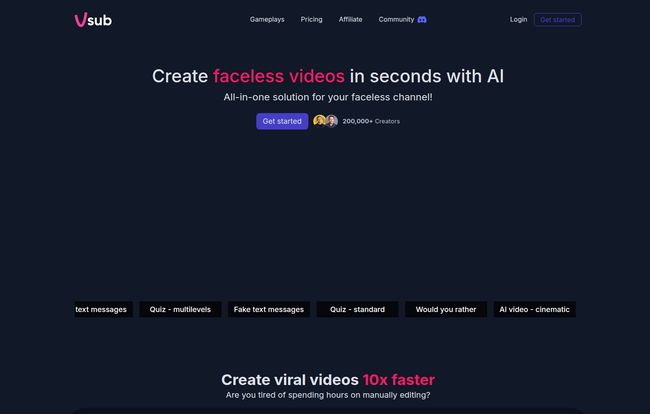
This was the first thing that impressed me. Vsub isn’t just a generic text-to-video tool. It has pre-built templates for proven viral formats: Reddit stories, quizzes, fake text message conversations, brain teasers, you name it. This is smart. It lowers the creative friction to almost zero. You don’t have to figure out what to make, you just have to provide the content for a format that’s already popular. Their claim of creating viral videos “10x faster” might be a bit of marketing fluff—virality is never guaranteed—but creating the video itself 10x faster? Yeah, I can absolutely see that.
AI Shorts and Those Snazzy Visual Styles
The “Generate AI shorts with one click” feature is the main event. You can give it a topic or a script, and it pulls together AI-generated images to match. What’s cool is the variety of styles it offers. You can go for a dark anime look, a comic book aesthetic, or a more cinematic vibe. This is a great way to give your channel a consistent visual identity without having to become a master of Midjourney or Stable Diffusion yourself. It adds a layer of polish that can make the content feel less… well, less robotic.
Don’t Sleep on the Animated Emoji Captions
This might seem like a small detail, but in my experience, it’s huge. Vsub’s ability to automatically generate captions with animated emojis is a killer feature for the short-form video world. Why? Because on TikTok and Shorts, you’re fighting for every millisecond of attention. A pop-up emoji, a highlighted word, a slick animation—these are the little dopamine hits that keep a viewer’s thumb from scrolling away. Automating this is a massive timesaver, as anyone who has manually captioned a video knows the pain.
Let’s Talk Turkey: Vsub’s Pricing and That Credit System
Alright, this is where we need to put our business hats on. The tool sounds great, but what’s it going to cost? Vsub runs on a subscription model with three main tiers.
| Plan | Price | What You Get |
|---|---|---|
| Starter | $29 /mo | 5,000 credits/month, videos up to 2 min long. |
| Pro | $49 /mo | 10,000 credits/month, videos up to 10 min long. |
| Premium | $99 /mo | 25,000 credits/month, videos up to 20 min, team features. |
Seems straightforward, right? But the real story is in the credits. This isn’t an “unlimited” service. It’s more like an arcade where you buy tokens to play the games. And every action costs a different number of tokens.
The Credit Conundrum
Here’s a rough breakdown of what things cost, based on their pricing page:
- Video Rendering: 15 credits per minute
- AI Voice (ElevenLabs): 100 credits per 1000 characters
- AI Images (Stable Diffusion): 100 credits for 20 images
So, let’s do some quick back-of-the-napkin math. A one-minute quiz video might need: 15 credits for rendering, 100 credits for the voiceover, and let’s say 10 AI images, which would be 50 credits. That’s a total of 165 credits for one 60-second video. On the $29 Starter plan with 5,000 credits, that gets you about 30 videos per month. That’s… actually pretty reasonable. One video a day.
But if you’re making more complex videos or longer ones, those credits can disappear fast. It’s a system that rewards efficiency. You have to be mindful of your usage, which isn’t necessarily a bad thing, but it’s something to be aware of before you jump in. It’s not a free-for-all buffet.
The Good, The Bad, and The AI
So, after digging in, what’s the verdict? No tool is perfect, and Vsub is no exception. The speed is its biggest selling point. You can genuinely go from idea to a ready-to-post video in minutes, not hours. For someone testing out different channel ideas, this is incredible. You can launch three different faceless channels in a weekend and see what sticks. The templates are also a huge plus, tapping directly into formats that are proven to work.
On the flip side, you are working inside Vsub’s sandbox. Your creative control is limited by the templates and AI styles they offer. You won’t be creating the next viral masterpiece that breaks the mold. You’ll be creating a very good version of what’s already working. And sometimes, the AI-ness of it all can show. The images might be a bit off, or the pacing might feel slightly formulaic. It lacks that unpredictable human spark. And of course, the credit system means you have to keep an eye on your budget.
My Final Take: Is Vsub Worth Your Money?
Here’s my honest opinion. Vsub is a powerful “idea validation engine” and a fantastic production tool for a specific type of creator.
You should seriously consider Vsub if: You want to start a faceless channel but have no time or editing skills. You’re a content marketer who needs to produce a high volume of short-form videos. Or you’re an entrepreneur who wants to quickly test different content niches without investing hundreds of hours upfront.
You might want to skip it if: You’re an experienced video editor who values granular control. You have a very unique brand that doesn’t fit into popular templates. Or if your budget is zero and you’re willing to trade your time to learn the manual process.
Ultimately, Vsub doesn’t replace creativity, but it does obliterate the technical and time-related barriers to getting started. It’s not a magic wand that guarantees virality, but it might be the best darn shovel for digging for digital gold that I’ve seen in a while.
Frequently Asked Questions About Vsub
- How many videos can I really make with the Starter plan?
- Based on my calculations, for a standard 1-minute video with AI voice and images, you can likely make around 25-30 videos per month. This can change depending on how many AI features you use per video.
- Can I use my own voice instead of an AI one?
- The platform is heavily geared towards its integrated AI voice generators like ElevenLabs and AWS. While some templates allow you to add existing audio, its main strength and workflow are built around text-to-speech.
- Is Vsub good for long-form YouTube videos?
- No, not really. It’s specifically designed for short-form content. The plan limits (2, 10, and 20 minutes) and the credit costs make it impractical for traditional 10+ minute YouTube videos.
- What’s the big deal with the captions?
- They include auto-generated animated emojis and text effects. This is a huge time-saver and is designed to boost engagement on platforms like TikTok and YouTube Shorts, where viewer attention is extremely short.
- Can I cancel my Vsub plan anytime?
- Yes, according to their website, you can cancel your subscription at any time. No long-term, scary commitments.
- Do my unused credits roll over to the next month?
- Their FAQ section lists this as a question but doesn’t show an answer. Typically with SaaS credit systems, credits do not roll over—it’s a ‘use it or lose it’ model to encourage consistent use. It would be best to confirm with their support team directly.
Conclusion
In the frantic race for online attention, tools that offer a speed advantage are worth their weight in gold. Vsub is a fascinating and powerful contender in the AI video space. It has a clear focus: empowering creators to churn out high-quality, faceless short-form content at an impressive scale. It’s not a one-size-fits-all solution, and you need to understand the credit system. But for the right person, Vsub could be the key to finally getting their video content strategy off the ground and running.


