
Categories: AI Chatbot, AI CRM, AI Translate
WAPlus Review: The WhatsApp CRM You Didn’t Know You Needed

If you use WhatsApp for business, your chat list probably looks like a digital disaster zone. A chaotic mix of client queries, team updates, follow-ups you swore you’d remember, and maybe a few memes from your cousin for good measure. We’ve all been there. Trying to manage customer relationships through standard WhatsApp is like trying to run a restaurant out of a studio apartment kitchen. It’s possible, but it ain’t pretty.
For years, I’ve juggled tools, CRMs, and a thousand browser tabs, always feeling like there was a massive disconnect between where conversations happen (WhatsApp) and where they’re managed (literally anywhere else). So when I stumbled upon WAPlus, a Chrome extension that claims to turn WhatsApp Web into a full-blown productivity powerhouse, my inner SEO and traffic-gen nerd perked up. Another tool? Sure. But one that works inside WhatsApp? Now that’s interesting.
Visit WAPlus CRM
So, What Exactly is WAPlus?
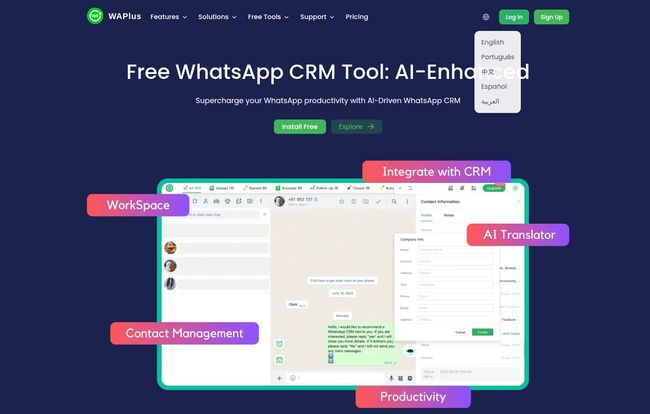
Think of WAPlus not as a separate app you have to learn, but as a set of power-ups for the WhatsApp Web you already use. It’s a free Google Chrome extension that bolts a mini-CRM directly onto your WhatsApp interface. It doesn’t replace WhatsApp; it enhances it. It’s like getting a professional-grade dashboard and toolkit for your trusty old car. Suddenly, you’ve got turbo-charge, GPS, and an assistant, all without having to buy a new vehicle.
It’s designed for the scrappy entrepreneur, the small sales team, the customer support agent who is tired of telling people to “please hold” via text. It aims to bridge that gap I mentioned earlier, bringing customer management tools right into the chat window.
The Features That Actually Get Me Excited
A tool is only as good as its features, right? A lot of platforms promise the moon and deliver a pile of rocks. I dug into what WAPlus offers, and a few things genuinely stood out from the usual marketing fluff.
Taming the Inbox with Smart Automation
Two features immediately caught my eye: Automatic Reply and the Message Scheduler. We all know the pressure of instant replies. A potential lead messages you at 10 PM, and if you don’t respond, they might move on. The auto-reply function is your first line of defense, letting you send a customized message instantly—”Hey, we got your message and will be back to you first thing in the morning!”—which manages expectations and makes you look professional.
The Message Scheduler is my personal favorite. How many times have you remembered you need to follow up with someone… at midnight? You can’t message them then. So you make a mental note, which, let’s be honest, has a 50/50 chance of vanishing by morning. With this, you just type the message, schedule it for 9:15 AM the next day, and go to sleep. It’s a simple concept, but the peace of mind it brings is huge.
Your Own AI Chatbot Assistant?
Okay, I’m always a bit skeptical of “AI Chatbot” claims, especially in smaller tools. But WAPlus includes one, and the idea is sound. You can train it to handle frequently asked questions. Think about it: how often do you type out your business hours, location, or basic service info? By setting up an AI chatbot to handle these common queries, you free yourself up to focus on the more complex, high-value conversations. It’s not going to close a million-dollar deal for you, but it can act as a fantastic triage nurse for your inbox.
Finally, Real CRM Integration
This is the big one. This is the feature that separates a simple “productivity tool” from a genuine business solution. WAPlus integrates directly with major CRMs like HubSpot, Salesforce, and Zoho. This is a massive win. It means you can sync contacts, create deals, and update customer profiles in your main CRM without ever leaving the WhatsApp chat window.
The amount of time saved by eliminating the mind-numbing copy-and-paste between tabs is reason enough to try it. It ensures your single source of truth (the CRM) is always up-to-date with the latest customer interactions. No more “Oh, did anyone update John’s profile in HubSpot after that chat?” It just happens. This is the kind of integration that large enterprises pay a fortune for, and it’s right here in a lightweight extension.
Who Is This Really For?
While anyone could probably find a use for it, WAPlus really shines for a few specific groups:
- Solopreneurs and Freelancers: You’re the CEO, sales team, and customer support all in one. WAPlus acts like your first administrative hire, automating follow-ups and organizing your client chats so you can focus on actual work.
- Small Sales Teams: For teams that use WhatsApp for lead nurturing and client communication, this tool can standardize the process. Everyone can use the same quick replies and the CRM integration keeps the pipeline clean.
- Small Business Customer Support: If you offer support via WhatsApp, the auto-reply and AI chatbot features can drastically reduce response times and handle the bulk of repetitive questions, freeing up your human agents for the tough stuff.
Let’s Talk Money: The WAPlus Pricing Structure
Here’s where it gets really compelling. WAPlus operates on a freemium model, and their free plan is surprisingly generous. I’ve laid it out in a simple table so you can see for yourself.
| Plan | Price (Billed Annually) | Key Features |
|---|---|---|
| Free | $0 /user/mo | Lifetime free access with basic contact management, limited scheduled messages, and limited broadcasts. A fantastic starting point. |
| Starter | $7.99 /user/mo | Unlimited scheduler, broadcasts, and events. More productivity features unlocked. |
| Pro | $14.90 /user/mo | Adds CRM integrations (HubSpot, etc.), Webhook access, and a higher message limit. This is the sweet spot for serious businesses. |
| Growth | $19.90 /user/mo | The highest limits for users who are heavily reliant on WhatsApp for marketing and sales outreach. |
The Lifetime Free plan is not a trial. It’s a genuinely usable version of the tool that lets you get a feel for its core functions. For many individuals, it might be all you ever need. The paid plans are for when you’re ready to scale and need those heavy-hitting features like CRM integration. The pricing is very reasonable, especially when you compare it to the cost of more cumbersome, enterprise-level solutions.
The Good, The Bad, and The Chrome-Dependent
No tool is perfect. Let’s have an honest look at the pros and cons based on my analysis.
The Things I Love
The biggest pro is the zero-cost entry point. You can install it and get value from it in minutes without ever pulling out your credit card. The automation and scheduling are huge quality-of-life improvements, and the CRM integration on the Pro plan is a genuine game-changer for organized businesses. It’s easy to use, and you dont need a technical degree to set it up.
Some Things to Keep in Mind
First off, it’s a Chrome extension. If you’re a die-hard Firefox or Safari user, you’re out of luck. It also relies entirely on WhatsApp Web, meaning your phone needs to be on and connected to the internet for it to work. This isn’t a flaw of WAPlus itself, but rather the nature of how WhatsApp Web functions. And naturally, the free plan has limitations. You won’t get the full suite of powerful features unless you’re willing to pay, which is a fair trade-off.
My Final Verdict: Is WAPlus Worth Your Time?
Absolutely, yes.
In a world full of over-complicated, expensive SaaS platforms, WAPlus is a breath of fresh air. It takes a tool you already use daily and makes it exponentially more powerful. It solves a real, tangible problem for a huge number of people—managing business on WhatsApp without losing your mind.
If you’re a solopreneur, give the free version a try. You have literally nothing to lose. If you’re part of a small team struggling to keep your WhatsApp leads and clients organized, the Pro plan’s CRM integration could pay for itself in saved time within the first month. It’s a smart, focused tool that does exactly what it says on the tin.
Frequently Asked Questions
Can I use WAPlus CRM for free?
Yes! WAPlus offers a “Lifetime Free” plan that includes core features. It’s a great way to start, and you can always upgrade later if you need more advanced capabilities like CRM integration.
What payment methods are accepted for paid plans?
They accept major credit cards and Google Pay. The transactions are processed through secure gateways like Stripe.
How do I cancel my subscription?
According to their site, you can cancel at any time directly from your account settings. You just navigate to your profile and find the cancel option.
Can I upgrade or downgrade my plan?
You can upgrade at any time and get immediate access to the new features. Downgrading isn’t currently a direct option; you would need to cancel your current plan and subscribe to the new, lower-tier one.
Does WAPlus work on the WhatsApp mobile app?
No, WAPlus is a Chrome extension, so it only works with WhatsApp Web on a desktop or laptop computer using the Google Chrome browser.
Is WAPlus safe to use for my business?
WAPlus works as an overlay on WhatsApp Web and claims to use secure encryption. However, as with any third-party extension, it’s always good practice to review their privacy policy and be mindful of the permissions you grant it. Based on its partnerships and user base, it appears to be a reputable tool.
Conclusion
Stop letting your WhatsApp inbox dictate your workflow and your sanity. Tools like WAPlus are designed to put you back in the driver’s seat. It’s a simple, effective, and incredibly low-risk way to bring some much-needed order to the chaos of modern business communication. Give the free version a shot; your future, more-organized self will thank you.
Reference and Sources
For more details on features and pricing, you can visit the official sources:
- WAPlus Official Website: https://waplus.io/
- WAPlus Pricing Page: https://waplus.io/pricing
- HubSpot CRM Information: https://www.hubspot.com/products/crm


