
Categories: AI Assistant, AI Code Assistant, AI Developer Tools, Large Language Models (LLMs), Open Source AI Models
WebDB Review: A Free, AI-Powered Database IDE?

Okay, let’s have a real chat. How many database tools are you currently juggling? If you’re anything like me, your dock looks like a chaotic collection of icons for MySQL, a separate client for Postgres, and maybe some clunky, half-forgotten tool for that one MongoDB project you did two years ago. We pay for expensive licenses, put up with outdated UIs, and just kind of… accept it. It’s part of the job, right?
I’ve always felt there had to be a better way. So when I stumbled across WebDB, my professional skepticism immediately kicked in. Another all-in-one database IDE? Sure. And it’s free? And open-source? With an AI assistant? Yeah, okay. I’ve seen those promises before. But I’m a sucker for a new tool, so I cleared an afternoon and took it for a spin. And honestly? I’m kind of impressed.
What on Earth is WebDB Anyway?
At its heart, WebDB is an open-source database Integrated Development Environment (IDE). Think of it as a central command station for all your different databases. The goal is to connect to your servers—MySQL, PostgreSQL, MongoDB, even CockroachDB—and manage them all from one clean interface. No more app-switching. Hallelujah.
But the real kicker isn’t just that it brings everything under one roof. It’s the feature set they’ve packed into this thing. We’re not talking about a barebones query window. This is a full-fledged toolkit with some surprisingly modern tricks up its sleeve. The project’s whole vibe is “built by developers, for developers,” and it shows. It feels less like a corporate product and more like a passion project that got really, really good.
My Favorite Features: The Good, The Great, and The Gimmicky
I’m a features guy. A slick UI is nice, but if the tool can’t save me time or a headache, I’m out. Here’s where I think WebDB really shines, and where it… well, where it’s still a work in progress.
The AI Assistant: Your New SQL Co-pilot
Let’s start with the elephant in the room: AI. Every tool on the planet is bolting on an AI assistant, and most of them are useless. WebDB’s approach is a bit smarter. Instead of trying to build their own mediocre language model, it integrates with the big guns: OpenAI’s ChatGPT and Google’s Gemini. You bring your own API key, and the tool prompts the LLM with your database schema and sample data.
I tried it with a simple prompt: “Find all users who registered in May and have not placed an order.” The SQL it generated was… actually correct. And readable. It’s not going to write your entire application’s logic, but for churning out quick queries or helping you remember some obscure syntax, it’s a genuine time-saver. The performance is obviously tied to which LLM you use, so your mileage may vary. But as a brainstorming partner? I’m sold.
The Time Machine: Undoing Your “Oops” Moments
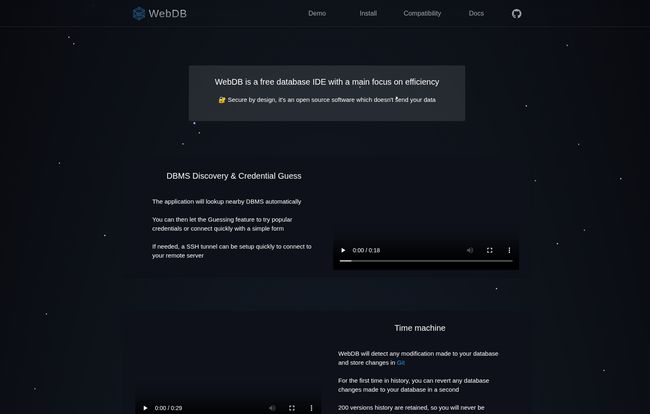
This. This is the feature that made me sit up straight. WebDB has a “Time Machine” that automatically detects any modification made to your database schema. Think of it like Git for your database structure. Did you accidentally drop a column in production? (We’ve all been there, don’t lie.) With the Time Machine, you can just roll back to a previous version. It’s brilliant.
Now, there’s a catch: it only retains the last 200 versions. For a massive, constantly-in-flux enterprise database, that might not be enough. But for 95% of us? That’s more than enough history to save you from a catastrophic mistake. This feature alone makes WebDB worth a look.
A Modern ERD and a Clever Data Generator
Entity-Relationship Diagrams (ERDs) can feel a bit old-school, but they are incredibly useful for understanding a database you’ve inherited. WebDB’s ERD tool is clean, modern, and does a great job of visualizing relationships. It’s one of those things you don’t realize you need until you see it done well.
Even better is the intelligent data generator. If you’ve ever had to populate a database with realistic-looking dummy data for testing, you know the pain. WebDB integrates with popular libraries like Faker and Falso to generate everything from names and addresses to product descriptions. It’s a small touch, but it’s a massive quality-of-life improvement.
Visit WebDB
Juggling SQL and NoSQL in One Place
My work often has me jumping between a traditional SQL database like Postgres and a NoSQL beast like MongoDB. WebDB handles both. Its support for multiple database types is a core selling point. The real star for me is the NoSQL structure manager, which automatically infers the document structure. It helps make sense of a schema-less database, which can sometimes feel like the wild west.
The Nitty-Gritty: Getting Started and The User Experience
So, what’s it like to actually use? The setup is pretty straightforward if you’re comfortable with dev tools. It has a slick “DBMS Discovery & Credential Guess” feature that can find and try to connect to local databases. It sounds a little sketchy, but for a local development environment, it’s incredibly handy—it found my local Postgres instance without me having to type a thing.
The UI is dark, clean, and minimalist. There aren’t a million buttons and confusing menus. It feels focused. It’s designed to get out of your way and let you work with your data. Some might find it a bit bare, but I appreciate the lack of clutter.
So, What’s The Price? Oh, Right…
This is my favorite part. It’s free. Not “freemium,” not “free trial.” Just free. It’s an open-source project, which means you can download it, use it, and never pay a dime. In an industry increasingly dominated by SaaS subscriptions, that is a deeply refreshing concept. Let’s break down what you get for that unbeatable price.
| The Good Stuff (Pros) | The Not-So-Good Stuff (Cons) |
|---|---|
| Completely free and open source. | Setup might be tricky for non-technical users. |
| Supports multiple DBs (SQL & NoSQL). | AI assistant’s quality depends on your LLM. |
| The “Time Machine” for versioning is a game-changer. | Time Machine is limited to 200 versions. |
| Useful AI assistant for writing queries. | It’s a newer tool, so might lack some niche features of established giants. |
| Secure by design; your data stays local. |
Who is WebDB Actually For?
I’ve been thinking about this. Who gets the most out of WebDB? My take:
- Solo Developers & Freelancers: It’s an absolute no-brainer. You get a powerful, professional-grade tool without adding another monthly bill to your stack.
- Data Analysts: The AI query helper and easy-to-use editor could seriously speed up your workflow, especially if you’re not a SQL wizard.
- Small to Medium-Sized Teams: This is a fantastic option to standardize tooling without needing a huge budget.
- Large Enterprises: Is it going to replace your heavily-licensed, policy-entrenched Oracle management suite tomorrow? Probably not. But for smaller projects, internal tools, or as a modern secondary client for developers, it’s a perfect fit.
Some Final, Unfiltered Thoughts
Look, no tool is perfect. WebDB has a few rough edges, and it relies on you to bring your own AI key. But what it offers for the price tag of zero is astounding. It’s a really compelling peice of software that solves a lot of the daily frustrations that people who work with data face. The Time Machine feature is a standout, and the thoughtful integrations show a deep understanding of a developer’s workflow.
It feels like one of those grassroots open-source projects that could genuinely disrupt the established players if it keeps up its momentum. It’s powerful, it’s focused, and it respects the user by not harvesting their data or charging them a fortune.
Frequently Asked Questions about WebDB
- Is WebDB really free to use?
- Yes, absolutely. It’s an open-source project released under a license that allows for free use. There are no hidden costs or premium versions.
- What databases does WebDB currently support?
- As of my review, it officially supports MySQL, PostgreSQL, MongoDB, and CockroachDB. The website indicates that more are on the way.
- Is my data safe with the AI assistant?
- This is a good question. WebDB itself is secure by design and doesn’t send your data to its own servers. However, when you use the AI assistant, it sends your schema and sample data to the LLM you’ve configured (like OpenAI or Gemini) to generate the query. You should be mindful of your data privacy policies when using this feature with sensitive information.
- What exactly is the “Time Machine” feature?
- It’s a database version control system. It automatically tracks changes to your database’s structure (like adding or deleting tables/columns) and allows you to revert back to an older version if you make a mistake.
- Is WebDB difficult to set up?
- It can depend on your technical comfort level. For developers used to setting up local environments, it’s quite simple. Features like automatic DBMS discovery make it even easier. If you’re less technical, you might need to follow the documentation carefully, but it’s not overly complicated.
My Verdict
Should you download WebDB? Yes. It costs you nothing to try, and the potential upside in your workflow is huge. It’s a powerful, modern, and refreshingly honest tool in a market filled with expensive and bloated alternatives. It’s earned a permanent spot in my toolkit, and I’m genuinely excited to see where the project goes from here.


