
Categories: AI Cooking Assistant, AI Instagram, AI Recipe
WeChef.ai Review: Your Instagram Recipe Saver?

How many times has this happened to you? You’re scrolling through Instagram, minding your own business, and then BAM. You see it. The most amazing-looking one-pan chicken thigh recipe. Or a viral pasta dish that looks both absurdly easy and ridiculously delicious. You tap the little bookmark icon, thinking, “I’ll definitely make this later.”
And then… you don’t. It gets buried in your ‘Saved’ folder, a digital graveyard of good intentions, lost among memes and vacation spots you’ll never visit. Or worse, you try to find it again and it’s just… gone. Swallowed by the algorithm.
I’ve been in the SEO and traffic game for years, and I’ve seen countless tools that promise to change your life. Most of them are just noise. But every so often, a simple, clever little tool comes along that solves a very specific modern problem. Recently, I stumbled upon one of these: WeChef.ai. And honestly? It’s pretty slick.
So, What is WeChef.ai, Really?
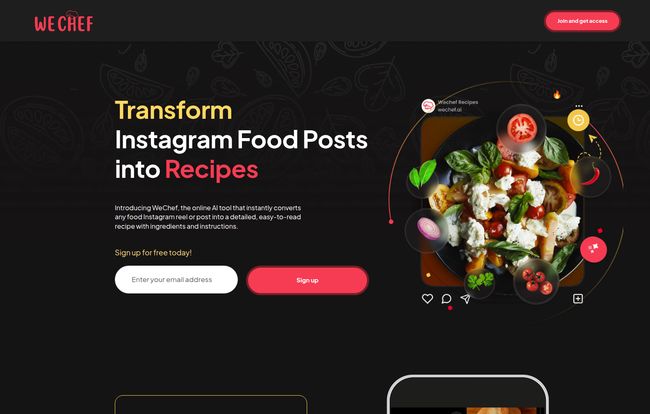
At its heart, WeChef.ai is like a magic little sous chef that lives in your Instagram DMs. It’s an AI-powered tool designed to do one thing, and do it well: transform those fleeting Instagram food posts and reels into actual, usable recipes.
Think about it. No more frantic pausing and rewinding a 30-second reel to catch the ingredient list. No more taking a dozen screenshots and trying to piece them together. The idea is simple: you send a post to the tool, and it sends you back a beautifully formatted recipe with a clear list of ingredients and step-by-step instructions. It’s supposed to build you a personal, digital cookbook from your own feed. A bold claim, for sure. So I had to try it.
Visit WeChef.ai
How It Actually Works (My Walkthrough)
The onboarding is ridiculously simple, which I appreciate. There’s no clunky software to download or a 10-page manual to read. The images on their site break it down, but here’s how it went down for me in practice.
I found a reel for some spicy garlic noodles that had been haunting my dreams. Here’s what I did:
- I hit the little paper airplane ‘Share’ icon below the post.
- Instead of sending it to a friend, I just typed @WeChef.ai into the search bar and sent the post directly to their bot in a DM. (The site also shows a “Share to…” method, but I found the DM route to be faster).
- I waited. For about… a minute? Maybe less. It was faster than making a cup of coffee.
- Ping. A message popped up from WeChef.ai with a link. I clicked it, and it took me to a clean, simple webpage with the recipe fully transcribed. Ingredients on one side, instructions on the other. No fluff, no pop-ups, just the recipe.
It was one of those “huh, that’s neat” moments. The process felt so integrated into an app I already use every day. That low barrier to entry is, in my opinion, its secret sauce.
The Good, The Bad, and The AI
No tool is perfect, especially one that relies on AI to interpret the wild west of user-generated content. So let’s get into the nitty-gritty. What works, and what are the gotchas?
Why I’m Genuinely Impressed
The biggest win for WeChef.ai is its sheer convenience. It turns a chaotic process (saving and trying to cook from social media) into an organized one. It’s the modern equivalent of clipping recipes from magazines and taping them into a binder, but without the sticky tape and cluttered drawers. The idea of building a personalized Instagram cookbook is just brilliant marketing, but it’s also… accurate. Every recipe you save is added to your personal list, creating a curated collection of things you actually want to cook.
And let’s not forget the best part: it’s currently free to sign up and use. In a world of endless subscriptions, ‘free’ is a powerful word. It makes it a complete no-brainer to at least try.
A Few Things to Keep in Mind
Now, for a dose of reality. The platform’s greatest strength is also its’ main limitation: it’s completely tethered to Instagram. If you’re not on Insta, or if you find recipes on TikTok, Pinterest, or food blogs, this tool won’t help you. You absolutely need an Instagram account to make it work.
The other big question mark is the AI itself. I fed it a few different reels, and for the most part, it did an excellent job. But AI isn’t magic. It’s interpreting video, on-screen text, and captions. What if the creator mumbles an ingredient? What if the text overlay is in a weird font? I imagine there will be times when it gets a measurement wrong or misses a step. You should always give the transcribed recipe a quick once-over to make sure it makes sense before you start throwing expensive ingredients in a pan. So far so good, but it’s something to be aware of.
Who is WeChef.ai For? (And Who Should Skip It?)
I see a few groups of people who would absolutely love this:
- The Casual Home Cook: You see a fun recipe, you want to save it without any fuss. This is your digital recipe box. Perfect for saving that viral feta pasta or the salmon rice bowl.
- The Aspiring Foodie: You’re serious about cooking and love discovering new creators on Instagram. WeChef.ai helps you build a curated library of recipes to try, organized and accessible.
- The Overwhelmed Parent: You need quick dinner ideas and see them constantly on your feed. This is a one-click way to save them for your weekly meal plan instead of letting them disappear.
Who should probably pass? If you’re a traditionalist who loves physical cookbooks and isn’t on Instagram, this obviously isn’t for you. Also, if you demand 100% flawless accuracy every single time, the nature of AI means you might get frustrated on occasion.
Let’s Talk Money: The WeChef.ai Pricing
This section is going to be short and sweet. Right now, WeChef.ai is free. You can sign up and start sending recipes without pulling out your credit card.
| Plan | Cost | Features |
|---|---|---|
| Standard Access | Free | Recipe transformation, personal cookbook, sharing. |
My guess? This is either a beta period to attract users or they plan to introduce a premium tier later on with advanced features like meal planning, shopping list generation, or maybe editing capabilities. But that’s just speculation from a guy who’s seen this business model a hundred times. For now, enjoy the free ride.
A Quick Comparison to… What, Exactly?
What’s the alternative here? The status quo is a mess. It’s a combination of:
- Screenshotting: Clutters your phone, hard to read, no organization.
- Instagram’s ‘Saved’ Folder: A black hole of content. Good luck finding that one reel from three weeks ago.
- Bookmarking in Browser: Doesn’t work for app-native content like Reels.
Tools like Pinterest are great for organization, but they don’t have this direct AI extraction feature from Instagram. WeChef.ai isn’t trying to be a massive platform like Pinterest; it’s a utility. A sharp, effective tool that solves one problem really well, which is a philosophy I can get behind. For a deeper look into the world of digital recipe keeping, platforms like The Kitchn often have great articles on how to best organize recipes digitally.
My Final Verdict: Is WeChef.ai Worth Your Time?
Yes. Absolutely.
Look, WeChef.ai isn’t going to reorganize your entire life or do your taxes. What it will do is elegantly solve a common, nagging frustration for anyone who gets food inspiration from social media. It bridges the gap between passive scrolling and active cooking.
It’s a perfect example of using AI for something practical and genuinely useful in daily life. It’s simple, effective, and free. For me, that’s a winning combination. It has already earned a permanent spot in my Instagram DMs.
Frequently Asked Questions
- Is WeChef.ai completely free to use?
- As of right now, yes. You can sign up and use its core features for free. It’s possible they may introduce paid premium features in the future, but the basic service is currently free.
- Do I need an Instagram account to use WeChef.ai?
- Yes, absolutely. The entire platform is built around extracting recipes from Instagram posts and reels, so an active Instagram account is required to send content to the tool.
- How accurate is the AI at transcribing recipes?
- In my tests, it was surprisingly accurate. However, because it’s an AI, its accuracy depends on the quality of the original post (clear audio, legible text, etc.). It’s always a good idea to give the final recipe a quick scan to make sure it makes sense.
- Can I use it for any Instagram post, or just food reels?
- It’s designed for food content, including both Reels and static image posts that contain recipe information in the caption or on the image itself. It probably wouldn’t work very well on a picture of a cat, for example.
- How do I find my saved recipes?
- When you sign up on the WeChef.ai website, it creates a personal account for you. All the recipes you successfully convert are saved and organized in your personal dashboard or “cookbook” on their site.
- Can I edit the recipes after WeChef.ai saves them?
- Based on the current information, there doesn’t appear to be a feature for editing the recipes once they are transcribed. This would be a fantastic addition for future updates, allowing users to add personal notes or correct any small AI errors.
Conclusion
In a sea of digital tools, WeChef.ai stands out for its simplicity and utility. It’s not trying to reinvent the wheel; it’s just making the wheel a hell of a lot more useful for home cooks in the 21st century. It’s a small, smart tool that will likely make a big difference in how you interact with food content online. Now if you’ll excuse me, I have some spicy garlic noodles to go cook before they get lost in my feed forever.
Reference and Sources
- WeChef.ai Official Instagram: @WeChef.ai
- The Kitchn – The Best Way to Organize Recipes Digitally: https://www.thekitchn.com/the-best-way-to-organize-recipes-digitally-23237930


