
Categories: AI Assistant, AI Call Center, AI Chatbot, AI Customer Service, AI For Data Analytics, AI Workflow
WitChat Review: The AI Chatbot Changing Customer Service

Alright, let’s have a real chat. In the world of SEO and traffic generation, we spend an insane amount of time getting people to our websites. We obsess over keywords, build links until our fingers cramp, and analyze traffic patterns like we’re cracking the Da Vinci code. But what happens when they get there? What happens when they have a question? All that hard work can go down the drain with one bad customer service experience. I’ve seen it happen. A clunky support system is like a giant, flashing exit sign on your website.
So, when a tool like WitChat pops up on my radar, claiming to make communication “so simple,” my curiosity is piqued. It promises AI-powered, next-gen tools for an “unparalleled” customer experience. Big words. But in an industry flooded with AI promises, you have to ask: is it just another shiny object, or is it the real deal? Let’s take a look.
So, What is WitChat, Really?
At its core, WitChat is an AI-powered customer service platform. Think of it as a central hub for all your customer conversations. Instead of having your team jump between Facebook messages, emails, and a separate live chat window on your site, WitChat pulls it all together. It’s built to handle everything from text and phone calls to social media DMs and, of course, a good old-fashioned website chat.
The secret sauce, they claim, is the AI. It’s not just a dumb bot that can only answer “yes” or “no.” It’s designed to understand what users are actually asking and provide real, helpful answers, 24/7. This is the dream, right? An automated front line that handles the common questions, freeing up your human experts to deal with the truly complex stuff.
Visit WitChat
The Key Features That Actually Matter
A features list can be boring, so I’m just going to focus on the bits that genuinely made me nod and say, “Okay, that’s pretty cool.”
AI Chatbots & AI Workflow
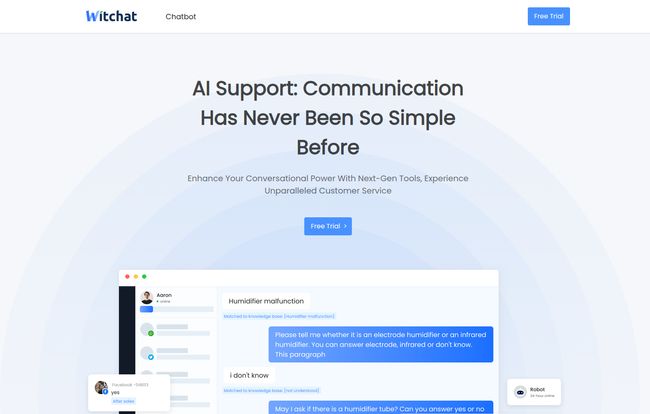
This is the headline act. The ability to build an AI chatbot that can handle queries around the clock is a game-changer for any business, especially small to medium ones. Imagine a customer has a question about a “humidifier malfunction” at 2 AM (as seen in their demo). Instead of waiting for your support team to clock in, the AI can walk them through troubleshooting steps. The “AI Workflow” feature suggests you can build out these conversational trees, creating a pretty sophisticated and automated support process. Less waiting for customers, fewer repetitive tickets for your team. Win-win.
Genuine Omnichannel Support
I’ve seen a lot of platforms claim to be omnichannel, but it often feels clunky—like they just bolted on Facebook Messenger support as an afterthought. WitChat seems to have built this in from the ground up. The idea of managing WhatsApp, website live chat, and email tickets all from one workbench is incredibly appealing. Consistency is everything in customer experience. A customer should get the same level of service no matter how they contact you, and this seems to deliver on that promise.
Live Chat and a Proper Ticketing System
Even with amazing AI, you’ll always need a human. WitChat includes a robust live chat feature for when a query needs that human touch. The bot can seamlessly hand off a conversation to a live agent. And critically, it has a built-in ticketing system. This is non-negotiable for any serious support setup. It ensures that complex issues are tracked, assigned, and followed up on, so nothing falls through the cracks. It’s the safety net that makes the whole AI-first approach viable.
Conversation Analysis for Data Geeks Like Me
Okay, here’s the feature that really gets my inner SEO nerd excited. WitChat offers Conversation Analysis. This isn’t just about tracking how many chats you had. It’s about digging into what people are asking. What are the most common problems? What questions lead to the most frustration? This is pure gold. You can use these insights to improve your product, update your website’s FAQ page (which is great for SEO!), and train your AI to be even better. It turns your customer service department from a cost center into an invaluable source of business intelligence.
Let’s Talk Money: The WitChat (or Udesk?) Pricing
Now for the million-dollar question. Or, in this case, the $19-a-month question. When I clicked over to their pricing, I found a page for “Udesk Pricing.” A bit of a head-scratcher. My best guess is that Udesk is the parent company or the white-label platform powering WitChat. It’s a bit of inside baseball, but it doesn’t change the value proposition. Here’s how it breaks down:
| Plan | Price (Per Agent/Month) | Who It’s For |
|---|---|---|
| Ticket | $19 | Businesses that primarily need a solid email/form-based ticketing system and knowledge base. |
| Live Chat | $29 | Companies focused on real-time support through website chat and instant messaging, plus ticketing. |
| Call Center | $59 | For teams that rely heavily on phone support, with all the call monitoring and routing features you’d expect. |
| Professional | $89 | The all-in-one package. For large teams that need every channel: tickets, live chat, and call center functionality. |
The pricing seems pretty reasonable and competitive. The ability to pick and choose your primary channel (Tickets, Chat, or Calls) is smart. No one wants to pay for a full call center suite if they only offer email support.
The Good, The Bad, and The AI
No tool is perfect. Let’s be honest about where WitChat likely shines and where you might hit a snag.
What I’m Optimistic About (The Pros)
The biggest win here is efficiency. Automating first-response and common questions is a massive time-saver. That leads directly to better customer satisfaction because people get instant answers. The 24/7 availability is a huge selling point for any company with a global customer base. And as I mentioned, the omnichannel and analytics capabilities are, in my opinion, what separates a basic chat tool from a professional customer service platform.
A Few Potential Sticking Points (The Cons)
First, any AI is only as good as its training. You’ll need to invest time in setting WitChat up, building out its knowledge base, and refining its responses based on real conversations. It’s not a magic wand you can just wave. Second, there’s always the potential for AI to misunderstand a complex or sarcastically-phrased query. You need to have a solid human handoff process for when the bot gets confused. This isn’t a WitChat-specific problem, it’s a reality of the current state of AI, but something to be aware of.
So, Who Should Give WitChat a Shot?
In my view, WitChat looks like a fantastic fit for a few types of businesses. E-commerce stores dealing with a high volume of repetitive questions (Where’s my order? What’s your return policy?) could benefit massively. SaaS companies who need to provide 24/7 technical support for a global user base would also be a great match. Really, any business that’s feeling the pain of scaling their customer support team and wants to work smarter, not just hire more people, should take a close look.
If you’re a tiny one-person operation, it might be overkill. But if you’re at that point where customer emails are starting to feel like a tidal wave, a tool like this could be the lifeboat you need.
Also Read: Oliv AI Review: Your New AI Sales Assistant?
My Final Takeaway
Look, the hype around AI can be exhausting. But tools like WitChat represent the practical, useful side of the technology. It’s not about replacing humans, but about augmenting them. It’s about letting bots handle the boring stuff so your team can focus on building real relationships and solving the hard problems. Based on what I’ve seen, WitChat provides a powerful, well-structured platform to do just that. It combines the automation of AI with the essential human-touch tools that a modern support team needs to not just survive, but thrive.
Frequently Asked Questions
- Is WitChat difficult to set up?
- Like any powerful tool, there will be an initial setup phase. You’ll need to connect your communication channels and build out the AI’s knowledge base. However, the modular pricing suggests you can start simple and add complexity as you go.
- Can WitChat handle languages other than English?
- While not explicitly stated in the provided materials, most modern AI chatbot platforms are built with multi-language capabilities. It would be a standard feature to look for during a free trial or demo.
- What makes WitChat different from other chatbots?
- Its main differentiators appear to be the tight integration of its AI chatbot with a full omnichannel suite (ticketing, live chat, call center) and the actionable insights from its conversation analysis feature.
- Does WitChat offer a free trial?
- Yes, the pricing page clearly shows a “Try for Free” button for all of its plans, which is a great way to test the platform before committing.
- Is the Professional Plan worth the cost?
- At $89/agent/month, the Professional plan is for teams that need everything under one roof. If your company relies on a mix of email tickets, live chat, AND phone support, consolidating them into one system could absolutely be worth the cost in terms of efficiency and data consistency.
- Can I integrate WitChat with other tools like my CRM?
- Integration capabilities are a hallmark of good SaaS tools. While not detailed in the images, it’s highly likely that a platform like this would offer integrations with major CRMs and other business software. This would be a key question to ask during a sales demo.
Reference and Sources
- Information and screenshots were sourced from the official WitChat website.
- For more on the importance of omnichannel support, check out this great piece from Forbes.


