
Categories: AI Chatbot, AI Customer Service, AI Knowledge Base, No-Code&Low-Code
WizyChat Review: A No-Code GPT Chatbot That Works?

You land on a website, a little chat bubble pops up, and you think, “Great, maybe I can get a quick answer.” Ten seconds later, you’re in a circular conversation with a bot that’s about as helpful as a screen door on a submarine. It doesn’t understand your question, it keeps pointing you to the same useless FAQ page, and you just want to scream.
The dream has always been to have an AI assistant that actually knows the business. One that you can train on your own documents, your own website content, your own internal knowledge. For years, that meant hiring a developer, sinking thousands of dollars, and wrestling with complex APIs. Fun stuff.
But the landscape is shifting. Tools are popping up that promise to democratize this tech, and one that recently caught my eye is WizyChat. Their claim is simple: build a custom GPT chatbot, trained on your data, with no coding required. As someone who lives and breathes SEO and user experience, that’s a bold claim. So, naturally, I had to see if it was just marketing fluff or the real deal.
So, What is WizyChat Anyway?
Think of WizyChat as a trainer for a super-smart, brand-new employee. You don’t have to teach it how to think—it already has the powerful brain of OpenAI’s GPT models (including the latest GPT-4o). What you have to do is give it the right study materials. Your job is to hand it your company’s ’employee handbook’.
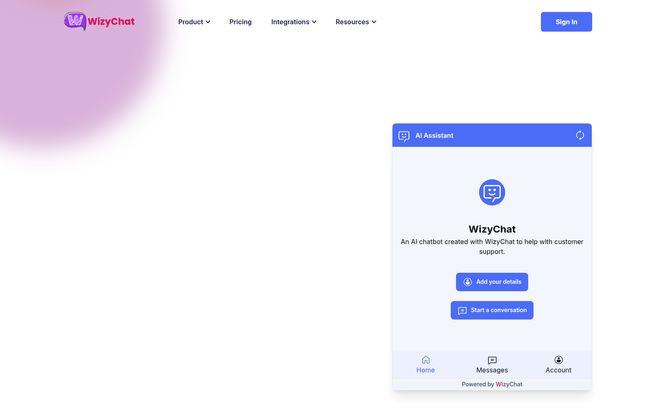
Visit WizyChat
This “handbook” can be almost anything: your website’s pages, internal PDFs, Word documents, raw text files, even CSVs. WizyChat ingests all this information and uses it to build a unique knowledge base. From that point on, when a customer asks a question, the bot doesn’t just guess; it pulls answers directly from the material you provided. It’s a customer support agent, a sales assistant, and a lead capture form all rolled into one, and it never calls in sick.
Diving In: My First Impressions
Signing up was painless. The user interface is clean, modern, and mercifully free of the clutter that plagues so many SaaS platforms. Creating a new chatbot is the first thing you see, and the process is broken down into simple steps.
The real magic happens in the ‘Data Sources’ section. You can just drop in URLs, and WizyChat will crawl them. Or you can upload files directly. I tested it by feeding it a few blog posts and a product-spec PDF. The processing was surprisingly fast. Within minutes, I had a functional chatbot that could answer specific questions about the content I’d uploaded. No code, no fuss. It just… worked.
The Features That Actually Matter
A long list of features can be overwhelming. Let’s cut through the noise and talk about what really makes a difference here.
No-Code is The Star of the Show
This is the big one. The entire platform is built for people who don’t speak Python. If you can write an email and upload a file, you can build a chatbot with WizyChat. This opens up powerful AI capabilities to small business owners, marketers, bloggers—basically anyone who doesn’t have a developer on speed dial. It’s a genuine game-changer, not just a buzzword.
Feeding Your Digital Brain
The flexibility in data sources is a huge plus. It supports scraping websites, raw text, and files like PDF, Word, and PowerPoint in over 95 languages. This means you’re not forced to reformat all your existing knowledge into some weird proprietary format. You use what you already have. This is a subtle point but a massive time-saver.
Making It Look Like Yours
A generic-looking chatbot can feel a bit… impersonal. WizyChat gives you a decent amount of control over the look and feel. You can change the colors to match your brand, set up initial prompts and pre-canned responses, and customize the welcome message. If you spring for the Professional plan or higher, you can even remove the “Powered by WizyChat” branding, which is essential for a truly integrated feel.
Let’s Talk Money: The WizyChat Pricing Plans
Alright, the all-important question. What’s this going to cost? I’ve seen some pretty wild pricing in the AI space, but WizyChat’s structure seems surprisingly grounded. Plus, they offer a 14-day money-back guarantee, which always gives me a little more confidence.
| Plan | Price | Best For |
|---|---|---|
| Free | $0 /mo | Testing the waters. You get 1 chatbot and 150 messages a month using the top-tier GPT-4o model. Honestly, its a very generous free plan. |
| Hobby | $15 /mo | Solopreneurs or small sites. The message and chatbot count goes up significantly, and you get WordPress integration. |
| Professional | $60 /mo | Serious businesses. This is where you remove the branding and get API access plus integrations with Zapier and Make.com. |
| Premium | $250 /mo | Growing companies that need more volume, advanced branding (like custom domains), and better analytics. |
| Enterprise / Agency | From $500 /mo | The full package. White-labelling, on-premise hosting, and custom everything for agencies or large-scale operations. |
The Good, The Not-So-Good, and The ‘Coming Soon’
No tool is perfect, right? Here’s my balanced take.
On the plus side, the ease of use is phenomenal. The accessibility is its greatest strength. The fact that it supports so many data formats and languages right out of the box is a massive win. And the customisation options are solid for most use cases.
On the other hand, you have to be mindful of your plan’s limits. Pricing is based on usage, so a sudden spike in traffic could push you into a higher tier. Also, while the integration list is good, some key ones like “URL Documents Auto-Sync” are still listed as ‘Soon’. I’m always a little wary of ‘coming soon’ promises, but the core product is strong enough that I’m optimistic.
Who Is This Really For?
So, who should drop what they’re doing and sign up for WizyChat?
- Small Business Owners & E-commerce Stores: Absolutely. Imagine a bot that can answer product questions, handle returns queries, and capture leads 24/7. This could be huge for reducing support tickets. Start with the Hobby or Professional plan.
- Bloggers & Content Creators: For sure. Train a bot on your entire archive. Let readers ask it questions to find specific articles or information. It’s a fantastic way to improve user engagement. The Free or Hobby plan is likely all you need.
- Marketing Agencies: Yes, especially with the Enterprise plan. Offering custom, white-labelled chatbots as a service to your clients? That’s a high-value offering right there.
- Large Corporations: This could be a powerful tool for internal knowledge bases. Train a bot on HR policies or technical documentation to help employees find answers instantly.
Frequently Asked Questions About WizyChat
- Do I need to know how to code to use WizyChat?
- Nope. Not a single line. It’s designed specifically for non-technical users. It’s all point-and-click.
- What kind of data can I use to train my chatbot?
- A whole bunch of stuff. You can use your website pages, plain text, PDFs, Word docs, PowerPoints, and CSV files. It’s very flexible.
- Can I embed the chatbot on my website?
- Yes! You can embed your chatbot on unlimited websites. They provide a simple script to copy and paste. There’s also a direct WordPress integration on the paid plans.
- Is there a free trial for WizyChat?
- Even better. There’s a permanent Free plan. It has its limitations (150 messages/month), but it’s perfect for trying out the core functionality before you commit any money.
- How does WizyChat handle different languages?
- It supports over 95 languages. You can feed it documents in one language, and it can generally answer questions about that content in another, which is pretty powerful.
- What happens if I go over my monthly message limit?
- Like most SaaS platforms, you’ll likely get a notification prompting you to upgrade to the next tier to accommodate your increased usage. Your bot won’t just shut down without warning.
My Final Verdict: Is WizyChat Worth Your Time?
After spending some quality time with it, I can say that WizyChat delivers on its main promise. It makes building a genuinely useful, custom AI chatbot incredibly accessible. It removes the technical barrier that has kept this kind of tech out of reach for so many.
Is it the most powerful, infinitely-configurable AI platform on the market? No, but that’s not its goal. It’s not for the enterprise data scientist who wants to fine-tune every hyperparameter. It’s for the business owner, the marketer, the creator who needs a practical tool that solves a real problem—and does it well.
If you’ve been curious about adding an intelligent chatbot to your site but have been put off by the cost and complexity, I’d say give WizyChat a spin. The free plan costs you nothing but a few minutes of your time, and you might just be surprised at what you can build.


