
Categories: AI Image Generator, AI Tools Directory, AI Writing Assistants
Word.Studio Review: Your AI Creative Playground?

Staring at a blinking cursor on a stark white page, the silence of the room only broken by the low hum of your computer and the high-pitched scream of a deadline flying past. Creative block isn’t just a myth; it’s a monster that feeds on caffeine and self-doubt. For years, we’ve been promised that AI writing assistants would be our knight in shining armor. And they’ve been… okay. But often, they feel like you’re trying to have a nuanced conversation with a very smart, but very literal, toaster.
You have to wrestle with prompts, rephrase your requests a dozen times, and the output can still feel… well, robotic. Soulless. Like a perfectly grammatical but utterly boring report. So when I stumbled across Word.Studio, I was skeptical. Another one? But as I started clicking around, that skepticism started to fade, replaced by a genuine curiosity. This felt different. It wasn’t positioning itself as a single all-knowing chatbot, but more like a digital workshop. A playground for ideas. And I have to say, I was intrigued.
So What Exactly is Word.Studio? (And Why Should You Care?)
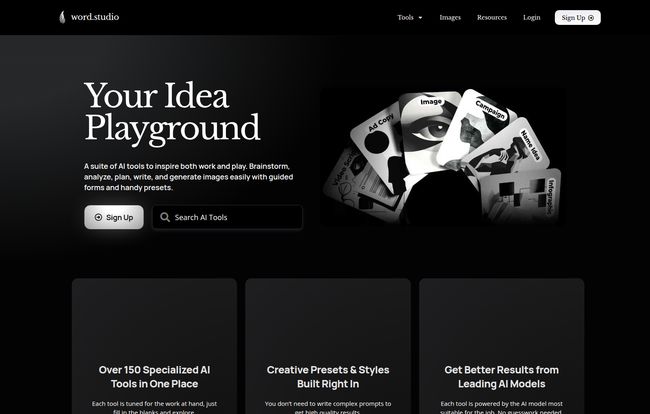
Okay, let’s break it down. Word.Studio isn’t your typical AI writer. Instead of giving you one big box to type everything into, it presents you with a massive collection of specialized, purpose-built tools. Think of it this way: ChatGPT and its cousins are like a sophisticated Swiss Army knife. Impressive, sure, but you wouldn’t want to build a house with it. Word.Studio, on the other hand, is like walking into a fully stocked workshop. There’s a specific tool for every specific job, from crafting a business plan to generating a metaphor.
This approach immediately caught my attention. As an SEO and content guy, my needs change by the hour. One minute I need to brainstorm blog post ideas, the next I’m trying to write snappy social media copy, and then I have to draft a formal-sounding email to a new client. Using a single AI for all that requires constant ‘prompt engineering.’ Word.Studio’s philosophy is to eliminate that headache by giving you the right tool from the get-go. Its a simple, but brilliant, shift in perspective.
Visit Word.Studio
A Peek Inside the Toolbox: The Sheer Variety is Kinda Wild
When I say a massive collection, I’m not kidding. The dashboard looks like an app store for creative tasks. It’s almost overwhelming at first, but once you start to see how they’re categorized, it all makes sense. They’ve got something for practically everyone who works with words.
For the Marketers and Business Brains
This is where I spent most of my time, naturally. You’ve got tools like the Brand Voice Analyzer, which is gold for keeping content consistent. There’s a Competition Analyzer, a Landing Page Writer, and even a Social Media Machine. I played around with the Email Copy Generator and it spat out some surprisingly decent subject lines that didn’t sound like they were written by a 90s spam-bot. A huge time-saver for anyone juggling multiple campaigns.
For the Creative Writers and Wordsmiths
Now this is where things get fun. I saw a Metaphor Maker and just had to click it. I’m a sucker for a good analogy. And you know what? It worked. Some suggestions were duds, but a few were genuinely clever springboards. There are also tools like a Poetry Machine, a Story Structure planner, and something called a Novel Muttiner. It’s like having a brainstorming partner who never gets tired of your weird ideas.
For the Students, Academics, and Job Seekers
I can see this being a lifesaver for people in these fields. There’s an Essay Writer (use with caution and academic integrity, folks!), a Summarizer that’s perfect for dense research papers, and a Resume Editor. They even have a Cover Letter Writer and a Job Description Writer. It’s a full-stack toolkit for career advancement. Pretty cool.
My Honest Take: The Good, The Bad, and The AI-Generated
No tool is perfect, right? After spending a good amount of time in the Word.Studio… well, studio, I’ve got some thoughts. The biggest pro is, without a doubt, the user experience and the sheer breadth of tools. It genuinely saves time by cutting out the middleman of prompt-crafting. I was stuck describing a complex SEO concept the other day, popped a few keywords into the Metaphor Maker, and got back “SEO is like being a gardener for a digital forest.” Cheesy? Maybe a little. But it got my brain moving in the right direction, and that’s the whole point.
Now, for the reality check. Some people might see the need to edit the AI’s output as a con. I don’t. I see it as a feature. AI should be a collaborator, not a replacement for your own brain. If you’re looking for a one-click solution that spits out a perfect, ready-to-publish article, this isn’t it. And it shouldn’t be. The free plan is also limited to 5,000 words a day. That sounds like a lot, but if you’re doing heavy-duty work, you will hit that ceiling. It’s a great trial, but you’ll need to upgrade if you get serious. Also, a few of the more powerful tools are locked behind the Pro membership, which is to be expected.
Let’s Talk Money: Word.Studio Pricing
The pricing structure is refreshingly simple, which I appreciate. No confusing credit systems or convoluted tiers. You’ve basically got two paid options, plus the free plan to get your feet wet.
| Plan | Price | Best For |
|---|---|---|
| Free | $0 | Testing the waters, occasional light use. (Up to 5,000 words/day) |
| Starter | $7 / month | Solo creators, freelancers, and students who need the essential tools without breaking the bank. |
| Pro | $16 / month | Power users, marketing teams, and agencies who want access to everything, including the chat function and image generators. |
For what you’re getting, I think the pricing is more than fair. Seven bucks a month for the Starter plan is less than two fancy coffees and unlocks a ton of utility. You can check out the full details on their pricing page.
Is Word.Studio Just Another GPT Wrapper?
This is a question I ask of every new AI tool, and it’s a fair one. Are they just putting a pretty face on OpenAI’s API and calling it a day? According to their own FAQ, the answer is no. They state they use a variety of advanced large language models, including ones from OpenAI (like DALL-E for images) but also from places like Black Forest Lab’s FLUX Pro. They say they choose the most appropriate model for each tool’s specific needs.
To me, this is the secret sauce. They’re not just a reseller; they’re a curator. They’re doing the work of figuring out which AI model is best for generating a business plan versus writing a poem, so you don’t have to. That’s a genuine value-add that separates them from the ocean of simple ‘GPT wrappers’ out there.
So, is Word.Studio Worth Your Time and Money?
After all this, here’s my verdict. If you’re a creative professional, a marketer, a business owner, or a student who regularly works with words, then yes. Absolutely give it a try.
Word.Studio isn’t trying to be the one AI to rule them all. It’s for the person who appreciates having the right tool for the right job. It’s for the person who sees AI not as a magic bullet to do their work for them, but as a powerful, tireless assistant that can help them brainstorm, draft, and refine their own ideas faster and more effectively. It’s a tool that helps you get from that dreaded blank page to a solid first draft in record time. And in our line of work, that’s priceless.
Frequently Asked Questions about Word.Studio
1. How does Word.Studio actually work?
Word.Studio uses a variety of advanced AI models, including those from OpenAI and Black Forest Lab. It intelligently selects the best model for each specific tool—whether you’re creating a marketing plan or a poem—to deliver more tailored and effective results without complex user prompts.
2. Is the content generated by Word.Studio original and safe to use?
The content is generated by the AI in real-time and is original in that sense. However, like any AI tool, it learns from vast amounts of existing text, so there’s always a small chance of it producing something similar to its training data. It’s always best practice to use the output as a starting point and add your own voice, facts, and perspective. Run it through a plagiarism checker if you’re concerned, especially for academic or professional work.
3. What is the main difference between the Starter and Pro plans?
The Starter plan ($7/month) gives you access to the “Essential AI Tools.” The Pro plan ($16/month) unlocks everything: all tools, all templates, prompt lists, and crucially, the image generators and a dedicated AI Chat function. The Pro plan is for those who want the full, unrestricted workshop experience.
4. Can I really use Word.Studio for free?
Yes, you can. The free plan is quite generous, offering access to several tools and a daily limit of 5,000 words. It’s the perfect way to explore the platform and see if its workflow suits you before committing to a paid plan.
5. Who is Word.Studio best for?
In my opinion, it’s ideal for marketers, content creators, bloggers, copywriters, small business owners, and students. Basically, anyone whose job or studies involve a lot of writing and ideation across different formats would find a ton of value in this toolkit.
The age of AI collaborators is here, and tools like Word.Studio are making that partnership more accessible, practical, and honestly, more fun. It might just be the thing that finally slays the creative block monster for good.


