
Categories: AI Ad Generator, AI Agent, AI Blog Generator, AI Copywriting, AI Digital Marketing, AI Email Generator, AI Image Generator, AI Models, AI SEO Tools, AI Social Media Post Generator, AI Text Generator, AI Writing Assistants, Large Language Models (LLMs)
Wordkraft AI Review: The All-in-One AI Content Tool?

If you’re in the marketing or content world, your bookmarks bar probably looks like a chaotic mess of AI tools. You’ve got one tab for your favorite chatbot, another for an image generator, a third for a long-form article writer, and maybe a fourth for… well, who even remembers at this point? The subscription emails pile up, and you spend half your day just figuring out which tool is best for the task at hand. It’s a phenomenon I’ve started calling “AI tool fatigue,” and frankly, it’s exhausting.
So, when a platform like Wordkraft AI comes along claiming to be an “all-in-one” solution, my inner cynic immediately raises an eyebrow. I’ve seen a lot of tools that promise to be a Swiss Army knife but end up being a spork—not particularly good at anything. But Wordkraft AI felt a bit different. The promise wasn’t just a bunch of proprietary tools, but access to the best AI models on the market, all under one roof. My curiosity was piqued. I had to see if this could really be the answer to my multi-tab madness.
So What Is Wordkraft AI, Really?
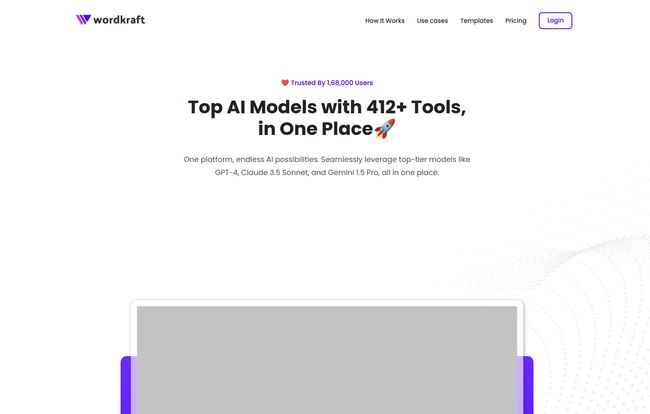
At its heart, Wordkraft AI isn’t trying to reinvent the wheel. Instead, it’s building a better car around it. It’s a unified platform that gives you direct access to the heavy hitters of the AI world: OpenAI’s GPT-4, Anthropic’s Claude, Google’s Gemini, Meta’s Llama, and even Perplexity. Think of it less as a single AI tool and more like a master dashboard or a universal remote for all the top AI engines. You get to pick the right brain for the right job, without juggling five different subscriptions.
On top of that, they’ve wrapped this multi-model access in a suite of over 250 tools designed specifically for folks like us: content creators, digital marketers, and social media managers. It’s built to streamline the entire content workflow, from brainstorming keywords to writing SEO-friendly articles and even posting them directly to your WordPress site. This one-click posting feature? We’ll get to that later, but it’s a big deal.
Visit Wordkraft AI
The Standout Features That Genuinely Impressed Me
A long list of features can be overwhelming. Let’s cut through the noise and talk about what actually moves the needle in your day-to-day work.
The AI Model Buffet Is the Main Course
This is, without a doubt, the killer feature. If you’ve spent any time with AI, you know that GPT-4 is fantastic for complex reasoning, while Claude can be amazing for more creative and conversational writing. Gemini has its own strengths, too. Being able to switch between these models for different tasks within the same interface is a massive advantage. Need a factual, well-structured outline? Maybe start with GPT-4. Need to flesh it out with engaging, human-sounding prose? Flip over to Claude. This flexibility is something you just dont get with most other platforms.
One-Click WordPress Posting Is a Dream
I almost scrolled past this feature, but I’m so glad I didn’t. The ability to send a finished, SEO-optimized article directly to your WordPress blog as a draft is a huge time-saver. It cuts out the tedious copy-pasting, reformatting, and uploading images. For anyone managing a blog or multiple client sites, this feature alone could justify the cost. It closes the loop on the content creation process, taking you from idea to published post with so much less friction. It’s a small detail that has a big impact on workflow efficiency.
A Library of Tools and Templates That Actually Help
With over 250 tools and 78 templates, there’s a lot to explore. Some are simple, like a headline generator or a social media post creator. Others are more complex, like the full-blown SEO article writer. These templates are a fantastic launchpad, especially if you’re not a master prompt engineer. They give you a structured way to get high-quality output without having to guess what the AI wants to hear. It lowers the barrier to entry, which I really appreciate.
Let’s Talk Money: Wordkraft AI Pricing
Alright, the all-important question: what’s this going to cost? I was pleasantly surprised by their pricing structure. It feels fair and accessible, especially with their genuinely useful free plan.
| Plan | Price | Best For |
|---|---|---|
| Free | $0 / month | Anyone who wants to test the platform. The daily credit refresh is generous and lets you properly kick the tires. |
| Starter | $15 / month | Freelancers, small bloggers, or marketers who need consistent access to top-tier models without breaking the bank. |
| Pro | $29 / month | Power users, agencies, and content teams. The unlimited essential messages and high credit counts make this a workhorse plan. |
The free plan isn’t a gimmick. You get daily credits, access to most of the tools, and the ability to create your own agents. For a lot of people, this might be all they need for occasional use. The Pro plan at $29 for what it offers feels like a steal, especially when a single ChatGPT Plus or Claude Pro subscription costs $20 each.
My Honest Take: The Good, The Bad, and The… Complicated
No tool is perfect. After spending some quality time with Wordkraft AI, here’s my unfiltered perspective as an SEO and content guy.
What I Genuinely Love
The consolidation is the biggest win. Having all these powerful models in one place with a clean, simplified UI saves both time and money. It’s that simple. The value proposition is crystal clear. I also think the one-click WordPress integration is more than just a convenience; it’s a powerful workflow feature that competitors should be taking notes on.
Where It Could Be Better
Okay, let’s talk about the inbuilt keyword research tool. Is it there? Yes. Will it replace a dedicated tool like Ahrefs or Semrush? Absolutely not. It’s fine for some basic brainstorming or getting a quick sense of a topic, but it lacks the depth, filtering, and competitive data that we SEOs live and die by. I see it as a nice-to-have for generating ideas on the fly, not a professional research tool. Manage your expectations there.
A Necessary Word of Caution
This isn’t a knock on Wordkraft specifically, but on using these powerful tools in general. It is so, so easy to become lazy and let the AI do all the work. And trust me, readers can sniff out soulless, generic AI content from a mile away. I’ve seen it cripple websites that once had a unique voice. You must treat Wordkraft AI as a co-pilot, an assistant, a brilliant intern. Use it to generate drafts, bust through writer’s block, and streamline your research. But please, for the love of good content, inject your own personality, experience and voice into the final product. Use the AI, don’t let it use you.
So, Who Is This For?
After all this, who should sign up for Wordkraft AI? I think it’s a fantastic fit for a few key groups:
- Content Creators and Bloggers: The ability to quickly draft articles, generate ideas, and publish them to WordPress makes this a no-brainer. It will seriously speed up your production schedule.
- Digital Marketers and SEOs: While it won’t replace your primary SEO suite, it’s an incredible secondary tool for generating ad copy, social media captions, email newsletters, and first-draft articles at scale.
- Small Business Owners: If you’re wearing all the hats, Wordkraft AI can be your entire marketing content team for less than the cost of a few pizzas a month. It’s an incredibly cost-effective solution.
Also Read: Promptrr.io Review: The Etsy for AI Prompts?
The Final Verdict: Should You Try Wordkraft AI?
Yes. It’s as simple as that. Given that there’s a robust, non-timed free plan, there is literally no reason not to give it a spin. For me, Wordkraft AI makes a strong case for being the solution to AI tool fatigue. It successfully combines the power of the world’s best AI models into one convenient, affordable, and user-friendly package.
It’s not perfect, and you still need your human brain to guide it, but it’s one of the most practical and well-thought-out AI content platforms I’ve tested recently. It understands the actual workflow of a content creator and puts the right tools at your fingertips. Go sign up for the free plan and see for yourself.
Frequently Asked Questions
What is Wordkraft AI’s pricing model?
Wordkraft AI uses a freemium model. It has a permanent Free plan with daily credits, a Starter plan at $15/month for more regular use, and a Pro plan at $29/month for heavy users and teams.
Is there a free trial for Wordkraft AI?
Even better! There’s a completely free plan that doesn’t require a credit card. It gives you a daily allowance of credits to use the tools, so you can try it out for as long as you want.
Can Wordkraft AI replace my SEO tool like Ahrefs or Semrush?
In my opinion, no. The keyword research feature is useful for quick ideas and content brainstorming within the platform, but it doesn’t have the deep analytics, backlink data, or competitive analysis of a dedicated, professional SEO suite.
Which AI models can I access with Wordkraft AI?
On the paid plans, you get access to a fantastic lineup, including GPT-4, Claude, Google Gemini, Meta Llama, and Perplexity, all in one place.
Is the content generated by Wordkraft AI original and safe to use?
The content is generated on the spot and is original in the sense that it’s not copied from somewhere else. However, like any AI, it learns from vast amounts of internet data, so it’s always best practice to run a plagiarism check and, more importantly, edit the content heavily to add your own unique voice and perspective.
What is the cancellation policy?
Based on their website, you can typically cancel a monthly subscription at any time. For the most up-to-date information, it’s always best to check their terms of service or contact their support directly.
Reference and Sources
- Wordkraft AI Official Website: https://wordkraft.ai/
- Wordkraft AI Pricing Page: https://wordkraft.ai/pricing/


