
Categories: AI Chatbot, AI Knowledge Base, AI Project Management, AI Search Engine, AI Task Management
Wroolo Review: A PM Tool That Actually Gets It?

I swear, if I have to evaluate one more ‘revolutionary’ project management platform that turns out to be just a prettier version of a spreadsheet, I might just go back to using sticky notes. Your team’s tasks are in Asana, the project blueprint is a forgotten diagram in Miro, and crucial documentation is lost somewhere in the seventh circle of Google Drive. It’s organized chaos. At best.
For years, the PM world has been locked in a cold war: Structure vs. Flexibility. On one side, you have the rigid, top-down architects who live by the Work Breakdown Structure (WBS). Everything planned, everything scoped. On the other, you have the agile, go-with-the-flow crowd who swear by Kanban boards. It’s a constant battle between long-term planning and short-term adaptability.
So when I stumbled upon Wroolo, a tool that claimed to do both—and then some—my curiosity was definitely piqued. A structured WBS that feeds into a flexible Kanban board? With an AI brain on top? It sounded too good to be true. So, naturally, I had to see for myself.
What Exactly is Wroolo? Beyond the Hype.
At its heart, Wroolo is a hybrid system. Think of it this way: managing a complex project with just a Kanban board is like trying to build a skyscraper with only a daily to-do list. You see what’s in front of you, but you have no idea if the foundation is sound. Traditional WBS tools, on the other hand, give you the blueprint but are often clumsy for managing the day-to-day construction work.
Wroolo attempts to be both the architect’s blueprint and the construction crew’s dynamic workboard. It combines:
- A Work Breakdown Structure (WBS) in a ‘Tree View’ for scoping out the entire project from top to bottom.
- A nested Kanban board for managing the actual flow of work.
- An AI-powered knowledge base that actually helps you find things.
- Discussion channels to keep conversations where they belong—with the project.
Basically, they looked at the mess on our digital desks and decided to build one container to hold it all. An ambitious goal, for sure.
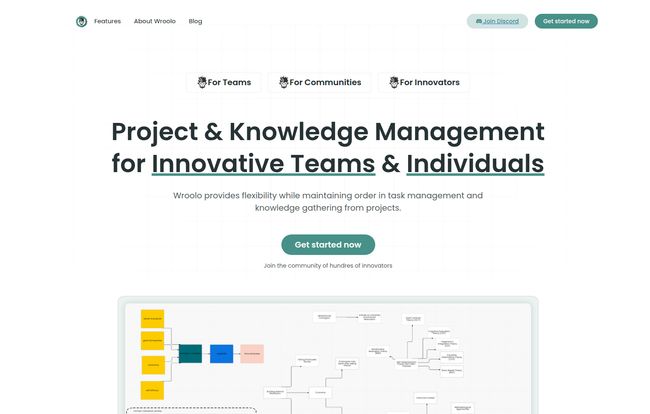
Visit Wroolo
The WBS and Kanban Combo: Did They Pull It Off?
This is the core promise, and where Wroolo really shines. The classic problem with a WBS is that it’s static. You make it once, and then it gathers dust. The problem with a Kamban board is that on massive projects, it becomes an endless scroll of cards with no clear hierarchy. Chaos.
Wroolo’s approach is surprisingly elegant. You start in the Tree View, which is their WBS. Here, you can map out your entire project scope. I’m talking about breaking down massive epics into smaller tasks, and those tasks into even smaller sub-tasks. The ability to endlessly nest sub-tasks is a feature for the truly detail-oriented, and for complex software development, it’s a lifesaver. You can see dependencies and get a bird’s-eye view of everything, before a single line of code is written.
Then, those tasks live on your Kanban board. This isn’t just a separate feature; it’s a different view of the same data. You get the structure of the WBS and the fluid workflow of Kanban in one place. It bridges the gap between the big-picture planners and the people in the trenches doing the work. In my experience, this is the disconnect that causes most projects to fail.
Let’s Talk About That AI-Powered Knowledge Base
Okay, let’s be real. Every company is slapping ‘AI’ onto their products these days. Most of the time, it’s just a glorified search bar. I was skeptical here, too. But Wroolo uses something called Retrieval Augmented Generation (RAG), and it’s a bit different.
Instead of just searching for keywords in your documents, RAG allows the AI to understand your questions and find contextually relevant answers from your knowledge base. Think about it. You don’t have to remember if the file was called ‘Q3 Marketing Plan FINAL’ or ‘Marketing Budget v2’. You can just ask Wroolo, “What was our approved ad spend for the fall campaign?” and it will sift through your posts and documents to find the answer. It’s like having an intern who has read and memorized every document your team has ever created. This, for me, is a huge step up from the clunky search functions in Confluence or Notion.
The Pricing Model That Made Me Do a Double-Take
This is the part that really got my attention. As an agency guy, the per-user pricing model of most SaaS tools is the silent killer of budgets. Your team grows, you bring in a few freelancers, and suddenly your bill for a simple PM tool is hundreds of dollars a month. It’s maddening.
Wroolo has a flat-rate pricing model. No per-user fees. Let that sink in. You pay one price for the team, whether you have 5 users or 50. This is, frankly, how it should be. It encourages collaboration instead of punishing you for it.
| Plan | Price | Key Features |
|---|---|---|
| Micro teams | Free | Unlimited users, 10 projects, 30 AI queries/month |
| Small teams | $33 / month | Unlimited users, 30 projects, 100 AI queries/month |
| Bigger teams | $66 / month | Unlimited users, unlimited projects, 500 AI queries/month |
The free tier is also incredibly generous. Unlimited users and up to 10 projects? That’s more than enough to run a small team or a few serious personal projects without ever paying a dime. It’s a fantastic way to see if the system works for you before committing.
Who is Wroolo Actually For? (And Who Should Skip It)
No tool is perfect for everyone. It’s not a silver bullet. Some people might find the sheer number of features a bit much at first, and they wouldn’t be wrong. There’s a bit of a learning curve.
I’d say Wroolo is a fantastic fit for:
- Complex Projects: Think software development, large-scale construction, or multi-stage marketing campaigns. If your project has a lot of moving parts and dependencies, Wroolo is built for that.
- Product Managers & Agency Owners: Anyone who needs to maintain a high-level view while also diving into the granular details will appreciate the WBS-to-Kanban flow.
- Budget-Conscious Teams: The flat-rate pricing is a massive advantage for any team that’s growing or uses a lot of external collaborators.
Who might want to look elsewhere?
- Solo-preneurs with a Simple To-Do List: If you just need to track a few simple tasks, Wroolo might be overkill. A basic tool like Trello or even Apple Reminders could be a better fit.
- Teams Needing Extreme Simplicity: If your team resists change and needs the absolute most straightforward tool possible, the initial setup and concepts in Wroolo might present a challenge.
At the end of the day, Wroolo feels like a tool built by people who have actually managed complex projects and felt the pain of using inadequate tools. The little things, like discussion channels attached to tasks and an integrated electronic notebook, show a deep understanding of a project manager’s real workflow.
So, is it The One?
Is Wroolo the ‘Holy Grail’ of project management I was looking for? For some projects, it comes incredibly close. It’s not just another clone; it’s a thoughtful, opinionated take on how to manage complex work. It successfully marries the long-term structure of a WBS with the short-term agility of a Kanban board, a feat few others have managed so gracefully.
The AI knowledge base is more than a gimmick, and the pricing model is a breath of fresh air in a stale, expensive market. It won’t be for everyone, but if you’ve ever felt caught between the chaos of a Trello board and the rigidity of MS Project, I think you owe it to yourself to give Wroolo a try. The free plan is waiting.
Frequently Asked Questions about Wroolo
What’s the main difference between Wroolo and something like Jira?
Jira is heavily focused on the software development lifecycle, with a strong emphasis on agile sprints and bug tracking. Wroolo is a bit more flexible. While it’s great for software, its WBS-first approach makes it equally powerful for any kind of complex project planning, not just coding. The flat pricing is also a major differentiator from Jira’s per-user model.
Is Wroolo good for non-technical teams, like marketing or content?
Absolutely. Any project that has a clear scope and a series of execution steps can benefit. A marketing team could use the WBS to plan a quarterly campaign (from research and creative to launch and analysis) and then use the Kanban board to manage the day-to-day creation of ads, blog posts, and social media content.
How steep is the learning curve?
I’d be honest, it’s not as simple as picking up a basic to-do list app. Because it combines several concepts (WBS, Kanban, AI), you’ll need to spend an hour or two understanding how they fit together. However, once it clicks, the workflow is very logical. The payoff is worth the initial investment of time.
Can I import my data from other tools like Trello or Asana?
That’s the million-dollar question for anyone switching tools! I didn’t see a giant ‘Import from Trello’ button on the homepage, but for a tool this comprehensive, I’d be very surprised if they didn’t have a CSV import feature or a dedicated migration path. Your best bet is to sign up for the free plan, check their help documentation, or just ask their support team. Most modern companies are eager to help you move over.
What is a Work Breakdown Structure (WBS) anyway?
Think of it as a family tree for your project. At the very top is the final result (e.g., ‘Launch New Website’). The next level down breaks that into major phases (‘Design’, ‘Development’, ‘Content Creation’). Then you break each of those down further and further until you have a set of individual, manageable tasks. It’s a way to make sure nothing gets forgotten.


