
Categories: AI Animation Generator, AI Character, AI Chatbot
YCamie Review: Your AI Shimeji Desktop Pet Generator?

Some days, the most exciting thing on my desktop is when the screensaver finally kicks in. As a remote worker, my computer screen isn’t just a tool; it’s my office, my water cooler, and my window to the world. And lately, that window has been looking awfully… sterile.
I remember a time, back in the wild west days of the internet, when we’d liven things up with little digital characters called Shimejis. You’d download these tiny pixelated friends, and they’d crawl all over your screen, duplicate themselves, and generally cause adorable chaos. It was fun! It was also a massive pain to get working right.
So when I stumbled upon YCamie, a platform that promises to create a custom AI Shimeji with just a few clicks, my inner geek got pretty excited. Is this the comeback tour for the desktop pet? And can AI actually make it… better?
First Off, What Is a Shimeji?
For those who missed the memo back in the 2010s, a Shimeji is basically a little animated character that lives on your desktop. Think of them as a digital pet or a tiny, interactive buddy. They can walk on your open windows, climb the sides of your screen, and sometimes you can even poke them or give them little tasks. In the past, you had to hunt for character files created by artists, wrangle with Java installations, and pray it didn’t crash your system. It was a commitment.
YCamie: The AI-Powered Twist on a Classic
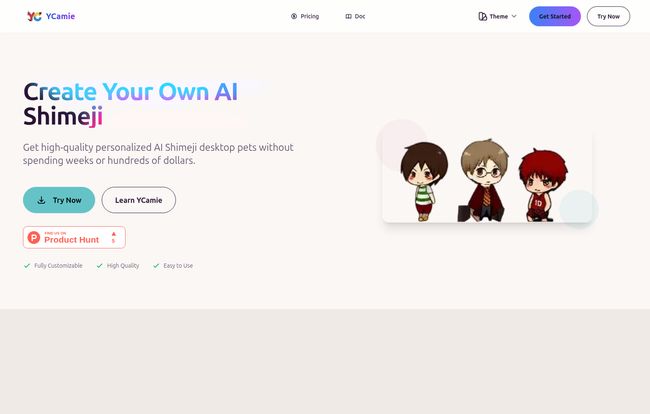
This is where YCamie completely changes the game. Instead of you hunting for a pre-made character, you create your own. And you don’t need to be an artist. You don’t need to know how to code. You just need an idea.
The old way was a chore. You’d spend hours searching for the perfect character, dealing with complicated setups, and being limited to what other people had made. YCamie’s approach is the polar opposite. You just describe what you want—say, “a sleepy red panda wearing a tiny wizard hat”—or upload a picture, and its AI gets to work generating your very own desktop companion. It’s the difference between building a car from scratch and just telling the valet to bring yours around.
Visit YCamie
#
The Core Features That Actually Matter
So what makes this platform stand out? It’s not just about making a cute picture. The AI generates a whole set of animations for your character. They don’t just stand there; they have personality. The animations are surprisingly smooth, and the characters feel… alive. They even have an interactive AI chat feature, which takes the whole “desktop companion” idea to a new level.
And the best part? One-click installation. No Java nightmares. No digging through system files. You generate your pet, you click download, and you run it. That’s it. This alone is a huge win for anyone who just wants the fun without the technical headache.
Let’s Talk Money: YCamie’s Pricing Plans
Okay, so it’s cool, but what’s the catch? Usually, it’s the price. I was pleasantly surprised here. YCamie has a few tiers, and they seem pretty reasonably priced for what you get.
| Plan | Price | Key Features |
|---|---|---|
| Free | $0 | 3 generations per month, 25-frame animation. A perfect way to test the waters. |
| Basic | $14 USD | 50 generations per month. Great for someone who’s hooked and wants more creative freedom. |
| Advanced | $24 USD | 200 generations/month, higher-quality 46-frame animation, and multi-device support. For the true desktop pet enthusiast. |
My take? The Free plan is genuinely useful for seeing if you like it. Three creations are enough to get a feel for the AI. The Basic plan at $14 feels like the sweet spot for most people. But that Advanced plan… the 46-frame animation sounds tempting for super smooth movements, and multi-device support is a neat perk if you hop between a laptop and desktop.
Is This Just a Toy, or Can It Actually Help?
Here’s the thing. The YCamie site brings up some stats about remote work—how 76% of people feel lonely and 89% believe a happier environment makes them more productive. At first, I rolled my eyes. A cute desktop character isn’t going to solve work burnout. Or is it?
After a few days with my own custom-generated Shimeji (a grumpy-looking cat in a hoodie, naturally), I have to admit… it’s nice. It’s a tiny, whimsical break from the monotony of spreadsheets and documents. It adds a little flicker of life and personality to an otherwise static workspace. It’s not a cure-all, but it’s a small, joyful act of personalizing your digital space. And in a world where our digital space is our office, that’s not nothing. It’s a small, affordable way to make your screen a slightly warmer, more welcoming place to be for eight hours a day.
Frequently Asked Questions About YCamie
What features do YCamie Shimeji pets have?
They’re quite interactive! They have custom animations that let them walk, climb, and sit on your windows. The platform also includes an AI chat feature for some light conversation, and you can customize their appearance and behavior through simple text prompts. It’s much more than just a static GIF.
What are the system requirements?
The website doesn’t list specific, hardcore specs, which is usually a good sign. Because it’s a one-click install that avoids heavy dependencies like Java, it should be pretty lightweight. It’s designed to run on modern Windows and Mac operating systems without bogging them down. I had no performance issues on my standard work laptop.
Can I create a Shimeji of my favorite anime or game character?
Technically, you can describe any character you want. However, you should always be mindful of copyright. Creating a character for your own personal use is generally fine, but creating and distributing characters based on existing intellectual property can get sticky. My advice? Get inspired by your favorites and create your own unique version!
How good is the AI at creating characters?
It’s pretty impressive, but like all AI, it’s about the prompt. The more specific you are, the better the result. Instead of “a cat,” try “a fluffy calico cat with green eyes and a mischievous grin.” You might need to use a few of your generations to get it perfect, but the process is so fast it doesnt feel like a waste.
Is it difficult to set up?
Absolutely not, and this is its biggest strength. You generate the character on their website, click a download button, and run the file. It’s genuinely that simple. It’s probably one of the easiest desktop customizations I’ve ever done.
Final Thoughts: A Worthy Desktop Companion?
So, is YCamie the next big thing in productivity? Probably not. But that’s not the point. It’s a wonderfully simple and modern take on a nostalgic piece of internet culture. It successfully removes all the old technical barriers and replaces them with the creative freedom of AI.
If your screen feels a little too cold and corporate, or if you’re just looking for a bit of fun to break up the day, I can definately say give the free version a shot. You might be surprised how much a tiny, AI-generated friend can brighten up your digital world.


