
Categories: AI Blog Generator, AI Newsletter Generator, AI Repurpose, AI Tweet Generator, AI Writing, AI Youtube Summary
YT Copycat Review: Turn YouTube Videos into SEO Gold?

The content hamster wheel. We’ve all been on it. You spend days researching, writing, and optimizing a blog post, hit publish, check the analytics, and immediately the pressure is on for the next piece. And the next. And the one after that. It’s a relentless grind that can burn out even the most passionate content creator.
For years, I’ve preached the gospel of content repurposing. It’s the smartest way to work. Why create one asset when you can slice and dice it into ten? The biggest, juiciest, most underutilized goldmine for this? YouTube.
Think about it. A single 10-minute video is packed with research, a structured script, personality, and valuable information. But turning that video into a high-quality blog post, a Twitter thread, or a newsletter has always been… well, a pain. You’re either manually transcribing, wrestling with clunky software, or feeding transcripts to ChatGPT and spending hours trying to get the formatting right. It’s tedious work.
So when I stumbled upon a tool called YT Copycat, which claimed it could do all of that with a single URL in seconds, my seasoned SEO-blogger cynicism kicked in. But my curiosity won. I’ve been playing with it for a while now, and, I gotta say, I’m pretty impressed.
What Exactly is YT Copycat? (And Why Should You Care?)
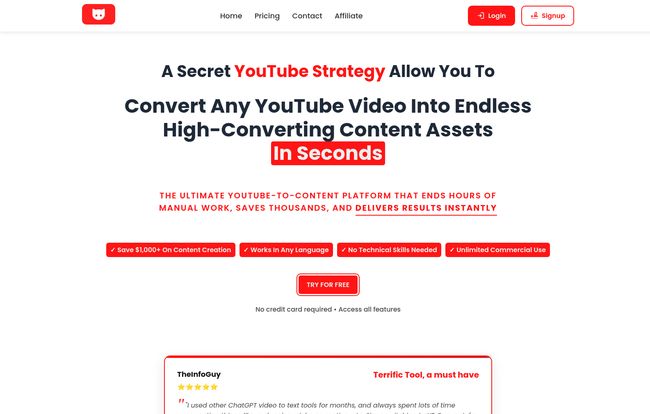
Let’s cut through the marketing fluff. YT Copycat is an AI-powered platform designed to do one thing exceptionally well: it takes any YouTube video and transforms it into various forms of written content. It’s not just a simple transcription service. No, that would be boring. It actually analyzes the video’s structure, key points, and tone to generate surprisingly coherent and well-formatted text.
You can turn a video into:
- A full-length, SEO-optimized blog article with proper headings.
- Engaging Twitter (or X, whatever we’re calling it this week) threads.
- Professional newsletters that don’t sound like a robot wrote them.
- LinkedIn posts to build your personal brand.
- Even a full podcast script, complete with AI-generated audio.
The whole premise is to take the 80% of grunt work out of repurposing, leaving you with the final 20% of creative polish. For anyone trying to scale their content output without hiring a whole team or spending their entire weekend writing, this is a pretty compelling idea.
Visit YT Copycat
The YT Copycat Advantage Over Just Using ChatGPT
“But wait,” I hear you say, “can’t I just do this with ChatGPT?”
Yes, you can. And I have. Frankly, just using ChatGPT for this feels like trying to assemble IKEA furniture with a spoon. It’s possible, sure, but it’s frustrating and inefficient. You have to first get the transcript, then feed it to the AI with a long, complicated prompt, and then spend ages correcting the structure, adding headings, and making it readable.
YT Copycat is different. It’s a purpose-built machine. The contrast is pretty stark:
With ChatGPT alone, you’re looking at:
- Manual Prompt Writing: You have to be an expert prompter to get decent results.
- Hours of Editing: The output is often a giant wall of text you need to format from scratch.
- Time-Consuming Publishing: It’s a constant back-and-forth of copy-pasting.
With YT Copycat, the process is:
- Automated Processing: You just paste the YouTube URL. The tool does the heavy lifting.
- Instant Publish-Ready Content: The content comes out structured with H2s, H3s, and lists.
- One-Click Export: It’s designed for speed and efficiency.
It’s the difference between having an untrained intern who needs constant guidance and a senior assistant who already knows exactly what you want. It just gets it.
My Favorite Features and How They Actually Work
I’ve poked around every corner of this tool. Some features are just “nice-to-haves,” but a few are genuine game-changers for my workflow.
From Video to Blog Post in Under a Minute
This is the bread and butter of YT Copycat. I tested it with a few of my favorite marketing-related YouTube videos. You paste the URL, select “Blog Article,” choose a tone (like friendly or professional), and hit go. Within about 30-45 seconds, you have a 1,500+ word article.
Now, is it 100% perfect and ready to publish? No. Let’s be real. It’s an AI. You’ll still want to do a human pass-through to add your own voice, check some facts, and maybe tweak the intro and conclusion. But what it gives you is a fantastic first draft. A draft that is probably 85% of the way there. It saves me hours of writing from a blank page.
The WordPress Integration is a Game-Changer
This one got me excited. You can actually connect your WordPress site directly to YT Copycat. Then, you can subscribe to specific YouTube channels. Whenever one of those channels publishes a new video, the tool can automatically convert it into a draft blog post and send it straight to your WordPress dashboard. Automatically.
For niche site builders or people running affiliate blogs based on product reviews, this is insane. You can essentially build a content pipeline that runs on autopilot, keeping your blog fresh with relevant content.
Turning Videos into Podcasts? Seriously?
I was skeptical about this one, but it’s surprisingly cool. The tool generates a podcast script from the video, which is already useful. But then it uses a built-in text-to-speech engine to create an actual audio file. The standard voice is okay, but if you have a premium account, it can use more advanced voices that sound much more natural. It’s a clever way to tap into the audio trend and reach a new audience on platforms like Spotify without buying a microphone.
The Big Question: What’s the Catch? A Look at the Downsides
No tool is perfect, and this YT Copycat review wouldn’t be honest without pointing out the things that made me pause. It’s not a magic wand.
- Reliance on the Source: The output is entirely dependent on the quality of the original YouTube video. If the video is unstructured, rambling, or has poor audio, the resulting text will be messy too. Garbage in, garbage out.
- The “Plagiarism-Free” Claim: The site claims 100% original, plagiarism-free content. In my experience with AI tools, that’s a bit of a marketing stretch. The content is unique in its combination and structure, and will likely pass checkers. But it’s still derived from an existing source. Let’s be clear, Google’s own documentation says that AI-generated content is fine as long as it’s helpful and high-quality. This tool helps you create that, but don’t think of it as a magical plagiarism eraser.
- Word Limits on Subscriptions: The standard monthly/yearly plans come with word count limitations based on the tier you choose. This is a pretty standard practice for SaaS companies, but it’s something to be aware of if you’re a heavy user.
Let’s Talk Money: YT Copycat Pricing and that Lifetime Deal
Okay, this is where things get really interesting. YT Copycat offers standard monthly and yearly plans, which are competitively priced.
| Plan | Monthly Price | Yearly Price (per month) | Key Features |
|---|---|---|---|
| Productivity | $14 | $11 | 50k GPT-3 words, 10k GPT-4 words |
| Content Creator | $37 | $30 | 250k GPT-3 words, 40k GPT-4 words |
| Pro | $97 | $79 | 1M GPT-3 words, 100k GPT-4 words |
But here’s the kicker, and the reason I decided to write this post. At the time of writing, they are offering a $297 one-time payment for lifetime access. No monthly fees. No recurring charges. Pay once, own it forever.
Let that sink in. Competing tools like Jasper or Copy.ai can cost upwards of $600 per year. With this deal, you pay about half of that once, and you’re done. They even throw in a bunch of bonuses like WP themes and ChatGPT prompt packs that are actually useful.
I’m always wary of lifetime deals (LTDs), but this one seems to be a strategic move to capture a large user base quickly. For anyone serious about content marketing, it’s an absolute no-brainer.
Who is YT Copycat For (And Who Should Skip It)?
This tool isn’t for everyone, but for a specific group of people, it’s a productivity powerhouse.
This is a fantastic tool for:
- Niche Site Builders and Bloggers: You can create supporting content and fresh articles at lightning speed.
- YouTubers: Easily repurpose your own video content for your blog to capture search traffic.
- Digital Marketing Agencies: Scale content production for multiple clients without scaling your costs.
- Freelancers: Add a high-value “Video to Blog” service to your offerings.
- Podcasters: Quickly generate scripts and even audio from video interviews or solo shows.
You might want to skip it if:
- Your content strategy has absolutely nothing to do with video.
- You’re a creative writer who enjoys the process of starting from a blank page every single time.
- You have zero budget, though the lifetime deal makes a strong case for a small one-time investment.
Is YT Copycat the Future of Content Repurposing?
So, what’s the final verdict in this YT Copycat review? It’s not a tool that will replace skilled writers or content strategists. Let’s get that straight. What it is, is an incredibly powerful assistant. It’s a force multiplier.
It takes the most soul-crushing, time-consuming parts of content creation and automates them. It lets you focus on the fun parts: the strategy, the unique insights, the final polish that makes content truly great. It’s transformed my workflow for repurposing video, and the lifetime deal makes it one of the best value-for-money tools I’ve seen in a long time.
If you’re on the content hamster wheel, this might just be the tool that lets you finally step off and take a breath.
Frequently Asked Questions About YT Copycat
- Is the content from YT Copycat really SEO-friendly?
- Yes, for the most part. It generates content with proper H1, H2, and H3 structures, which is great for on-page SEO. However, you should still do a final review to ensure your target keywords are naturally integrated and the content aligns with search intent.
- Can I use the content for my clients’ websites?
- Absolutely. The landing page states that the content comes with full commercial rights, so you can use it for client work or sell it directly without any royalties.
- Do I need to be a tech expert to use this tool?
- Not at all. The interface is incredibly simple. If you can copy and paste a URL from YouTube, you have all the technical skills you need to get started.
- What happens if I don’t like it? Is there a refund policy?
- Yes, they offer a 30-day money-back guarantee. You can try it out, and if it doesn’t fit your workflow or meet your expectations, you can get a full refund.
- How is this better than just using ChatGPT?
- It’s about automation and purpose-built design. YT Copycat is specifically trained and structured to convert videos into well-formatted content with one click, saving you the multiple steps and detailed prompting required with a general-purpose tool like ChatGPT.
- Is the lifetime deal really for life?
- According to their offer, yes. It’s a one-time payment for lifetime access to the tool and its features. This is often a strategy for new software to gain market share, and it can be a fantastic deal for early adopters.


