
Categories: AI Agent, AI Chatbot, AI Copilot, AI Workflow, No-Code&Low-Code
Zapier Review: Is This Automation Tool Still a Must-Have?

Let’s have a frank chat. In the world of SEO and digital marketing, we’re constantly bombarded with the “next big thing.” A new tool launches every week promising to revolutionize our workflow, 10x our productivity, and probably even make us a decent cup of coffee. Most of them are… fine. They do one thing okay, and then they fade away.
But some tools stick. They become so deeply embedded in how we work that we can’t imagine life without them. For me, and for millions of others, that tool is Zapier.
If you’ve never heard of it, the official line is that Zapier is a no-code automation platform. But that’s such a corporate, boring way to describe it. I’ve always thought of it as digital duct tape. It’s the magic that sticks all your different apps and software together, making them talk to each other when they otherwise wouldn’t. Think of it as the ultimate middleman, a digital translator that saves you from the soul-crushing drudgery of manual data entry and repetitive tasks.
How Zapier Works: The Magic of Triggers and Actions
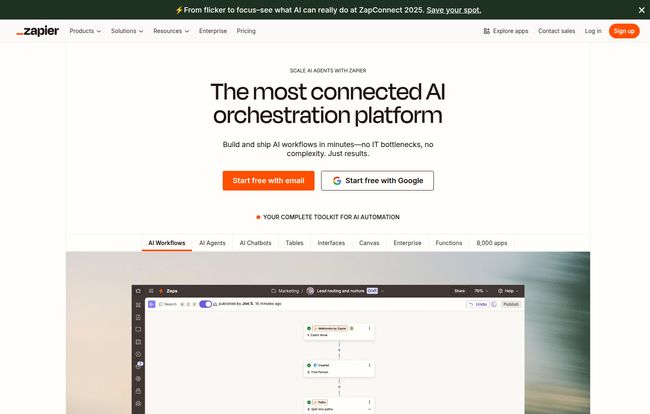
The core concept behind Zapier is beautifully simple. It’s all based on a “when this happens, do that” formula. In Zapier-speak, this is a Trigger and an Action. The whole workflow, from trigger to action(s), is called a Zap.
It’s like setting up a series of digital dominoes:
- The Trigger: The first domino you push. This could be anything from receiving a new email in Gmail, getting a new lead from a Facebook Ad, or a customer filling out a form on your website.
- The Action(s): The subsequent dominoes that fall. This is what you want Zapier to do. For example: take that email attachment and save it to Dropbox. Add that new Facebook lead to a Google Sheet and your Mailchimp list. Create a new customer profile in your CRM from that form submission and send a notification to your team’s Slack channel.
The real power isn’t just one trigger and one action. It’s in the multi-step Zaps. One trigger can set off a cascade of five, ten, even twenty actions across a dozen different apps. That’s when you start to feel like a productivity wizard. And with over 8,000 app integrations, the chances are pretty high that whatever software you use, Zapier can connect to it. It’s an insane number, and honestly, it’s their biggest moat against competitors.
Visit Zapier
The Good Stuff: Why I Keep Coming Back to Zapier
I’ve tried other automation platforms—some are cheaper, some claim to be more powerful. But I always find myself returning to Zapier. Here’s why.
The No-Code Revolution is Real
This is the big one. You don’t need to know Python or understand APIs to make powerful things happen. If you can write an email, you can probably build a Zap. This democratization of automation is huge. It empowers marketers, salespeople, and support teams to build their own solutions without waiting for an overburdened IT department. It puts the power directly in your hands.
The AI Integration is More Than Just a Buzzword
When AI exploded, every SaaS tool on the planet scrambled to slap an “AI-powered” sticker on their homepage. I was skeptical of Zapier’s move too, but I’ve been pleasantly surprised. They’ve integrated AI in a genuinely useful way. You can now build Zaps that summarize text, classify customer feedback, draft email responses, and more, all powered by models like OpenAI’s GPT. They’re even rolling out “AI agents” you can train to perform tasks. It’s not just a gimmick; it’s a logical extension of their core mission to automate work.
Scalability from Solopreneur to Megacorp
Zapier is one of the few tools that can truly grow with a business. I started using it for my own personal productivity—simple things to keep my freelance work organized. Then I used it for small business clients. Now, I see massive companies like Meta and Siemens using it for enterprise-level workflows. It’s trusted, it’s secure (they have all the compliance badges like SOC 2, GDPR, HIPAA), and it can handle the load.
Let’s Be Real: The Not-So-Great Parts
Okay, it’s not all sunshine and automated rainbows. I wouldn’t be giving you an honest review if I didn’t mention the downsides. And there are a couple of big ones.
The Learning Curve Can Be a Cliff
Building your first Zap is a piece of cake. The interface guides you right through it. But when you want to build something truly complex—with filters, paths, and custom logic—the learning curve gets steep, fast. Your simple workflow can quickly start to look like a plate of spaghetti. It takes patience and a bit of trial and error to get the hang of advanced Zaps, and troubleshooting a broken step can sometimes feel like digital detective work.
Watching Your Wallet: The Cost of Automation
Zapier’s pricing model is based on “tasks.” A task is essentially every successful action your Zap performs. A simple 2-step Zap uses one task every time it runs. A 10-step Zap uses nine tasks. If you have popular Zaps running hundreds of times a day, those tasks can add up very quickly. The price can escalate from a reasonable monthly fee to a significant business expense if you’re not careful about monitoring your usage. Which brings us to…
A Breakdown of Zapier’s Pricing
Zapier’s pricing can feel a bit confusing, but it boils down to how many Zaps you need and how many tasks you’ll run per month. Here’s a simplified look at their plans (based on annual billing, which saves you a decent chunk of change):
| Plan | Price (Billed Annually) | Who It’s For |
|---|---|---|
| Free | $0/month | The curious. Perfect for dipping your toes in, trying out single-step Zaps, and automating a few very simple personal tasks. It’s quite limited, but it’s a great starting point. |
| Starter | Starts at $19.99/month | Solopreneurs and small businesses. This is where things get serious. You get multi-step Zaps, which is essential, and a higher task limit. |
| Professional | Starts at $49/month | Growing businesses and power users. This unlocks advanced features like Paths (if-then logic) and faster polling times, meaning your Zaps run more frequently. |
| Team | Starts at $69/month | As the name suggests, this is for teams. You get unlimited users, shared folders for Zaps, and collaborative tools. |
| Enterprise | Custom Pricing | Large organizations that need advanced security, compliance, and dedicated support. |
My advice? Start with the Free plan. See if it works for you. You’ll quickly figure out if you need to upgrade, and the platform does a good job of telling you what your task usage looks like. Don’t get caught by surprise at the end of the month.
Who is Zapier Actually For?
Honestly, almost any one who works on a computer can find a use for Zapier. But it really shines for specific roles:
- Marketers: Automatically route leads, sync email lists, post to social media, get notified of brand mentions. The possibilities are endless.
- Sales Teams: Update CRMs automatically, log calls, create tasks after meetings, and get notifications for hot leads.
- Support Staff: Create support tickets from emails or social media mentions, route them to the right person and track them in a project management tool.
- Solopreneurs & Freelancers: This is your secret weapon. Connect your accounting software, your project manager, your email, your calendar… basically, build yourself a virtual assistant.
There are alternatives, of course. A tool like Make (formerly Integromat) offers more power and a different pricing model that some advanced users prefer. But for sheer breadth of app support and ease of getting started, Zapier is still the king of the hill in my book.
My Final Verdict: Is Zapier Worth It?
Yes. A thousand times, yes.
Despite the potential complexity and the need to watch your budget, the value Zapier provides is immense. Think about it: how much is an hour of your time worth? Or an hour of your employee’s time? I can guarantee Zapier has saved my business hundreds, if not thousands, of hours over the years. Hours that I’ve reinvested into growing my business, talking to clients, or just… not working.
It’s one of those rare tools that lives up to the hype. It’s the silent partner working 24/7 in the background, tying everything together. If you’re not automating your repetitive tasks yet, you’re leaving a ton of time and efficiency on the table. Give their free plan a shot. You might just find your new favorite tool.
Frequently Asked Questions About Zapier
- What is a Zap?
- A Zap is an automated workflow that connects your apps. It consists of a trigger (an event that starts the Zap) and one or more actions (tasks that the Zap performs).
- What’s the difference between a trigger and an action?
- A trigger is the event that kicks off your workflow, like getting a new email. An action is what Zapier does in response, like copying an attachment from that email to Google Drive.
- How often does Zapier check for new data?
- This depends on your plan. The Free plan checks for new data every 15 minutes. Paid plans have faster polling intervals, ranging from 1 to 5 minutes, meaning your automations run much quicker.
- Can I use AI in my Zaps?
- Yes! Zapier has integrated AI features that allow you to do things like summarize text, generate content, classify data, and more, right within your Zaps. You can connect to services like OpenAI directly.
- Is Zapier secure for business use?
- Absolutely. This is a big focus for them. Zapier has enterprise-grade security and is compliant with standards like SOC 2 and 3, GDPR, and HIPAA, making it a trusted choice for businesses of all sizes.
Conclusion
In a world full of digital noise, Zapier is a tool that brings harmony. It takes the chaotic mess of different apps we all use and orchestrates them into a smooth, efficient system. It’s not just about saving time; it’s about freeing up your mental energy to focus on what truly matters. And in my experience, that’s an investment that always pays off.


