
Categories: AI Assistant, AI Notes Generator, AI Quiz Generator, AI Summarizer, AI Transcriber, AI Translate
Zoc AI Review: A Student’s New Best Friend?

Remember sitting in a lecture hall, the professor is on their third topic in ten minutes, and you’re still trying to decipher what you wrote for the first one? Your fingers are cramping, your coffee is cold, and you’ve got a page of notes that looks more like a secret code than a study guide. Yeah. I’ve been there. We’ve all been there.
For years, the solution was to get better at typing, learn shorthand (does anyone still do that?), or just accept that you’d miss half of what was said. But now, we’re in the age of AI, and a whole new category of tools has popped up promising to be our academic savior. I’ve seen a ton of them, and frankly, most are just glorified voice recorders. But then I stumbled across a tool called Zoc.ai, and its pitch wasn’t just about recording—it was about understanding. And that got my attention.
So, What Exactly is Zoc AI?
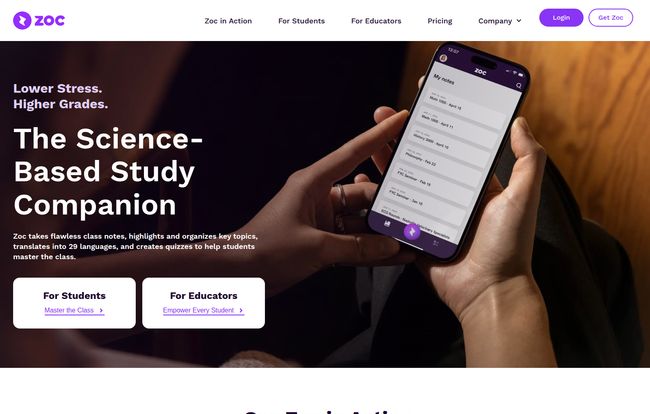
At its core, Zoc AI is an AI-powered note-taking tool built for students and educators. But calling it just a “note-taker” feels like calling a smartphone just a “phone.” It’s a bit of an understatement. According to their site, Zoc positions itself as a “science-backed study companion.” It’s designed to do the heavy lifting of transcribing lectures in real-time, but its real magic lies in what it does after the words are on the page. It organizes, summarizes, and even quizzes you on the material.
Visit Zoc
It’s a bold claim: lower stress and higher grades. As someone who’s seen countless apps make similar promises, I’m naturally skeptical. But the idea of offloading the frantic note-taking process to focus on actually absorbing the information… well, that’s a pretty compelling thought.
The Core Features That Stood Out
Let’s get into the nitty-gritty. What does Zoc actually do that your standard note app can’t?
More Than Just Transcription
Okay, the real-time transcription is the foundation. You hit record on your laptop or phone, and it types out what the lecturer says. Cool. But the game-changer is the ‘Synthesize’ feature. Zoc’s AI doesn’t just give you a wall of text. It identifies key topics, main points, and important concepts, then organizes them into a coherent, structured summary. It’s like having a meticulous, lightning-fast scribe sitting next to you who not only types everything but also neatly formats it with headers and bullet points. For a chronically disorganized person like me, that alone is huge.
The AI Tutor in Your Pocket
This is the part that really made me raise an eyebrow, in a good way. Zoc has an integrated AI tutor. Once your notes are generated, the AI can create interactive quizzes and flashcards based on the material. It can answer your questions about the lecture content. Think about that for a second. It’s 2 a.m., you’re stuck on a concept for your midterm, and there’s no one to ask. Except now, there is. It’s like having a TA who’s had way too much coffee and is available 24/7 to help you prep. The potential here for improving retention is pretty incredible.
Breaking Down Language Barriers
Another fantastic feature is the ability to translate notes into 29 different languages. This is a massive win for international students who might be trying to learn complex subjects in a non-native language. It’s also great for language students who want to see translations of their lecture material. It’s a thoughtful touch that shows Zoc is thinking about the diverse needs of a modern student body.
Who Is This Tool Really For?
While the obvious answer is “students,” I think it’s a bit more nuanced than that. The homepage cites a statistic that 81% of US undergraduates say digital learning tools help improve their focus and grades. Zoc is clearly aimed right at the heart of that demographic.
But I also see a massive benefit for students with learning challenges. For someone with ADHD, maintaining focus during a long lecture can be a monumental struggle. For someone with dysgraphia, the physical act of writing is a barrier. Zoc removes that barrier, allowing the student to engage with the material on their own terms. It’s a powerful accessibility tool disguised as a study aid.
And then there are the educators. Zoc offers specific plans for them, including bulk licensing and a dedicated account manager. Imagine providing a tool like this to an entire freshman class. It levels the playing field, ensuring every student has access to high-quality notes, regardless of their note-taking skill. That’s a pretty powerful proposition for any institution that genuinely cares about student success.
The Elephant in the Room: Let’s Talk Pricing
Alright, no tool is perfect if you can’t afford it. So, how much does this AI magic cost? I had to click over to their pricing page to find out, which is a minor pet peeve of mine, but the breakdown is pretty straightforward.
| Plan | Pricing | Key Features |
|---|---|---|
| For Students | $14.99 per month or $99.99 per year (a 44% discount) |
Unlimited transcription, summaries, AI tutor, translation, Google Drive export. |
| For Educators | Contact for Info | All student features plus dedicated support, account management, and bulk licensing. |
For students, it’s about fifteen bucks a month. Honestly? That’s less than three fancy coffees. If it saves you from even one all-night cram session fueled by caffeine and regret, it has already paid for itself. The annual plan brings the cost down significantly, which is the smart move if you decide to commit.
My Honest Take: The Good and The… Quirks
No review is complete without a little critique. Let’s start with the good stuff. The fact that major universities like Stanford and UNLV are mentioned as places where Zoc students and educators reside lends it a ton of credibility. Being a Webby Honoree doesn’t hurt, either. It shows they’re not some fly-by-night operation.
The core promise—reducing stress and improving grades—feels achievable with the feature set they offer. The AI tutor is genuinely innovative, moving beyond simple transcription that competitors like Otter.ai focus on.
Now for the quirks. The effectiveness of the transcription is obviously going to depend on the clarity of the lecture. A mumbling professor with a thick accent in a booming echoey hall is going to be a challenge for any AI. Garbage in, garbage out, as they say. You also need a reliable internet connection for the real-time features to work their magic. Finally, the pricing isnt front-and-center on the homepage, you have to dig a little. Not a deal-breaker, but something to note.
Putting It to the Test: A Little Thought Experiment
Imagine you’re in that notoriously difficult organic chemistry class. The professor is drawing complex molecular structures and explaining reaction mechanisms at light speed. If you’re typing, you miss the visuals. If you’re drawing, you miss the explanation. It’s a nightmare.
With Zoc, you could theoretically just let it run. It captures every word of the explanation. You can focus your limited attention on sketching the structures, knowing the detailed verbal context is being saved. Later, you can review the transcribed notes alongside your drawings, ask the AI tutor to clarify the difference between an SN1 and an SN2 reaction, and even translate a confusing term. Its a tool for focus, not for zoning out.
Frequently Asked Questions about Zoc AI
1. Can Zoc handle different accents and noisy classrooms?
While most modern AIs are getting very good with accents, performance will always depend on audio quality. For best results, sitting closer to the speaker and in a less noisy environment is ideal. It’s not magic, but it’s designed to be robust.
2. How does Zoc AI compare to other tools like Notability or Otter.ai?
Think of it as a hybrid. Tools like Notability are great for manual, handwritten notes. Tools like Otter.ai are excellent at pure transcription. Zoc aims to merge the two worlds by not just transcribing, but also structuring the information and adding an interactive study layer with its AI tutor, which is its key differentiator.
3. Is there a free trial for Zoc AI?
The website doesn’t explicitly mention a free trial on its main pages. It’s best to visit the site directly or contact their support to see if they offer a trial period or a limited free version to test it out.
4. Can I use Zoc on my phone and my laptop?
Yes. The platform is designed to be used on any device. You can record a lecture on your phone and then review the organized notes later on your laptop, which is perfect for a student’s flexible workflow.
5. Is my data and lecture information kept private?
Most reputable service providers have strict privacy policies. While you should always read the terms and conditions yourself, platforms handling educational data typically use encryption and secure storage to protect user information.
Final Verdict: Is Zoc AI a Smart Investment?
Look, no tool is a silver bullet that will magically get you a 4.0 GPA. You still have to do the work. You still have to study. But the biggest bottleneck for many students isn’t their willingness to learn, it’s the process of capturing and organizing information efficiently.
Zoc AI seems to tackle that bottleneck head-on. It’s not about making students lazy; it’s about making them more effective. By automating the most tedious part of learning, it frees up your brainpower to focus on what matters: understanding, questioning, and connecting ideas.
For the student who feels constantly overwhelmed, the international student navigating a new language, or the student with learning differences, a tool like Zoc could be more than just helpful—it could be a complete game-changer. For the price of a few lattes a month, it seems like a pretty smart bet.
Reference and Sources
- Zoc.ai Homepage: https://zoc.ai/
- Zoc.ai Pricing: https://zoc.ai/pricing/


