
Categories: AI Animated Video, AI Animation Generator, AI Short Video Generator, Text to Video
AI Hugging Review: Create Hug Videos from Photos & Text

I spend my days eyeballs-deep in SEO trends, CPC models, and the latest traffic-generating wizardry. It’s a world of analytics, algorithms, and A/B testing. So, when a tool pops up that’s less about crunching numbers and more about… well, hugging, you can bet my curiosity is piqued. We’re all drowning in a sea of static content, right? Perfectly curated photo dumps on Instagram, professional headshots on LinkedIn. It’s all a bit… still.
But what if those photos could move? What if they could convey one of the most basic human emotions? That’s the promise of a quirky new platform I’ve been playing with: AI Hugging. Yeah, you read that right. It’s an AI that makes your photos hug each other. Let’s get into it.
So, What on Earth is AI Hugging?
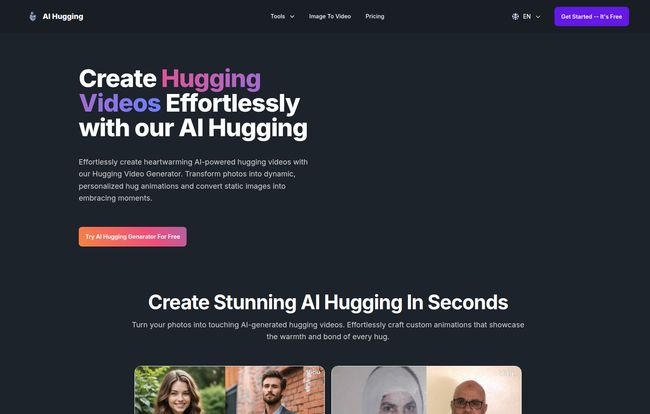
Okay, let’s break it down. At its core, AI Hugging is a specialized generative AI tool. But instead of creating hyper-realistic cityscapes or surrealist art like Midjourney, it has one, very specific job: to take a static image and animate the people in it to share a hug. It’s like teaching your old photo albums to give hugs.
It’s not just about photos either. One of its most fascinating features is the text-to-video function. You can literally type a description—say, “a father warmly embracing his daughter after she gets her diploma”—and the AI will generate an animation based on your prompt. It’s a simple concept, but the implications for creating quick, emotionally resonant content are pretty interesting. This isn’t about creating the next Hollywood blockbuster; it’s about adding a little spark of life to cherished moments.
Putting It to the Test: My First AI Hug
Theory is great, but I had to see it for myself. I grabbed a picture of my two friends from a summer BBQ last year. They’re standing side-by-side, smiling for the camera. Classic stuff. I uploaded it to the AI Hugging platform, which was refreshingly straightforward. No complicated settings or technical jargon to wade through.
I hit the ‘generate’ button and waited. My expectations were, honestly, a bit mixed. I’ve seen enough janky AI video to be skeptical. Would it look like a glitchy mess from an old video game?
Visit AI Hugging
The result? Genuinely surprising. The tool intelligently identified the two people and animated them turning towards each other in a smooth, natural-looking embrace. It wasn’t perfectly human, of course—there’s still a hint of that digital smoothness. But it was far from janky. It was… sweet. It captured the warmth of the original photo and amplified it. I immediately sent it to them and got a “WHOA, how did you do that?!” back in seconds. Mission accomplished.
The Standout Features
After playing around for a bit, a few things really stood out to me as being particularly well-thought-out.
From Still Photos to Moving Moments
This is the bread and butter of the service. The ability to re-animate old photos is just plain cool. Think about it: old family photos, pictures of loved ones you miss, wedding pictures. It adds a dynamic layer of nostalgia that a simple picture can’t quite capture. Its really something to see a black and white photo of your grandparents suddenly share a tender moment.
Weaving Hugs from Just Words
The text-to-video feature is where things get creative for marketers and content creators. Need a quick visual for a blog post about family connections? Or an ad for Mother’s Day? Instead of spending hours searching for the perfect stock video, you can just… create one. It gives you a level of creative control that’s hard to beat for speed and ease.
No Pesky Watermarks
This is a big one for me. So many “free” or entry-level creative tools slap a massive, ugly watermark all over your creation unless you pay up. AI Hugging, even on its free plan, gives you watermark-free videos. That’s a huge sign of confidence in their product and a massive plus for anyone wanting to use the videos professionally without them looking cheap.
Let’s Talk Money: The Pricing Structure
Alright, the all-important question: what’s this going to cost me? The pricing model is credit-based, which is pretty common for AI services that use a lot of processing power. Here’s a quick rundown:
| Plan | Price | What You Get |
|---|---|---|
| Free | $0 /month | 10 credits (enough for 1 video per month) |
| Basic | $9.99 /month | 3,000 credits (enough for 300 videos) |
| Standard | $19.99 /month | 10,000 credits (enough for 1,000 videos) |
| Pro | $29.99 /month | 25,000 credits (enough for 2,500 videos) |
The free plan is perfect for trying it out and seeing if it works for you. One video a month is enough to make a cool birthday card or a social post. For content creators or small businesses, the Basic plan at ten bucks a month for 300 videos seems like an absolute steal. You could fill a whole month’s social media calendar with that.
The Good, The Bad, and The AI Huggy
No tool is perfect, so let’s get real about the pros and cons.
What I Genuinely Liked
Honestly, the sheer ease of use is at the top of my list. You don’t need to be a video editor or an AI prompt engineer to get a great result. It’s intuitive. The quality of the animations is impressive for such a new, niche tool, and as I mentioned, being watermark-free is a massive advantage. It’s suitable for both deeply personal projects and quick professional content.
A Few Things to Keep in Mind
The free plan is a little tight on credits. One video is a great taster, but you’ll quickly want more if you like the results. That’s just business, I get it—server time ain’t free. Also, priority email support is reserved for the paid tiers, which is standard practice but worth knowing if you’re the type who needs a lot of hand-holding. It’s a simple enough tool that I doubt many will need it, though.
Who is This Tool Really For?
I see a few groups getting a real kick out of this.
- Social Media Managers: Looking for a way to stop the scroll? An animated hugging video will definitely stand out in a feed of static images. It’s perfect for engagement-focused campaigns.
- Families and Friends: This is an amazing tool for creating unique, heartfelt digital greeting cards for birthdays, anniversaries, or just to say you miss someone.
- Small Businesses: Companies that want to project a warm, human-centric brand image could use this for their ‘About Us’ page or in marketing emails to add a personal touch.
- Anyone Curious: Frankly, it’s just fun to play with. If you’re even a little bit interested in what AI can do, the free plan is a no-brainer to try.
Final Thoughts on My AI Hugging Adventure
AI Hugging isn’t going to change the world. It’s not solving global crises. But that’s okay. What it does is take a little piece of our digital lives and make it warmer, more dynamic, and more human. In a digital landscape that can often feel cold and impersonal, a tool dedicated to creating something as simple and positive as a hug feels like a breath of fresh air. It’s a niche, yes, but it’s a delightful one. It’s a reminder that technology can be used not just for efficiency and productivity, but for connection, too.
Frequently Asked Questions
- What exactly is AI Hugging?
- It’s an online tool that uses artificial intelligence to animate static photos of people into short videos where they appear to hug each other. It also has a feature to generate these hugging videos from a simple text description.
- Do I need any video editing skills to use it?
- Absolutely not. That’s one of its biggest strengths. The process is incredibly simple: you upload a photo or type some text and the AI does all the heavy lifting. No timelines, keyframes, or complicated software needed.
- How realistic are the videos it generates?
- They are surprisingly good! While you can tell it’s an animation, the motion is generally fluid and natural. The goal isn’t perfect photorealism, but to capture the emotion and feeling of a hug, which it does very well.
- Can I use the videos I create for professional or commercial projects?
- Yes, the tool is designed for both personal and professional use. Since the videos are watermark-free, they are perfect for use in social media marketing, digital ads, or on business websites to add a human touch.
- How does the credit system work?
- It’s quite simple: 10 credits are used to generate one video. The free plan gives you 10 credits per month (1 video), while paid plans offer a much larger pool of credits for more frequent use.
- What if I want to cancel my subscription?
- Based on their pricing page and standard SaaS practices, you should be able to manage or cancel your subscription at any time through your account settings. This would typically stop any future billing cycles.


