
Categories: AI Subtitle Generator, AI Transcriber, AI Transcription
Free AI Transcription with Transcriptit: Is It Any Good?

As someone who lives and breathes SEO and content, my life is a constant, caffeine-fueled hunt for tools that make my job easier without draining my wallet. Then comes the soul-crushing part: transcription. You can either spend hours typing it out yourself, listening and pausing like a human VCR, or you can shell out cash for a service. And some of those services… well, they cost a pretty penny.
So, you can imagine my skepticism when I stumbled upon a site called Transcriptit. The homepage was practically yelling at me with promises of “Absolutely Free” and “Unlimited Hours.” My internal monologue immediately went, “Yeah, right. What’s the catch?” In our line of work, ‘free’ usually comes with some serious asterisks. But I’m a glutton for punishment and a sucker for a potential bargain, so I decided to put it through its paces. And folks, I’m here to report back. This one might just be different.
What Exactly is Transcriptit?
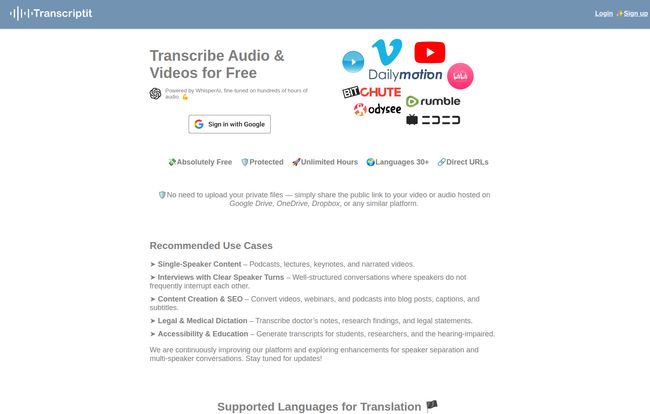
At its core, Transcriptit is a web-based tool that transcribes audio and video files for you. No frills, no fancy dashboard with a million buttons. It’s wonderfully simple. But here’s the kicker: it’s powered by OpenAI’s WhisperAI. If you’ve been following the AI space, you know Whisper is a beast. It’s the same tech that powers some seriously high-end applications, and it’s known for its incredible accuracy, even with complex vocabulary.
The other thing that immediately stood out to me is their model. You don’t upload your giant 4K video file. Nope. You just give it a public link. We’re talking YouTube, Google Drive, Dropbox, Dailymotion… you name it. For someone who already has their content living in the cloud, this is a massive time-saver. No downloading, no re-uploading, just copy-paste. Easy.
Visit AI-Powered Transcription
The Features That Caught My Eye
Okay, so it’s a transcriber. Lots of those around. But a few things made me lean in a little closer.
The Price is Right (It’s Free)
I have to start here because it’s the most glaringly obvious benefit. It costs nothing. Zero. Zilch. Nada. In an industry where every SaaS tool wants a monthly subscription, this feels like finding a unicorn. I kept looking for a hidden pricing page or a “1 free trial then pay up” button, but it’s just… free. This is a massive win for solo creators, students, or anyone on a shoestring budget.
WhisperAI Under the Hood
This isn’t some janky, homegrown algorithm. Using OpenAI’s Whisper is like putting a Formula 1 engine in a go-kart. It gives the tool a baseline of quality and reliability that you just don’t expect from a free service. It means the tool has a better shot at understanding jargon, different accents, and technical terms, which is crucial for niche content.
Speaking My Language (Multilingual Support)
The site claims support for over 30 languages. For my international SEO friends and clients with global audiences, this is huge. You can repurpose content for different regions without having to find a separate tool for each language. I haven’t tested all 30, obviously, but the flexibility is a major plus.
Putting Transcriptit to the Test: My Experience
Theory is great, but I had to see it in action. I grabbed a link to one of my recent 15-minute YouTube videos where I talk about Core Web Vitals. The audio is pretty clean, just me talking to a mic. I pasted the URL into Transcriptit, hit the button, and went to grab a coffee.
A few minutes later, I had a full text document. The accuracy? Genuinely impressive. It correctly spelled “Largest Contentful Paint” and “Cumulative Layout Shift.” It stumbled on my brand name once or twice, but that’s an easy fix with find-and-replace. For a zero-cost, zero-effort first draft, it was about 95% of the way there. That’s a huge chunk of manual work just… gone.
The Good, The Bad, and The AI-Generated
No tool is perfect, especially a free one. It’s not a magic wand, but more like a really, really good Swiss Army knife. It’s versatile, but you wouldn’t use it for brain surgery.
Where It Shines
For single-speaker content, this tool is an absolute dream. Think podcasts, lectures, video essays, voice notes, or dictating your own content. It’s also a lifesaver for content repurposing. Getting that first-draft transcript is often teh biggest hurdle to turning a video into a blog post, and Transcriptit obliterates that hurdle. It’s also fantastic for creating accessible content by providing transcripts for those with hearing impairments.
Where It Stumbles a Bit
Now for the reality check. The site’s icon says “Unlimited Hours,” which got me excited. But the fine print and my testing confirmed a key limitation: it works for files under 50 minutes. So, it’s more like “unlimited files under 50 minutes.” That’s a critical distinction. If you’re transcribing a two-hour webinar, you’ll need to split the file first. Not a deal-breaker, but something to know.
The other area is what I call the “Who Said What?” problem. Right now, it doesn’t do advanced speaker separation. If you have a chaotic interview with two or more people constantly interrupting each other, the transcript is going to be a single block of text. It’s not going to label “Speaker A” and “Speaker B.” To be fair, they are upfront about this on their site, even mentioning that improvements for multi-speaker conversations are in the works. For now, it’s best for structured interviews where people take clear turns speaking.
How SEOs and Content Creators Can Use This… Yesterday
If you’re in this field, your mind should already be racing. But here are the low-hanging fruit:
- Video to Blog Post Goldmine: This is the big one. Transcribe your video, clean up the text, add some headings and images, and boom—you have a fully-fledged, SEO-optimized blog post. You’re doubling your content output from a single piece of work.
- Making Videos More Searchable: Paste the full transcript into your YouTube description (or a shortened version with a link to the full text on your site). This gives Google and YouTube so much more context about what your video contains, which can seriously help your rankings.
- Creating Captions: While it doesn’t output an SRT file directly (at least not yet!), you can easily copy the text and use a free tool to format it into captions. Better accessibility, better user engagement. Win-win.
Let’s Talk Money: The Transcriptit Pricing Model
I know you’re still waiting for the catch. I was too. So here’s the entire, complicated pricing structure. You ready?
| Feature | Cost |
|---|---|
| Audio Transcription | $0 |
| Video Transcription | $0 |
| Up to 50 Mins/File | $0 |
| Unlimited Files | $0 |
Yep. That’s it. It’s free. It’s just a fantastic, generous tool provided by the folks at Empirix Tech.
So, Is Transcriptit the Holy Grail of Free Transcription?
I wouldn’t call it a holy grail. It won’t replace a professional human transcriptionist for a legal proceeding or a complex, multi-speaker documentary. It’s not going to perfectly format everything and label every speaker with zero errors.
But is it an insanely useful tool for 90% of the transcription tasks a content creator or SEO professional faces? Absolutely. It’s the perfect first step. It gets you a high-quality draft that you can then polish into a final product in a fraction of the time it would take to do from scratch. It lowers the barrier to entry for so many valuable content strategies.
For what it is—a free, fast, and surprisingly accurate AI transcriber—Transcriptit has earned a permanent bookmark in my browser. I’ve already used it three more times since I started writing this article.
My Final Word
In a world of freemium models and sneaky up-sells, Transcriptit is a breath of fresh air. It does one thing, it does it well, and it doesn’t ask for your credit card. If you create any kind of audio or video content, you owe it to yourself to give it a shot. What have you got to lose? It’s free.
Frequently Asked Questions
- Is Transcriptit really free to use?
- Yes, as of my latest check, Transcriptit is completely free to use. There are no hidden costs or subscription plans for the features offered.
- What AI model does Transcriptit use for transcription?
- It’s powered by OpenAI’s WhisperAI, which is a state-of-the-art model known for high accuracy across a wide range of audio conditions.
- What is the maximum file length for transcription?
- You can transcribe an unlimited number of files, but each individual file must be under 50 minutes in length.
- Does Transcriptit support multiple speakers in a conversation?
- Currently, the tool does not offer advanced speaker separation (labeling Speaker A, Speaker B, etc.). It works best for single-speaker content or clear, turn-based interviews. The developers have noted they are working on improving this feature.
- What languages are supported by Transcriptit?
- The platform supports over 30 languages for transcription, making it a versatile tool for international content creators.
- Do I need to upload my video or audio files directly?
- No, and that’s one of its best features. You don’t need to upload large files. Instead, you provide a public URL to your file hosted on platforms like YouTube, Google Drive, Dropbox, and others.


