
Categories: AI Detector, AI PDF, AI PDF Editor
AI-Redact Review: Free AI PDF Redaction Tool

If you’ve ever had to redact a document, you know the special kind of headache it induces. It’s the digital equivalent of meticulously going over a document with a black sharpie, only a hundred times more tedious and with a much higher risk of carpal tunnel. You spend hours squinting at the screen, clicking, dragging, and praying you didn’t miss a single stray social security number. It’s a necessary evil, especially for those of us in legal, HR, or any field that juggles personally identifiable information (PII).
For years, the process has been clunky and, frankly, overpriced. I’ve wrestled with Adobe’s native tools more times than I care to admit. So when I stumbled upon a tool called AI-Redact that promised free, automatic PDF redaction using artificial intelligence, my inner SEO-nerd and my pragmatic side both sat up and paid attention. Could this actually work? Or was it another over-hyped AI gimmick?
I decided to take a look under the hood. And I’ve got to say, I’m pretty impressed.
So What Exactly Is AI-Redact?
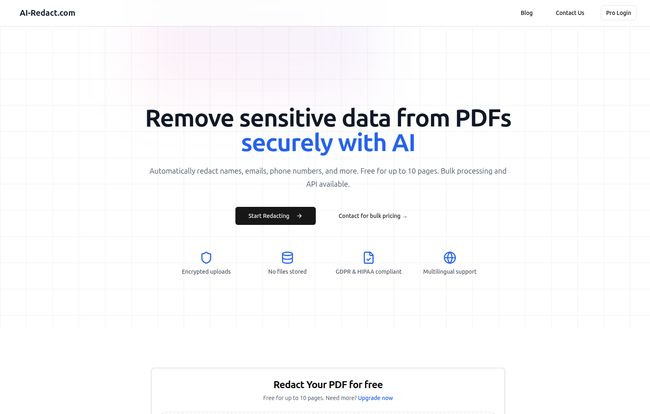
At its core, AI-Redact is a web-based platform designed to do one thing and do it well: remove sensitive information from your PDF documents. Instead of you manually finding and blacking out every name, email address, or phone number, you just tell the AI what you want gone, and it does the heavy lifting for you.
Visit AI-Redact
Think of it as a highly-trained, lightning-fast paralegal who only drinks electricity and never complains. It uses deep-learning algorithms to scan your document, identify the specific types of data you’ve flagged, and then poof—it’s gone. This is a potential game-changer for small businesses, independent contractors, or even larger firms that need a quick, no-fuss solution without getting locked into a massive software suite.
The Core Features That Actually Matter
Any tool can pack its homepage with fancy-sounding features. But what actually moves the needle? After poking around AI-Redact, a few things really stood out to me as genuinely useful.
AI-Powered Automation is the Star of the Show
This is the main event, of course. The ability to just upload a PDF and have the machine automatically find and redact information is its biggest selling point. The platform specifically mentions targeting names, emails, and phone numbers, which covers a huge chunk of standard redaction needs. While the accuracy of any AI is never a hundred percent perfect—let’s be real—automating the first 95% of the work is a massive time-saver. You can spend your time reviewing the final product instead of doing all the grunt work yourself.
Security and Compliance Aren’t Just Buzzwords Here
Here’s something that made me breathe a sigh of relief. Handling sensitive documents online can feel… sketchy. AI-Redact seems to get this. They talk a big game about security, and it seems to hold up. They mention that documents are uploaded via an encrypted connection and, more importantly, are automatically deleted from their servers after processing. This isn’t a cloud storage service in disguise; it’s a processor. They also claim GDPR and HIPAA compliance, which is absolutely critical. In my world, if a tool handling PII isn’t compliant, its a non-starter. End of story.
It’s Not Picky About Formats or Languages
Ever tried to redact a scanned PDF? It can be a nightmare because the text isn’t ‘live’. AI-Redact claims to handle both computer-generated and scanned PDFs, which suggests some solid OCR (Optical Character Recognition) technology is working in the background. Furthermore, they offer multilingual redaction. This is a huge plus for international businesses or law firms dealing with documents from all over the globe. It’s a thoughtful inclusion that shows they’re thinking beyond a purely English-speaking market.
Let’s Talk Money: AI-Redact’s Pricing Structure
Ah, the all-important question. How much is this going to cost me? This is often where great-sounding tools fall apart, hiding their prices behind a “Contact Sales” wall of doom. I was pleasantly surprised here.
AI-Redact offers a genuinely free tier that lets you process up to 10 pages. This is perfect for a one-off task or just for testing the platform to see if it works for you. No credit card, no sign-up song and dance. I love that.
Once you need more, they move to a transparent, pay-as-you-go model. Based on their homepage slider:
| Number of Pages | Estimated Cost | Price Per Page |
|---|---|---|
| 100 | $13.00 | $0.13 |
| 10,000+ | Volume Pricing | As low as $0.05 |
This API & pay-as-you-go plan gives you access to their API, bulk redaction, and better support. For the big players—the enterprises needing to process thousands of documents with custom requirements—there’s a “Custom” plan. This one does require contacting them, which is pretty standard for enterprise-level service.
Side note: I did try to find a dedicated pricing page, but the link seemed to be on a coffee break (I hit a 404 error). Luckily, the homepage lays it all out clearly enough. A minor hiccup.
My Honest Take: The Good and The Could-Be-Better
No tool is perfect. After my analysis, here’s my breakdown.
What I really like is the accessibility. The free tier is a brilliant move. It removes the barrier to entry and builds trust. The straightforward pricing is another huge win. On the flip side, the biggest potential drawback is the one inherent to all AI tools: accuracy isn’t guaranteed. You’ll still need to give that final document a once-over. Also, for mid-sized businesses that need bulk processing but aren’t quite at the ‘enterprise’ level, having to contact them for a quote can sometimes slow things down. But these are pretty minor quibbles in the grand scheme of things.
So, Who Is This For?
I see a few groups getting a ton of value out of AI-Redact:
- Lawyers and Paralegals: Sifting through discovery documents or preparing evidence for court is a perfect use case.
- HR Professionals: Anonymizing resumes or redacting sensitive employee information from reports.
- Researchers and Academics: Removing PII from survey data or interview transcripts before publication.
- Small Business Owners: Anyone who occasionally handles contracts or client forms with sensitive data but doesn’t have a budget for expensive software.
- Journalists: Protecting sources by redacting names and identifying details from documents.
Basically, if your job involves looking at PDFs and saying, “Uh oh, that probably shouldn’t be in the final version,” this tool is likely for you.
Frequently Asked Questions about AI-Redact
Can I really trust an AI with my sensitive documents?
It’s a valid concern! Based on their policies, the trust factor is high. They use encrypted uploads and, most importantly, state that files are deleted immediately after processing. They aren’t storing your data, just passing it through their redaction engine. This is a much safer model than many other online tools.
What if the AI misses something?
This is the reality of any automated system. It’s a powerful assistant, not a replacement for a final human review. The best practice would be to let the AI do the first 95% of the work and then do a quick final check yourself. It still saves an immense amount of time compared to doing it all manually.
Is the free version actually useful?
Absolutely. For a single, short document (up to 10 pages), it’s completely functional. It’s also the perfect way to test the tool’s accuracy and workflow on one of your own documents before you consider paying for a larger batch.
What kind of information can it actually find and redact?
The free tool is pre-trained to find common PII like names, email addresses, and phone numbers. For more complex or custom data types (like specific account numbers or medical IDs), you’d likely need to explore their Custom plan, which mentions custom models.
Does this work on my scanned, crooked document from 2005?
It should! They specifically mention support for various PDF formats, including scanned ones. The quality of the original scan will, of course, affect the AI’s accuracy, but it’s designed to handle more than just pristine, digitally-born PDFs.
The Final Word on AI-Redact
Look, I’m a professional skeptic when it comes to new tools, especially in the AI space where promises are cheap. But AI-Redact feels different. It’s a focused, practical tool that solves a very real, very annoying problem.
It’s not trying to be everything to everyone. It redacts PDFs. It does so with a smart, AI-powered approach, a clear focus on security, and a pricing model that is both fair and transparent. Is it going to put an army of paralegals out of work? No. But is it going to make their jobs (and ours) a whole lot easier? You bet. If you ever find yourself facing a mountain of PDFs and a black marker, I’d say give their free tool a shot. You have nothing to lose but a headache.
Reference and Sources
- AI-Redact Official Website: https://www.ai-redact.com


