
Categories: AI Avatar Generator, AI Headshot Generator, AI Linkedin Photo Generator, AI Portrait Generator, AI Profile Picture Generator, AI Yearbook
AI Shots Review: Pro Headshots for $9? My Honest Take

At some point, we all hit that moment. You’re updating your LinkedIn profile, you’re asked for a bio pic for a webinar, or maybe you’re just tired of that cropped photo from your cousin’s wedding five years ago. You need a professional headshot. And then comes the sinking feeling. You start googling local photographers and see prices that make your wallet weep. You try to coordinate schedules. You think about how much you hate posing awkwardly in a stuffy studio. Ugh.
For years, this has been the necessary evil of looking professional online. A rite of passage. But the tech world moves fast, and the rise of generative AI is shaking things up in ways I’m still trying to wrap my head around. Enter tools like AI Shots, a platform that promises to deliver stunning, professional portraits with just a few photos you already have on your phone. No photographer. No studio. No awkward small talk. Just you, your phone, and an algorithm.
It sounds a little too good to be true, right? That’s what I thought. So, I decided to put on my SEO blogger hat, risk the cost of two coffees, and see if this thing actually works.
So, What’s the Deal with AI Shots?
Think of it like this: AI Shots is your personal, on-demand photo studio that lives in the cloud. You “hire” it by feeding it a handful of your best (and most recent) selfies. It then goes to work, using some serious AI wizardry to generate a whole new set of professional-grade portraits of you. It’s not just applying a filter; it’s creating entirely new images where you’re in different outfits, different locations, and different lighting.
It’s designed to completely bypass the time, cost, and general hassle of a traditional photoshoot. Instead of spending a week finding and booking a photographer, you can theoretically have a new set of headshots ready before your lunch break is over.
The Process: From Selfie to Suit and Tie
I was curious about how painless this really was. The landing page promises simplicity, and I have to say, it delivers on that front. The whole thing starts with a simple ‘Sign In With Google’ page. No complicated forms, no asking for my life story. I appreciate that.
Once you’re in, the core of the process is the photo upload. This is, and I can’t stress this enough, the most important step. The platform asks for a selection of your photos. My advice? Don’t be lazy here. The old saying “garbage in, garbage out” has never been more true. The AI needs good, clear data to learn what your face actually looks like.
A Pro-Tip for Getting Results That Look Like You
Don’t just upload your three favorite, perfectly-angled selfies. Give the AI a variety to work with. I’m talking about clear shots of your face from the front, from the side, with different expressions (a smile, a neutral look), and in good lighting. Avoid sunglasses, hats, and blurry photos from a night out. The better the source material, the higher the chance your AI-generated twin will actually be, you know, an identical twin and not a distant, slightly-off cousin.
After you’ve uploaded your pictures, you pay the fee, and then… you wait. They promise a turnaround time of about 60 minutes. Which is just bonkers. I’ve waited weeks for photographers to send back edited photos. An hour feels like a blink of an eye in comparison.
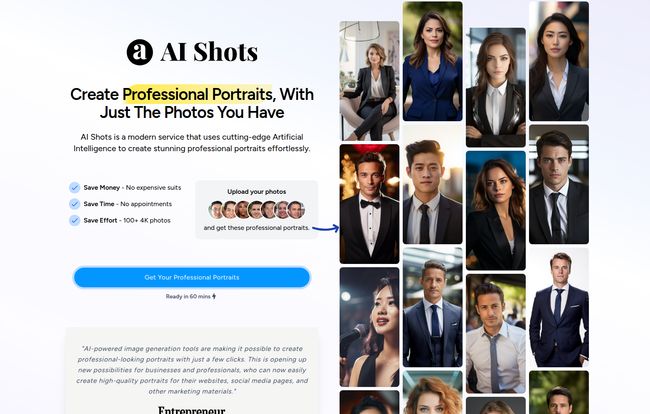
Visit AI Shots
The Good, The Bad, and The AI
Alright, let’s get into the nitty-gritty. No tool is perfect, especially not one that costs less than a movie ticket. Here’s my breakdown of the highs and lows.
What I Absolutely Loved
First off, the price. It’s almost comical. For $9, you get over 100 photos. Let that sink in. A single professional headshot from a photographer can easily cost $150-$300. Here, you’re getting a massive library of options for the price of a burrito. This makes professional imaging accessible to literally everyone—students, job seekers, freelancers, you name it.
Then there’s the speed. The 60-minute delivery is a game-changer for anyone in a pinch. Need a headshot for a press release that’s due tomorrow? No problem. It’s on-demand branding.
And the variety is just plain fun. The images on their site show everything from a classic ‘Studio’ look to ‘Office’ and ‘Smart Casual.’ But they also have creative packs like ’90s Yearbook’ and ‘Indie Rocker.’ So you can get your serious LinkedIn photo and a hilarious new profile pic for your personal accounts all in one go.
Some Things to Keep in Mind
Now for the reality check. The biggest potential issue is the one I mentioned before: likeness. If you give it poor-quality photos, the AI can get… creative. You might get images where the eyes are slightly off, or the facial structure isn’t quite right. It’s the uncanny valley effect. While many results can be spot-on, you should expect a few duds in your batch of 100+ photos. That’s just the nature of the beast right now.
The other major point is their no-refund policy. This is a big one. You’re paying for the computational power and the AI’s time, not for a guaranteed perfect outcome. It’s a $9 gamble. Given the low cost, it’s not a huge risk, but it’s something you need to be aware of before you click ‘buy’. You have to be okay with the possibility that you might not love every single photo.
Let’s Talk Money: A Cost-Benefit Breakdown
As someone who’s constantly analyzing CPC and ROI, the value proposition here is fascinating. Let’s break it down in a simple table.
| Factor | Traditional Photographer | AI Shots |
|---|---|---|
| Cost | $150 – $500+ | $9 |
| Turnaround Time | 1-3 weeks | ~60 minutes |
| Number of Images | 5-10 edited photos | 100+ 4K photos |
| Effort | Scheduling, travel, posing | Upload a few selfies |
Looking at it this way, the argument for at least trying AI Shots is pretty compelling, especially if you’re on a budget. The potential savings in both time and money are massive.
Who Is This Tool Actually For?
In my opinion, AI Shots is a perfect fit for a huge group of people. If you’re a job seeker trying to polish your online presence, a freelancer building a personal brand, a startup founder needing quick assets, or a student entering the professional world, this is a no-brainer. It’s also fantastic for anyone who is just deeply uncomfortable in front of a camera and wants to avoid a traditional shoot at all costs.
Who isn’t it for? Probably a high-level CEO who needs a specific, highly-art-directed portrait for the company’s annual report that matches existing brand photography to a T. In situations where you need absolute control and a human artistic touch to guide the session, a professional photographer is still the way to go. But for 90% of everyday professional needs? AI is becoming a ridiculously viable option.
The Bigger Conversation About AI in Creative Work
It’s impossible to talk about a tool like this without touching on the bigger conversation happening in the creative industry. Are tools like AI Shots going to put photographers out of business? I really don’t think so. Not the good ones, anyway.
What it’s doing is creating a new category of image creation. It’s serving a market that, frankly, was underserved before—the people who couldn’t or wouldn’t spend $300 on a headshot. A great photographer provides an experience, a vision, and a human connection that an algorithm can’t replicate. But for quick, affordable, and high-quality enough images, AI is an incredible tool. It’s not a replacement; it’s a democratization of technology. It’s giving more people access to looking good online, and I find that hard to argue with.
My Final Verdict on AI Shots
So, is AI Shots worth the $9? In my book, yes. A thousand times yes. It’s an incredibly powerful tool that solves a common problem with shocking efficiency and affordability.
You have to go in with the right expectations. Understand that you’re rolling the dice a little, that the quality of your input photos is paramount, and that a no-refund policy means you own the results, for better or worse. But for the potential to get over 100 usable, professional, and even fun portraits in an hour, it’s a risk I’d take any day of the week. This is one of those little tech innovations that genuinely makes life easier, and it’s a fascinating peek into the future of personalized digital content.
Your Questions Answered
- How much does AI Shots cost?
- The standard package is incredibly affordable at just $9 USD. This gets you over 100 4K photos with a 60-minute turnaround time and 10 different shooting locations/styles.
- How quickly will I get my photos?
- The turnaround is one of its best features. You can expect to receive your full gallery of AI-generated portraits in about 60 minutes after you complete your purchase and upload.
- Will the headshots really look like me?
- This is the million-dollar question! The answer is: it depends. The final likeness is heavily influenced by the quality and variety of the photos you upload. For best results, use clear, well-lit photos from different angles. Some images will be perfect, others might look slightly off—it’s part of the process.
- What if I don’t like the results? Can I get my money back?
- This is an important one: AI Shots has a strict no-refund policy. You are paying for the computational process, so it’s best to view the $9 as a small investment with a high potential payoff but no guarantee.
- What kind of photos should I upload for the best results?
- Variety is key! Upload a mix of high-quality, clear selfies. Include shots from the front and sides of your face, with different facial expressions, and in different lighting conditions. Avoid photos with sunglasses, hats, heavy makeup, or other people in them.
- Can I actually use these on my LinkedIn profile?
- Absolutely! That’s one of the primary use cases. The professional styles like ‘Office’ and ‘Studio’ are perfect for making your LinkedIn, resume, or company bio look sharp and up-to-date.


