
Categories: AI Agent, AI Assistant, AI Chatbot, AI Copilot, AI Customer Service, AI Productivity Tools
Command AI Review: Is This Non-Annoying User Help?

You sign up for a shiny new SaaS tool, excited to get started. And then it begins. A barrage of pop-ups, a five-minute-long “mandatory” product tour that you just click through, and a chatbot in the corner that feels less like a helpful assistant and more like a digital paperclip with an attitude problem. We’ve been conditioned to hate user assistance. We close the pop-ups, ignore the tours, and pray we never have to talk to the bot.
It’s a massive problem for product and marketing teams. How do you guide users to those amazing, aha! moments if they’ve already built a fortress of annoyance around themselves? For years, I’ve seen teams wrestle with this, balancing the need for guidance with the risk of just plain irritating their user base into churning.
So when I came across Command AI, their tagline—or philosophy, really—caught my eye: “Don’t annoy your users.” Bold. I was intrigued, and a little skeptical. Could this be the one? The platform that finally cracks the code on helpful, proactive, and… non-annoying user assistance?
So, What Exactly is Command AI?
At its heart, Command AI is a user assistance platform. But that’s a bit like calling a supercar “a mode of transport.” It doesn’t quite capture the magic. It’s a generative-first AI platform built to help product, marketing, and customer success teams create truly personalized and contextual experiences for their users. Think of it less as a series of pre-programmed pop-ups and more like a helpful ghost in the machine, gently guiding users without ever getting in their way.
Not Just Another Chatbot: The “Nudge” Philosophy
The first big piece of the puzzle is what they call AI-Powered Nudges. This isn’t your typical, blunt-force product tour. Nudges are subtle, timely, and smart. They can take the form of checklists to guide a new user through setup, short tours that highlight a specific feature you know they haven’t used yet, or even in-app surveys that ask for feedback at the perfect moment. Because it’s AI-powered, it’s not just showing the same message to everyone. It looks at user behavior to deliver the right nudge to the right person at the right time. Game changer.
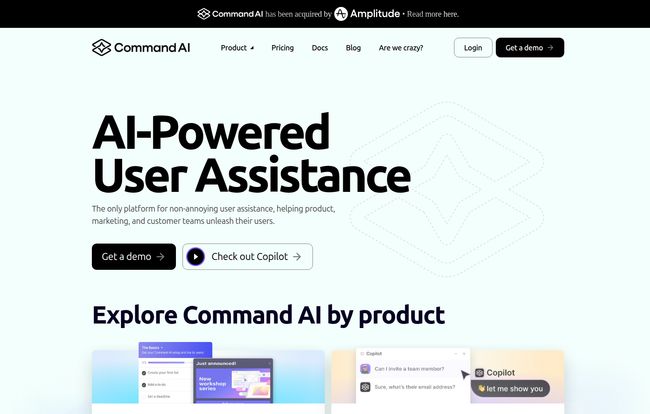
Visit Command AI
Meet Your New AI Copilot
The second pillar is the AI Support Agent, or Copilot. This is where things get really interesting. It’s an in-app assistant that users can interact with using natural language. They can ask questions like, “How do I set up an integration with Slack?” or “Where do I find my billing history?” and get an instant, AI-generated answer. It can even perform actions for the user. This frees up your human support team to handle the truly complex issues while giving users the instant gratification they crave.
It’s a far cry from the old-school chatbots that could only point you to a help doc. This is about understanding intent and providing immediate value.
A Closer Look at the Command AI Features
When you pop the hood, you see a platform that’s been thoughtfully designed. It’s not just a couple of cool AI tricks; it’s a comprehensive system. You have the AI-Guided Nudges we talked about—tours, checklists, announcements, and surveys all working in concert. Then there’s the AI Support Agent (Copilot) with its natural language search and personalized content suggestions. It even has a Co-browse feature, which is fantastic for high-touch support situations where you need to see what the user is seeing.
And for the tech-minded folks, the platform is built on a generative-first AI model and comes with robust API integrations. The fact that you can connect it to your existing tools without a massive engineering headache is a huge plus. Some of the names they’re already working with, like Superhuman, Gusto, and Freshworks, tells me this thing is built to scale.
Let’s Talk About Command AI Pricing
Alright, the all-important question: what’s this going to cost? I appreciate that Command AI is pretty transparent with their pricing, at least for their first two tiers. So many companies hide this behind a “Contact Sales” wall, which drives me nuts.
They break it down into three main plans, all billed annually:
| Plan | Price (per month, billed annually) | Best For | Key Features |
|---|---|---|---|
| Starter | $249 | Startups and small businesses | Up to 2,500 MAUs, 5 Nudges, GPT-3.5 Turbo, Basic Branding |
| Growth | $599 | Growing companies | Up to 10,000 MAUs, 20 Nudges, GPT-4 Turbo (optional), API Access, Co-browse |
| Enterprise | Custom | Large-scale operations | Unlimited MAUs/Nudges, GPT-4 Turbo standard, SOC 2/HIPAA, Custom Models |
The Starter plan at $249/mo seems like a solid entry point for a startup that’s serious about nailing its user onboarding from day one. You get the core functionality and can support up to 2,500 monthly active users.
The Growth plan at $599/mo is where it gets more powerful. The jump to 10,000 MAUs, more Nudges, API access, and the option for the more advanced GPT-4 Turbo model makes this the sweet spot for established SaaS companies looking to reduce churn and improve feature adoption.
The Enterprise plan is the classic “let’s talk” tier. This is for the big leagues, with unlimited everything, dedicated support, and crucial compliance features like SOC 2 and HIPAA. It’s good to know they have a solution that can grow with you.
My Honest Take: The Good, The Bad, and The AI
So, after digging in, what’s my verdict? I’m genuinely optimistic. This feels like a step in the right direction for user assistance.
What I Really Like
The whole “non-annoying” philosophy is more than just marketing fluff; it’s baked into the product design. The focus on proactive, personalized nudges over disruptive pop-ups is exactly what the industry needs. The integration of a powerful AI Copilot also feels like the future of customer support. I also love the clear pricing tiers and the fact that even the Starter plan is quite robust. It makes the platform accessible.
A Few Caveats to Consider
Of course, no tool is perfect. The effectiveness of any AI platform, including this one, is heavily dependent on the quality of the data it’s trained on. You’ll need good help documentation and a clear understanding of your user journeys to make the most of it. There’s always the small risk of AI hallucination, though I suspect they have good guardrails in place. And while the basic integrations are no-code, more complex setups might require some technical know-how. Finally, for the big Enterprise features, you still have to get on a call to talk pricing, which is standard but always a slight drag.
Who is Command AI Actually For?
I see this being a perfect fit for a few key groups:
- SaaS Product Managers: If you’re struggling with feature adoption or high drop-off rates during onboarding, this is practically built for you.
- Marketing Teams: Imagine being able to announce new features or run surveys directly in-app, in a way that users actually engage with.
- Customer Success & Support Teams: The AI Copilot could be a force multiplier, handling the bulk of common questions and freeing up your team to provide truly exceptional human support when it’s needed most.
If you’re in one of those roles and you’ve ever screamed at your screen because of a bad user onboarding experience, you should probably check this out.
Frequently Asked Questions about Command AI
- What is Command AI in simple terms?
- It’s an AI-powered platform that helps software companies guide their users with smart, subtle “Nudges” (like tours and checklists) and an AI assistant (Copilot) that provides instant support without being annoying.
- How is Command AI different from a regular chatbot?
- A regular chatbot often follows a strict script or just searches a knowledge base. Command AI’s Copilot uses generative AI to understand natural language and provide personalized answers and even perform actions. The “Nudges” are also proactive and personalized, unlike a static chatbot that just waits for a question.
- What kind of companies use Command AI?
- Their website shows a range of high-growth tech companies and established players, including brands like Gusto, Freshworks, Yotpo, and Superhuman.
- Is there a free trial for Command AI?
- The pricing page focuses on booking a demo. A demo is likely the best way to see if it fits your specific needs and to discuss trial options with their team.
- Do I need to be a developer to set it up?
- They mention that integrations are available on all plans and don’t require code, which suggests the basic setup is designed to be user-friendly for non-technical folks. More advanced API work would likely require some dev resources.
- What is the difference between GPT-3.5 and GPT-4 Turbo in their plans?
- GPT-4 Turbo is a more advanced and capable AI model than GPT-3.5. It generally provides more accurate, nuanced, and context-aware responses, making it better for complex user queries. It’s a premium feature included in the higher-tier plans.
Is Command AI Worth a Shot?
I think so. We’re at a point where bad user experience is no longer acceptable. Users have too many options, and their patience is thin. A tool that promises to not only solve this but to do it with intelligence and a bit of grace is compelling. Command AI seems to be taking a thoughtful, user-centric approach to a problem that has plagued software for decades.
It’s not just about adding an AI widget; it’s about fundamentally rethinking how we help people use our products. And honestly, its a refreshing change of pace. Maybe, just maybe, the future of user help doesn’t have to be so annoying after all.


