
Categories: AI Assistant, AI Knowledge Base, AI Productivity Tools, AI Summarizer, AI Workflow, AI Writing Assistants
Elephas Review: Is This Your Mac’s New Super Brain?

We’re all drowning. Drowning in a sea of PDFs, random notes, saved articles, and half-forgotten brilliant ideas scattered across a dozen apps. For years, we’ve been told the solution is a “second brain.” A noble idea, for sure. But for most of us, myself included, my second brain often looks more like a digital junk drawer after a particularly chaotic garage sale. It’s organized chaos on a good day, and a straight-up fire hazard on a bad one.
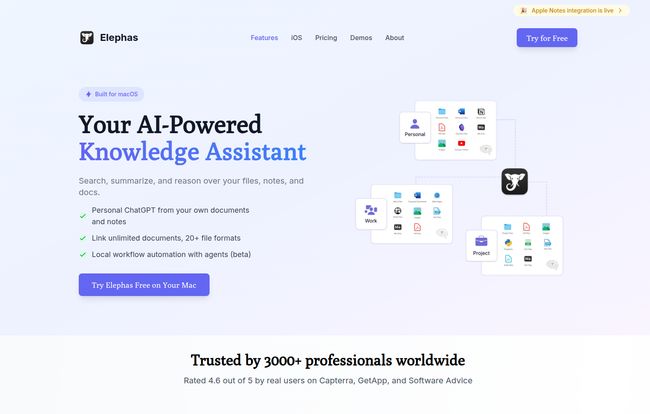
So, when I kept hearing whispers about Elephas, I was skeptical. Another AI tool promising to change my life? Yawn. We’ve all seen them. Most are just fancy wrappers for ChatGPT that don’t really solve the core problem: connecting AI to my actual stuff. But Elephas claimed to be different. It called itself a personal AI assistant that lives on your Mac and works with your data. No sending my private strategy documents off to some mysterious cloud server. Okay, you have my attention.
I decided to take the plunge, and after a few weeks of living with this thing, I have some thoughts. A lot of them, actually.
Visit Elephas
What Exactly Is Elephas? (And Why It’s Not Just Another ChatGPT Wrapper)
This is the most important bit to get. Elephas isn’t here to write you a sonnet about your dog (though it probably could). Its main purpose is to be an intelligent layer on top of your own information. Think of it less like a know-it-all chatbot and more like a brilliant research assistant who has exclusively studied your life’s work. They’ve read every book in your personal library, every note you’ve ever scribbled, and nothing else.
Because of this, it doesn’t ‘hallucinate’ or make stuff up. We’ve all been there, right? Asking an AI for a source and it confidently invents a non-existent academic paper. Infuriating. Elephas can’t do that, because if the information isn’t in the documents you’ve provided, it doesn’t know it. This is a feature, not a bug. It draws a hard line between your curated knowledge and the wild, unpredictable expanse of the internet. For a professional, that distinction is gold.
My Experience Getting Set Up
Getting started was surprisingly straightforward. You download the app, give it permission to, well, be your brain, and then start feeding it. You point it to the folders on your Mac where your knowledge lives. For me, that meant my ‘Work’ folder, my ‘Swipe Files’, a giant folder of SEO research PDFs, and even my Notion and Obsidian vaults. It handles over 20 file formats, including the big ones like PDF, DOCX, PPTX, and even HTML files.
I’ve seen some people mention the interface can be a little complicated, and I get it. This isn’t a single-button-solution for your grandma. There’s a depth to it. You can create custom commands, build automated workflows, and really fine-tune how it works. It felt less like a complication and more like a cockpit with a lot of controls. It takes a minute to learn what they all do, but once you do, you feel like you can fly. A little bit of a learning curve for a whole lot of power? I’ll take that trade any day.
The Super Brain in Action: Putting Elephas to the Test
Okay, so it’s all set up. Now for the fun part. The core of Elephas is what they call the “Super Brain.” Here’s how it stacked up in my daily grind.
Querying My Own Knowledge Base
This felt like magic. Genuinely. I have notes from SEO conferences, client meetings, and project briefs scattered everywhere. I threw a question at Elephas: “Based on my notes, what were the top 3 recurring themes from the BrightonSEO conference last year?” I held my breath. In seconds, it scanned multiple documents—a PDF of the schedule, a text file of my frantic notes, and a few saved web pages—and spat out a perfect summary. It even cited which documents the info came from. No more frantic searching through folders. A total game-changer. Seriously.
The Magic of the Super Command
Beyond just chatting with your data, there’s the ‘Super Command’ feature. It’s a universal text box (summoned with a keyboard shortcut) that lets you use AI anywhere. I was writing an email in Apple Mail and needed to sound a bit more professional. I highlighted my sloppy first draft, hit the shortcut, and typed “make this more concise and professional.” Boom. Done. I’ve used it in Google Docs, Slack, and even Messages. It’s like having a writing assistant built into every single app on your Mac.
Integrating With My Workflow
As a heavy Obsidian user, I was thrilled to see it integrates directly. It doesn’t try to replace my favorite tools; it just makes them smarter. And the cross-platform access is the cherry on top. I can be on my iPhone, use the Elephas keyboard to query my knowledge base that lives on my Mac back at the office, and get an answer instantly. It’s the kind of smooth integration that Apple users dream about.
The Big Deal About Privacy: Can You Trust It?
Here’s the part where I get serious for a second, especially for my fellow business owners and SEOs. Privacy. We handle sensitive client data, unlaunched strategies, and proprietary information. The idea of feeding that into a public AI model gives me hives. Elephas addresses this head-on with a 100% offline mode. You can literally disconnect from the internet, and the core functionality of querying your own data still works. Your data stays on your device. Period. This isn’t just a feature; it’s the entire foundation of trust for a tool like this. It’s a massive, massive differentiator in today’s market.
Let’s Talk About the Price Tag
Alright, Elephas isn’t free. Good tools rarely are. It’s a subscription service, and when I last checked their pricing page, it was broken down into a few tiers. Let’s lay it out simply. (Note: Prices can change, so always check their site for the most current info!)
| Plan | Price (Monthly) | Best For |
|---|---|---|
| Standard | $14.99 | Individuals and students who primarily use one Mac and want to organize their personal knowledge base. |
| Pro | $19.99 | Professionals and power users who need multi-device support (Mac, iPhone, iPad), PKM integrations, and support for audio/video files. This is the sweet spot, in my opinion. |
| Pro+ | $24.99 | The serious user with unlimited devices and a massive knowledge base who wants no-holds-barred access with unlimited tokens. |
Is it worth it? For me, yes. If I calculate the hours I’ve saved from manually searching for information, the monthly cost of the Pro plan pays for itself pretty quicky.
The Not-So-Perfect Parts
No tool is perfect, and it’d be disingenuous to pretend Elephas is. There are a couple of things to be aware of.
First, the big one: it’s for the Apple ecosystem only. If you’re a Windows or Android user, you’re out of luck for now. This is a walled garden, and while it’s a very nice garden, the walls are high. Sorry, my PC friends.
Second, as I mentioned, there is that learning curve. To get the most out of Elephas, you need to invest a little time. You have to think about how to structure your files, you have to learn the commands, and you might want to build some custom workflows. If you’re looking for a simple AI chatbot, this aint it. This is a power tool for knowledge workers.
My Final Verdict: Is Elephas Worth It?
After a few weeks, Elephas has burrowed its way into my daily workflow. It didn’t just add a new button to my screen; it fundamentally changed how I interact with my own information. That chaotic digital junk drawer is starting to feel like a meticulously organized library with a genius librarian on call 24/7.
So, who is Elephas for? It’s for the writer, the researcher, the student, the marketer, the consultant—any knowledge worker living in the Apple ecosystem who feels overwhelmed by the sheer volume of their own data. It’s for the person who loves the idea of a ‘second brain’ but needs an actual brain to help manage it.
Who is it not for? Windows users, obviously. But also, it’s not for the casual user who just wants to ask an AI to tell them a joke. This is a professional-grade tool with a corresponding price and learning investment.
For me, it’s a keeper. It solves a real, tangible problem in a way that is both powerful and, crucially, private. It’s the AI assistant I was waiting for, even if I didn’t quite know it.
Frequently Asked Questions
Is Elephas safe and private to use?
Yes, absolutely. This is one of its main selling points. With its 100% offline mode, all your data and queries can be processed directly on your device, meaning your sensitive information never leaves your computer. This makes it significantly more private than most cloud-based AI tools.
What’s the main difference between Elephas and ChatGPT?
The simplest way to think about it is this: ChatGPT’s knowledge comes from a vast, public snapshot of the internet. Elephas’s knowledge comes from your personal files and documents. Elephas gives you answers based on your own curated information, while ChatGPT gives you answers based on its general training data.
Does Elephas work with tools like Notion and Obsidian?
Yes. The Pro plan offers seamless integration with popular Personal Knowledge Management (PKM) tools like Notion, Obsidian, DevonThink, and Roam Research. It doesn’t replace them but rather enhances them by allowing you to use its AI capabilities on the content within them.
Can Elephas really run completely offline?
Yes. The core ‘Super Brain’ feature, which lets you chat with your own documents, is designed to work entirely offline. This ensures maximum privacy and accessibility, even when you don’t have an internet connection.
Is there a free trial for Elephas?
The website prompts you to “Try it now,” which usually implies a trial period or a money-back guarantee. I’d recommend checking the official Elephas website for the most up-to-date information on any trial offers they currently have.
Is Elephas a one-time purchase or a subscription?
Elephas operates on a SaaS (Software as a Service) model, which means it requires a recurring monthly or annual subscription rather than a one-time payment. This model allows for continuous updates and support.
Conclusion
In a world overflowing with information, tools that help us find the signal in the noise are invaluable. Elephas does more than that; it helps you create the signal in the first place by understanding the context of your own digital world. It’s a sophisticated, private, and powerful assistant for anyone serious about managing their knowledge. If you’re a Mac user feeling the pain of information overload, you owe it to your sanity to give Elephas a look. It just might be the super brain your second brain has been waiting for.


