Categories: AI Copilot, AI Email Assistant, AI Grammar Checker, AI Knowledge Management, AI Productivity Tools, AI Summarizer, AI Translate
Flot AI Review: My New AI Sidekick for Everything?

How many browser tabs do you have open right now? If you’re anything like me, a fellow digital native juggling client work, content creation, and a desperate attempt to stay on top of industry news, the answer is probably “too many.” And in at least three of those tabs, there’s probably some version of an AI chatbot. One for writing, one for brainstorming, maybe another for summarizing that monstrously long report you were supposed to read yesterday.
It’s a special kind of digital chaos, isn’t it? The constant copy-pasting, the context switching that fries your brain… it’s the opposite of productive. For months, I’ve been muttering to myself that someone, somewhere, needs to build a universal remote for all this AI goodness. A tool that just… works. Everywhere.
Well, I think I might have found it. It’s called Flot AI, and it’s been making some quiet waves. I’ve been putting it through its paces, and this isn’t your standard, hyped-up product review. This is a real-world look at whether Flot AI can actually deliver on its promise to be an all-in-one AI assistant that simplifies your life, rather than just adding another layer of complexity.
So What Is Flot AI, Really?
Forget the marketing jargon for a second. In simple terms, Flot AI is like a Swiss Army knife for your brain, powered by AI, that follows you around the internet. It’s a small, unobtrusive tool that integrates directly into your workflow, whether you’re in a Google Doc, your email client, WordPress, or even a social media site. You highlight text, press a shortcut, and a powerful menu of AI options appears. No more switching tabs.
The biggest deal here is that it’s not just one AI. It hooks you into the best of the best—models like OpenAI’s ChatGPT (including GPT-4), Anthropic’s Claude, and Google’s Gemini—all from the same interface. As an SEO, this is huge. I know that Claude can be a bit more creative for blog post ideas, while GPT-4 is a beast for logical tasks and data analysis. Flot AI lets you pick the right tool for the job without the hassle.
Visit Flot AI
It’s built on three core pillars: helping you write better, read faster, and, most intriguingly, remember everything.
Breaking Down the Core Features of Flot AI
This is where things get interesting. Let’s look at the engine under the hood.
Your New Universal AI Writing Assistant
This is the feature most people will gravitate towards first. The writing assistance in Flot AI feels… ambient. It’s just there when you need it. I was replying to a pretty dense client email the other day, and instead of tabbing over to ChatGPT to rephrase a sentence to sound more professional, I just highlighted my clunky draft, and Flot gave me five better options instantly. It was a small thing, but those small things add up to significant time savings and less mental friction.
You can use it to draft entire articles, brainstorm social media captions, fix grammar, or change the tone of your text on the fly. And with custom prompts and templates, you can really dial it in for your specific, repetitive tasks. It’s a true workflow enhancement.
A Speed-Reading Superpower
We all have to consume a ton of information. Industry reports, competitor blog posts, long email threads. Flot AI’s reading feature is a godsend. You can highlight a whole webpage or a PDF and ask it to give you a five-bullet summary. Or a one-paragraph abstract. Or to translate a section from another language. I’ve used it to get the gist of a 30-page SEO case study in about 90 seconds. Is it a perfect replacement for a deep read? No. But for quickly assessing if something is worth your time, it’s phenomenal.
The “AI Memory” That Genuinely Impressed Me
Okay, this is the standout feature for me. This is the one that made me go, “Oh, wow.” Flot AI has a feature called AI Memory. You can highlight any piece of information—a statistic, a client preference, a brilliant quote, a project detail—and save it to your “memory.”
Later, you can just ask Flot AI a natural language question, like, “What was that stat I saved about bounce rates on mobile?” and it will pull it up for you. Instantly. It’s like having your own personal, searchable knowledge base built from the things you decided were important. For someone doing research or managing multiple clients, this is an absolute game-changer. It solves the “I know I read that somewhere…” problem that plagues my work life. This alone feels like it’s worth the price of admission.
My Honest Take: The Good and The Not-So-Good
No tool is perfect, right? I’m always skeptical of anything that claims to do it all. Here’s my unfiltered take.
What I genuinely like is the seamlessness. The reduction in friction is real. The amount of time I’ve saved by not switching contexts is noticeable, and frankly, my brain feels less cluttered at the end of the day. The multi-model access is also a pro-level feature that you don’t see in many similar tools. And as I’ve already gushed, the AI Memory is brilliant.
However, it’s not a complete free-for-all. The plans come with monthly credit limits and caps on “Memory Units.” This is pretty standard for AI tools that rely on expensive APIs, but you need to be aware of it. If you’re a super-heavy user, you could potentially burn through your credits before the month is up. The other little thing is that the lifetime deal I found requires you to activate it within 60 days of purchase—a minor hoop to jump through, but worth mentioning.
Let’s Talk Money: Flot AI Pricing and That Lifetime Deal
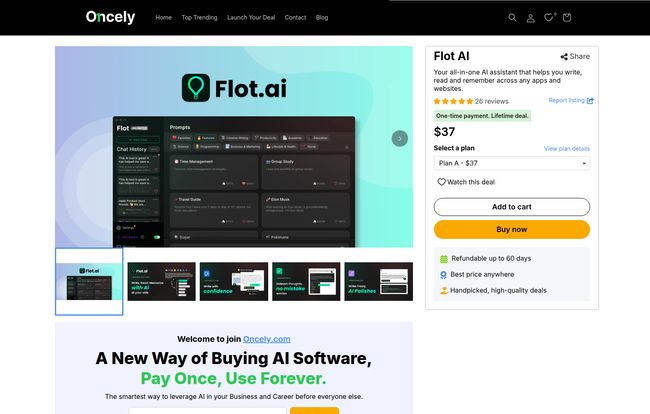
In a world of endless SaaS subscriptions that slowly bleed your bank account dry, finding a good lifetime deal (LTD) feels like striking gold. I found Flot AI on a platform called Oncely, offering a one-time purchase model. This is immediately more attractive to me than yet another $20/month charge.
Here’s a quick breakdown of the plans they were offering:
| Plan | Price (One-Time) | Details |
|---|---|---|
| Plan A | $37 | 250 credits/month, 1,200 Memory Units |
| Plan B | $117 | 600 credits/month, 3,000 Memory Units |
| Plan C | $197 | 1,000 credits/month, 5,000 Memory Units |
In my opinion, Plan A is great for students or casual users who want to dip their toes in. For professionals like me—marketers, writers, developers—Plan B or C is probably the sweet spot. Given the power of the tool, a one-time payment of under $200 for 1,000 credits a month feels like a pretty solid long-term investment.
Who Is This For? And Who Should Probably Skip It?
So, who should pull the trigger on Flot AI?
I’d say it’s a near-perfect tool for content creators, marketers, SEOs, researchers, students, and anyone whose job involves a lot of writing and reading online. The ability to streamline your workflow and build a personal knowledge base is incredibly powerful. It’s for people who value efficiency and want to integrate AI more naturally into their existing habits.
Who should maybe pass? If you only use AI once in a blue moon, the free versions of standard chatbots might be enough for you. Also, if you’re an enterprise-level power user who needs unlimited everything and advanced team features, you might need a more specialized, and much more expensive, corporate solution. But for the vast majority of us solo operators and small teams, Flot AI hits a real sweet spot.
The Final Verdict: Is Flot AI Worth the Hype?
After spending some quality time with it, I’m genuinely impressed. Flot AI isn’t just another AI wrapper. It’s a thoughtfully designed productivity tool that solves a very real problem: the fragmentation of our digital workspaces. It brings the power of multiple top-tier AIs directly to where you work, eliminating the constant, frustrating context switching.
The AI Memory feature alone elevates it from a “nice-to-have” gadget to a truely useful tool that can have a lasting impact on your personal knowledge management. While the credit limits mean you have to be mindful of your usage, the value offered, especially through the lifetime deal, is undeniable.
For me, it’s a keeper. It has smoothed out the rough edges of my daily grind and made me feel just a little bit more organized and in control. And in this chaotic digital world, that’s a win I’ll take any day.
Frequently Asked Questions about Flot AI
Here are a few questions I had myself, and the answers I found.
- 1. Does Flot AI work on both Mac and Windows?
- Yes, it’s designed to work as an application and extension across desktop operating systems. It integrates with the apps and websites you use on your computer.
- 2. What’s the difference between a “credit” and a “memory unit”?
- Think of credits as your currency for actions. Each time you ask the AI to write, summarize, or translate something, it costs credits. The cost can vary depending on the complexity of the task and the AI model used. Memory units are different; they measure the storage capacity for the AI Memory feature. Saving a piece of information consumes a small number of memory units.
- 3. How does Flot AI compare to a standard ChatGPT Plus subscription?
- ChatGPT Plus gives you priority access to OpenAI’s latest models in one specific interface. Flot AI’s advantage is its integration across all your apps and websites, access to multiple models (not just OpenAI’s), and the unique AI Memory feature. It’s less about having one powerful destination and more about having AI available everywhere.
- 4. Can I use Flot AI on my phone?
- Based on the information available, Flot AI is primarily a desktop-focused tool, designed to enhance your workflow on a computer where you do most of your heavy lifting. Mobile functionality isn’t its main focus.
- 5. Is my data safe with the AI Memory feature?
- This is a critical question for any AI tool. According to Flot AI’s founders, the content in your AI memory is securely stored and private to you. However, as with any cloud-based service, it’s always good practice to review the company’s privacy policy and avoid storing extremely sensitive personal or financial information.
- 6. Is that lifetime deal on Oncely legitimate?
- Yes, platforms like Oncely, AppSumo, and others specialize in offering legitimate lifetime deals for new and growing software products. It’s a common strategy for SaaS companies to attract early adopters. Just make sure to read the terms, like the 60-day activation period!