
Categories: AI App Builder, AI Code Generator, No-Code&Low-Code
Gemini Coder Review: An AI App Generator Worth a Look?

If you’ve spent any time in the web development world, you’ve seen the promises. A new tool drops every week claiming it’ll build your entire SaaS business while you sleep. Most of them, frankly, spit out a tangled mess of code that looks like it was written in 2004. So when I first heard about Gemini Coder, another “text prompt to web app” generator, my skepticism meter was cranked to eleven.
But then I saw the tech stack: Google’s Gemini API, Next.js, and Tailwind CSS. Okay, you have my attention. That’s not some clunky, proprietary framework; that’s the stuff we’re actually using to build cool things today. It’s the stack I’d choose myself for a new project. So, I decided to put my cynicism aside, roll up my sleeves, and see if this thing could actually walk the walk.
So What Exactly Is Gemini Coder?
Think of it less as a magic button and more like a hyper-efficient junior developer who’s had way too much coffee. You give it a clear instruction—a prompt—describing the web application you want to build. For example, “Create a personal portfolio website with a home page, an about page, and a contact form.”
Gemini Coder takes that prompt, feeds it to Google’s powerful Gemini AI, and then gets to work. It doesn’t just generate some random HTML. It scaffolds a complete, functional web application using Next.js for the structure and React components, and styles it all with Tailwind CSS. It’s like skipping the first five hours of every new project—all the tedious setup, file creation, and config juggling. All that stuff that makes you question your life choices. Gone.
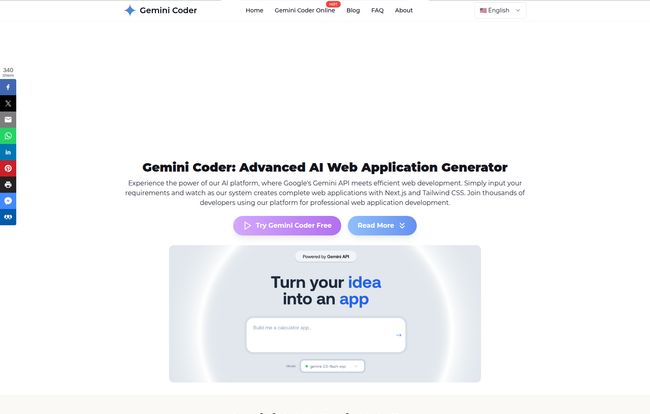
Visit Gemini Coder
Taking It for a Spin: My First Impressions
The process is refreshingly simple, almost suspiciously so. The website says it’s three steps, and it pretty much is.
- Describe Your Application: This is the prompt part. I started with something simple: “A landing page for a fictional coffee subscription service called ‘Rocket Fuel Beans’. It should have a hero section with a call-to-action, a features section, and a simple footer.”
- Generate and Preview: You hit the button and wait. And you don’t wait long. In about a minute, a preview of my ‘Rocket Fuel Beans’ site popped up right in my browser. No cloning repos, no `npm install`, no dependency hell. Just… there it was. Live.
- Download Your Code: This is the best part. You’re not locked into their platform. You can see the generated code right next to the preview, and with one click, you download a ZIP file containing the entire Next.js project. You can `cd` into it, run `npm install`, and you’re off to the races on your own machine.
The in-browser code editor is a nice touch. You can make quick tweaks to the generated code and see the preview update instantly. It’s a fantastic feedback loop for refining your initial idea before you even commit to downloading it.
The Good, The Bad, and The AI
No tool is perfect, right? Especially in this wild west of AI-driven development. After playing around with a few different prompts, from simple blogs to more ambitious dashboards, I got a pretty good feel for where Gemini Coder really excels, and where you might hit a wall.
Where It Absolutely Shines
The speed is the most obvious win. For rapid prototyping, it’s a game-changer. You can test out five different layout ideas in thirty minutes. For indie hackers or agencies trying to quickly mock up a concept for a client, this is invaluable. It gets you from zero to something faster than any other method I’ve tried.
The code quality is also surprisingly clean. I was expecting a mess of `div` soup and inline styles, but what I got was well-structured React components and utility-first classes from Tailwind CSS. It’s readable, maintainable, and it follows modern best practices. It’s the kind of code you wouldn’t be embarrassed to push to GitHub. It’s a solid foundation to build upon, not a black box you have to fight against.
A Few Caveats to Keep in Mind
Now for the reality check. Your output is only as good as your input. The whole field of “prompt engineering” sounds a bit silly, but it’s a real thing here. A vague prompt like “make a cool website” will give you a vague, not-so-cool website. You have to be specific. Think like you’re giving instructions to a new intern: be clear, be precise, and define your terms. There’s a bit of an art to it, and it takes practice.
Also, let’s manage expectations about complexity. Can Gemini Coder build you the next Facebook? No. Not even close. It’s fantastic for generating front-end components, layouts, and entire static sites. But if you need complex backend logic, database integrations, or user authentication, you’re still going to have to write that code yourself. This tool builds the beautiful car body; you still have to install teh engine.
So, What’s the Damage? The Pricing Situation
Here’s the million-dollar question. According to their FAQ, Gemini Coder has a free version. This is awesome, and it’s not some crippled demo. You can genuinely build and download full applications to try it out and see if it fits your workflow. From what I can tell, this free tier is pretty generous.
The site does hint at “professional features” being available, which strongly implies a future or current paid tier. They don’t have a public pricing page up as of this writing, but this is a standard freemium model. I’d imagine paid plans might include things like:
- More complex or larger application generations
- Higher usage limits on the Gemini API
- Team collaboration features
- Priority support
For now, the free offering is more than enough to prove its worth. You can get a huge amount of value from it without ever pulling out your credit card.
Who Should Be Using Gemini Coder?
I see a few groups getting a massive boost from this.
Indie Hackers & Solopreneurs: This is your new best friend for validating ideas. Stop spending a week building a landing page and do it in an afternoon. If the idea gets traction, you have a solid Next.js codebase to build on. If it flops, you’ve lost minimal time.
Frontend Developers: Tired of building the same three-column layout and hero section for the tenth time? Let Gemini Coder handle the boilerplate. It frees you up to focus on the more challenging and creative parts of the job—the complex state management, the slick animations, the API integrations.
Students and New Developers: This is an incredible learning tool. Write a prompt describing a component and then study the code it produces. It’s like having a senior developer on call, showing you how to structure things properly in Next.js and Tailwind.
Frequently Asked Questions about Gemini Coder
1. Can I really use Gemini Coder for free?
Yes! Gemini Coder offers a free version that allows you to generate and download full web applications. They mention ‘professional features’ which suggests a paid plan might exist for more advanced needs, but the free tier is very functional for getting started.
2. What kind of websites can I build with it?
It’s best suited for modern, responsive front-end applications. Think landing pages, portfolios, blogs, marketing sites, and dashboards. Since it uses Next.js and Tailwind CSS, the output is flexible and high-quality.
3. Is the generated code actually any good?
In my experience, yes. It’s surprisingly clean. It uses a modern tech stack (Next.js, Tailwind) and generates readable, component-based code that follows best practices. It’s a great starting point, not a mess you have to clean up.
4. Can I use the generated code for commercial projects?
The website’s FAQ confirms that the system is perfect for professional and commercial applications, subject to their terms of service. As always, it’s a good idea to read the ToS for any tool you use in a commercial capacity.
5. Do I need to be a coder to use it?
To get the most out of it, yes, some coding knowledge is beneficial. While anyone can write a prompt and get a website, the real power comes from being able to take the generated code, understand it, and build upon it. It’s more of a developer’s assistant than a pure no-code platform.
My Final Verdict
I came in a skeptic and I’m walking away impressed. Gemini Coder isn’t here to take your job. It’s here to make your job better. It’s a powerful tool for obliterating the most tedious parts of front-end development, letting you jump straight to the creative and challenging work. It successfully bridges the gap between a simple idea and a tangible, well-structured codebase.
Will I use it for every project? No. But for whipping up a quick prototype, a new landing page, or just getting a Next.js project off the ground without the usual ceremony? Absolutely. It has earned a spot in my bookmark bar, and in this fast-moving industry, that’s high praise indeed.


