
Categories: AI Call Center, AI Meeting Assistant, AI Noise Cancellation, AI Note Taker, AI Recording, AI Summarizer, AI Transcription
Krisp AI Review: Is This The End of Noisy Calls?

Let’s paint a picture. You’re on the most important call of the quarter. You’ve prepped, you’ve got your coffee, you’re in the zone. Then, it happens. The dog decides right now is the perfect time to reenact the final scene from Marley & Me. The garbage truck starts its screeching symphony of reverse beeps. Or my personal favorite, the construction crew next door starts up a jackhammer that sounds like it’s drilling directly into your skull.
We’ve all been there. That frantic scramble for the mute button, the profuse apologies, the silent prayer that your client didn’t just hang up. For years, this was just… the cost of doing business remotely. A tax paid in professionalism points.
Then I found Krisp. And honestly, it feels a bit like cheating.
So, What is This Krisp Sorcery Anyway?
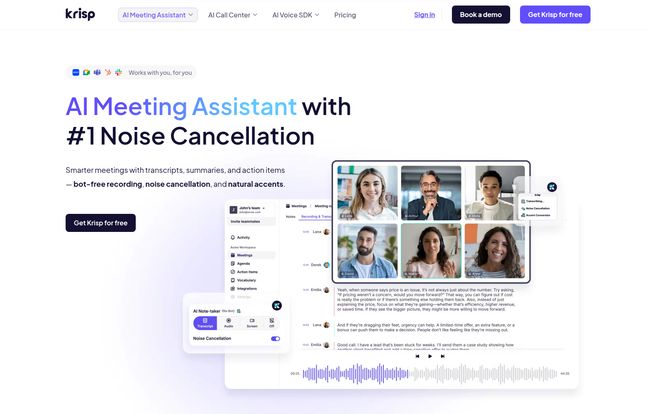
At its heart, Krisp is an AI-powered app that acts like a digital bouncer for your audio. It intelligently identifies and boots any sound that isn’t a human voice. The dog, the truck, the surprisingly loud keyboard clicks from your colleague—gone. It leaves only your crystal-clear voice. But calling it just a noise-cancellation tool is like calling a smartphone just a phone. It’s so much more.
It’s an AI meeting assistant, a transcriber, a note-taker, and even an accent converter. It’s a whole suite of tools designed to solve the one problem that plagues modern communication: clarity.
Visit Krisp
The Core Features I Actually Use
Look, a features list is just a list. Let’s talk about what actually makes a difference in the day-to-day grind.
The Legendary Noise Cancellation
This is the main event, and it does not disappoint. I was skeptical. I’ve tried the built-in noise suppression in Zoom and Teams, and they’re… fine. They’ll muffle a distant siren. Krisp, on the other hand, performs an exorcism on background noise. I once took a call while my neighbor was mowing his lawn right outside my window, and the person on the other end asked if I was in a recording studio. That’s not an exaggeration. It’s a lifesaver for anyone who doesn’t have a soundproofed home office—so, you know, most of us.
The Meeting Assistant That Deserves a Raise
Here’s where Krisp goes from a “nice-to-have” to a “how-did-I-live-without-this” tool. After a meeting, Krisp’s AI Meeting Assistant automatically generates a full transcript, a concise summary, and a list of action items. Think about that for a second. No more designating a frantic note-taker. No more arguing over who said what. It’s all there, documented and summarized. It’s like having a hyper-efficient intern who never takes a coffee break. The time I’ve saved on writing meeting recaps alone has probably paid for the Pro subscription ten times over.
A Quick Word on Accent Conversion
Now this is an interesting one. Krisp offers an “AI Accent Conversion” feature. The goal is to make communication smoother between people with different accents. Right now, it’s primarily focused on converting various Indian-English accents to a more standardized one. It’s a bold idea and speaks to the future of truly global, frictionless communication. While its current application is a bit niche, I’m fascinated by the potential. It’s a feature that shows Krisp isn’t just solving today’s problems; they’re thinking about tomorrow’s.
Who Is This Really For?
Initially, I thought Krisp was just for remote workers like me. But the more I use it, the more I see its value across the board.
- For the freelancer or remote worker: It’s a no-brainer. It instantly makes you sound more professional, regardless of your work environment.
- For sales teams: Imagine every discovery call and demo being perfectly clear, with automated notes and action items dropped into your CRM. It’s a productivity machine.
- For call centers: This is a game-changer. Reducing background noise for both the agent and the customer can drastically improve customer experience and reduce call times.
- For podcasters & content creators: It’s a cheap and effective way to get clean audio without investing in a ton of expensive gear.
They even have an SDK for developers to build this tech into their own apps, which is pretty cool.
Let’s Talk Money: Breaking Down Krisp’s Pricing
Okay, the million-dollar question. Or, in this case, the zero-dollar question. Because Krisp has one of the most generous free plans I’ve ever seen. Seriously.
On the Free plan, you get unlimited transcriptions and 60 minutes of noise cancellation and accent conversion per day. For many people, that’s more than enough. It’s the perfect way to try it out with zero risk.
If you live in meetings, the Pro plan is where it’s at. For about $8.60 a month (billed yearly), you get unlimited everything – noise cancellation, AI notes, meeting history. It’s an absolute steal for what it provides.
The Business & Enterprise plan, at $15 a month, adds admin controls, more accent conversion minutes, and other team-focused features. For larger teams and call centers, they have custom plans.
Honestly, the value proposition is just… solid. You can get so much functionality without ever paying a dime.
The Not-So-Perfect Bits (Because Nothing Is)
Alright, let’s be real. No tool is perfect. While I obviously love Krisp, there are a couple of things to keep in mind. First, the accuracy of teh AI transcription, while very good, depends heavily on your audio quality. If someone is mumbling or has a poor connection, the transcript will reflect that. It’s not magic, just very clever AI. Second, some of the best features, like unlimited noise cancellation, are behind the Pro paywall. But given the robust free tier, I can’t really complain about that.
My Final Verdict: Is Krisp Worth It?
Yes. A thousand times, yes. Krisp is one of those rare tools that delivered on its promise and then some. It seamlessly integrated into my workflow and solved a problem I didn’t even realize how much I was stressing over.
It’s the noise-canceling headphones for your entire digital life. It gives you the confidence to speak clearly and be heard, no matter what chaos is erupting around you. In an age of constant online meetings, that’s not just a feature; it’s a superpower.
Frequently Asked Questions about Krisp
Does Krisp work with Zoom, Google Meet, and other apps?
Yes, it does. Krisp works as a virtual microphone and speaker on your computer (Mac or Windows) and can be selected as your audio source in virtually any communication app, including Zoom, Microsoft Teams, Google Meet, Slack, Discord, and more.
Is Krisp actually free to use?
It is! The free plan is surprisingly robust, offering 60 minutes of daily noise cancellation and unlimited meeting transcriptions. It’s a fantastic starting point and may be all that many users need.
Is the AI transcription 100% accurate?
No AI transcription service is 100% perfect, and Krisp is no exception. However, its accuracy is very high, especially in calls with clear speakers and good audio quality. It’s more than sufficient for generating reliable meeting summaries and action items.
Will Krisp slow down my computer?
Krisp is designed to be lightweight and efficient. All audio processing happens locally on your device, but it’s optimized to have a minimal impact on your computer’s performance. I run it all day on a standard laptop with no noticeable slowdown.
Does Krisp listen to or store my conversations?
According to Krisp’s privacy policy, all audio processing happens directly on your device. Your voice and audio are not sent to or stored on their servers for the noise cancellation feature. For features like transcription, data is processed to generate the notes, but they have security measures in place to protect user privacy.
Stop Apologizing for Your Dog
Look, the modern workplace is noisy and chaotic. Krisp offers a simple, powerful way to bring a little bit of calm and a lot of clarity to it. Stop letting background noise undermine your professionalism. Give the free version a shot. You have nothing to lose except, well, the sound of your neighbor’s lawnmower.


