
Categories: AI Animation Generator, AI Anime Generator, AI Avatar Generator, AI Background Generator, AI Cartoon Generator, AI Colorize, AI Face Recognition, AI Models, AI Sketch Generator, AI Sticker Generator, AI Vtuber, AI Waifu Generator
Live3D Review: Your All-in-One VTuber Software?

Let’s have a real chat. The world of VTubing has absolutely exploded. It feels like just yesterday it was a niche corner of the internet, and now, virtual avatars are headlining events and pulling in massive audiences. If you’ve ever thought, “Hey, I could do that,” you’ve probably fallen down the rabbit hole of figuring out how. The tech can feel intimidating, right? You need an avatar, tracking software, stream assets… it’s a lot.
I’ve been in the SEO and traffic game for years, and I’m always watching for the next big wave. VTubing isn’t just a wave; it’s a full-on tsunami of creative content. So, when a tool like Live3D pops onto my radar, claiming to be an all-in-one suite, my curiosity gets the best of me. I had to see if it lives up to the hype or if it’s just another complicated program that promises more than it delivers. So, I spent some time with it. Here’s what I found.
So What Is This Live3D Thing Anyway?
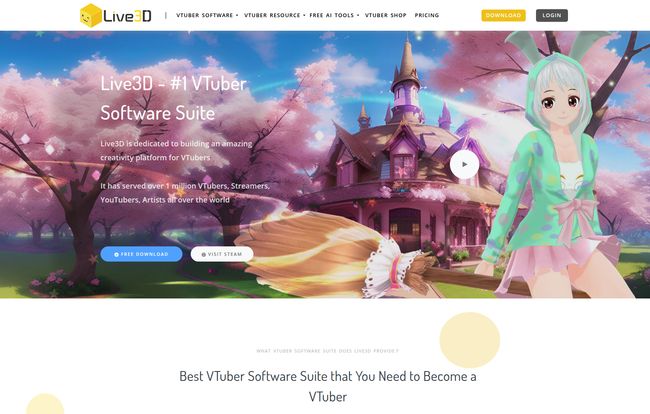
Okay, breaking it down. Live3D isn’t just one single program. It’s more like a toolbox, a whole suite of different apps that work together to get you from zero to virtual hero. The main components are the VTuber Maker, VTuber Editor, VTuber Gallery, and a neat little VTuber Extension. Think of it as a complete production studio for your digital persona.
Instead of hunting down a model from one artist, tracking software from another developer, and interactive doodads from a third-party site, Live3D tries to put it all under one roof. The goal is simple: make it easier for people like you and me to become a virtual YouTuber without needing a degree in computer animation. A noble goal, for sure.
Getting Started and First Impressions
My first thought upon launching it? “Okay, this is pretty clean.” The interface is modern and, thankfully, not as scary as some other 3D software I’ve wrestled with in the past. There’s a free version, which is always my first stop. I’m a big believer in ‘try before you buy’, and it’s a good sign when a company is confident enough to let you play around with their creation.
You can immediately start messing with pre-made models and see how the tracking feels on your own face. It’s that instant gratification that I think is so important for newcomers. It demystifies the process. You’re not staring at a blank screen of despair; you’re seeing an anime character mirror your expressions in real-time. And that, my friends, is a little bit of magic.
The Core Tools That Really Matter
Alright, let’s get into the meat and potatoes. A software suite is only as good as its individual tools, so how do Live3D’s features stack up?
Crafting Your Digital Self in the Avatar Editor
This is the fun part. The VTuber Maker and Editor are where you build or tweak your avatar. Live3D comes with a surprisingly rich library of models and assets right out of the box. We’re talking hairstyles, outfits, accessories… the whole nine yards. It feels like a high-tech dress-up game, and I mean that in the best way possible.
You can pick a base model and then just go to town with customization. For someone who doesn’t have the skills (or the budget) to commission a fully custom VRM model from scratch, this is a fantastic starting point. You can create a character that feels unique enough to be yours without spending weeks learning Blender. That’s a huge win.
Visit Live3D
Bringing Your Avatar to Life with Tracking
Here’s where the rubber meets the road. If the tracking is bad, the whole illusion falls apart. I was genuinely impressed with Live3D’s facial tracking. Using just my standard webcam, it picked up my head movements, eye blinks, and mouth shapes with solid accuracy. Is it professional motion-capture-suit level? No, of course not. But for streaming? It’s more than good enough. It’s expressive and responsive.
What really caught my eye was the hand tracking. This is often a weak point in entry-level software, but Live3D does a decent job. It allows for more animated, natural-feeling gestures, which adds so much personality to a stream. I’ve seen popular streamers fight with janky hand tracking, and it can really take the audience out of the experience. Live3D seems to handle this better than many of its peers.
More Than a Pretty Face with Interactive Streaming
This is a feature I think is seriously underrated. Live3D includes a bunch of interactive tools and effects designed for streamers. Viewers can trigger effects on your stream, you can set up special animations, and more. This is what separates a static stream from an engaging show. It turns your audience from passive viewers into active participants.
Building a community is the name of the game in streaming, and tools that help you do that are worth their weight in gold. It shows that the Live3D team understands what streamers actually need to succeed, not just what looks cool on a feature list.
Who Is Live3D Really Built For?
After playing around with it, I have a pretty clear picture. Live3D is almost perfectly aimed at the aspiring VTuber or the streamer who wants to dip their toes into the virtual world without a massive upfront investment of time and money. It’s for the person who wants to get a great-looking 3D avatar up and running for their next stream, like, this week.
Now, it’s important to note its focus is primarily on 3D models. If you’re a die-hard 2D Live2D fan, this might not be your jam. But for the exploding world of 3D VTubing, it’s a powerhouse. It’s also great for artists who want to use the VTuber Gallery for pose references. It’s a surprisingly versatile tool in that regard.
The Elephant in the Room: Live3D Pricing
Okay, let’s talk money. As I mentioned, Live3D has a free version. It’s got enough to get you started and see if you like the platform. But to get the good stuff—the more advanced assets and features—you’ll need to subscribe.
Now, for the really high-end users, businesses, or agencies, they have a VIP plan. The pricing on the website is listed as “$1K~?”, which means it’s not a one-size-fits-all price. This is a bespoke service where you contact them for a quote. This plan includes things like:
- Full feature customization
- Custom assets design (props, video, etc.)
- Copyright for commercial use
- Full body motion capture support
- One-to-one service and support
This VIP plan is clearly not for the hobbyist. It’s for serious creators or companies who want to build a unique virtual brand and need a dedicated team to help them do it. For most people, the standard paid subscriptions (which aren’t listed in detail here) will be the way to go, but it’s cool that they offer this high-touch service.
The Good, The Bad, and The Honest Truth
No tool is perfect. Let’s be real. I loved the comprehensive nature of the suite; having everything in one place is just so convenient. The huge library of assets and the reliable tracking are massive plus points. And the fact that they are constantly adding new stuff shows they’re invested in the platform.
On the flip side, locking the best features behind a subscription is standard practice, but still something to be aware of. If you want to go all out, you’ll have to open your wallet. I also saw a note about the Apple Store review process potentially delaying app releases, which is a classic iOS developer headache but could be a minor annoyance for Mac users. And again, its strength is 3D, so if you’re looking for 2D, you’ll need to look elsewhere.
Frequently Asked Questions About Live3D
1. Do I need a fancy camera for the face tracking?
Nope! One of the best parts is that it works with a standard webcam. You don’t need any special equipment to get started with the facial motion capture, which is great for keeping startup costs low.
2. Can I use my own custom VRM models with Live3D?
Yes, you can. The VTuber Editor allows you to import and edit VRM models. So if you already have a custom avatar or commission one later, you can bring it into the Live3D ecosystem and use their tracking and features.
3. Is Live3D difficult for beginners to learn?
I would say no. Compared to professional 3D animation software, it’s incredibly user-friendly. It’s designed for creators, not animators. There will be a small learning curve, like with any new software, but it’s one of the more accessible options I’ve seen.
4. What kind of interactive features does it have for streaming?
It has a range of stream effects that can be triggered by you or your audience, helping to boost engagement. Think of things like on-screen animations, virtual confetti, or special effects that make your stream feel more dynamic and responsive to your viewers.
5. What’s the difference between VTuber Maker and VTuber Editor?
Think of VTuber Maker as the creation hub for building your character from the ground up using Live3D’s library of assets. VTuber Editor is more for fine-tuning, importing existing VRM models, and setting up the more technical aspects of your avatar.
My Final Verdict: Is Live3D Your Ticket to VTuber Stardom?
So, here’s my final thought. If you are serious about getting into VTubing but feel overwhelmed by the technical hurdles, Live3D is a seriously compelling option. It’s a powerful, feature-rich, and surprisingly accessible platform that removes a ton of friction from the process.
It’s like a digital costume shop and puppeteer’s workshop rolled into one powerful package. You get to focus on the fun part—developing your persona and creating content—while the software handles the heavy lifting on the technical side. While it may not be for the 2D purist or the person who wants every single feature for free, it provides an incredible amount of value. For the aspiring 3D VTuber, Live3D might just be the most important tool you add to your arsenal this year. It certainly has my stamp of approval.


