
Categories: AI Image Enhancer, AI Image Sharpening, AI Image Upscaler, AI Photo Enhancer, AI Photo Restoration
Mejorar Imagen Review: An AI Image Enhancer That Works?

How many times have you found the perfect image for a client’s website or a blog post, only to discover it’s the size of a postage stamp? Or you dig up an old family photo, a precious memory, but it’s so fuzzy it looks like it was taken with a potato. For years, my solution was a painful, tedious tango with Photoshop, trying to sharpen and resize without turning everything into a pixelated nightmare.
It’s a grind. A time-suck. And honestly, the results are often… meh.
So, when another AI image enhancement tool slides across my desk—or, you know, my screen—I’m usually skeptical. The market is flooded with them, all promising miracles. But a colleague mentioned Mejorar Imagen (which, for my English-speaking friends, just means “Improve Image”), and I decided to give it a whirl. What I found was, well, pretty darn interesting.
So, What Exactly is Mejorar Imagen?
In a nutshell, Mejorar Imagen is a web-based tool that uses artificial intelligence to upscale and enhance your images. It’s not just about making pictures bigger; it’s about adding detail, clarity, and sharpness that wasn’t there before. The big, flashy promise on their homepage is the ability to improve image quality by up to 10 times and a wild 12K resolution. That’s a bold claim.
It’s designed for everyone from professional photographers trying to salvage a slightly out-of-focus shot to e-commerce store owners needing crisp product photos, or even just regular folks like you and me wanting to fix old, blurry pictures.
How Does This AI Magic Actually Work?
This is where I usually get bogged down in technical jargon, but the beauty here is the simplicity. It’s almost suspiciously easy. You don’t need a degree in graphic design or a high-powered computer. The process is boiled down to three basic steps:
- Upload Your Image: You drag and drop your sad, low-res JPG, PNG, or whatever you’ve got (it supports a good range of formats).
- Pick Your Enhancement: You tell the AI how much you want to upscale it (2x, 4x, 10x, etc.).
- Process and Download: You hit the button, wait a few seconds—and I mean seconds—and then you get to see the result and download your newly glorious, high-resolution image.
It’s less like performing complex digital surgery and more like waving a magic wand. It feels like the tool does all the heavy thinking, analyzing the image and intelligently filling in the blanks to create a sharper, more realistic version.
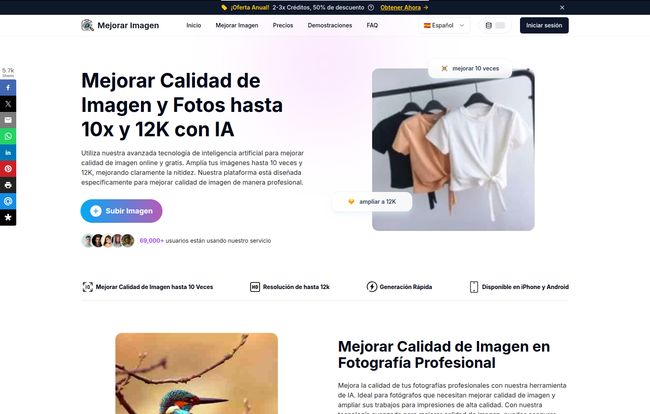
Visit Mejorar Imagen
The Key Features That Caught My Eye
Beyond the simple interface, a few things stood out to me as genuinely useful in the real world of SEO, content creation and digital marketing.
The Sheer Power of 10X and 12K Upscaling
I was dubious about the 10x claim, but I have to admit, it’s impressive. I tested it on a few old stock photos I had lying around – the kind you get for free that are just a little too small for a full-width hero banner. The results were clean. The AI is smart enough to enhance details in things like fabric textures and distant foliage without creating that weird, plasticky, over-processed look. For anyone working with web design or print, this feature alone is a game-changer.
It’s Fast. Seriously Fast.
In our line of work, time is the one resource you can never get back. I’ve spent hours trying to manually enhance a single image in other software. Mejorar Imagen kicked out most of my test images in under 30 seconds. That’s an insane time-saver. When you’re working on a deadline or have a batch of 50 product images to get online, that speed is invaluable.
Multi-Platform and Format Friendly
The tool is web-based, so it works on my desktop, my laptop, and they even have apps for iPhone and Android. This is a huge plus. I can’t tell you how many times I’ve been out and about and needed to quickly fix an image for a social media post. Being able to do it from my phone without wrestling with a clunky mobile version of a desktop app is a relief. It also handles all the common image formats (JPG, PNG, WEBP, etc.), so you’re not stuck having to convert files beforehand.
The Good, The Bad, and The Realistic
No tool is perfect, right? Let’s get down to the nitty-gritty. After running a dozen or so images through it, here’s my honest take.
What I loved was its ease of use. It’s ridiculously straightforward. The quality of the final output genuinely surprised me, especially on photos of people and architecture. But there are a few things you should know. For one, the free enhancements are quite limited, so you’ll quickly need to consider a paid plan if you use it regularly. Also, and this is a big one, once you enhance an image, it’s only stored on their servers for one hour. So you gotta download it right away. Don’t enhance an image and then go make a cup of tea and forget about it. Lastly, the maximum upload size is 20MB, which is fine for most web images but might be a constraint for professional photographers working with massive RAW files.
Let’s Talk Money: The Pricing Breakdown
This is always the million-dollar question, isn’t it? Mejorar Imagen has two main pricing models: a monthly/annual subscription and a pay-as-you-go credit system. The rule is simple: 1 credit enhances 1 image.
| Model | Best For | Starting Price | Details |
|---|---|---|---|
| Subscription Plan | Regular users, agencies, businesses | Starts at $4.99/month (billed annually) | Offers the best cost-per-credit. The annual plan gives a huge discount. Credits reset with your plan. |
| Pay As You Go | Occasional users, one-off projects | $6.9 for 200 credits | More expensive per credit, but the credits never expire. You buy a bundle and use them whenever you need. |
My advice? If you think you’ll enhance more than 20-30 images a month, the annual subscription is a no-brainer. The cost per image drops dramatically. If you just need to fix a few old photos for a personal project, the pay-as-you-go option is perfect. You can check out the full details on their pricing page.
Is Mejorar Imagen Worth Your Time and Credits?
So, the final verdict. I went in a skeptic and came out a convert. For its specific purpose—quickly and effectively upscaling and enhancing images with AI—Mejorar Imagen is a fantastic tool. It’s not going to replace a skilled human retoucher for high-end creative work, but it’s not trying to. It’s a powerful, time-saving utility that democratizes high-quality image enhancement.
I’d say if you’re a social media manager, a blogger, an e-commerce entrepreneur, or anyone who frequently works with digital images and is tired of fighting with resolution issues, you should absolutely give it a try. It’s earned a spot in my digital toolbox.
Frequently Asked Questions
- Is Mejorar Imagen really free to use?
- Yes and no. It offers a few free enhancements so you can test the waters and see the quality for yourself. For any consistent use, you’ll need to purchase credits or a subscription.
- How is this different from using the sharpen tool in Photoshop?
- Photoshop’s tools are manual and often just increase the contrast between pixels, which can lead to noise and artifacts. Mejorar Imagen’s AI analyzes the content of the image and intelligently generates new pixel data to add genuine detail, which is a much more sophisticated approach.
- What happens to my images after I upload them?
- According to their site, your original images are deleted immediately after processing, and the enhanced versions are kept for only one hour for you to download. This is a good privacy feature, but you need to be quick to save your work!
- What’s the deal with the credits?
- It’s simple: 1 credit = 1 image enhancement. If you’re on a subscription, you get a certain number of credits per month/year. On pay-as-you-go, you buy a bundle of credits that never expire.
- Do I need to be a tech expert to use this tool?
- Absolutely not. If you can drag and drop a file, you can use Mejorar Imagen. It’s one of the most user-friendly tools of its kind that I’ve seen.
A Clearer Picture for the Future
Look, the digital world is only becoming more visual. The demand for high-quality, crisp images is not going away. Tools like Mejorar Imagen are becoming less of a luxury and more of a necessity for anyone trying to make an impact online. It’s a powerful shortcut that saves time, headaches, and delivers results that, just a few years ago, would have seemed like science fiction. Give it a shot; you might just be surprised.


