
Categories: AI Illustration Generator, AI SVG Generator, AI Vector Graphics, Text to Image
neoSVG Review: The AI SVG Generator That Actually Works?

That Vector Graphic You Need? Your Words Can Now Create It.
Okay, let’s be real. We’ve all been there. It’s 11 PM, you’re putting the finishing touches on a landing page or a blog post, and you realize you need an icon. Not just any icon. You need something specific. Something like… ‘a happy cloud high-fiving a sun wearing sunglasses’. You scroll through endless stock libraries, your soul slowly draining with every generic clipart you see. You might even open up Illustrator, ready to wrestle with the pen tool for an hour, only to create something that looks like a potato. A lumpy, sad potato.
The struggle is real. Or at least, it was.
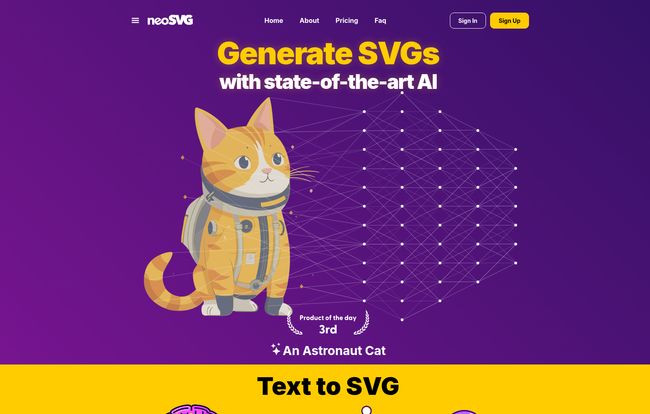
I’ve been hearing whispers in the SEO and design communities about a new breed of AI tools. Not the ones that spit out uncanny-valley photos, but ones that create clean, crisp, and infinitely scalable vector graphics. SVGs. The lifeblood of modern web design. So when I stumbled upon neoSVG, with its slick purple website and a hero image of an ‘Astronaut Cat,’ I was intrigued. An AI that makes SVGs from a text prompt? Sign me up. I had to see if this was just another gimmick or a genuine game-changer.
So, What Exactly is neoSVG?
At its heart, neoSVG is an AI-powered SVG generator. You type in a description of the graphic you want, and it builds a scalable vector graphic for you. It’s that simple. But the implications are huge.
For anyone not steeped in design jargon, an SVG (Scalable Vector Graphic) is a type of image file that isn’t made of pixels. It’s made of code—points, lines, and curves. This means you can scale it to the size of a billboard or a tiny favicon, and it will never lose quality. No pixelation. Ever. It’s why logos, icons, and web illustrations are almost always SVGs. They’re lightweight and look sharp on any screen.
neoSVG automates the creation of these magical files. Instead of you drawing them, you just… ask for them. It’s like having a tiny, lightning-fast illustrator living in your browser, ready to draw a ‘monkey playing chess’ or a ‘hamburger on fire’ at a moment’s notice (yes, those are actual examples from their site, and I love the chaos).
Visit neoSVG
The Different Flavors of AI: Understanding the Models
One thing that stood out to me right away is that neoSVG isn’t a one-size-fits-all machine. It gives you choices. You can pick between three different AI models, each with its own strengths and, importantly, its own cost in ‘credits’. Think of it like an arcade—you can play the simple games for one token or the big, flashy ones for five.
- Basic 1: This is your go-to for simple, clean icons. Think monochromatic, minimalist stuff. It’s super fast and costs a measly 0.2 credits per generation. Perfect for when you need a whole set of UI icons and don’t want to burn through your budget.
- Standard 3: This feels like the workhorse model. It introduces more color and complexity. It’s a solid middle ground for most illustrations, like blog post headers or simple spot graphics. This one will set you back 1 credit.
- Pro 2: This is the big gun. You use this when you want something impressive, colorful, and detailed. The results are labeled as ‘Amazing’, and it costs 5 credits a pop. This is what you’d use for that ‘Astronaut Cat’ hero image. It’s slower, but the results can be pretty darn cool.
I appreciate this kind of control. It means you’re not wasting powerful (and more expensive) processing on a simple shopping cart icon.
Putting it Through its Paces: My Honest Experience
Naturally, I had to play with it. I started simple. “A minimal rocket ship logo.” The Basic model kicked out a few decent options in seconds. Were they perfect? No, but they were a fantastic starting point—far better than my lumpy potato drawings.
Then I got a bit more ambitious. I switched to the Standard model and typed, “A friendly robot waving from a laptop screen.” The results were genuinely charming. A bit quirky, but totally usable for an article about AI or tech. The real fun, though, is seeing where the AI’s imagination goes. Prompting it with “Pope riding a motorcycle” gave me a result that was both hilarious and surprisingly well-composed. It’s a creativity engine as much as it is a production tool.
Of course, it’s not without its quirks. Like all AI art tools, the quality of your output is directly tied to the quality of your input. Vague prompts give you vague results. Sometimes it produces weird artifacts or interprets your words a little too literally. There’s a bit of a learning curve to writing effective prompts, a skill that’s becoming weirdly valuable these days.
Who Is This Actually For?
I can see a few groups of people falling in love with this tool immediately.
UI/UX Designers and Developers
Need a quick set of 20 icons for a new app feature? Instead of spending half a day designing them, you could generate a consistent set with the Basic model in minutes. It’s an incredible accelerator for prototyping and even for production assets.
Marketers and Content Creators
You know that feeling of needing a custom graphic for every blog post to keep things fresh? This is your solution. No more boring, overused stock photos. You can create unique, on-brand illustrations for social media, ads, and articles in a flash.
Small Businesses and Startups
Don’t have the budget for a full-time designer? neoSVG can be a lifesaver for creating initial branding elements, website illustrations, and presentation graphics. It lowers the barrier to having a professional-looking visual identity.
The All-Important Question: What’s the Catch? (And the Cost)
Nothing this useful is ever completely free, right? neoSVG runs on a subscription model based on credits. And frankly, this is probably my biggest hesitation, but it’s a necessary one. AI computation is expensive.
Here’s a quick look at their pricing, which seems pretty reasonable for what you get:
Starter Plan: $15 per month
This gets you 50 credits monthly. That translates to about 250 Basic generations, 50 Standard generations, or 10 Pro generations (or a mix). This seems perfect for freelancers or someone who needs custom graphics occasionally.
Professional Plan: $35 per month
Here you get 150 credits monthly. We’re talking up to 750 Basic generations or 150 Standard ones. This is aimed at professionals and small teams who will be using this as a regular part of their workflow.
Enterprise Plan: $95 per month
This is the big one, with 500 credits a month. It’s for agencies, large teams, and anyone who needs a high volume of vector assets on a daily basis.
The downside? You have to be mindful of your credit usage. It’s easy to get carried away and burn through them experimenting. The upside? The potential time savings are astronomical. How much is an hour of your time worth? Or an hour of a designer’s time? I’d wager it’s more than the cost of a few credits.
My Final Verdict: Is neoSVG the Future of Vector Graphics?
So, is neoSVG a replacement for Adobe Illustrator and professional designers? No. Not at all. And it’s not trying to be. Illustrator is for surgical precision, for complex, multi-layered masterpieces. A designer’s creativity and strategic thinking is irreplaceable.
What neoSVG is, is an incredibly powerful assistant. It’s a tool for ideation, for rapid prototyping, and for creating high-quality, ‘good enough’ graphics in a fraction of the time. It demolishes creative blocks and handles the grunt work, freeing you up to focus on the bigger picture.
For me, the value is undeniable. The ability to translate a fleeting idea into a clean, usable vector in under a minute is something I would have called science fiction just a few years ago. It’s not perfect, but its a massive leap forward. If you work anywhere near web design, marketing, or content creation, you owe it to yourself to grab a Starter plan and see how it fits into your workflow. You might just find your new favorite tool.
Frequently Asked Questions
- 1. What exactly is an SVG file again?
- An SVG (Scalable Vector Graphic) is an image format based on XML code, not pixels. This allows it to be scaled to any size—from a tiny icon to a huge billboard—without losing any quality or getting blurry. They are ideal for logos, icons, and web illustrations.
- 2. How does the neoSVG credit system work?
- You subscribe to a monthly plan which gives you a set number of credits. Each time you generate a vector, it costs credits. The amount depends on the AI model you use: the simple Basic model is cheap (0.2 credits), while the complex Pro model costs more (5 credits).
- 3. Can I edit the vectors that neoSVG creates?
- Yes! Since the output is a standard SVG file, you can download it and open it in any vector editing software like Adobe Illustrator, Inkscape, or Figma to make tweaks, change colors, or combine it with other elements.
- 4. Is neoSVG easy for beginners to use?
- The interface itself is extremely simple—it’s basically just a text box. The main skill is learning how to write clear, descriptive prompts to get the AI to produce what you want. There might be some trial and error, but you don’t need any design background to start generating images.
- 5. Are the graphics I create free for commercial use?
- Typically, AI service tools with paid plans allow for commercial use of the assets you create. However, policies can vary and change. It’s always best practice to check the latest Terms of Service on the neoSVG website to be 100% certain of the usage rights.
- 6. How is this different from Midjourney or DALL-E?
- While they are all AI image generators, tools like Midjourney create raster images (like JPGs or PNGs), which are made of pixels and can’t be scaled up without losing quality. neoSVG is specifically designed to create SVGs—scalable, editable vector graphics—which serve a different purpose, especially in web and graphic design.


