
Categories: AI Background Remover, AI For Data Analytics, AI QR Code Generator, AI Scheduling, AI Social Media, AI Social Media Post Generator, AI Task Management
RADAAR Review: Is This My New Favorite SMM Tool?

If you’re in the marketing game, you know the daily struggle. You’ve got a tab open for Facebook, another for Instagram, one for LinkedIn, and you’re trying to remember if you posted that witty comeback on Twitter or just thought about it in the shower. It’s organized chaos. We’ve all been there, trying to spin a dozen plates at once and hoping none of them come crashing down.
For years, the solution has been to lean on social media management platforms. We’ve seen the big names—Buffer, Hootsuite, Sprout Social—and they’ve all had their moment in the sun. But I’m always on the lookout for a new contender, a tool that maybe, just maybe, gets it. A tool that feels less like a corporate mandate and more like a partner in crime.
Recently, a name that’s been popping up on my, well, radar is RADAAR. It claims to be a best-in-class platform for brands, agencies, and startups. Big words. So, I did what any self-respecting digital marketer would do: I rolled up my sleeves and took a look under the hood. Is it just another face in the crowd, or is it the unified command center we’ve all been hoping for?
Visit RADAAR
So, What’s the Big Deal with RADAAR?
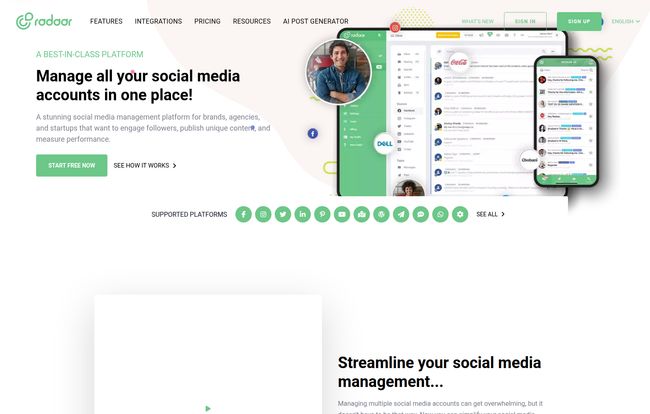
At its core, RADAAR is a social media management platform. But that’s like calling a smartphone a pocket calculator. It does so much more. It’s designed to bring all your social media streams—publishing, engagement, monitoring, analytics—into one, sane place. We’re talking Facebook, Insta, Twitter, LinkedIn, YouTube, and even TikTok. The whole gang’s here.
Instead of just being a scheduler, it’s positioned as a full-blown workspace. Think of it less as a tool and more as your social media team’s central nervous system. It’s for the solopreneur juggling everything and the bustling agency managing a dozen clients. It’s an ambitious goal, for sure.
The Core Features That Actually Matter
A platform is only as good as its features. So let’s get into the nitty-gritty. What are you actually getting when you sign up?
The All-in-One Publishing Hub
This is the bread and butter. RADAAR’s scheduler is clean and intuitive. You can create posts, tailor them for different platforms (a must!), and schedule them out. But a couple of things stood out to me. The Content Pool feature is a fantastic touch—a place to store ideas and evergreen content to pull from later. No more frantic searching through old spreadsheets. And yes, they have an AI Post Generator. I’m usually skeptical of these, but it can be a decent starting point for brainstorming when you’re facing that dreaded writer’s block. A little prompt to get the creative juices flowing.
Taming the Inbox Beast
I remember a time I missed a huge client opportunity because a DM got buried on Instagram while I was focused on LinkedIn. A unified inbox would have been a lifesaver. RADAAR’s Social Inbox pulls all your incoming messages, comments, and mentions into a single feed. You can reply, assign tasks to teammates, and archive conversations. It’s about turning reactive firefighting into proactive engagement. For any brand that gets more than a handful of comments a day, this isn’t a luxury; it’s a necessity.
Listening in with Social Monitoring
Now this is a feature that often separates the basic tools from the professional ones. RADAAR allows you to set up monitoring queries to track keywords, hashtags, or brand mentions across the web. This isn’t just about seeing who tagged you. It’s about listening to the wider conversation. What are people saying about your industry? What’s your competitor’s sentiment score looking like? It’s your digital ear to the ground, and for a platform at this price point, it’s a pretty powerful inclusion.
Analytics That Don’t Require a PhD
Data is useless if you can’t understand it. I was pleasantly surprised by RADAAR’s analytics dashboard. It’s visual, clean, and presents the key metrics—follower growth, engagement rates, best-performing content—in a way that’s easy to digest. You can generate custom reports, which is brilliant for agency folks who need to show clients what their money is doing. It’s not as frighteningly deep as some enterprise-level tools, but for 95% of users, it’s exactly what you need.
Let’s Talk Money: RADAAR’s Pricing Structure
Okay, the all-important question: what’s this going to cost me? When I was digging around, I found a couple of different pricing pages, which suggests they might be testing things out. But the most detailed plan, and the one that seems current, breaks down like this. And they offer a 14-day free trial, which I always appreciate. Test drive before you buy.
| Plan | Price (Monthly) | Who It’s For |
|---|---|---|
| BASIC | $29.99 | The solopreneur or a very small business just starting out. It gets you 6 social profiles and some basic features, but you miss out on the Social Inbox and Monitoring. |
| PREMIUM | $79.99 | This feels like the sweet spot for most small to medium businesses or small agencies. You get 12 profiles, unlimited posts, the all-important Social Inbox, and it supports up to 5 users. |
| PROFESSIONAL | $249.99 | This is for larger teams and established agencies. 25 social profiles, 10 users, and you get the full suite, including the social monitoring queries. |
Note: Pricing can change, so it’s always best to check their official pricing page for the latest info.
The Good, The Bad, and The Honest
No tool is perfect. Let’s weigh the pros and cons based on my experience and what other users are saying. On the plus side, having everything—scheduling, inbox, monitoring, and even a password manager—under one roof is a massive win. The collaboration tools are solid, making it great for teams. Pablo K., a growth hacker, even said it “easily competes with established platforms like Hootsuite or Buffer.” High praise.
On the flip side, some features in the basic plan feel a bit limited. Leaving out the Social Inbox on the entry-level tier is a tough pill to swallow, as it’s one of the biggest pain points for social media managers. A few users have also mentioned that the mobile app could use a bit more love. These aren’t deal-breakers, but they’re important to know. It shows the platform is still growing and refining, which isnt always a bad thing.
My Final Verdict: Who Is RADAAR Really For?
So, do I think RADAAR is worth it? In a word, yes. But with a caveat.
If you’re a small business or a growing agency feeling constrained by simpler tools but intimidated by the price tag of enterprise solutions, RADAAR is in a fantastic middle ground. It offers a suite of powerful, professional-level features (like social monitoring) at a price that won’t make your CFO cry. It’s for the team that has graduated from just scheduling posts and needs to start having real, managed conversations online.
For me, the combination of the unified inbox and social monitoring is the killer app here. It shifts the focus from just talking at your audience to actually listening and engaging with them. And in 2024, that’s teh whole ball game.
Frequently Asked Questions about RADAAR
-
Is RADAAR good for beginners?
- Yes, the interface is quite clean and intuitive. While it has powerful features, a beginner could easily get the hang of the scheduling and inbox tools without feeling overwhelmed. The learning curve is much gentler than some of the older, more cluttered platforms.
-
What social media platforms does RADAAR support?
- RADAAR supports most of the major players: Facebook (Pages & Groups), Instagram (Business Profiles), Twitter, LinkedIn (Profiles & Pages), YouTube, and TikTok. Always check their site for the most up-to-date list.
-
Is there a free version of RADAAR?
- They don’t have a permanently free plan, but they offer a 14-day free trial of their paid plans, with no credit card required. This is a great way to see if it fits your workflow before committing.
-
Can I use RADAAR for my agency’s clients?
- Absolutely. The higher-tier plans (Premium and Professional) are designed with agencies in mind, offering support for more social profiles and multiple users. The collaborative features and reporting make it a solid choice for client management.
-
What’s the main difference between the Basic and Premium plans?
- The biggest jump from Basic to Premium is the inclusion of the Social Inbox, more social profiles (from 6 to 12), and more users (from 2 to 5). If managing engagement and comments is a priority, you’ll want to start with the Premium plan.
Time to Tidy Up Your Social Media?
The hunt for the perfect social media tool is a personal one. What works for a massive corporation won’t work for a solo blogger. But after spending some time with RADAAR, I’m genuinely impressed. It strikes a fantastic balance between power and usability, offering a robust set of tools without a soul-crushing price tag. It feels modern, comprehensive, and built for the way we actually work on social media today. If your current system feels more like a tangled mess of cords than a streamlined machine, RADAAR is definitely worth putting on your… well, you know.


