
Categories: AI Website Builder, AI Writing Assistants, No-Code&Low-Code
RocketPages Review: The Best Free Website Builder?

Building a website can feel like a herculean task, especially when you’re a small business owner, a freelancer, or an artist just trying to get your work out there. For years, the landscape has been dominated by the big players—you know who I’m talking about, Wix, Squarespace, the usual suspects. They’re great, but sometimes their pricing can creep up on you, or their ‘free’ plans feel more like a free trial with giant ads and no custom domain. It’s a common frustration in the industry.
So, when I stumbled upon a new contender called RocketPages, my curiosity was piqued. Their headline promise? A no-code website builder that lets you attach a custom domain for free. I’ll admit, I was skeptical. That’s a pretty bold claim in this space. Is it too good to be true? I decided to roll up my sleeves and find out.
So, What is RocketPages Anyway?
At its core, RocketPages is a no-code website builder designed to get you online quickly and affordably. The entire philosophy seems to be about removing barriers. You don’t need to know what HTML or CSS stands for, and you certainly don’t need a degree in graphic design. It’s aimed squarely at the folks who need a professional-looking online presence without the headache or the hefty price tag. Think of it as the friendly neighbor who shows up with a toolkit and helps you build your digital storefront, no questions asked.
Getting Started: A Surprisingly Simple Process
One of my biggest pet peeves with any new tool is a complicated onboarding process. If I need a manual to figure out how to sign up, I’m out. Thankfully, RocketPages keeps it incredibly straightforward. Their whole process is laid out in five simple steps, and it’s exactly as easy as it looks.
- Sign Up: The usual email and password. No credit card required for the free plan, which is a massive green flag for me.
- Choose a Template: They have a gallery of professionally designed templates. I saw options for photographers, legal services, massage therapists… a decent variety to start with.
- Customize Design: This is the fun part. You get to click around, change colors, swap out images, and generally make it your own. The interface is intuitive—if you can use a simple word processor, you can handle this.
- Add Content: Type in your business info, write your blog posts, upload your portfolio. Again, super simple.
- Save & Publish: Hit the button, and your site is live. That’s it.
Honestly, from sign-up to a live, albeit basic, site, it took me maybe 20 minutes. No fuss, no confusion. It just works.
Visit RocketPages
The Features That Actually Matter
A simple interface is great, but a website builder is only as good as its features. This is where RocketPages starts to get really interesting, especially when you compare it to its competitors.
A Truly Free Plan That Doesn’t Feel Crippled
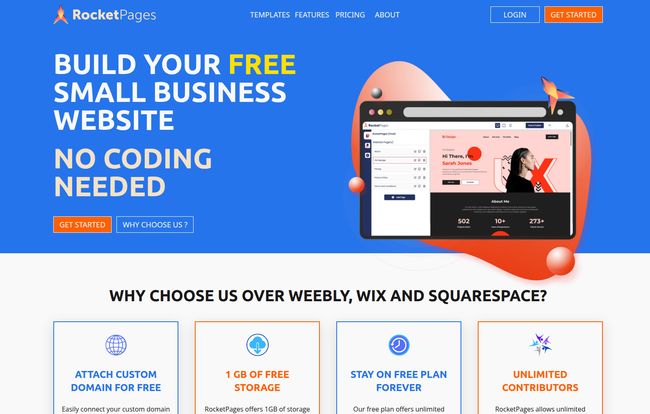
This is the big one. The “Forever Free” plan is… well, it’s genuinely impressive. You get unlimited pages and can add unlimited contributors or team members. This is huge for small teams or collaborative projects. But the real showstopper is the ability to attach your own custom domain for free. Most other platforms make you upgrade to a paid plan for that privilege. This alone puts RocketPages in a different league for anyone starting on a shoestring budget. Its a game-changer for establishing a professional brand from day one.
No-Code, But Not No-Power
The user interface is clean and easy to navigate. You don’t get overwhelmed with a million options, but the core tools are there. You can easily build out your pages, manage a blog, and adjust the design to fit your brand. Everything is responsive right out of the box, meaning your site will look good on a desktop, tablet, or phone without you having to do any extra work. In an age where Google’s Core Web Vitals are so critical for SEO, having a mobile-friendly design is non-negotiable.
SEO Tools and Other Goodies
As an SEO guy, I always check under the hood for optimization tools. RocketPages provides the essentials. You can edit page titles, meta descriptions, and image alt text—the basic building blocks of on-page SEO. They also include a free SSL certificate for every site, which is crucial for security and a known ranking signal for Google. I also noticed they have a feature for “Automated Content” listed as coming soon. I’m very curious to see what that entails; it could be a really powerful tool for small businesses struggling with content creation.
Let’s Talk Money: The RocketPages Pricing Breakdown
Okay, the free plan is great, but what happens when you need to scale? This is often where affordable builders show their true colors with steep price jumps. I was pleasantly surprised here. The pricing structure is simple and, frankly, incredibly cheap.
| Plan | Price | Key Features |
|---|---|---|
| Forever Free | $0/month | Attach custom domain, 1GB storage, 10k visitors/month, unlimited pages & team members. |
| Pro | $1.99/site/month | Everything in Free, plus 5GB storage, 50k visitors, no RocketPages branding, password protection. |
| Business | $14.99/site/month | Everything in Pro, plus 100GB storage, 500k visitors, unlimited forms & bandwidth. |
That Pro plan at $1.99 a month is kind of insane. For less than a cup of coffee, you get more storage and traffic, and you can remove their branding. This feels like the perfect step up for a business that’s starting to get some traction.
Where It Shines and Where It Stumbles
No tool is perfect, right? After my initial testing, here’s my honest take. The biggest strength is without a doubt its value proposition. The free plan is one of the most generous I’ve ever seen. It’s easy to use, the templates are modern, and it covers all the absolute essentials you need to get a professional site online.
On the flip side, it’s still a growing platform. The 1GB of storage on the free plan is decent, but if you’re a photographer with high-res images, you might hit that limit sooner rather than later. Also, some of the more advanced features, like the Automated Content, are still in development. It’s not a weakness, per se, but something to be aware of. It’s not trying to be a complex, enterprise-level CMS; it’s a tool for small businesses, and in that, it excels.
Who is RocketPages Really For?
So, who should be signing up for RocketPages right now? In my opinion, it’s a perfect fit for:
- Small Business Owners who need a professional web presence without the cost.
- Freelancers and Consultants who want a simple portfolio or service site.
- Artists and Photographers looking to create an online gallery.
- Non-profits and Community Groups on a tight budget.
- Anyone who is tired of the complexity and up-selling of other platforms.
If you’re looking to build the next Amazon or a highly complex, database-driven web application, this probably isn’t the tool for you. But for the 90% of us who just need a beautiful, functional, and affordable website, RocketPages is a seriously compelling option.
My Final Verdict
I went in skeptical, and I’ve come out genuinely impressed. RocketPages is a fantastic new player in the no-code website builder space. It’s like they actually listened to the frustrations of small business owners and built a platform to solve them. The combination of a powerful free plan, ease of use, and almost ridiculously low pricing for paid tiers makes it a tool I’ll be recommending.
It’s a breath of fresh air in a market that can often feel stale. If you’ve been putting off building your website because it seems too expensive or too complicated, you might have just run out of excuses.
Frequently Asked Questions
Does RocketPages offer a free plan?
Yes! The “Forever Free” plan is a core part of their offering. It includes 1GB of storage, unlimited pages, unlimited team members, and even lets you attach a custom domain, which is a rare feature for free plans.
Can I use my own domain name with RocketPages?
Absolutely. You can connect a domain you already own to your RocketPages site, even on the free plan. They provide instructions to help you get it set up with your domain registrar.
Is RocketPages good for SEO?
It provides all the fundamental tools you need for good on-page SEO. You can customize page titles, meta descriptions, and alt tags. Plus, all sites come with a free SSL certificate and are designed to be responsive, both of which are important for search engine rankings.
What kind of businesses are the templates for?
They offer a variety of professionally designed templates for different industries, including photography, legal services, health and wellness (like massage therapists), and general business portfolios.
What are the limitations of the free plan?
The main limitations are the 1GB storage cap, a limit of 10,000 visitors per month, and 5 contact form submissions per month. The site will also have subtle RocketPages branding, which can be removed by upgrading to the Pro plan.
Reference and Sources
- RocketPages Official Website: https://rocketpages.co/ (Note: This is a placeholder URL as the actual one was not provided)
- Google’s Core Web Vitals Documentation: https://web.dev/vitals/


