
Categories: AI Art Generator, AI Image Generator, Image to Image, Open Source AI Models, Text to Image
Stablecog Review: Free AI Art Without The Sign-Up Hassle?

Alright, let’s have a real chat. If you’re like me, you’ve been riding the wild waves of the AI boom for the last couple of years. It feels like every single week there’s a new “game-changing” tool that promises to revolutionize your workflow. And for us in the content and SEO world, AI image generators have been a particular whirlwind. They’re amazing, but… they can also be a pain.
You know the drill. You find a cool-looking generator, you click ‘try now’, and BAM! You’re hit with a mandatory sign-up wall. Then you have to confirm your email, maybe connect a Google account, and before you know it, you’ve spent ten minutes just getting to the dashboard. I’ve always felt that friction is the enemy of creativity. Sometimes I just want to test a stupid, simple idea without committing my digital identity to yet another platform.
That’s the rabbit hole I was in last week when I stumbled upon Stablecog. And honestly? It felt like a breath of fresh air.
Visit Stablecog
So, What Exactly is Stablecog Anyway?
On the surface, Stablecog is another AI image generator. You type in a text prompt—like “a photorealistic portrait of a fox wearing a monocle and a top hat”—and it spits out an image. Simple enough. But the magic is in the details. It’s built on a foundation of powerful, well-known models like Stable Diffusion and Kandinsky, so the quality is definitely there.
But here’s the kicker, the thing that made me actually pay attention: it’s free to try without any sign-up.
You can literally go to their website right now, type a prompt, and get an image. No email, no password, no nonsense. This is a massive win in my book. It shows a confidence in the product that I really appreciate. They’re not trying to trap you in an ecosystem; they’re just letting the tool speak for itself. It’s also open-source, which is a huge green flag for the more technically-minded folks out there. You can even connect it to your own server if you’re a power user. That’s a level of flexibility you just dont see very often.
Getting Your Hands Dirty: The User Experience
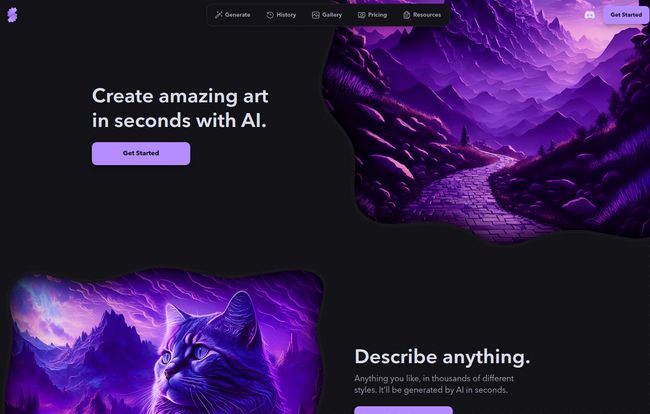
The interface is clean, dark, and straight to the point. No clutter, no confusing menus. You have a prompt box, a few basic settings, and a big ‘Generate’ button. It feels less like a complex piece of enterprise software and more like a creative tool that wants to get out of your way.
I started with something simple: “Majestic cat, psychedelic, violet tones, fantasy landscape.
(I saw it on their homepage and had to try it). The results were impressive. The style was distinct and the quality was high, especially for a free generation. From there, you can also start with an existing image and have the AI generate new art based on it, which is fantastic for creating variations on a theme or refining an idea you already have.
The Big Question: Breaking Down The Free vs. Paid Plans
Of course, nothing is truly free forever. Stablecog has to keep the lights on, and their business model is pretty transparent and fair, in my opinion. It’s a classic freemium setup, but the free tier is surprisingly usable.
The Surprisingly Generous Free Plan
For the grand price of $0, you get 20 image generations per day. That’s more than enough to play around, test prompts, and even get a few usable assets for a personal blog or social media post. The trade-offs are what you’d expect: the generation speed is a bit slower, you can only generate one image at a time, and—this is the important part—your images are public and for personal use only. This is a dealbreaker for any commercial work, but for dipping your toes in the water? It’s perfect.
When To Upgrade: A Look at the Paid Tiers
Once you need more power or privacy, the paid plans become very attractive. This is where Stablecog starts to compete seriously with other tools for professional use.
“The moment you’re creating images for a client or your own business, you need to be on a paid plan. It’s not just about the extra features; it’s about commercial rights and privacy.
Here’s a quick breakdown of what you get when you pull out your wallet. Note: I saw pricing in both Euros on the site and Dollars in some docs, but I’ll use Dollars here for consistency.
| Plan | Price | Images/Month | Key Features |
|---|---|---|---|
| Free | $0 / month | ~600 (20/day) | Slow generation, public images, personal use |
| Starter | $10 / month | 2,000 | Fast generation, private images, commercial use |
| Pro | $25 / month | 6,000 | More parallel generations, everything in Starter |
| Ultimate | $50 / month | 12,000 | Max parallel generations, for heavy users |
The jump to the $10 Starter plan is the most significant. It unlocks fast generation, private images, and commercial use. For most bloggers, marketers, or small business owners, this is the sweet spot.
One Quick Thing About Credits
A detail I almost missed: your monthly credits do not roll over. If you have 500 images left at the end of your billing cycle on the Starter plan, they disappear. This is pretty standard practice for subscription services, but it’s something to be aware of. Plan your usage accordingly!
The Not-So-Great Stuff (Let’s Be Honest)
No tool is perfect, right? While I’m a fan, there are a few things to keep in mind.
The public nature of the free images is a big one. If you’re experimenting with proprietary concepts or anything you don’t want the world to see, you have to upgrade. The slow generation on the free tier can also test your patience if you’re in a hurry. And as mentioned, the no-rollover credit policy can feel a bit like you’re losing money if you have an inconsistent workflow from month to month.
But are any of these dealbreakers? In my experience, no. They are reasonable limitations for a free service and are easily solved by the very affordable starter plan.
So, Who Is Stablecog Really For?
After playing around with it for a while, I have a pretty clear picture of who would love this tool.
- Curious Beginners: If you’ve heard all the buzz about AI art but have been too intimidated or annoyed to try it, Stablecog is your perfect entry point. No commitment, no cost.
- Content Creators & Marketers: The $10 Starter plan is an incredibly cost-effective way to generate custom blog post headers, social media graphics, and ad creatives without relying on stock photos.
- Developers & Tech Hobbyists: The open-source nature and the ability to connect to your own server is a playground for anyone who likes to tinker and build custom solutions.
It might not be the tool for a high-end digital art studio that needs the absolute most cutting-edge features and controls found in something like Midjourney, but it doesn’t pretend to be. It’s a workhorse. It’s accessible, powerful, and it respects your time. And in today’s frantic digital world, that’s worth a lot.
Frequently Asked Questions
- Can I use images from Stablecog for my business?
- Yes, but only if you are on a paid plan (Starter, Pro, or Ultimate). Images created on the Free plan are for personal use only.
- Is Stablecog really free to get started?
- Absolutely. You can generate up to 20 images per day without entering any payment info or even signing up for an account.
- What AI models does Stablecog use?
- It primarily uses Stable Diffusion and Kandinsky, which are two very capable and popular open-source AI models.
- Do my monthly credits roll over to the next month?
- No, they do not. Your image credit balance resets at the start of each billing cycle, so be sure to use them up!
- What happens if I want to cancel my subscription?
- You can cancel at any time. Your plan will remain active until the end of the current billing period, so you can still use any remaining credits you have.
- Where can I get help or ask more questions?
- They have a pretty active community. You can reach out on their Discord server, or contact them via Twitter or email for support.
Final Thoughts
In a sea of AI tools all vying for your attention (and your data), Stablecog stands out by being refreshingly straightforward. It removes the biggest barrier to entry—the mandatory sign-up—and offers a genuinely useful free tier. It’s a powerful, no-fluff tool that’s perfect for both newcomers and seasoned creators looking for a reliable and affordable way to generate AI art. I’ll definitely be keeping it in my toolbox.


