
Categories: AI Avatar Generator, AI Headshot Generator, AI Linkedin Photo Generator, AI Photography, AI Profile Picture Generator, AI Selfie Generator, AI Social Media
Supawork AI: A Free AI Headshot Generator? My Review

That professional headshot you’re using? It’s probably a few years old. Maybe it was taken at a company event, the lighting is kinda weird, and you’re wearing a shirt you haven’t seen since 2019. Or worse, it’s a cropped picture from a friend’s wedding. We’ve all been there.
The struggle to get a decent, professional-looking photo for LinkedIn, your personal blog, or your resume is real. Professional photographers cost a pretty penny, and trying to get the lighting right on a selfie is a whole afternoon wasted. So when I stumbled upon Supawork AI and its claim of a 100% free AI Professional Headshot Generator, my inner SEO-and-marketing-tool-skeptic immediately perked up. Free? With no sign-up? In this economy? Yeah, right.
But hey, I do this for a living. I test things so you don’t have to. I rolled up my sleeves, found a semi-decent selfie, and decided to see if Supawork was the real deal or just another digital gimmick.
First Off, What Exactly is Supawork AI?
Before we get to the main event, it’s worth knowing that Supawork AI isn’t just a one-trick pony. I was surprised to see it’s actually a whole suite of AI tools. It’s like they’ve thrown an entire creative department into one platform. You’ve got everything from an AI Resume Builder (which makes perfect sense alongside a headshot tool) to more… niche generators like a Ghibli-style image creator and even an AI Kissing Video Generator. A bit of an odd mix, I’ll admit, but it shows ambition.
The main attraction, though, the thing that gets you in the door, is definitely the professional headshot generator. And that’s what I came to investigate.
The Big Promise: A Truly Free AI Headshot Generator
Here’s the claim that caught my eye: create a professional headshot without dropping a credit card or even an email address. This is huge. So many ‘free’ tools are just lead magnets, designed to get your data before hitting you with a paywall. The fact that Supawork asks for nothing upfront is a massive green flag in my book.
The process they advertise is laughably simple:
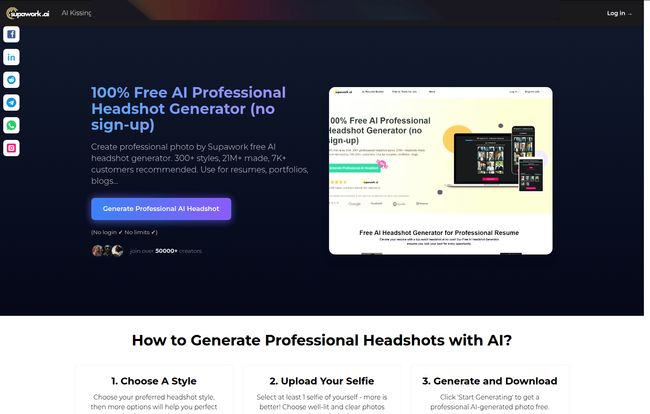
- Upload a Selfie: You just pick a clear, well-lit photo of your face.
- Choose Your Style: This is the fun part. They boast over 300 styles.
- Generate & Download: The AI does its thing, and you save your new headshot.
It sounds too good to be true. So, naturally, I had to try it.
Putting Supawork to the Test: My Real-World Experience
I grabbed a recent photo from my phone—nothing special, just a quick snap in my home office with decent lighting. I navigated to the Supawork site and, true to their word, the uploader was right there on the homepage. No pop-ups, no ‘sign up for our newsletter’ nonsense. A breath of fresh air, honestly.
Once my photo was uploaded, the style selection appeared. And wow, they weren’t kidding about variety. There were corporate styles with sharp suits and office backgrounds, creative looks with more casual attire and artistic settings, outdoor shots, minimalist backdrops… you name it. It felt less like a rigid tool and more like a digital closet and photo studio rolled into one. I picked a classic “corporate” look, curious to see if it could really put me in a blazer.
Visit Supawork AI
The generation process took about a minute. The result? I gotta admit, I was impressed. It wasn’t me, but it was a polished, professional version of me. The AI smoothed out my skin, fixed the lighting, and put me in a sharp-looking suit against a clean, blurred office background. The resemblance was uncanny, but in a good way. It looked like a photo I would have paid a couple hundred bucks for. A few clicks later, it was downloaded to my computer, high-resolution and ready to go.
The Good, The Bad, and The AI Quirks
No tool is perfect, especially not a free one. After playing around with a few more photos and styles, I got a pretty good feel for Supawork’s strengths and weaknesses.
What I Absolutely Loved
The upsides are significant. The most obvious is that it’s completely free. That can’t be overstated. The no sign-up policy is my second favorite feature; it respects your time and your privacy. I also have to give them major points for the sheer variety of styles. Whether you’re a lawyer or a landscape artist, there’s probably a look that fits your personal brand. And ease of use? My technophobe uncle could figure this out. It’s incredibly straightforward.
And let’s talk privacy for a moment. According to their site, photos are deleted after use. In an era where our data is the product, this is a genuinely user-first policy that more companies should adopt.
Things to Keep in Mind
Now for the reality check. The quality of your output is heavily, heavily dependent on the quality of your input photo. A blurry, poorly-lit selfie will give you a blurry, poorly-rendered headshot. Garbage in, garbage out, as they say. You’re also putting your faith in the AI’s interpretation of your face. Once in a while, a generated image might have that slightly ‘off’ AI sheen, a hint of the uncanny valley. A weirdly shaped ear or an eye that’s just a fraction off-center. It didnt happen often, but it’s possible.
Finally, you’re giving up the control you’d have with a real photographer. You can’t ask the AI to ’tilt your chin down a bit’ or ‘try a warmer smile.’ You pick a style and you get what the algorithm gives you. For a free tool, that’s a trade-off I’m more than willing to make.
So, Who Is This Tool Actually For?
While a Fortune 500 CEO might still spring for a high-end photographer, Supawork AI is an absolute game-changer for a huge number of people:
- Job Seekers & Students: If you’re building your first LinkedIn profile or applying for jobs on a tight budget, this is a no-brainer. It gives you a polished, professional image for free.
- Freelancers & Solopreneurs: Need to update your website’s ‘About Me’ page? Want a fresh look for your social media profiles? This lets you do it in minutes.
- Content Creators & Bloggers: A consistent, professional headshot across all your platforms builds brand recognition. Supawork makes that accessible to everyone.
- Small Teams: If you want to create a unified look for your team’s page but don’t have the budget for a group photoshoot, this is a fantastic workaround.
My Final Verdict: Is Supawork AI Worth Your Time?
Look, I’ve seen a lot of tools come and go. Many overpromise and underdeliver. Supawork AI isn’t one of them. It does exactly what it says on the tin: it gives you a high-quality, professional AI headshot, for free, with no strings attached.
Is it going to put professional photographers out of business? No. There’s an art and a human connection in a real photoshoot that AI can’t replicate. But that’s not the point. Supawork is a different tool for a different need. It’s the ultimate democratization of the professional headshot, breaking down barriers of cost and access.
For the grand price of zero dollars and about five minutes of your time, you can drastically improve your online professional presence. In my book, that’s not just a good deal—it’s an essential tool for the modern professional’s toolkit.
Frequently Asked Questions
Is the Supawork AI headshot generator really free?
Yes, it’s 100% free to use. I tested it thoroughly, and there are no hidden costs, fees, or paywalls for the headshot generation feature.
Do I need to create an account or sign up?
Nope. One of its best features is that no sign-up or email address is required. You can just go to the site and start creating your headshot immediately.
What happens to my photos after I upload them?
Supawork AI states that they have a privacy-focused approach, and user photos are deleted after the headshot is generated. This is a great feature for data privacy.
Can I use these headshots for my business or LinkedIn profile?
Absolutely. The headshots are generated in high resolution and are perfect for use on professional platforms like LinkedIn, company websites, resumes, portfolios, and blogs.
How can I get the best possible results from the AI?
For the best outcome, use a clear, high-quality selfie where your face is well-lit and facing forward. Avoid photos with sunglasses, hats, or blurry focus, as this will confuse the AI.
Does Supawork offer other tools besides the headshot generator?
Yes, it’s a full suite of AI tools. They also offer an AI Resume Builder, an Image to Video tool, an AI Image Enhancer, and several other creative and professional AI services.


