
Categories: AI Design Assistant, AI Design Generator, AI Documents Generator, AI Mockup Generator
SysDesigna Review: Kill Scope Creep Before It Starts

Let me tell you a story. It’s a horror story, really, for anyone who’s ever managed a complex software project. A few years back, I was the lead analyst on a big case management system build for a non-profit. We spent weeks in workshops. Whiteboards were covered. Sticky notes formed a new, terrifying kind of wallpaper. We wrote a 200-page spec doc that I was secretly proud of. It was a masterpiece of tables and requirements.
We handed it to the dev team. They went into their cave for three months. When they emerged, blinking in the sunlight, they presented what they’d built. And it was… technically correct. It did everything the spec doc said. But it was also completely, utterly wrong. The workflow felt clunky. Users hated it. The stakeholder who signed the check looked like he’d just bitten into a lemon.
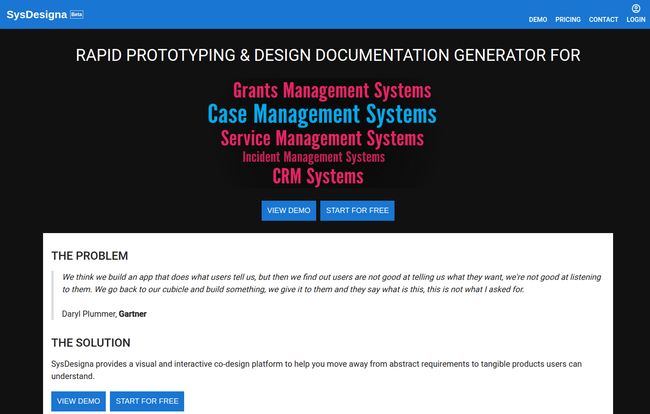
The pain is real. We’ve all been there. It’s that sinking feeling when you realize you and the client were speaking two different languages the entire time. There’s a great quote from Daryl Plummer at Gartner that hits the nail on the head: “We think we build an app that does what users tell us, but then we find out users are not good at telling us what they want.”
It’s not their fault! They’re experts in their field, not in abstract system design. Trying to get a user to imagine a complex app from a Word document is like trying to describe a new song by just showing them the sheet music. It just doesn’t connect.
For years, I’ve just accepted this as the cost of doing business. The inevitable rework, the painful UAT cycles, the budget overruns. But lately, I stumbled across a tool that’s trying to be the universal translator for that broken conversation. It’s called SysDesigna, and honestly, it’s got my attention.
What Exactly is SysDesigna, Anyway?
Okay, cutting through the jargon. SysDesigna is a rapid prototyping and AI-powered documentation generator. It’s built specifically for designing business applications. Think CRMs, Grants Management, Service Management—apps with complex workflows, data relationships, and user permissions.
It isn’t a tool for designing the next flashy consumer app with slick animations. It’s not trying to be Figma or Sketch. Instead, it’s like an architect’s CAD software, but for business systems. It lets you build a functional, clickable blueprint of your application before a single line of code is written. You can define your data model, lay out your forms, and map out your workflows, all in a visual interface.
This is for the CRM consultants, the case management system analysts, the business analysts who live and breathe process flows and data fields. It’s for us.
The Core Workflow: From Vague Idea to Solid Plan
The magic of SysDesigna, from what I can see, is its three-step process. It’s a logical flow that takes you from that initial, fuzzy concept to a concrete plan that both stakeholders and developers can actually understand.
Step 1: Designing Your App (Without Writing Code)
This is where it starts. Instead of a Word doc, you open up SysDesigna and start building. You can quickly create different versions of your app, defining the core components: page layouts, forms and fields, the relationships between different data entities (like how a ‘Contact’ relates to a ‘Case’), and even setting up roles and permissions. It’s all visual, all drag-and-drop. The website claims you can build a prototype in minutes, which might be a tad optimistic for a complex system, but it’s certainly worlds faster than writing a spec from scratch.
Step 2: The Magic of Simulation and Refinement
Here’s where you bridge that communication gap. Once you have a basic prototype, you hit ‘Simulate’. You can then sit down with your end-users and stakeholders and let them actually click through it. They can see what happens when they click a button. They can understand how a record moves through a workflow. They can look at a screen and say, “Wait, that field should be over there,” or “This notification doesn’t make sense.”
Visit SysDesigna
This is the feedback loop we’ve always dreamed of. It’s immediate, it’s contextual, and it’s a thousand times more effective than having them review a static wireframe or a dense document. You’re getting genuine buy-in before the expensive work begins.
Step 3: Generating Specs with a Click
This part feels like cheating, in the best possible way. After you’ve designed and refined your prototype, SysDesigna’s AI gets to work. It automatically generates the detailed documentation for you. We’re talking:
- System Design Specifications
- User Acceptance Tests (UAT)
- Detailed Test Cases and End-to-End Scenarios
As someone who has spent literal weeks of my life writing UAT scripts, the thought of having them generated automatically makes me a little emotional. This isn’t just a time-saver; it ensures the final tests are perfectly aligned with the approved prototype, eliminating any drift or misinterpretation.
My Honest Take: The Good, The Bad, and The… Free?
No tool is perfect, right? So let’s get real. After kicking the tires, here’s my take.
The upside is massive. The ability to fast-track design and get stakeholder alignment early is the holy grail of project management. It de-risks the entire development process. The AI documentation generator is a standout feature that could save consultancies and internal teams an incredible amount of time and tedium. It turns the boring-but-necessary documentation step into a simple byproduct of good design.
On the other hand, the platform is still in Beta. You should probably expect some rough edges or features that are still evolving. The main limitation I see is with the free tier. While it’s fantastic that they offer one for both personal and commercial use, the limit of 2 projects per user feels a bit tight. If you’re a freelance consultant juggling multiple clients, you’ll hit that wall pretty quick. Which brings us to pricing.
A Look at SysDesigna’s Pricing
The pricing model is… simple. Maybe a little too simple for my taste.
| Tier | Cost | Limits & Notes |
|---|---|---|
| Free Tier | Free | For personal & commercial use. Limited to 2 projects per user. |
| Increased Limit | Contact Them | You have to reach out to request an increased limit or new features. |
This “contact us” model is common for B2B SaaS, but it always makes me a little wary. I prefer transparent pricing tiers. However, for a tool in beta, it makes sense they’d want to talk to their power users to guide development. Still, it’s something to be aware of.
So, Should You Try It?
If you’re a solo dev building a mobile game, this ain’t it. But if your job title has the words ‘CRM’, ‘Consultant’, ‘Business Analyst’, or ‘System Architect’ in it, then my answer is a resounding yes.
The problem SysDesigna tackles is one of the most expensive and frustrating challenges in our industry. It’s the root cause of scope creep, budget nightmares, and strained client relationships. Any tool that can pour concrete on the shaky ground of initial requirements is worth its weight in gold.
The free tier, while limited, is more than enough to take it for a proper spin on a small project or a proof-of-concept. See if it fits your workflow. See if it makes that initial conversation with a stakeholder just a little bit easier. I have a feeling it will.
FAQs about SysDesigna
- Is SysDesigna really free to use?
- Yes, it has a free tier that is available for both personal and commercial use. However, it comes with a limit of 2 projects per user.
- What kinds of applications is SysDesigna best for?
- It’s specifically designed for business applications like CRMs, Case Management Systems, Grants Management Systems, and other platforms with complex data and workflow logic.
- Do I need to be a developer to use SysDesigna?
- Nope! That’s kind of the whole point. It’s a no-code visual design tool meant for analysts, consultants, and project managers to build prototypes before the coding starts.
- How does the AI documentation generation work?
- Based on the prototype you design—the data models, page layouts, and workflows—the system’s AI generates technical documentation like system specs and user acceptance test cases automatically.
- Is this a replacement for tools like Figma or Adobe XD?
- Not really. Figma and XD are focused on UI/UX design and pixel-perfect visual mockups. SysDesigna is focused on the underlying system logic, data structure, and process flows, and then generating the technical specs from that design.
- What happens when I need more than 2 projects?
- According to their pricing page, you need to contact them directly to request an increase to your project limit. This suggests they handle higher-tier pricing on a case-by-case basis.


